Größenlimits für Uploads in ASP.NET MVC 5 unter IIS
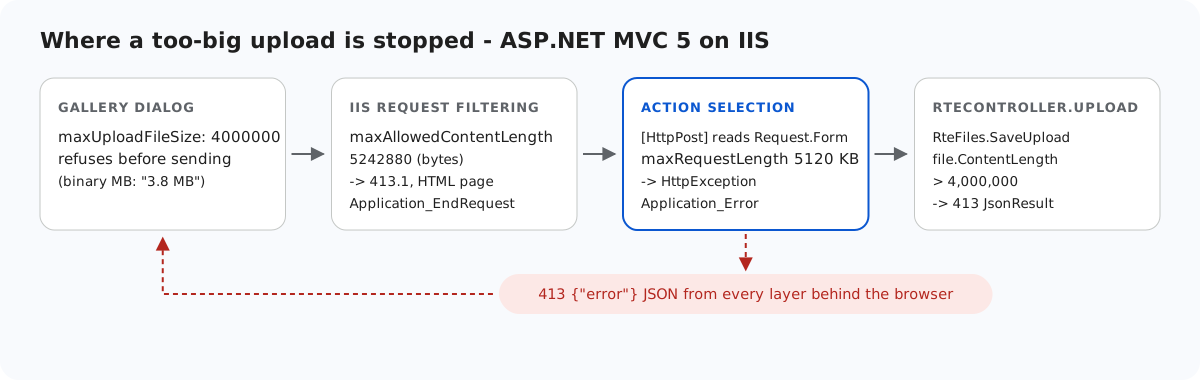
Ein zu großes Bild, das an eine ASP.NET-MVC-5-Action unter IIS gesendet wird, kann an vier Stellen gestoppt werden. Zwei davon antworten mit HTML, und eine greift, bevor Ihre Action überhaupt ausgewählt ist, sodass kein try/catch im Controller sie erreichen kann. Diese Seite führt die Ebenen auf, die web.config-Werte in Bytes und in Kilobytes und die beiden Ereignisse in Global.asax.cs, die aus jeder Ablehnung ein JSON-413 für den Editor machen.
Die Ebenen
- Der Galerie-Dialog.
maxUploadFileSize: 4000000in der View lässt ihn eine größere Datei ablehnen, bevor er sie sendet: „big.png is 4.3 MB. The maximum allowed size is 3.8 MB.“ Der Dialog rechnet in binären Megabytes, und es wurde kein Request gesendet. Das ist eine Komfortfunktion. Uploads von anderen Stellen oder von anderen Clients erreichen den Server trotzdem. - IIS-Anforderungsfilterung,
maxAllowedContentLengthin Bytes. Der Standardwert ist 30,000,000. Er wird gegen Content-Length geprüft, bevor ASP.NET startet. - ASP.NET,
<httpRuntime maxRequestLength>in Kilobytes. Der Standardwert ist 4096 KB, also 4,194,304 Bytes. Er greift beim ersten Lesen des Bodys. - RteFiles.SaveUpload: 4,000,000 Bytes, beantwortet mit einem JSON-413.
<!-- maxRequestLength is in KILOBYTES (default 4096 = 4,194,304 bytes). 5120 KB = 5,242,880
     bytes: comfortably above the 4,000,000-byte image limit plus multipart overhead, so a
     file that is slightly too big still reaches the handler and gets its JSON 413. -->
<httpRuntime targetFramework="4.8" maxRequestLength="5120" /><requestFiltering>
<!-- maxAllowedContentLength is in BYTES (default 30,000,000). Same 5,242,880 bytes as
maxRequestLength above. IIS checks this one first, before ASP.NET runs. -->
<requestLimits maxAllowedContentLength="5242880" />
</requestFiltering>Beide sind 5,242,880 Bytes, einmal als 5120 KB und einmal in Bytes geschrieben. Alles zwischen 4,000,000 Bytes und etwa 5.2 MB erreicht die Action und erhält deren spezifische Meldung.
Die Überraschung: [HttpPost] liest den Body
Wir haben maxAllowedContentLength auf 50,000,000 erhöht, damit das Limit von ASP.NET zuerst greift, und den Dateizugriff der Action in ein try/catch gepackt. Ein Upload mit 6 MB gab trotzdem eine HTML-Seite mit 500 und „Maximum request length exceeded.“ zurück. Der Stacktrace zeigt, warum:
[HttpException (0x80004005): Maximum request length exceeded.]
   System.Web.HttpRequest.GetEntireRawContent()
   System.Web.HttpRequest.FillInFormCollection()
   System.Web.HttpRequest.get_Form()
   System.Web.Mvc.HttpRequestExtensions.GetHttpMethodOverride(HttpRequestBase request)
   System.Web.Mvc.AcceptVerbsAttribute.IsValidForRequest(...)
   System.Web.Mvc.ActionMethodSelectorBase.RunSelectionFilters(...)
[HttpPost] sucht nach einem Formularfeld X-HTTP-Method-Override, während MVC noch die Action auswählt. Das Lesen von Request.Form liest den gesamten Body, und genau dort wirft maxRequestLength die Ausnahme. Es ist noch keine Action und kein Action-Filter gelaufen. Application_Error sieht sie trotzdem:
// Optional, both below: oversized uploads answer in JSON on /rte/ like every other error.
//
// IIS rejects bodies over maxAllowedContentLength before MVC runs (HTTP 413.1, HTML page),
// but EndRequest still runs.
protected void Application_EndRequest(object sender, EventArgs e)
{
    RteFiles.RewriteTooLarge(new HttpContextWrapper(Context));
}

// A body over <httpRuntime maxRequestLength> (reachable when maxAllowedContentLength is
// the larger of the two, or for a chunked upload) throws "Maximum request length
// exceeded" when MVC first reads the form: during action selection ([HttpPost] looks
// for an X-HTTP-Method-Override form field), before any action or filter can catch it.
protected void Application_Error(object sender, EventArgs e)
{
    HttpException ex = Server.GetLastError() as HttpException;
    if (ex != null && ex.WebEventCode == WebEventCodes.RuntimeErrorPostTooLarge
        && Request.AppRelativeCurrentExecutionFilePath.StartsWith("~/rte/", StringComparison.OrdinalIgnoreCase))
    {
        Server.ClearError();
        RteFiles.WriteError(new HttpContextWrapper(Context), 413, "The upload is larger than the server allows.");
    }
}
Damit antwortete derselbe Upload mit 6 MB mit 413 {"error":"The upload is larger than the server allows."}.
Das eigene 413.1 von IIS
Mit den ausgelieferten Werten erreicht ein Upload mit 6 MB ASP.NET nie. Die IIS-Anforderungsfilterung antwortet mit 413.1 „Request Entity Too Large“ und einer HTML-Seite. (IIS 7 und 8 verwendeten dafür 404.13, und das Beispiel akzeptiert beides.) Application_EndRequest im selben Abschnitt oben läuft auch für diesen Request. RteFiles.RewriteTooLarge prüft den Unterstatus, sodass die eigenen 413-Meldungen der Action unberührt bleiben:
// Call from Application_EndRequest (Global.asax.cs). A body over maxAllowedContentLength is
// rejected by IIS request filtering before any handler runs - HTTP 413.1 with an HTML
// page (404.13 on IIS 7/8) - but EndRequest still runs, so the /rte/ routes can answer
// in JSON instead. The substatus check leaves the handlers' own 413s alone.
public static void RewriteTooLarge(HttpContextBase context)
{
    HttpResponseBase response = context.Response;
    bool rejectedByIis = (response.StatusCode == 413 && response.SubStatusCode == 1)
        || (response.StatusCode == 404 && response.SubStatusCode == 13);
    if (rejectedByIis
        && context.Request.AppRelativeCurrentExecutionFilePath.StartsWith("~/rte/", StringComparison.OrdinalIgnoreCase))
    {
        WriteError(context, 413, "The upload is larger than the server allows.");
    }
}
Auf Ihrem eigenen Rechner reicht das. Das standardmäßige errorMode="DetailedLocalOnly" von IIS zeigt entfernten Besuchern benutzerdefinierte Fehlerseiten. Am Web-Forms-Beispiel, das dieselbe web.config hat, haben wir errorMode="Custom" gesetzt, um einen entfernten Besucher zu simulieren. IIS ersetzte das JSON dann trotzdem durch seine eigene Seite „request entity is too large“. Dieser location-Block lässt das JSON nur unter /rte/ durch:
<!-- /rte/ always answers in JSON. With errorMode="Custom" (what remote visitors get by
     default) IIS would otherwise swap its own HTML page in for the 413 that
     Global.asax.cs writes when request filtering rejects an oversized upload. -->
<location path="rte">
  <system.webServer>
    <httpErrors existingResponse="PassThrough" />
  </system.webServer>
</location>
Testen
Während das Beispielprojekt zu dieser Anleitung auf Port 5402 läuft:
head -c 4500000 /dev/zero > four.jpg
printf '\xff\xd8\xff' | cat - four.jpg > big.jpg
curl -F "file=@big.jpg" http://localhost:5402/rte/upload
{"error":"The image is larger than the 4 MB (4,000,000 bytes) limit."}

head -c 6000000 /dev/urandom > huge.jpg
curl -F "file=@huge.jpg" http://localhost:5402/rte/upload
{"error":"The upload is larger than the server allows."}
Beide sind HTTP 413 mit JSON. Das erste kam von RteFiles, das zweite von Application_EndRequest nach dem 413.1 von IIS. Um den Fall bei der Action-Auswahl zu sehen, erhöhen Sie maxAllowedContentLength über 5,242,880 und senden huge.jpg erneut. Application_Error beantwortet ihn.
Dieselbe Anleitung für andere Plattformen
JavaScript · Next.js · PHP · ASP.NET Core · Web Forms