Ask AI from the toolbar
Proofread, rewrite, shorten, expand, summarize, translate, or justify from the selection or whole document.
A polished authoring surface, cleaner markup, AI-assisted review, structured JSON and Markdown workflows, customization APIs, and the content tools teams actually use.
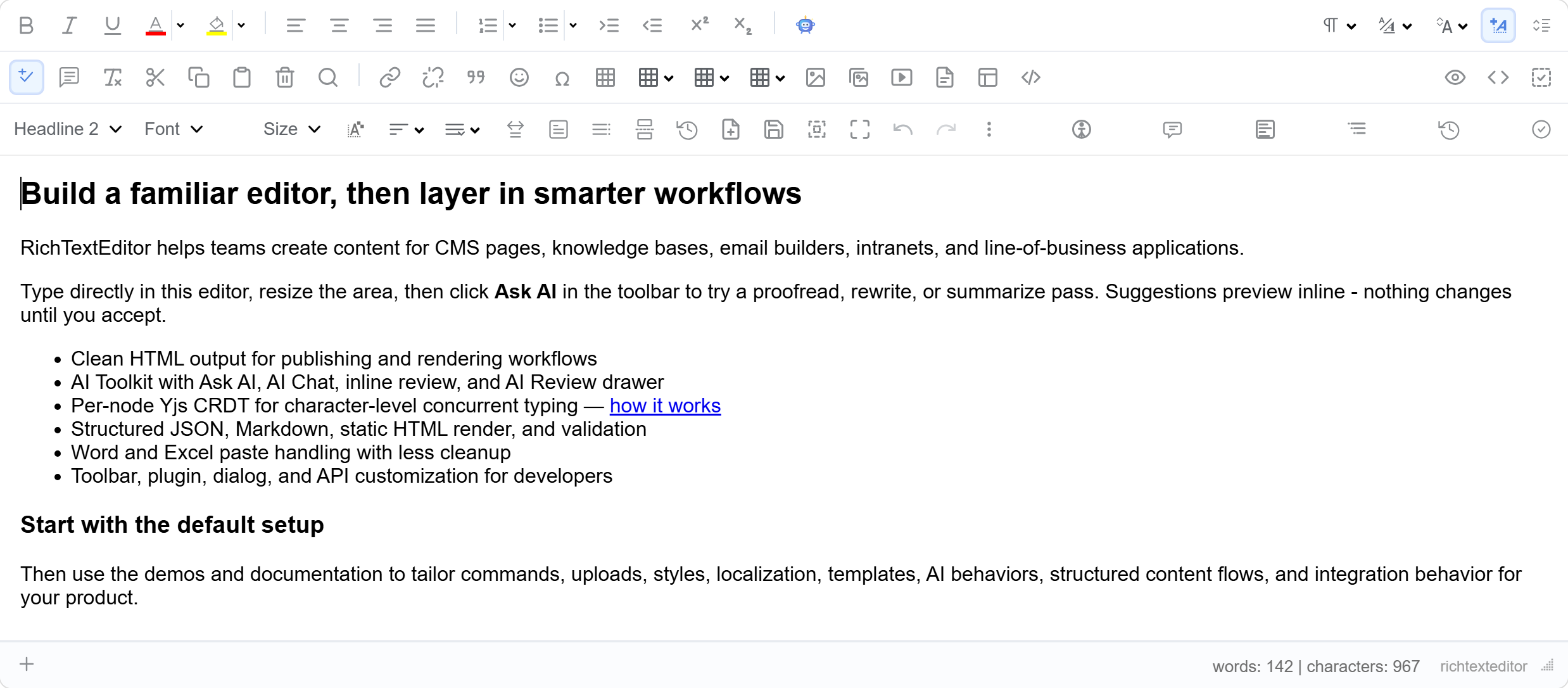
Other commercial editors meter AI, gate Track Changes behind add-ons, or put Web Forms / Blazor / Classic ASP bindings in the Enterprise tier. We don’t. See the head-to-head comparison.
Thousands of teams use RichTextEditor inside content management systems, knowledge bases, e-learning, email builders, and line-of-business apps. Every capability below is available through the toolbar, the JavaScript API, or both.
Ask AI, AI Chat, inline suggestion preview, and the AI Review drawer directly inside the editor.
Capture semantic JSON, round-trip Markdown, render static HTML, validate before save.
Control content, selection, insertions, commands, and editor behavior from your app code.
Proofread, rewrite, shorten, expand, summarize, translate, or justify from the selection or whole document.
Multi-turn, scope-aware conversation panel with quick prompts and copy/apply/insert/replace actions.
Persistent queue of pending, accepted, and rejected suggestions with optional server-ledger sync.
See suggested changes in place before they commit. Accept or reject at the suggestion level.
registerAction plugs domain-specific modes (legal review, SEO rewrite, tone match) into the same UI.
Ships with a deterministic local resolver so you can evaluate the UX before wiring a real provider.
Notion-style blocks and a slash menu, diagrams and equations, inline Markdown and emoji autocomplete, foldable headings, distraction-free typewriter & focus modes, AI ghost-text autocomplete, Markdown export, local-draft recovery, read-aloud, and one-click email HTML — all editor-native, injection-safe, and in the base $129 license. No premium tier.
Type / for a searchable insert menu — headings, lists, callouts, columns, toggles, equations, diagrams, tables, and more. Structure without leaving the keyboard.
Info / success / warning callout boxes, 2–4 column responsive layouts, and native <details> toggles. Editor-native; round-trips through getHTMLCode / getJSON.
TeX / LaTeX dialog with live preview and edit-in-place. Renders via KaTeX or MathJax loaded on your page; emits stable .rte-math-inline markup.
Author flowcharts, sequence, gantt, and pie charts as code, rendered to SVG. Use a host mermaid instance or a server resolver (e.g. Kroki); the source round-trips for re-editing.
Turn a URL into a rich link-preview card — favicon, title, description, domain. Zero-backend by default, or wire a resolver for full unfurls. http(s)-only and escaped.
A drag handle appears on hover to reorder top-level blocks. It lives outside the editable, so your saved HTML stays clean.
Google-Docs-style date, person, and link chips — atomic, injection-safe, and round-tripping. Person / link chips use an optional resolver for live suggestions.
Type **bold**, *italic*, `code`, ~~strike~~, plus block shortcuts (#, >, -, 1.). Word-boundary aware, so identifiers and math are left alone.
:shortcode: autocompleteType :fire: and it becomes an emoji inline, or : + a query for a keyboard-navigable popup. GitHub / Slack style; ~140 curated codes, extensible.
Text-to-speech of the selection or document, highlighting each sentence as it’s spoken. Browser-native via the Web Speech API — no backend, no key. The speech-out complement to dictation.
One-click, inline-styled HTML for Outlook and Gmail — computed styles inlined, classes stripped, wrapped in a centered table. editor.getEmailHTML().
Native browser spell-check out of the box, or wire a resolver (LanguageTool / server / LLM) for a review panel with click-to-replace suggestions.
Interactive checklists with clickable checkboxes (Notion / GitHub style). Done state lives in data-checked and round-trips through getHTMLCode / getJSON — no fragile <input>s.
Paste a YouTube or Vimeo URL on its own line and it becomes a responsive 16:9 embed (Notion / Medium style). Injection-safe — the iframe src is rebuilt from a sanitized video id.
Obsidian / Notion-style section folding — click the gutter chevron on a heading to collapse everything beneath it. Fold state is runtime-only; saved markup stays clean and content is never lost.
Distraction-free writing: typewriter scrolling pins the caret line to a fixed anchor (iA Writer / Typora), and focus mode dims every block except the current one. Purely presentational.
Notion-style export of the whole document to Markdown — one-click copy to clipboard or save as .md. editor.getMarkdown() / copyAsMarkdown() / downloadMarkdown().
Autosaves to localStorage as you type and offers to restore the unsaved draft after a crash or refresh (Gmail style). Never auto-applies; prunes stale drafts. Opt-in via config.localDraft.
Copilot / Notion-AI-style inline completion — pause typing and a greyed suggestion continues your sentence; Tab accepts, Esc dismisses. Bring-your-own resolver (no model ships); serialization-safe and undo-friendly.
Server-side document export, voice input, mobile-first layout, pluggable upload backends, named version milestones, and built-in AI provider adapters. All shipped in the base license — no premium tier.
Server-side HTML → .docx via MIT-licensed DocumentFormat.OpenXml. Client helper triggers a browser download. No cloud SaaS subscription.
One-line DI for OpenAI, Anthropic, and Azure OpenAI. Works with OpenAI-compatible endpoints (Groq, Together, Ollama) via BaseUrl.
Server-Sent Events relay provider tokens as they arrive. JS helper streamRequest({ onDelta, onDone }) with XHR fallback. Abortable mid-stream.
Web Speech API microphone button. Live interim transcripts, auto-punctuation, BCP-47 language. Chrome / Edge / Safari / Opera. The only major editor shipping this.
Compact single-row toolbar. 44×44 tap targets (WCAG 2.5.6), sticky header above the virtual keyboard, bottom-sheet dropdowns. Auto-swap on narrow viewports.
Implement IRichTextBoxUploadStore to route uploads to S3, Azure Blob, Cloudinary, GCS, or any custom backend. Default writes to local disk.
Take named snapshots (“Draft sent to legal”), rename existing entries, filter to user-named only, generate side-by-side diffs. Closes CKEditor’s premium named-versions differentiator.
Detects ordered vs unordered list type from the marker span, parses nesting depth, strips actual bullet glyphs. Numeric / Roman / alphabetic markers round-trip as <ol>.
Opt in with textSync: "crdt": same-paragraph concurrent typing via per-node Yjs binding, presence cursors via Y.RelativePosition, per-author Y.UndoManager (Ctrl-Z undoes only your edits). 88 KB minified, ships in the base license. Pairs with any Yjs provider you self-host.
Produces a minimal, consistent markup tree - publish-ready without a second cleanup step.
Output is well-formed HTML 5. Need stricter XHTML for a downstream pipeline? Convert it in one pass on the way out.
Round-trip between HTML and semantic JSON. Store content as data, render on demand.
Import and export Markdown with structure preserved for docs, tickets, and cross-tool workflows.
Publish read-only HTML from structured content for emails, archives, and server rendering.
HTML mode shows neatly indented markup with lowercase tags for readable diffs.
Point ContentCss at one or more stylesheets. The editor renders with your app’s type and spacing.
Bundled themes plus complete class/image overrides. Tailor the chrome to your product.
Emit the URL form your publishing pipeline expects - no manual post-processing.
Strips Word-specific markup so the pasted result reads as clean HTML without bloat.
Preserves table structure and colors while dropping spreadsheet-specific noise.
Keep source formatting, strip to character-level formatting, or paste as plain text.
Word’s MsoListParagraph paragraphs convert to proper <ul>/<ol> on paste.
Drop images from the desktop or from another browser tab. Re-arrange in place without losing them.
Upload documents, link them from content. Configurable file type filter and size limits.
Built-in thumbnail generator, pagination, auto resize, rename/delete, and folder management.
Insert YouTube, MP4, and audio assets with the built-in dialog or the media-embed plugin.
Ship a library of starter layouts. Designers build templates once and authors reuse them.
Insert pre-formatted code blocks by picking a snippet instead of pasting from another tool.
Searchable emoji dialog with consistent rendering across platforms.
Export the current document to PDF client-side for downloads, attachments, and archives.
Read/write content, manage selection, insert nodes, fire commands, and subscribe to a rich event set.
Extend the toolbar with new commands, dialogs, and side panels. Same extension surface the built-ins use.
Build your own modal flows with custom forms and event handlers. Consistent look and keyboard handling.
Show, hide, re-arrange, or replace buttons. Add icon sets, groupings, and subtoolbars.
Plug your backend into the AI Toolkit with one function. Same UI, your model, your policies.
Insert semantic tags as placeholders for dynamic values. Great for mail-merge and templating.
White-list / black-list HTML elements and attributes. Limit what end-users can save.
Cap input to protect downstream database columns and APIs before anything hits the wire.
Navigate the tag hierarchy, inspect attributes, remove wrappers, and clean up structure.
Validate structured content before save with the JSON bridge - reject bad shapes at the editor layer.
Non-destructive comment markers on selections. Pair with the AI Review drawer for a full flow.
Listen to change, focus, paste, and command events to drive autosave, dirty flags, and audit trails.
Accessibility settings help you meet Section 508 and W3C WAI guidance for rich content authoring.
Built-in, not a paid add-on: scans the document authors are writing for missing alt text, empty headings, low contrast, and other a11y issues as they write.
Every toolbar command, dialog, and panel has a keyboard path. Focus management is predictable.
Drop-in language files for every label, button, tooltip, and message. Add a new language in minutes.
Right-to-left editing for Arabic, Hebrew, Persian, and other RTL scripts - end to end.
SVG icon set scales cleanly from 100% up to 4K retina displays without fuzz.
Respects prefers-reduced-motion to disable decorative transitions where the user asks.
Try Ask AI, Chat, and Review without an API key. Download the evaluation package when you are ready to drop the editor into your own project.