IIS 上 ASP.NET MVC 5 的上传大小限制
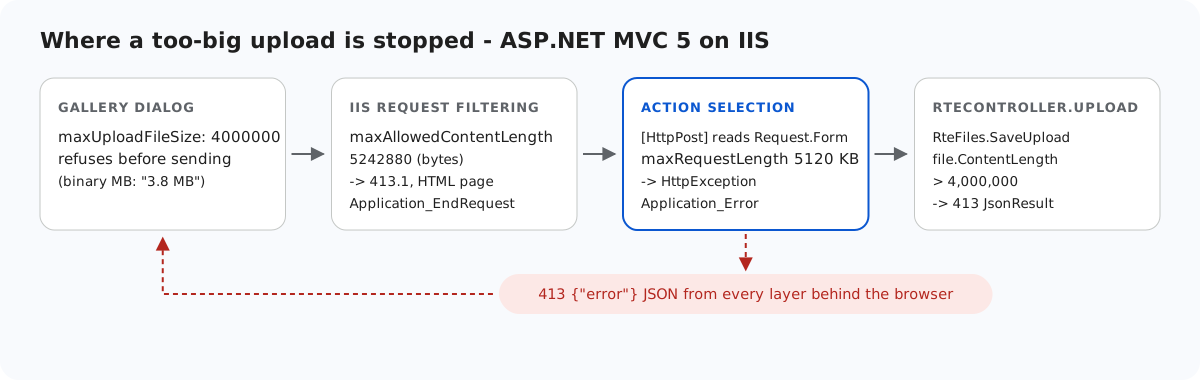
发送到 IIS 上 ASP.NET MVC 5 操作方法的超大图片,可能在四个地方被拦截。其中两处以 HTML 响应,还有一处甚至在选定操作方法之前就触发,因此控制器中的任何 try/catch 都捕获不到。本页列出这些层、以字节和千字节表示的 web.config 值,以及让每次拒绝都以 JSON 413 返回给编辑器的两个 Global.asax.cs 事件。
各层
- 图片库对话框。视图中的
maxUploadFileSize: 4000000让它在发送之前拒绝更大的文件:"big.png is 4.3 MB. The maximum allowed size is 3.8 MB."。对话框按二进制兆字节计算,并且不会发送任何请求。这只是为了方便用户。来自其他位置或其他客户端的上传仍然会到达服务器。 - IIS 请求筛选,
maxAllowedContentLength,单位为字节。默认值为 30,000,000。它在 ASP.NET 启动之前根据 Content-Length 进行检查。 - ASP.NET,
<httpRuntime maxRequestLength>,单位为千字节。默认值为 4096 KB,即 4,194,304 字节。它在首次读取请求体时触发。 - RteFiles.SaveUpload:4,000,000 字节,超出时返回 JSON 格式的 413。
<!-- maxRequestLength is in KILOBYTES (default 4096 = 4,194,304 bytes). 5120 KB = 5,242,880
     bytes: comfortably above the 4,000,000-byte image limit plus multipart overhead, so a
     file that is slightly too big still reaches the handler and gets its JSON 413. -->
<httpRuntime targetFramework="4.8" maxRequestLength="5120" /><requestFiltering>
<!-- maxAllowedContentLength is in BYTES (default 30,000,000). Same 5,242,880 bytes as
maxRequestLength above. IIS checks this one first, before ASP.NET runs. -->
<requestLimits maxAllowedContentLength="5242880" />
</requestFiltering>两者都是 5,242,880 字节,一处写成 5120 KB,另一处写成字节数。4,000,000 字节到约 5.2 MB 之间的文件都能到达操作方法,并得到相应的具体消息。
意外之处:[HttpPost] 会读取请求体
我们把 maxAllowedContentLength 提高到 50,000,000,让 ASP.NET 的限制先生效,并用 try/catch 包住了操作方法中访问文件的代码。一次 6 MB 的上传仍然返回了 HTML 500 "Maximum request length exceeded."。堆栈跟踪显示了原因:
[HttpException (0x80004005): Maximum request length exceeded.]
   System.Web.HttpRequest.GetEntireRawContent()
   System.Web.HttpRequest.FillInFormCollection()
   System.Web.HttpRequest.get_Form()
   System.Web.Mvc.HttpRequestExtensions.GetHttpMethodOverride(HttpRequestBase request)
   System.Web.Mvc.AcceptVerbsAttribute.IsValidForRequest(...)
   System.Web.Mvc.ActionMethodSelectorBase.RunSelectionFilters(...)
在 MVC 仍在选择操作方法时,[HttpPost] 会查找表单字段 X-HTTP-Method-Override。读取 Request.Form 就会读取整个请求体,maxRequestLength 正是在这里抛出异常的。此时还没有任何操作方法或操作筛选器运行。但 Application_Error 仍然能看到它:
// Optional, both below: oversized uploads answer in JSON on /rte/ like every other error.
//
// IIS rejects bodies over maxAllowedContentLength before MVC runs (HTTP 413.1, HTML page),
// but EndRequest still runs.
protected void Application_EndRequest(object sender, EventArgs e)
{
    RteFiles.RewriteTooLarge(new HttpContextWrapper(Context));
}

// A body over <httpRuntime maxRequestLength> (reachable when maxAllowedContentLength is
// the larger of the two, or for a chunked upload) throws "Maximum request length
// exceeded" when MVC first reads the form: during action selection ([HttpPost] looks
// for an X-HTTP-Method-Override form field), before any action or filter can catch it.
protected void Application_Error(object sender, EventArgs e)
{
    HttpException ex = Server.GetLastError() as HttpException;
    if (ex != null && ex.WebEventCode == WebEventCodes.RuntimeErrorPostTooLarge
        && Request.AppRelativeCurrentExecutionFilePath.StartsWith("~/rte/", StringComparison.OrdinalIgnoreCase))
    {
        Server.ClearError();
        RteFiles.WriteError(new HttpContextWrapper(Context), 413, "The upload is larger than the server allows.");
    }
}
加上这段代码后,同样的 6 MB 上传返回了 413 {"error":"The upload is larger than the server allows."}。
IIS 自己的 413.1
使用示例自带的配置值时,6 MB 的上传根本到不了 ASP.NET。IIS 请求筛选以一个 HTML 页面返回 413.1 "Request Entity Too Large"。(IIS 7 和 8 对此使用 404.13,示例两者都能处理。)对于这个请求,上面同一区域中的 Application_EndRequest 仍然会运行。RteFiles.RewriteTooLarge 会检查子状态码,因此操作方法自己返回的 413 消息不受影响:
// Call from Application_EndRequest (Global.asax.cs). A body over maxAllowedContentLength is
// rejected by IIS request filtering before any handler runs - HTTP 413.1 with an HTML
// page (404.13 on IIS 7/8) - but EndRequest still runs, so the /rte/ routes can answer
// in JSON instead. The substatus check leaves the handlers' own 413s alone.
public static void RewriteTooLarge(HttpContextBase context)
{
    HttpResponseBase response = context.Response;
    bool rejectedByIis = (response.StatusCode == 413 && response.SubStatusCode == 1)
        || (response.StatusCode == 404 && response.SubStatusCode == 13);
    if (rejectedByIis
        && context.Request.AppRelativeCurrentExecutionFilePath.StartsWith("~/rte/", StringComparison.OrdinalIgnoreCase))
    {
        WriteError(context, 413, "The upload is larger than the server allows.");
    }
}
在您自己的机器上,这样就够了。IIS 默认的 errorMode="DetailedLocalOnly" 会向远程访问者显示自定义错误页面。在使用相同 web.config 的 Web Forms 示例上,我们设置 errorMode="Custom" 来模拟远程访问者。结果 IIS 仍然把 JSON 替换成了它自己的 "request entity is too large" 页面。下面这个 location 块只在 /rte/ 上让 JSON 原样通过:
<!-- /rte/ always answers in JSON. With errorMode="Custom" (what remote visitors get by
     default) IIS would otherwise swap its own HTML page in for the 413 that
     Global.asax.cs writes when request filtering rejects an oversized upload. -->
<location path="rte">
  <system.webServer>
    <httpErrors existingResponse="PassThrough" />
  </system.webServer>
</location>
测试
在端口 5402 上运行本指南的示例项目,然后执行:
head -c 4500000 /dev/zero > four.jpg
printf '\xff\xd8\xff' | cat - four.jpg > big.jpg
curl -F "file=@big.jpg" http://localhost:5402/rte/upload
{"error":"The image is larger than the 4 MB (4,000,000 bytes) limit."}

head -c 6000000 /dev/urandom > huge.jpg
curl -F "file=@huge.jpg" http://localhost:5402/rte/upload
{"error":"The upload is larger than the server allows."}
两者都是带 JSON 的 HTTP 413。第一个来自 RteFiles,第二个来自 IIS 返回 413.1 之后的 Application_EndRequest。要观察选择操作方法时的情况,请把 maxAllowedContentLength 提高到 5,242,880 以上,再次发送 huge.jpg,此时由 Application_Error 作出响应。
其他平台的同一指南
JavaScript · Next.js · PHP · ASP.NET Core · Web Forms