Build a Markdown writing app with local drafts and downloads
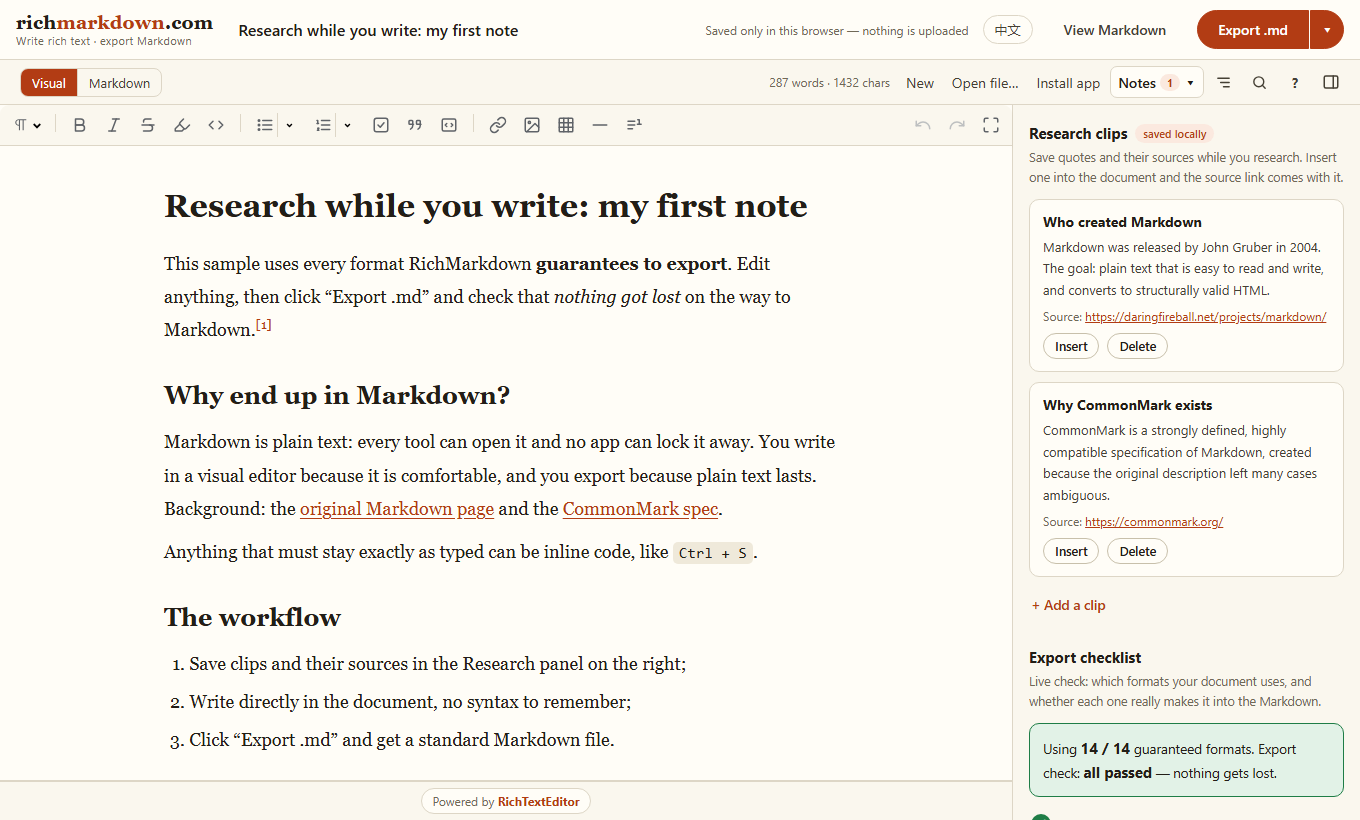
Build a browser app that lets people write visually, saves a local Markdown draft, and downloads a .md file. Use this workflow for documentation drafts, README files or personal notes.
For a complete live example, open RichMarkdown. It uses RichTextEditor and adds local notes, research clips and export choices. The product is free to use; licensing the editor for your own app is a separate decision.
Start with a working editor
Download the editor and serve its richtexteditor folder from your site. Run the page through a local web server rather than opening a file: URL. Load the core and plugins before creating an instance. The quick start covers framework-specific setup.
Add a draft and a download action
The complete page below creates an editor named editor, a button with id="download" and a status element with id="save-status". Use a different stable key for each document.
<link rel="stylesheet" href="/richtexteditor/rte_theme_default.css">
<script src="/richtexteditor/rte.js"></script>
<script src="/richtexteditor/plugins/all_plugins.js"></script>
<div id="editor"></div>
<button id="download" type="button">Download .md</button>
<p id="save-status" role="status"></p>
<script>
const editor = new RichTextEditor("#editor");
const status = document.getElementById("save-status");
const key = "my-markdown-draft";
let saved = "";
try { saved = localStorage.getItem(key) || ""; }
catch { status.textContent = "Browser storage is unavailable. Download a copy."; }
editor.fromMarkdown(saved || "# Untitled\n\nStart writing.");

function saveDraft() {
  try {
    localStorage.setItem(key, editor.toMarkdown());
    status.textContent = "Saved in this browser.";
  } catch {
    status.textContent = "Draft could not be saved. Download a copy.";
  }
}
let timer;
editor.attachEvent("change", function () {
  clearTimeout(timer);
  timer = setTimeout(saveDraft, 300);
});
window.addEventListener("pagehide", saveDraft);

document.getElementById("download").addEventListener("click", function () {
  const blob = new Blob([editor.toMarkdown()], {
    type: "text/markdown;charset=utf-8"
  });
  const url = URL.createObjectURL(blob);
  const link = document.createElement("a");
  link.href = url;
  link.download = "document.md";
  document.body.appendChild(link);
  link.click();
  link.remove();
  setTimeout(() => URL.revokeObjectURL(url), 1000);
});
</script>
Choose what Markdown must keep
Test real documents before choosing Markdown as your only saved format. Headings, lists, links, quotes and fenced code blocks have Markdown representations. Merged table cells, comments and arbitrary font styling do not map cleanly to plain Markdown. Keep HTML or structured JSON too if those details matter.
A code block's language label describes its contents; it does not execute, compile or validate code. Keep JavaScript, TypeScript, PHP and C# examples as text in the document.
Local drafts are a convenience
localStoragebelongs to this browser and origin. It is not a backup, encrypted storage or cross-device sync.- Clearing site data removes drafts. Provide a download action and explain this near the editor.
- For several documents, use separate keys and a document list. Larger collections may need IndexedDB.
- For teams, use authenticated server storage and resolve conflicting edits. A shared local key is not collaboration.
Before handling customer documents
Authorize every server-side read and write. Treat submitted Markdown as untrusted input. If a server turns it into HTML, use a Markdown renderer and HTML sanitization policy appropriate to where that HTML appears. A browser preview does not replace server validation.
Keep image files separately and save stable URLs. A Markdown file does not automatically include the images it references. See saving rich text with images.
Check the workflow
- Type a heading and list, then wait for the saved message.
- Reload and confirm the draft returns.
- Add a code block, download the file and open it in a Markdown reader.
- Check the language label, indentation, links and images.
- Disable browser storage; downloading should remain available.
Continue with Word and Google Docs to Markdown, the interactive Markdown demo and required-content validation.