Rich text word and character count: emoji, CJK and submit limits
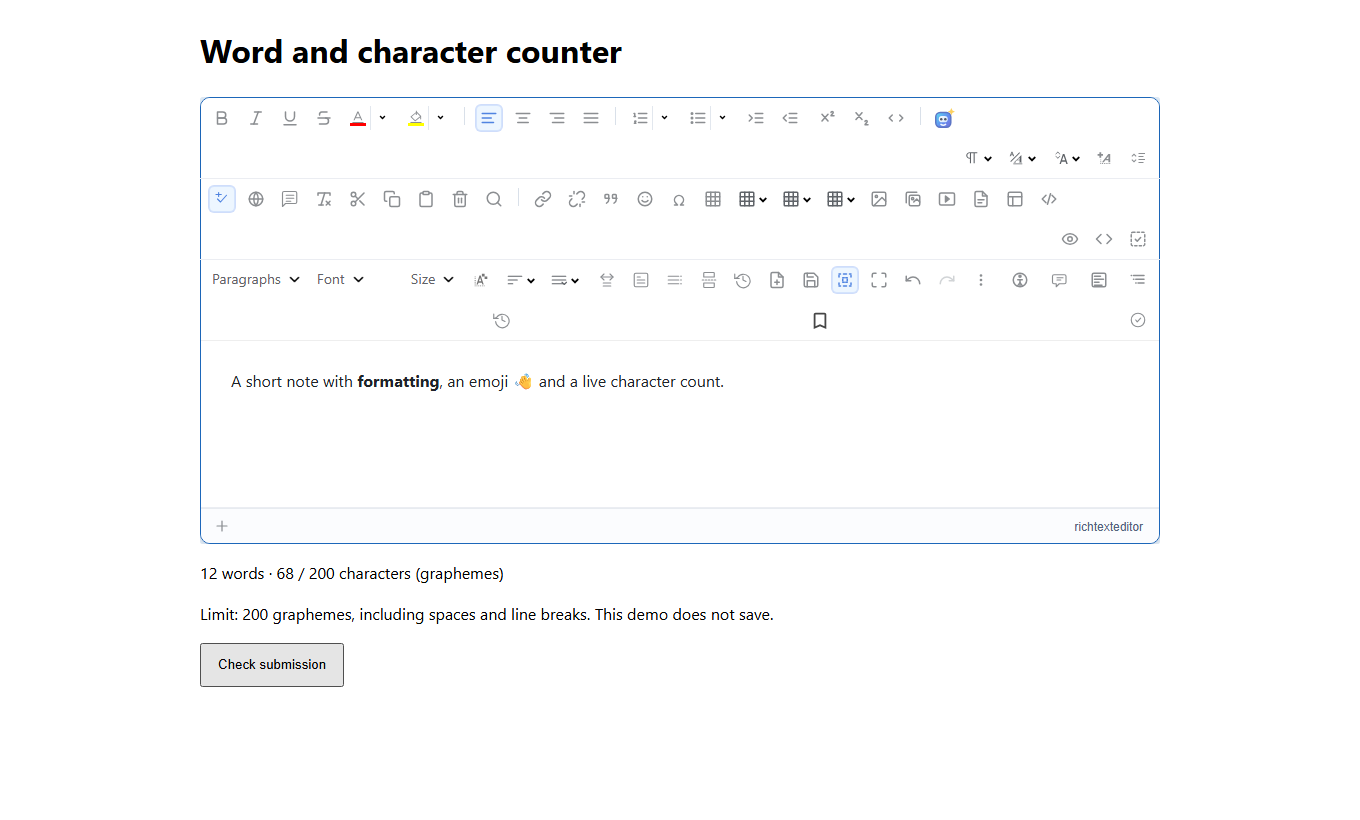
Add an application-specific counter to RichTextEditor without replacing the document on each keystroke. This guide includes a tested counting module and a complete browser example that validates a 200-character limit while keeping an over-limit draft intact.
Define what a character means
JavaScript string length counts UTF-16 code units. An emoji family or a letter with a combining accent can contain several units while looking like one character. This example counts grapheme clusters with Intl.Segmenter, includes spaces and line breaks, and normalizes CRLF or CR to LF.
Words are segments marked as word-like for an explicit document locale. This is not a promise to match Microsoft Word, the editor’s built-in status bar, SMS billing or a social network’s rules. Keep those policies separate and tell writers which unit your limit uses.
Download the counting module
Download the text metrics module. It accepts plain text, not HTML. Read the document through getPlainText() instead of counting the HTML returned by getHTMLCode(). Tags are not words; paragraph boundaries and any markers returned by your extraction policy need deliberate tests.
The module needs browser or server support for segmentation. It reports an error when that support is absent rather than silently switching to whitespace splitting, which is unsuitable for Chinese and Japanese.
Connect the counter and submit check
Serve the editor assets and the module from your application. The sample only checks a submission; it does not send or save content. The count is debounced while typing, then recomputed synchronously when the form is submitted. A rejected submission leaves the editor untouched.
<link rel="stylesheet" href="/richtexteditor/rte_theme_default.css">
<script src="/richtexteditor/rte.js"></script>
<script src="/richtexteditor/plugins/all_plugins.js"></script>
<style>body{font:16px/1.6 system-ui,sans-serif;max-width:960px;margin:24px auto;padding:0 16px}button{min-height:44px;padding:8px 16px}</style>
<h1>Word and character counter</h1>
<form id="message-form">
  <div style="max-width:100%;overflow-x:auto"><div id="editor"></div></div>
  <p id="counter"></p>
  <p>Limit: 200 graphemes, including spaces and line breaks. This demo does not save.</p>
  <button type="submit">Check submission</button>
  <p id="result" role="status" aria-live="polite"></p>
</form>
<script type="module">
import { countText } from "/js/text-metrics.mjs";
const editor = new RichTextEditor("#editor", { toolbar: "full", height: "320px", showStatistics: false });
editor.setHTMLCode("<p>Write a short note.</p>");
const LOCALE = "en"; // Choose the document language, not necessarily the UI language.
const LIMIT = 200;
const counter = document.getElementById("counter");
const result = document.getElementById("result");
function updateCount() {
  try {
    const metrics = countText(editor.getPlainText(), LOCALE);
    counter.textContent = metrics.words + " words · " + metrics.characters +
      " / " + LIMIT + " characters (graphemes)";
    return metrics;
  } catch {
    counter.textContent = "Counter unavailable. Check locale and Intl.Segmenter support.";
    return null;
  }
}
let timer, checkedText = null;
editor.attachEvent("change", () => {
  if (editor.getPlainText() !== checkedText) result.textContent = "";
  clearTimeout(timer);
  timer = setTimeout(updateCount, 200);
});
document.getElementById("message-form").addEventListener("submit", event => {
  event.preventDefault();
  clearTimeout(timer);
  const metrics = updateCount(); // Do not trust a delayed displayed count.
  checkedText = editor.getPlainText();
  if (!metrics) { result.textContent = "Cannot validate this count."; return; }
  if (metrics.characters > LIMIT) {
    result.textContent = "Too long. Shorten the draft; your content is still here.";
    editor.focus();
    return;
  }
  result.textContent = "Within limit. Ready for your server-side validation.";
  // Add your authenticated save here. This demo sends no request.
});
updateCount();
// Exposed only so you can inspect this standalone demo in developer tools:
window.counterDemo = { editor, updateCount };
</script>
Match the policy on your server
Repeat validation on the server using the submitted document and an agreed text-extraction policy. Do not trust a client-supplied count or an extra plain-text field. Check authorization, HTML sanitization and request byte size separately; 200 graphemes do not imply a small HTML payload.
You can reuse the module in a modern Node.js application after extracting plain text. Match normalization and locale, and run shared fixtures: Unicode and segmentation data can differ between browser and server versions. If limits have contractual meaning, choose and version an authoritative server policy.
Test languages and input methods
- Check empty text, spaces, paragraph breaks and CRLF input.
- Try a family emoji, a flag and a combining accent. Do not split or truncate them to fit.
- Use real Chinese and Japanese documents rather than assuming words are separated by spaces.
- Paste more than the limit and submit immediately, before the displayed count refreshes. The check must reject and preserve the draft.
- Delete enough text, submit again, and confirm it passes. Test IME composition and undo in your own integration.
The counter does not enforce required-content rules or decide whether an image-only document is valid. Avoid rewriting editor HTML or cancelling every keypress to implement this example; that can damage selection, undo and IME input.
Continue with related guides
See plain-text extraction, form validation, server autosave and word-count design choices.