PHP でリッチテキストエディターから画像をアップロードする
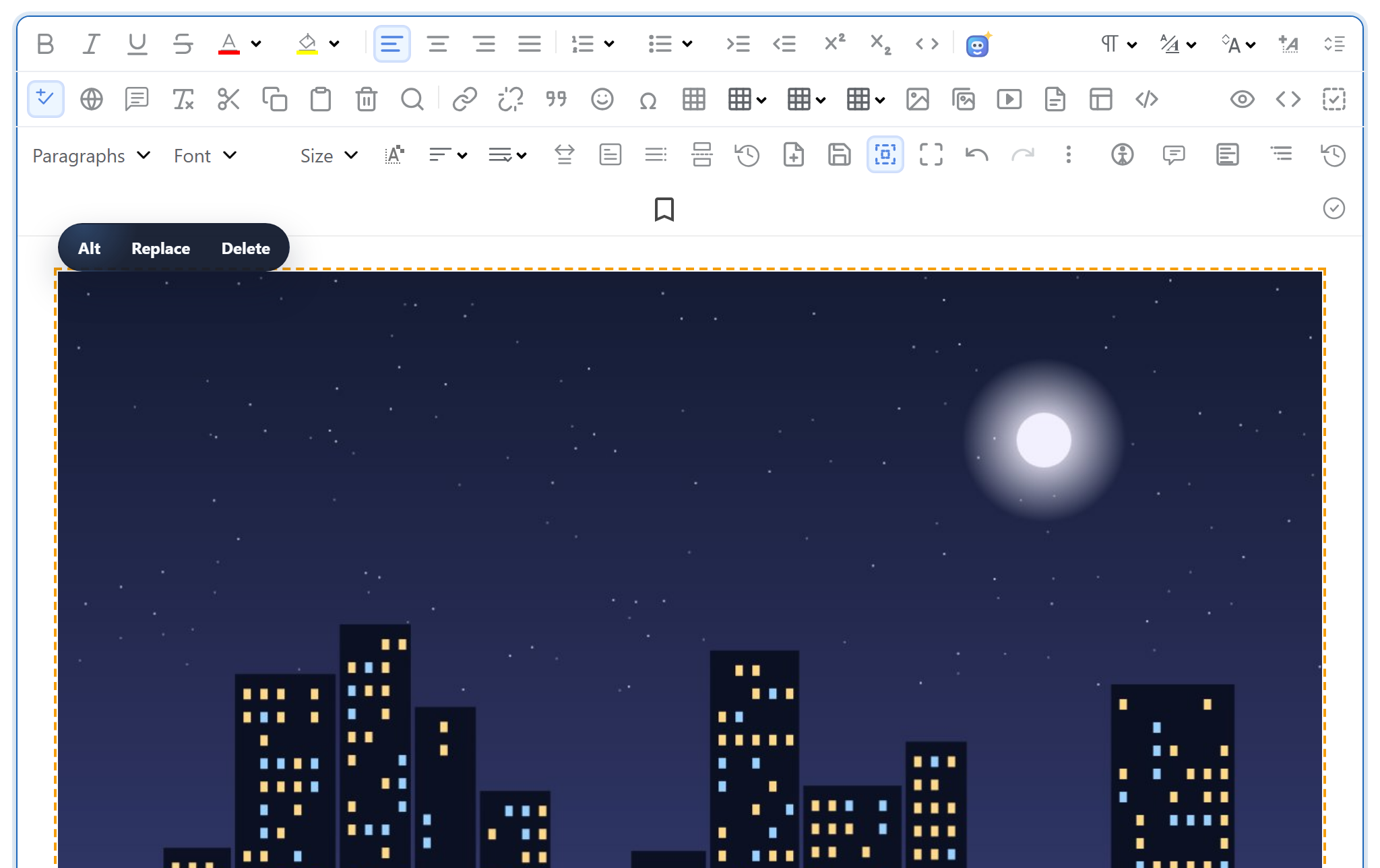
エディターに画像が挿入されると、ブラウザーはその画像をどこかに送信し、<img> に設定する URL を受け取る必要があります。このページでは、そのエンドポイントを素の PHP 8 で紹介します。$_FILES からファイルを受け取ってチェックし、move_uploaded_file() で保存して JSON で応答する、1 つのスクリプトです。フレームワークも追加の PHP 拡張機能も必要ありません。
エディターをサーバーに接続する
ページでは、エディターと、rte-files.js という小さなブラウザー用ファイルを読み込みます。このファイルは各画像を multipart/form-data として /rte/upload に POST します。ギャラリーダイアログは、これを使って開いているフォルダーにアップロードします。ドラッグ&ドロップ、貼り付け、「Insert Image」ダイアログでもこれを使いますが、これらのアップロードにはフォルダーの指定がなく、uploads/ のルートに保存されます。
<link rel="stylesheet" href="/richtexteditor/rte_theme_default.css">
<script src="/richtexteditor/rte.js"></script>
<script src="/richtexteditor/plugins/all_plugins.js"></script>
<script src="/rte-files.js"></script>
<script>
    new RichTextEditor("#editor", {
        toolbar: "full",
        galleryEndpoint: "/rte/gallery",
        maxUploadFileSize: 4000000     // same limit as rte/upload.php, checked before sending
    });
</script>
maxUploadFileSize を指定すると、ギャラリーダイアログは大きすぎるファイルを送信前に拒否できます。ブラウザーでのチェックは利便性のためのものにすぎないので、サーバーでもサイズを再度チェックします。
ルート
PHP の組み込みサーバーで、わかりやすい URL をファイルに対応付けるには、ルータースクリプトが必要です。サンプルプロジェクトでは、router.php が /rte/upload を rte/upload.php に送り、保存された画像を /uploads/ から配信します。
if ($path === '/' || $path === '/index.php') {
    require __DIR__ . '/index.php';
} elseif ($path === '/rte/gallery') {
    require __DIR__ . '/rte/gallery.php';
} elseif ($path === '/rte/upload') {
    require __DIR__ . '/rte/upload.php';
} elseif ($path === '/demo-login') {
    require __DIR__ . '/demo-login.php';          // stand-in for your login, see that file
} elseif ($path === '/rte-files.js') {
    rte_send_static($sharedDir, 'rte-files.js', RTE_STATIC_TYPES);
} elseif (str_starts_with($path, '/richtexteditor/')) {
    rte_send_static($editorDir, substr($path, strlen('/richtexteditor/')), RTE_STATIC_TYPES);
} elseif (str_starts_with($path, '/uploads/')) {
    // Images only, sent as bytes. Returning false here instead would let the
    // built-in server EXECUTE a .php file that ended up in uploads/.
    rte_send_static(__DIR__ . '/uploads', substr($path, strlen('/uploads/')), RTE_UPLOAD_TYPES);
} else {
    rte_not_found();
}
return true; // never false: false hands the request to the built-in server's own file handling
このルーターは決して false を返しません。もし返すと、組み込みサーバーがリクエストを自分で処理し、ドキュメントルート以下で見つけた .php ファイルを、uploads/ に紛れ込んだものも含めて実行してしまうからです。false を返す 1 行のルーターで試したところ、/uploads/probe.php をリクエストするとスクリプトが実行されました。Apache では、サンプルは代わりに .htaccess の書き換えルールを使い、nginx では完全一致の location ブロックを使います。両方とも安全なアップロードのガイドで紹介しています。
PHP から渡されるもの
スクリプトが実行される前に、PHP はすでにリクエストを解析し、ファイルを一時フォルダーに書き込んでいます。$_FILES['file'] にはその結果が入っており、最初にチェックすべきなのはその error フィールドです。
// Over post_max_size, PHP drops the WHOLE body: $_POST and $_FILES are both empty.
$length = (int)($_SERVER['CONTENT_LENGTH'] ?? 0);
if (empty($_FILES) && empty($_POST) && $length > rte_ini_bytes('post_max_size')) {
    throw new RteHttpError(413, 'The upload is larger than the server accepts (post_max_size).');
}

$file = $_FILES['file'] ?? null;
// One file only: "file[]" arrives as nested arrays, which this refuses.
if (!is_array($file) || !is_int($file['error'] ?? null) || !is_string($file['tmp_name'] ?? null)) {
    throw new RteHttpError(400, 'No file received. Send it as the "file" field.');
}
switch ($file['error']) {
    case UPLOAD_ERR_OK:
        break;
    case UPLOAD_ERR_INI_SIZE:   // larger than upload_max_filesize
    case UPLOAD_ERR_FORM_SIZE:  // larger than a MAX_FILE_SIZE form field
        throw new RteHttpError(413, 'The image is larger than the server accepts.');
    case UPLOAD_ERR_PARTIAL:
        throw new RteHttpError(400, 'The upload was interrupted. Please try again.');
    case UPLOAD_ERR_NO_FILE:
        throw new RteHttpError(400, 'No file received.');
    default:                    // NO_TMP_DIR, CANT_WRITE, EXTENSION: server-side problems
        error_log('rte upload: UPLOAD_ERR code ' . $file['error']);
        throw new RteHttpError(500, 'The server could not store the upload.');
}
if (!is_uploaded_file($file['tmp_name'])) {
    throw new RteHttpError(400, 'No file received.');
}

$size = filesize($file['tmp_name']);
if ($size === false || $size === 0) {
    throw new RteHttpError(400, 'The file is empty.');
}
if ($size > RTE_MAX_BYTES) {
    throw new RteHttpError(413, 'Images can be at most 4,000,000 bytes.');
}
ここには PHP に特有の点が 2 つあります。リクエストが post_max_size より大きいと、PHP は本文全体を破棄します。$_POST と $_FILES がどちらも空になるため、スクリプトは CONTENT_LENGTH を制限と比較しなければ理由がわかりません。また、upload_max_filesize の既定値は 2M で、このサンプルの制限である 4,000,000 バイトより小さい値です。これらについてはすべてサイズ制限のガイドで説明しています。
サーバーがチェックすること
拡張子は名前で決まり、バイト列はそれと一致していなければなりません。$_FILES['file']['type'] はクライアントがリクエストに書いた値にすぎないため、無視します。
// The name decides the extension; the bytes must agree with it.
// $file['type'] is whatever the browser (or attacker) sent, so it is ignored.
$ext = rte_extension((string)($file['name'] ?? ''));
if (!in_array($ext, RTE_IMAGE_EXTENSIONS, true)) {
    throw new RteHttpError(400, 'Only .jpg, .jpeg, .png, .gif and .webp images can be uploaded.');
}
$types = ['jpg' => IMAGETYPE_JPEG, 'jpeg' => IMAGETYPE_JPEG, 'png' => IMAGETYPE_PNG, 'gif' => IMAGETYPE_GIF, 'webp' => IMAGETYPE_WEBP];
// Signature first, then getimagesize() (core PHP, no GD needed) parses the header.
// A bare signature followed by junk still parses, but as 0x0, so require real dimensions.
$info = @getimagesize($file['tmp_name']);
if (!rte_signature_matches($file['tmp_name'], $ext) || $info === false
    || $info[2] !== $types[$ext] || $info[0] < 1 || $info[1] < 1) {
    throw new RteHttpError(400, 'The file is not a valid .' . $ext . ' image.');
}
getimagesize() は PHP 本体に含まれています。GD も fileinfo も必要ありません。
ファイルの保存先
リクエストで指定されるフォルダーは blog や products/2026 のような仮想パスで、ディスク上のパスではありません。まず、これをストレージルートの中で解決します。その後、ファイルを生成した名前で保存するので、photo.jpg という名前のアップロードが 2 つあっても、互いに上書きされることはありません。
$folder = rte_resolve_folder($_POST['folder'] ?? '');

// Generated name: uploads never overwrite each other and never keep the client's name as-is.
$base = rte_safe_base((string)$file['name']);
for ($try = 0; $try < 5; $try++) {
    $stored = $base . '-' . bin2hex(random_bytes(4)) . '.' . $ext;
    $target = $folder['dir'] . DIRECTORY_SEPARATOR . $stored;
    if (!file_exists($target)) {
        break;
    }
}
if (file_exists($target) || !move_uploaded_file($file['tmp_name'], $target)) {
    throw new RteHttpError(500, 'The server could not save the image.');
}
return ['url' => rte_url($folder['root'], [...$folder['segments'], $stored])];
レスポンスは {"url": "/uploads/blog/harbor-2839881c.jpg"} で、エディターはその URL を挿入します。失敗した場合、スクリプトは {"error": "..."} を付けて 400 または 413 を返します。
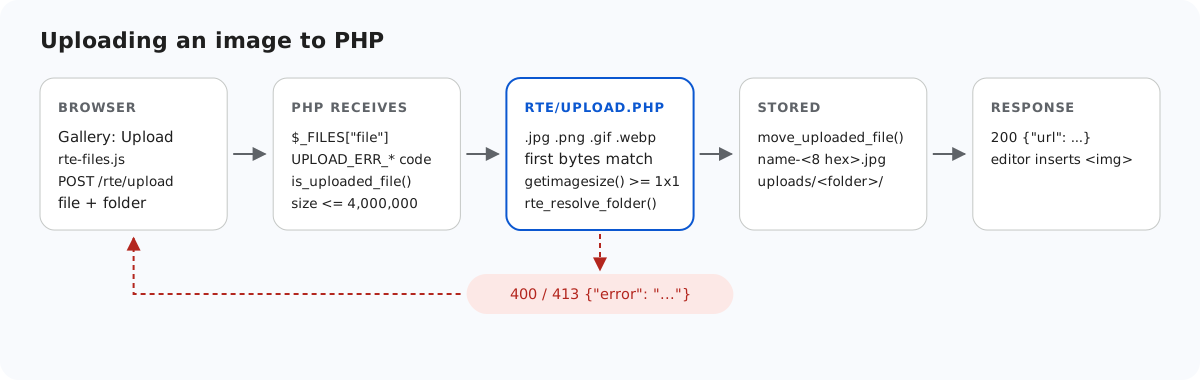
move_uploaded_file() より前に行われます。失敗した場合は JSON としてブラウザーに返されます。アップロードが失敗した場合、現在のギャラリーダイアログはサーバーのテキストではなく、独自のメッセージ「Upload failed for holiday.jpg.」を表示します。サーバーが示した理由はレスポンスの本文に含まれているので、ブラウザーの開発者ツールで確認できます。
テストする
このガイドのサンプルプロジェクトをダウンロードし、エディターのダウンロードに含まれる richtexteditor フォルダーを index.php と同じ場所に置いて、PHP の組み込みサーバーを起動します。
php -d upload_max_filesize=5M -d display_errors=0 -d log_errors=1 -S localhost:5201 router.php次に、curl で画像をアップロードします。1 回目はルートに、2 回目は blog フォルダーにアップロードします。
curl -F "file=@harbor.jpg" http://localhost:5201/rte/upload
{"url":"/uploads/harbor-f95d28e0.jpg"}

curl -F "file=@harbor.jpg" -F folder=blog http://localhost:5201/rte/upload
{"url":"/uploads/blog/harbor-2839881c.jpg"}フォルダーはあらかじめ存在している必要があります。http://localhost:5201/ を開いて「Insert Gallery」をクリックすると、アップロードしたファイルが一覧に表示されます。このサンプルは、すべてのプラットフォームのサンプルが実行する共通の契約テストにも合格します。node shared/contract-test.mjs http://localhost:5201 を実行すると、最後に ALL 35 CHECKS PASSED と表示されます。
ほかのプラットフォーム向けの同じガイド
JavaScript · Next.js · ASP.NET Core · Razor Pages · Blazor · MVC 5 · Web Forms