在 PHP 中从富文本编辑器上传图片
用户在编辑器中插入图片时,浏览器需要把图片发送到某个地方,并拿回一个 URL 填入 <img>。本页用纯 PHP 8 实现这个端点:一个脚本从 $_FILES 中取出文件,进行检查,用 move_uploaded_file() 保存,然后返回 JSON。不需要任何框架,也不需要额外的 PHP 扩展。
把编辑器连接到服务器
页面加载编辑器和一个很小的浏览器端文件 rte-files.js,它以 multipart/form-data 格式把每张图片 POST 到 /rte/upload。图片库对话框用它把图片上传到当前打开的文件夹。拖放、粘贴和 Insert Image 对话框也使用它;这些上传不带文件夹,会保存到 uploads/ 的根目录。
<link rel="stylesheet" href="/richtexteditor/rte_theme_default.css">
<script src="/richtexteditor/rte.js"></script>
<script src="/richtexteditor/plugins/all_plugins.js"></script>
<script src="/rte-files.js"></script>
<script>
    new RichTextEditor("#editor", {
        toolbar: "full",
        galleryEndpoint: "/rte/gallery",
        maxUploadFileSize: 4000000     // same limit as rte/upload.php, checked before sending
    });
</script>
maxUploadFileSize 让图片库对话框在发送之前就拒绝过大的文件。服务器会再次检查大小,因为浏览器端的检查只是为了方便用户。
路由
PHP 内置服务器需要一个路由脚本,把简洁的 URL 映射到文件。在示例项目中,router.php 把 /rte/upload 交给 rte/upload.php 处理,并从 /uploads/ 提供已保存的图片:
if ($path === '/' || $path === '/index.php') {
    require __DIR__ . '/index.php';
} elseif ($path === '/rte/gallery') {
    require __DIR__ . '/rte/gallery.php';
} elseif ($path === '/rte/upload') {
    require __DIR__ . '/rte/upload.php';
} elseif ($path === '/demo-login') {
    require __DIR__ . '/demo-login.php';          // stand-in for your login, see that file
} elseif ($path === '/rte-files.js') {
    rte_send_static($sharedDir, 'rte-files.js', RTE_STATIC_TYPES);
} elseif (str_starts_with($path, '/richtexteditor/')) {
    rte_send_static($editorDir, substr($path, strlen('/richtexteditor/')), RTE_STATIC_TYPES);
} elseif (str_starts_with($path, '/uploads/')) {
    // Images only, sent as bytes. Returning false here instead would let the
    // built-in server EXECUTE a .php file that ended up in uploads/.
    rte_send_static(__DIR__ . '/uploads', substr($path, strlen('/uploads/')), RTE_UPLOAD_TYPES);
} else {
    rte_not_found();
}
return true; // never false: false hands the request to the built-in server's own file handling
这个路由脚本从不返回 false。一旦这样做,内置服务器就会自己处理请求,而它会执行在文档根目录下找到的任何 .php 文件,包括被放进 uploads/ 的文件。我们用一个只有一行、返回 false 的路由脚本试过:请求 /uploads/probe.php 时,脚本被执行了。在 Apache 上,示例改用 .htaccess 重写规则;在 nginx 上,则使用精确匹配的 location 块。安全上传指南介绍了这两种做法。
PHP 提供的上传信息
在脚本运行之前,PHP 已经解析了请求,并把文件写入一个临时文件夹。$_FILES['file'] 记录了处理结果,首先要检查的就是它的 error 字段:
// Over post_max_size, PHP drops the WHOLE body: $_POST and $_FILES are both empty.
$length = (int)($_SERVER['CONTENT_LENGTH'] ?? 0);
if (empty($_FILES) && empty($_POST) && $length > rte_ini_bytes('post_max_size')) {
    throw new RteHttpError(413, 'The upload is larger than the server accepts (post_max_size).');
}

$file = $_FILES['file'] ?? null;
// One file only: "file[]" arrives as nested arrays, which this refuses.
if (!is_array($file) || !is_int($file['error'] ?? null) || !is_string($file['tmp_name'] ?? null)) {
    throw new RteHttpError(400, 'No file received. Send it as the "file" field.');
}
switch ($file['error']) {
    case UPLOAD_ERR_OK:
        break;
    case UPLOAD_ERR_INI_SIZE:   // larger than upload_max_filesize
    case UPLOAD_ERR_FORM_SIZE:  // larger than a MAX_FILE_SIZE form field
        throw new RteHttpError(413, 'The image is larger than the server accepts.');
    case UPLOAD_ERR_PARTIAL:
        throw new RteHttpError(400, 'The upload was interrupted. Please try again.');
    case UPLOAD_ERR_NO_FILE:
        throw new RteHttpError(400, 'No file received.');
    default:                    // NO_TMP_DIR, CANT_WRITE, EXTENSION: server-side problems
        error_log('rte upload: UPLOAD_ERR code ' . $file['error']);
        throw new RteHttpError(500, 'The server could not store the upload.');
}
if (!is_uploaded_file($file['tmp_name'])) {
    throw new RteHttpError(400, 'No file received.');
}

$size = filesize($file['tmp_name']);
if ($size === false || $size === 0) {
    throw new RteHttpError(400, 'The file is empty.');
}
if ($size > RTE_MAX_BYTES) {
    throw new RteHttpError(413, 'Images can be at most 4,000,000 bytes.');
}
这里有两个 PHP 特有的细节。当请求大于 post_max_size 时,PHP 会丢弃整个请求体:$_POST 和 $_FILES 都是空的,所以脚本必须把 CONTENT_LENGTH 与限制值比较,才能知道原因。另外,upload_max_filesize 默认为 2M,低于本示例 4,000,000 字节的限制。大小限制指南详细介绍了这些内容。
服务器检查什么
扩展名由文件名决定,而文件的字节内容必须与之相符。$_FILES['file']['type'] 只是客户端在请求中随意写入的值,因此忽略它。
// The name decides the extension; the bytes must agree with it.
// $file['type'] is whatever the browser (or attacker) sent, so it is ignored.
$ext = rte_extension((string)($file['name'] ?? ''));
if (!in_array($ext, RTE_IMAGE_EXTENSIONS, true)) {
    throw new RteHttpError(400, 'Only .jpg, .jpeg, .png, .gif and .webp images can be uploaded.');
}
$types = ['jpg' => IMAGETYPE_JPEG, 'jpeg' => IMAGETYPE_JPEG, 'png' => IMAGETYPE_PNG, 'gif' => IMAGETYPE_GIF, 'webp' => IMAGETYPE_WEBP];
// Signature first, then getimagesize() (core PHP, no GD needed) parses the header.
// A bare signature followed by junk still parses, but as 0x0, so require real dimensions.
$info = @getimagesize($file['tmp_name']);
if (!rte_signature_matches($file['tmp_name'], $ext) || $info === false
    || $info[2] !== $types[$ext] || $info[0] < 1 || $info[1] < 1) {
    throw new RteHttpError(400, 'The file is not a valid .' . $ext . ' image.');
}
getimagesize() 是 PHP 核心的一部分,不需要 GD 或 fileinfo。
文件存放在哪里
请求中的文件夹是一个虚拟路径,例如 blog 或 products/2026,绝不是磁盘路径。它首先会在存储根目录内解析。然后文件以生成的名称保存,因此两个都叫 photo.jpg 的上传永远不会互相覆盖:
$folder = rte_resolve_folder($_POST['folder'] ?? '');

// Generated name: uploads never overwrite each other and never keep the client's name as-is.
$base = rte_safe_base((string)$file['name']);
for ($try = 0; $try < 5; $try++) {
    $stored = $base . '-' . bin2hex(random_bytes(4)) . '.' . $ext;
    $target = $folder['dir'] . DIRECTORY_SEPARATOR . $stored;
    if (!file_exists($target)) {
        break;
    }
}
if (file_exists($target) || !move_uploaded_file($file['tmp_name'], $target)) {
    throw new RteHttpError(500, 'The server could not save the image.');
}
return ['url' => rte_url($folder['root'], [...$folder['segments'], $stored])];
响应为 {"url": "/uploads/blog/harbor-2839881c.jpg"},编辑器会插入这个 URL。失败时,脚本返回 400 或 413,并附带 {"error": "..."}。
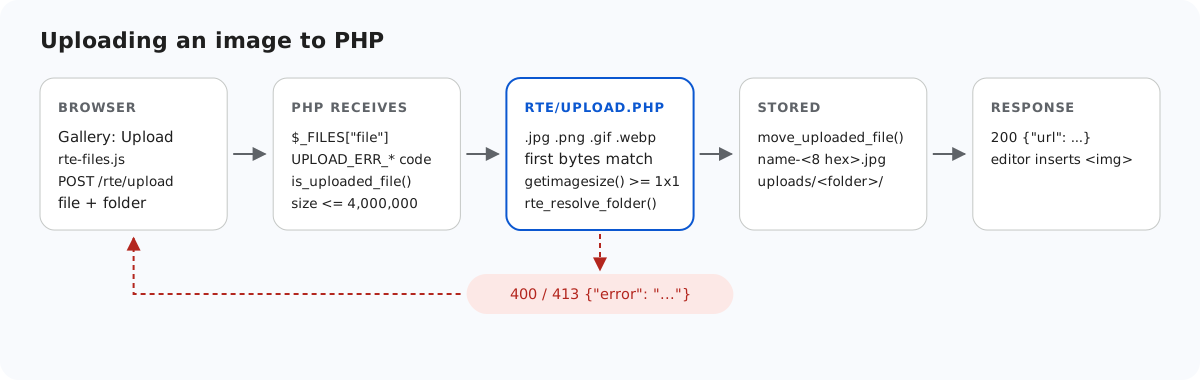
move_uploaded_file() 之前完成。检查失败时,会以 JSON 形式返回给浏览器。上传失败时,图片库对话框目前显示的是它自己的消息 "Upload failed for holiday.jpg."(holiday.jpg 上传失败),而不是服务器返回的文本。服务器给出的原因仍在响应体中,可以在浏览器的开发者工具中查看。
测试
下载本指南的示例项目,把编辑器下载包中的 richtexteditor 文件夹放到 index.php 旁边,然后启动 PHP 内置服务器:
php -d upload_max_filesize=5M -d display_errors=0 -d log_errors=1 -S localhost:5201 router.php然后用 curl 上传一张图片,一次上传到根目录,一次上传到 blog 文件夹:
curl -F "file=@harbor.jpg" http://localhost:5201/rte/upload
{"url":"/uploads/harbor-f95d28e0.jpg"}

curl -F "file=@harbor.jpg" -F folder=blog http://localhost:5201/rte/upload
{"url":"/uploads/blog/harbor-2839881c.jpg"}
文件夹必须事先存在。打开 http://localhost:5201/,点击 Insert Gallery,就能看到上传的文件。该示例还通过了所有平台示例都会运行的共享契约测试:node shared/contract-test.mjs http://localhost:5201 最后输出 ALL 35 CHECKS PASSED。
其他平台的同一指南
JavaScript · Next.js · ASP.NET Core · Razor Pages · Blazor · MVC 5 · Web Forms