在 Blazor Server 中读取富文本编辑器的 HTML
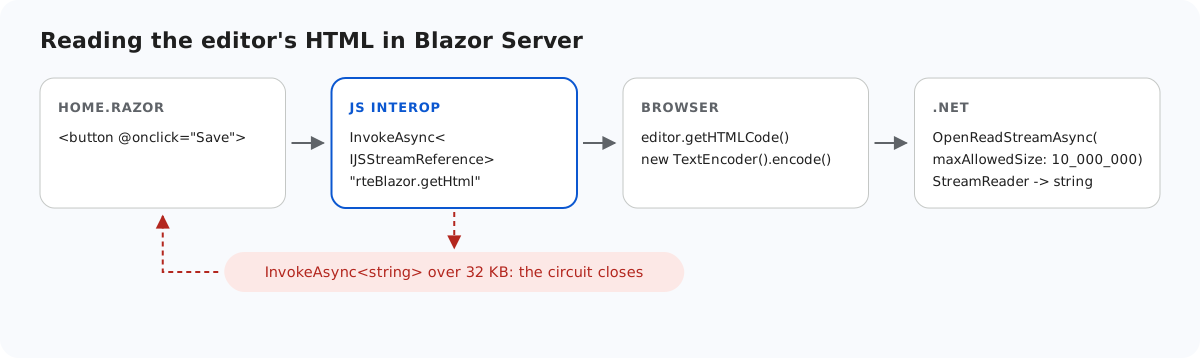
Blazor Server 页面迟早需要把编辑器的 HTML 取到 C# 中保存。最直观的调用 JS.InvokeAsync<string> 在测试时没问题,但遇到第一篇长文档就会失败,因为返回结果要经过线路(circuit)的 SignalR 连接传输,而该连接有 32 KB 的消息大小限制。本页介绍我们碰到这个限制时发生了什么,以及示例如何改为以流的形式读取 HTML。
32 KB 限制
在 Blazor Server 中,从浏览器发往服务器的每条消息都经过线路,JS 互操作调用的返回结果也不例外。线路的 SignalR MaximumReceiveMessageSize 默认为 32 KB。我们通过 InvokeAsync<string> 返回 editor.getHTMLCode(),测得结果如下:
- 20,000 个字符的 HTML:成功到达。
- 40,000 个字符:浏览器记录了 "Connection disconnected with error 'Error: Server returned an error on close: Connection closed with an error.'"。页面上的消息没有变化,而线路已经断开。
在默认日志级别下,服务器端不会记录这次失败,因此在测试中很容易被忽略。
从 JavaScript 返回字节
当 JS 函数返回 Uint8Array 时,Blazor 可以把它作为 IJSStreamReference 交给 .NET,它会分块发送,不受消息大小限制。示例的互操作函数位于 App.razor 中:
<script>
    // Called from Home.razor. The editor options stay in JavaScript, where they can also hold
    // functions (custom buttons, event handlers) that cannot be sent from .NET as JSON.
    window.rteBlazor = {
        create: function (host) {
            host.rte = new RichTextEditor(host, {
                toolbar: "full",
                galleryEndpoint: "/rte/gallery",
                maxUploadFileSize: 4000000 // same limit as the server, checked before the upload starts
            });
        },
        // Returned as bytes: .NET reads them as a stream, so documents over Blazor's 32 KB
        // SignalR message limit still arrive.
        getHtml: function (host) {
            return new TextEncoder().encode(host.rte.getHTMLCode());
        },
        destroy: function (host) {
            if (!host || !host.rte) return;
            // editor.destroy() exists only in newer editor builds
            if (typeof host.rte.destroy === "function") host.rte.destroy();
            host.rte = null;
            host.innerHTML = "";
        }
    };
</script>
getHtml 用 TextEncoder 把 HTML 编码为 UTF-8。编辑器本身由 create 创建;在 Blazor 中为富文本编辑器添加图片库介绍了 create 和 destroy。
在 C# 中读取流
async Task Save()
{
    var bytes = await JS.InvokeAsync<IJSStreamReference>("rteBlazor.getHtml", host);
    await using var stream = await bytes.OpenReadStreamAsync(maxAllowedSize: 10_000_000);
    using var reader = new StreamReader(stream);
    var html = await reader.ReadToEndAsync();
    message = $"Saved {html.Length} characters of HTML."; // save html to your database here
}InvokeAsync<IJSStreamReference>以流而不是值的形式请求字节。OpenReadStreamAsync(maxAllowedSize: 10_000_000)设置服务器最多读取的大小。它的默认值是 512,000 字节,请把它设置为数据库列能够容纳的大小。StreamReader把 UTF-8 字节还原为字符串。在这里保存它;在展示给其他用户之前,请先净化。
使用这段代码后,一篇包含 100,000 个 x 字符和一张插入图片的文档完整到达:"Saved 100116 characters of HTML."
为什么不提高限制
另一种办法是在中心(hub)选项中调大 MaximumReceiveMessageSize,例如通过 AddInteractiveServerComponents().AddHubOptions(...)。但这会提高每条线路上每条消息的限制。本页没有使用也没有测试这种做法。流式传输保留了默认限制,只让 HTML 在您选择的大小以内通过。
图片则是另一回事:它们根本不经过组件。在 Blazor 中从富文本编辑器上传图片解释了编辑器为什么把图片发送到 HTTP 端点,这样保存的 HTML 中只包含图片的 URL。
测试
用 dotnet run 运行本指南的示例项目,然后打开 http://localhost:5304。把一篇长文档粘贴到编辑器中,或者输入几段文字后反复粘贴多次,然后点击 Save。编辑器下方的消息会显示到达 C# 的字符数,远超 32 KB。要观察这个限制,可以把 Save 改为通过 InvokeAsync<string> 从一个以字符串形式返回 getHTMLCode() 的 JS 函数读取 HTML,再保存同一篇文档:线路会关闭。