Read the rich text editor's HTML in Blazor Server
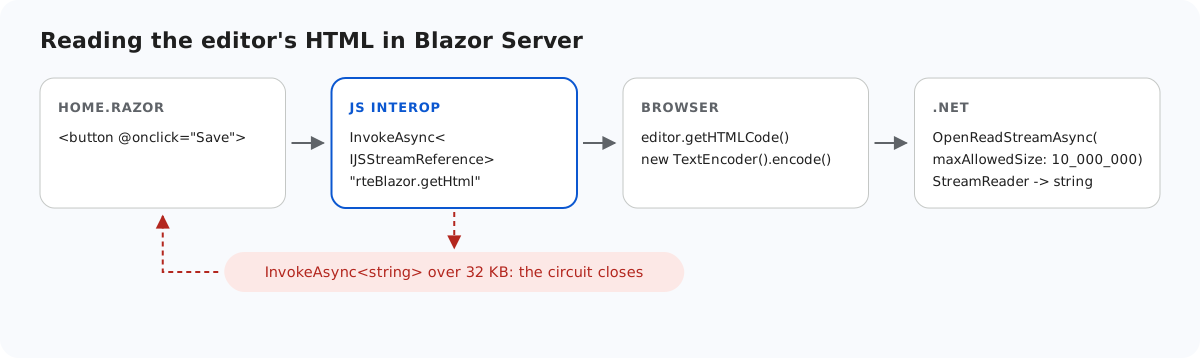
Sooner or later a Blazor Server page has to get the editor's HTML into C# to save it. The obvious call, JS.InvokeAsync<string>, works in testing and then fails for the first long document, because the result travels over the circuit's SignalR connection, which has a 32 KB message limit. This page shows what happened when we hit it, and how the sample reads the HTML as a stream instead.
The 32 KB limit
In Blazor Server, every message from the browser to the server goes over the circuit, and that includes the result of a JS interop call. SignalR's MaximumReceiveMessageSize for the circuit is 32 KB by default. We returned editor.getHTMLCode() through InvokeAsync<string> and measured:
- 20,000 characters of HTML: arrived.
- 40,000 characters: the browser logged "Connection disconnected with error 'Error: Server returned an error on close: Connection closed with an error.'" The message on the page did not change, and the circuit was gone.
The failure is silent on the server at the default log level, so it is easy to miss in testing.
Return bytes from JavaScript
When a JS function returns a Uint8Array, Blazor can hand it to .NET as an IJSStreamReference, which is sent in chunks outside the message limit. The sample's interop functions sit in App.razor:
<script>
    // Called from Home.razor. The editor options stay in JavaScript, where they can also hold
    // functions (custom buttons, event handlers) that cannot be sent from .NET as JSON.
    window.rteBlazor = {
        create: function (host) {
            host.rte = new RichTextEditor(host, {
                toolbar: "full",
                galleryEndpoint: "/rte/gallery",
                maxUploadFileSize: 4000000 // same limit as the server, checked before the upload starts
            });
        },
        // Returned as bytes: .NET reads them as a stream, so documents over Blazor's 32 KB
        // SignalR message limit still arrive.
        getHtml: function (host) {
            return new TextEncoder().encode(host.rte.getHTMLCode());
        },
        destroy: function (host) {
            if (!host || !host.rte) return;
            // editor.destroy() exists only in newer editor builds
            if (typeof host.rte.destroy === "function") host.rte.destroy();
            host.rte = null;
            host.innerHTML = "";
        }
    };
</script>
getHtml encodes the HTML as UTF-8 with TextEncoder. The editor itself is created by create; Add an image gallery to a rich text editor in Blazor explains create and destroy.
Read the stream in C#
async Task Save()
{
    var bytes = await JS.InvokeAsync<IJSStreamReference>("rteBlazor.getHtml", host);
    await using var stream = await bytes.OpenReadStreamAsync(maxAllowedSize: 10_000_000);
    using var reader = new StreamReader(stream);
    var html = await reader.ReadToEndAsync();
    message = $"Saved {html.Length} characters of HTML."; // save html to your database here
}InvokeAsync<IJSStreamReference>asks for the bytes as a stream instead of a value.OpenReadStreamAsync(maxAllowedSize: 10_000_000)sets the most the server will read. Its default is 512,000 bytes, so set it to what your database column can hold.StreamReaderturns the UTF-8 bytes back into a string. Save it from here, and sanitize it before you show it to other users.
With this code, a document of 100,000 x characters plus an inserted picture arrived complete: "Saved 100116 characters of HTML."
Why not raise the limit
The other way out is a bigger MaximumReceiveMessageSize in the hub options, for example through AddInteractiveServerComponents().AddHubOptions(...). That raises the limit for every message on every circuit. We did not use or test it for this page. Streaming keeps the default in place and only lets the HTML through, up to the size you choose.
Images are a different case: they never pass through the component at all. Upload images from a rich text editor in Blazor explains why the editor sends them to HTTP endpoints, so the saved HTML only holds their URLs.
Test it
Run the sample project for this guide with dotnet run and open http://localhost:5304. Paste a long document into the editor, or type a few paragraphs and paste them many times, then click Save. The message under the editor shows the number of characters that reached C#, well past 32 KB. To see the limit, change Save to read the HTML with InvokeAsync<string> from a JS function that returns getHTMLCode() as a string, and save the same document again: the circuit closes.