Add an image gallery to a rich text editor in Blazor
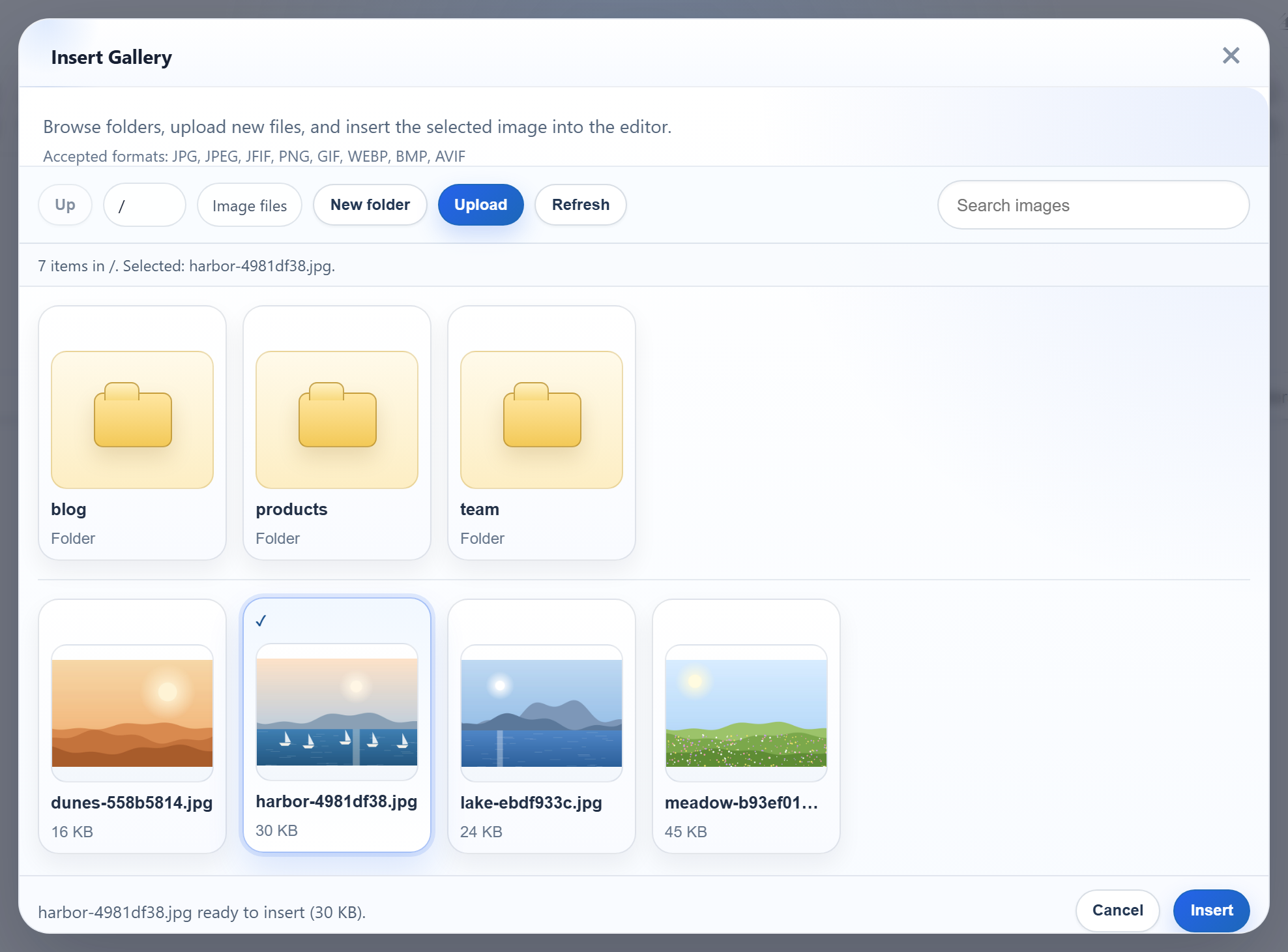
RichTextEditor is a JavaScript editor, so in a Blazor Web App it is created and removed through JS interop, and the gallery talks to ordinary HTTP endpoints next to your components. This page shows the Blazor parts: where the editor's scripts and options go, when the component may create the editor, how to remove it again, and how the gallery's routes sit in Program.cs. It uses Interactive Server rendering in .NET 8.
Scripts and options in App.razor
The editor's files, the shared rte-files.js and three small interop functions go in the <head> of App.razor, which is rendered once and not by an interactive component:
<link rel="stylesheet" href="richtexteditor/rte_theme_default.css" />
<script src="richtexteditor/rte.js"></script>
<script src="richtexteditor/plugins/all_plugins.js"></script>
<script src="rte-files.js"></script>
<script>
    // Called from Home.razor. The editor options stay in JavaScript, where they can also hold
    // functions (custom buttons, event handlers) that cannot be sent from .NET as JSON.
    window.rteBlazor = {
        create: function (host) {
            host.rte = new RichTextEditor(host, {
                toolbar: "full",
                galleryEndpoint: "/rte/gallery",
                maxUploadFileSize: 4000000 // same limit as the server, checked before the upload starts
            });
        },
        // Returned as bytes: .NET reads them as a stream, so documents over Blazor's 32 KB
        // SignalR message limit still arrive.
        getHtml: function (host) {
            return new TextEncoder().encode(host.rte.getHTMLCode());
        },
        destroy: function (host) {
            if (!host || !host.rte) return;
            // editor.destroy() exists only in newer editor builds
            if (typeof host.rte.destroy === "function") host.rte.destroy();
            host.rte = null;
            host.innerHTML = "";
        }
    };
</script>
The editor options, with galleryEndpoint, are written in JavaScript rather than sent from C#. Options can hold functions, such as custom buttons and event handlers, and those cannot travel from .NET as JSON. getHtml is explained in Read the editor's HTML in Blazor Server.
Creating the editor
protected override async Task OnAfterRenderAsync(bool firstRender)
{
    if (!firstRender) return;
    await JS.InvokeVoidAsync("rteBlazor.create", host);
    created = true;
}
The page has @rendermode InteractiveServer, and Blazor prerenders it: the first render happens on the server, with no browser connected. JS interop is not possible then. OnAfterRenderAsync runs only once the circuit is connected, and firstRender makes sure the editor is created once, not on every re-render. The @ref="host" element in the markup is an empty <div>; Blazor never writes inside it, so it does not fight the editor over the DOM.
Removing it
public async ValueTask DisposeAsync()
{
    if (!created) return;
    try { await JS.InvokeVoidAsync("rteBlazor.destroy", host); }
    catch (JSDisconnectedException) { } // the browser tab is already gone
}- The
createdflag. Without it, disposing the prerendered copy of the component threwInvalidOperationException: JavaScript interop calls cannot be issued at this time. JSDisconnectedExceptionhappens when the user closes the tab: the component is disposed after the browser is gone.destroy()may be missing. The released editor build we tested has noeditor.destroy(), sorteBlazor.destroycalls it only if it exists and then empties the host element.
The gallery routes
var builder = WebApplication.CreateBuilder(args);
builder.Services.AddRazorComponents().AddInteractiveServerComponents();
var app = builder.Build();

app.UseStaticFiles();
app.UseRteStaticFiles();   // /uploads, /richtexteditor, /rte-files.js
app.UseAntiforgery();      // Blazor's own forms; the /rte endpoints opt out (RteEndpoints.cs)

app.MapRteFiles();         // GET+POST /rte/gallery, POST /rte/upload
app.MapRazorComponents<App>().AddInteractiveServerRenderMode();

app.Run();
MapRteFiles() adds GET and POST /rte/gallery and POST /rte/upload as Minimal API endpoints. The gallery's listing is the same JSON as in the ASP.NET Core gallery guide. The routes are mapped before MapRazorComponents, and the POST routes call .DisableAntiforgery(), because the template's app.UseAntiforgery() would otherwise refuse the editor's requests. Upload images from a rich text editor in Blazor explains why the files do not go over the circuit.
What the dialog does today
The released dialog lists "Accepted formats: JPG, JPEG, JFIF, PNG, GIF, WEBP, BMP, AVIF". The server accepts five of them, so a .bmp is sent, refused with a 400, and the dialog shows its own "Upload failed for pic.bmp." instead of the server's message.
Test it
Run the sample project for this guide with dotnet run (.NET 8 SDK), open http://localhost:5304, wait for the toolbar and click Insert Gallery. You see the folders and pictures under the app's uploads/ folder, as in the picture at the top. The listing answers from a shell too:
curl "http://localhost:5304/rte/gallery?folder=team"
{"currentFolder":"team","currentFolderDisplay":"/team","parentFolder":"","folders":[],"images":[]}The same guide for other platforms
JavaScript · Next.js · PHP · ASP.NET Core · Razor Pages · MVC 5 · Web Forms