Web Forms でリッチテキストエディターに画像ギャラリーを追加する
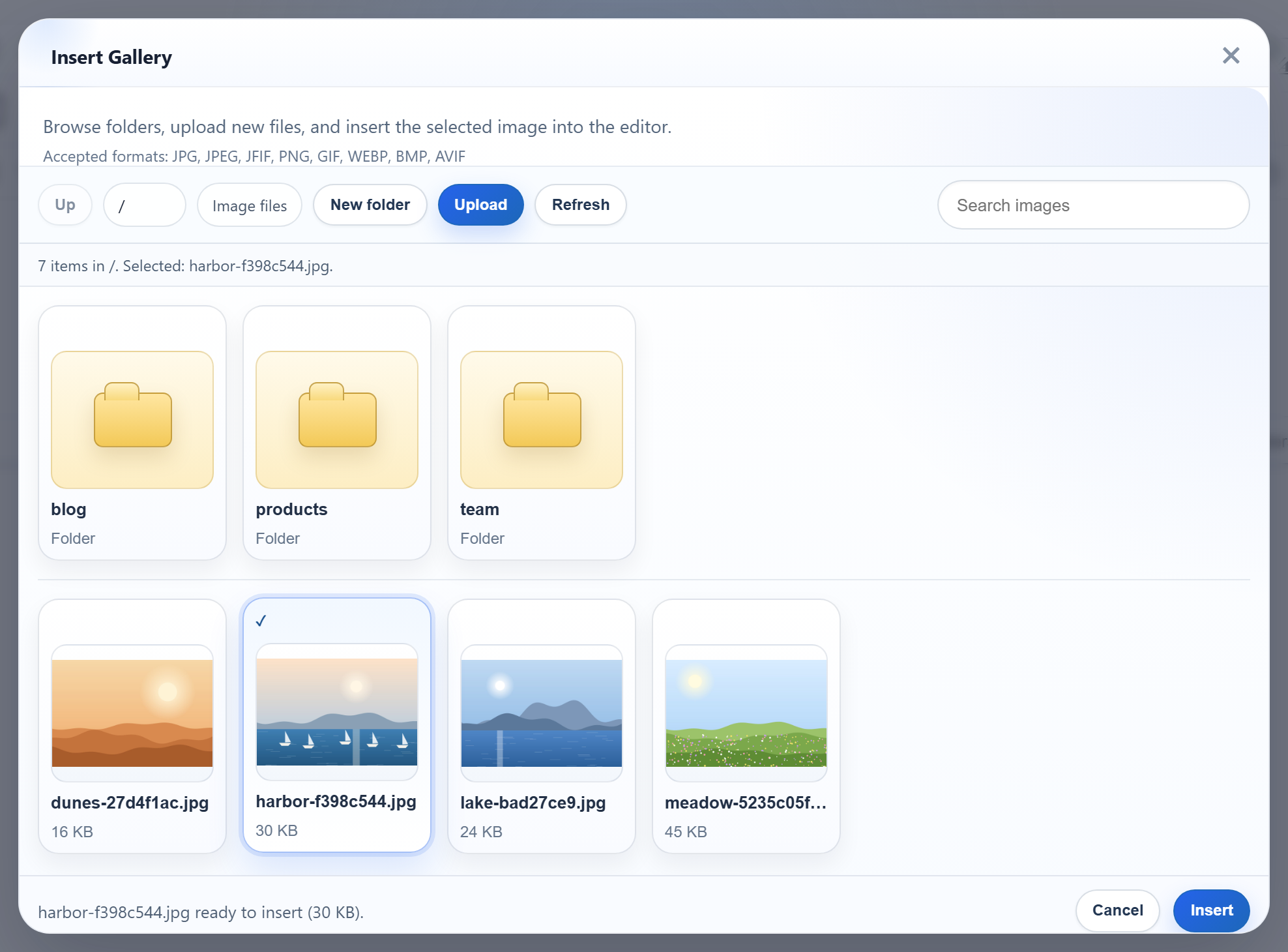
RichTextEditor の Insert Gallery ダイアログでは、サーバー上の画像を一覧表示し、フォルダーを開き、開いているフォルダーにアップロードできます。必要なのは、JSON で応答するエンドポイント 1 つです。ASP.NET Web Forms では、そのエンドポイントは App_Code 内の IHttpHandler です。このページでは、そのハンドラー、.NET Framework に最初から含まれるシリアライザーで書き出す JSON、そして自分のマシンでは問題なく見えるのに、リモートの訪問者や .webp ファイルではギャラリーを壊してしまう IIS の 2 つの動作を説明します。
ギャラリーを有効にする
galleryEndpoint オプションで、ダイアログの接続先をサーバーにします。maxUploadFileSize にはサーバーと同じ制限を使っているので、ダイアログは大きすぎるファイルを送信前に拒否できます。
<script>
    var editor = new RichTextEditor("#editor", {
        toolbar: "full",
        galleryEndpoint: "<%= ResolveUrl("~/rte/gallery") %>",
        maxUploadFileSize: 4000000   // same limit as the server
    });
</script>
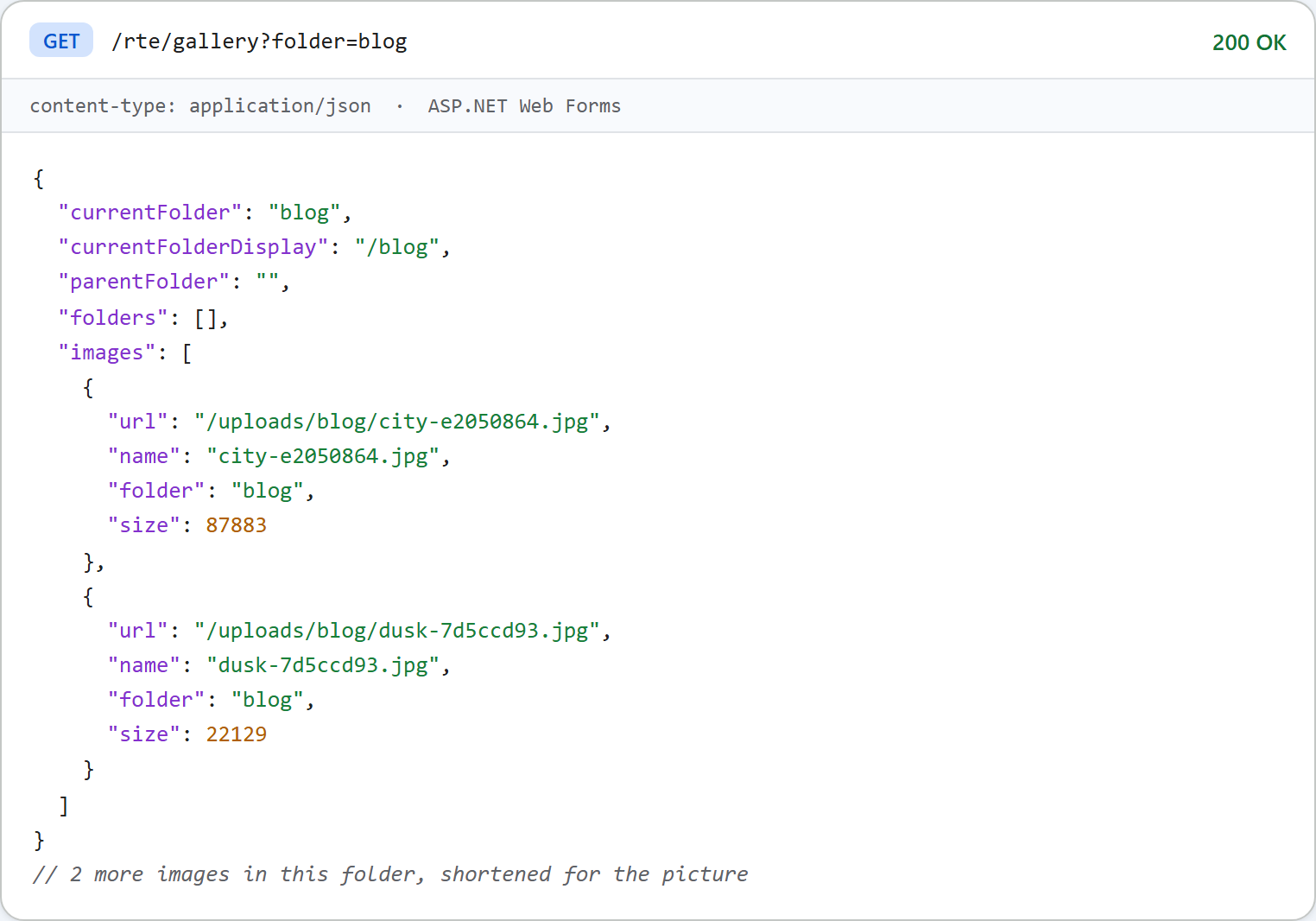
ダイアログは GET /rte/gallery?folder=blog を送信し、そのフォルダーのサブフォルダーと画像を受け取ることを想定しています。このパスは、Web Forms での画像アップロードのアップロード用ルートと同じ方法で、web.config でハンドラーに対応付けています。
ハンドラー
public void ProcessRequest(HttpContext context)
{
    try
    {
        // Request.Unvalidated: a value such as "<b" would otherwise make ASP.NET request
        // validation throw (HTTP 500) before our own rules can answer with a 400.
        if (context.Request.HttpMethod == "GET")
        {
            string folder = context.Request.Unvalidated.QueryString["folder"];
            RteFiles.WriteJson(context, 200, RteFiles.Listing(context, folder));
        }
        else if (context.Request.HttpMethod == "POST")
        {
            string action = context.Request.Unvalidated.Form["action"];
            string folder = context.Request.Unvalidated.Form["folder"] ?? "";
            if (action != "create-folder")
                throw new RteException(400, "Unknown action.");
            RteFiles.CreateFolder(context, folder, context.Request.Unvalidated.Form["name"]);
            RteFiles.WriteJson(context, 200, RteFiles.Listing(context, folder));
        }
        else
        {
            context.Response.AppendHeader("Allow", "GET, POST");
            throw new RteException(405, "Use GET or POST.");
        }
    }
    catch (RteException ex)
    {
        RteFiles.WriteError(context, ex.Status, ex.Message);
    }
}このハンドラーは、Request.QueryString ではなく Request.Unvalidated.QueryString を読み取ります。ASP.NET の要求の検証はジェネリックハンドラーにも適用されます。folder=<b> の場合、検証済みのコレクションが「A potentially dangerous Request.QueryString value was detected」をスローし、ダイアログは HTML の 500 を受け取りました。検証なしで読み取れば、ハンドラー独自のフォルダーのルールによって 400 {"error":"Invalid folder."} を返せます。
一覧
public static object Listing(HttpContext context, string folder)
{
    folder = folder ?? "";
    StorageRoot root = GetRoot(context);
    string dir = ResolveFolder(root, folder);

    List<string> folderNames = new List<string>();
    foreach (string path in Directory.GetDirectories(dir))
    {
        string name = Path.GetFileName(path);
        // Skip anything the dialog could not open again (hidden, odd names).
        if (IsValidName(name) && (File.GetAttributes(path) & FileAttributes.Hidden) == 0)
            folderNames.Add(name);
    }
    folderNames.Sort(CompareNames);

    List<FileInfo> files = new List<FileInfo>();
    foreach (FileInfo file in new DirectoryInfo(dir).GetFiles())
    {
        if (Array.IndexOf(ImageExtensions, file.Extension.ToLowerInvariant()) >= 0
            && (file.Attributes & FileAttributes.Hidden) == 0)
            files.Add(file);
    }
    files.Sort(delegate (FileInfo a, FileInfo b) { return CompareNames(a.Name, b.Name); });

    List<object> folders = new List<object>();
    foreach (string name in folderNames)
        folders.Add(new { folder = Combine(folder, name), name = name });

    List<object> images = new List<object>();
    foreach (FileInfo file in files)
        images.Add(new { url = UrlFor(root, folder, file.Name), name = file.Name, folder = folder, size = file.Length });

    string parent = null;
    if (folder.Length > 0)
    {
        int slash = folder.LastIndexOf('/');
        parent = slash < 0 ? "" : folder.Substring(0, slash);
    }

    return new
    {
        currentFolder = folder,
        currentFolderDisplay = "/" + folder,
        parentFolder = parent,
        folders = folders,
        images = images
    };
}
一覧に含めるのは .jpg、.jpeg、.png、.gif、.webp のファイルだけで、フォルダーと画像は名前順に並べます。並べ替えでは両方の名前を小文字にしてから序数比較します。JavaScript の toLowerCase() による比較と同じ順序になるからです。StringComparer.OrdinalIgnoreCase は逆に大文字にするため、_ が英字の前ではなく後になってしまいます。
NuGet パッケージなしで JSON を返す
public static void WriteJson(HttpContext context, int status, object value)
{
    HttpResponse response = context.Response;
    response.Clear();
    response.StatusCode = status;
    // Without this, IIS replaces 4xx/5xx bodies with its own error page when
    // <httpErrors errorMode="Custom"> is in effect (the default for remote users).
    response.TrySkipIisCustomErrors = true;
    // FormsAuthenticationModule turns every 401 into a 302 to the login page, which an
    // XMLHttpRequest follows silently and then fails to parse. Keep the 401.
    response.SuppressFormsAuthenticationRedirect = true;
    response.ContentType = "application/json";
    response.Cache.SetCacheability(HttpCacheability.NoCache);
    response.Cache.SetNoStore();
    // JavaScriptSerializer ships with .NET Framework (System.Web.Extensions) and writes
    // property names exactly as declared, so the anonymous objects above are camelCase.
    // Its default MaxJsonLength (2,097,152 chars) would fail a huge folder; lift it.
    JavaScriptSerializer serializer = new JavaScriptSerializer();
    serializer.MaxJsonLength = int.MaxValue;
    response.Write(serializer.Serialize(value));
}JavaScriptSerializerは System.Web.Extensions として .NET Framework に含まれているので、bin\フォルダーがなくても App_Code から使えます。プロパティ名は宣言どおりに書き出されます。匿名オブジェクトにはキャメルケースの名前を使っているので、設定なしで JSON はキャメルケースになります。ルートのparentFolderにはnullを書き出し、'は\u0027としてエスケープしますが、これも有効な JSON です。MaxJsonLengthの既定値は 2,097,152 文字で、web.config のjsonSerializationの設定はnew JavaScriptSerializer()には適用されません。何千枚もの画像があるフォルダーでは例外がスローされるため、サンプルではこの制限を引き上げています。TrySkipIisCustomErrors。IIS Express の既定はerrorMode="DetailedLocalOnly"なので、自分のマシンではどちらにしても JSON の 400 がそのまま届きます。リモートの訪問者が受け取る設定である<httpErrors errorMode="Custom">を指定したところ、このフラグなしでステータス 400 を設定したハンドラーは、本文を IIS の「Bad Request」の HTML ページに置き換えられました。フラグを設定すると、JSON はそのまま届きました。- キャッシュしない。一覧はアップロードのたびに変わるので、レスポンスではブラウザーに保存しないよう指示しています。
IIS Express での .webp
IIS Express の applicationhost.config には、.webp の MIME タイプがありません。.webp のアップロードは保存されて一覧にも表示されますが、その URL は 404.3 になり、サムネイルは空のままになります。サンプルではこのタイプを追加しています。
<staticContent>
  <!-- IIS Express (and older IIS) has no MIME type for .webp, so it would answer 404.3. -->
  <remove fileExtension=".webp" />
  <mimeMap fileExtension=".webp" mimeType="image/webp" />
</staticContent>
<mimeMap> の前に <remove> を置いているのは、すでに .webp を知っているサーバーでエントリが重複すると、500.19 の構成エラーになるためです。
テストする
このガイドのサンプルプロジェクトを run.ps1 で起動します(ポート 5401)。ダイアログの New folder ボタンで team という名前のフォルダーを作成してから、それを要求します。
curl "http://localhost:5401/rte/gallery?folder=team"
{"currentFolder":"team","currentFolderDisplay":"/team","parentFolder":"","folders":[],"images":[]}

curl "http://localhost:5401/rte/gallery?folder=..%2F"
{"error":"Invalid folder."}
1 つ目のレスポンスは HTTP 200、2 つ目は HTTP 400 です。存在しないフォルダーは 404 になります。ブラウザーでツールバーの Insert Gallery をクリックすると、ダイアログに uploads/ のフォルダーと画像が表示されます。
ほかのプラットフォーム向けの同じガイド
JavaScript · Next.js · PHP · ASP.NET Core · Razor Pages · Blazor · MVC 5