ASP.NET Web Forms での安全な画像アップロード
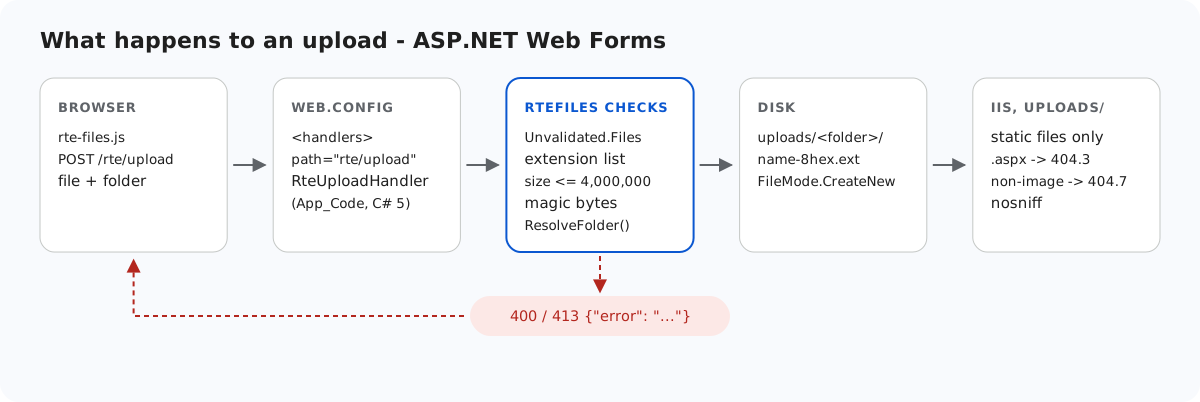
ASP.NET サイト内のアップロードフォルダーは、IIS が喜んでコードを実行してしまうフォルダーです。バグ、FTP、あるいは後の変更によって .aspx ファイルがそこに置かれると、IIS はそれをコンパイルして実行します。このページでは、Web Forms のサンプルが 1 バイトでも書き込む前に行うチェックと、いつかそれらのチェックがすり抜けられても uploads/ を静的なままに保つ web.config のブロックを紹介します。各レイヤーは IIS Express でテストしました。
書き込む前に
StorageRoot root = GetRoot(context);   // 401 here first in per-user mode
if (file == null || file.ContentLength == 0)
    throw new RteException(400, "No file was uploaded.");

// FileName is whatever the browser sent (old IE sends a full path). Don't feed it
// to Path.GetFileName: on .NET Framework that throws on characters like " < > |.
string clientName = file.FileName ?? "";
clientName = clientName.Substring(Math.Max(clientName.LastIndexOf('/'), clientName.LastIndexOf('\\')) + 1);
int dot = clientName.LastIndexOf('.');
string ext = dot >= 0 ? clientName.Substring(dot).ToLowerInvariant() : "";
if (Array.IndexOf(ImageExtensions, ext) < 0)
    throw new RteException(400, "Only .jpg, .jpeg, .png, .gif and .webp images can be uploaded.");
if (file.ContentLength > MaxUploadBytes)
    throw new RteException(413, "The image is larger than the 4 MB (4,000,000 bytes) limit.");

string dir = ResolveFolder(root, folder ?? "");

byte[] data = new byte[file.ContentLength];
Stream input = file.InputStream;
int read = 0;
while (read < data.Length)
{
    int n = input.Read(data, read, data.Length - read);
    if (n <= 0) break;
    read += n;
}
// file.ContentType is chosen by the browser (or the attacker), so look at the bytes.
if (read != data.Length || !SignatureMatches(ext, data))
throw new RteException(400, "The file is not a valid " + ext.Substring(1).ToUpperInvariant() + " image.");- 拡張子の許可リスト:.jpg、.jpeg、.png、.gif、.webp。
.svgはスクリプトを含められるため拒否します。.phpや.aspxは、バイト列の内容にかかわらず拒否します。 - サイズ:4,000,000 バイトで、JSON の 413 を返します。
ContentTypeではなくマジックバイト。HttpPostedFile.ContentTypeはブラウザーが送信した値にすぎません。text/htmlというラベルを付けて PNG のバイト列を POST したところ、まさにその値になりました。サンプルはこれを無視し、先頭バイトを拡張子のシグネチャと比較します。
static bool SignatureMatches(string ext, byte[] d)
{
    switch (ext)
    {
        case ".jpg":
        case ".jpeg":
            return d.Length >= 3 && d[0] == 0xFF && d[1] == 0xD8 && d[2] == 0xFF;
        case ".png":
            return d.Length >= 8 && d[0] == 0x89 && d[1] == 0x50 && d[2] == 0x4E && d[3] == 0x47
                && d[4] == 0x0D && d[5] == 0x0A && d[6] == 0x1A && d[7] == 0x0A;
        case ".gif":
            return d.Length >= 6 && d[0] == 0x47 && d[1] == 0x49 && d[2] == 0x46 && d[3] == 0x38;
        case ".webp":
            return d.Length >= 12 && Encoding.ASCII.GetString(d, 0, 4) == "RIFF"
                && Encoding.ASCII.GetString(d, 8, 4) == "WEBP";
    }
    return false;
}
PHP のソースを含む holiday.jpg という名前のファイルは、このチェックで失敗します。本物の JPEG の末尾に何かを追加したものは、それでも通過します。シグネチャが証明するのはファイルの種類であって、ファイルが無害であることではありません。だからこそ、後述のようにフォルダー自体を厳重に制限しています。
同じコードには、.NET Framework に関する注意点が 2 つあります。クライアントのファイル名は、決して Path.GetFileName に渡しません。.NET Framework 4.8 では、< や | で ArgumentException をスローするからです。また、要求の検証はファイル名も対象にするため、アップロードハンドラーは Request.Unvalidated.Files を読み取ります。そうしないと、<script>x.png という名前のファイルで HTML の 500 になりました。名前は a-z0-9- だけに絞り込み、ランダムな 16 進数 8 文字を加えるので、クライアントが選んだものがディスクに届くことはありません。
書き込める場所
folder フィールドは、ギャラリーと同じ ResolveFolder を通ります。各セグメントは有効なフォルダー名でなければならず、Path.GetFullPath の結果はルートの中にとどまっていなければなりません。コードは Web Forms のギャラリーフォルダーで紹介しています。契約テストでは、folder=../ を指定したアップロードは 400 に、存在しないフォルダーは 404 になりました。
uploads/ はファイルを配信するだけで、何も実行しない
IIS は、何を実行するかをフォルダーではなくハンドラーのマッピングで決めます。確認のため、1 行のページ <%= 6*7 %> を probe-root.aspx としてサイトのルートに置きました。これをリクエストすると 42 が返り、実行されたことがわかります。サンプルの web.config は、uploads/ でこれを阻止します。
<!-- Uploaded files are served as static files and nothing else. Clearing the handler list
     means that even if a .aspx, .ashx or .config ever lands in uploads/, IIS will not run
     it - it gets 404, not executed. The extension allow-list also refuses to serve
     anything that is not an image (.html, .svg, .txt ...), wherever it came from. -->
<location path="uploads">
  <system.webServer>
    <handlers>
      <clear />
      <add name="StaticFile" path="*" verb="GET,HEAD" modules="StaticFileModule" resourceType="File" requireAccess="Read" />
    </handlers>
    <security>
      <requestFiltering>
        <fileExtensions allowUnlisted="false">
          <add fileExtension=".jpg" allowed="true" />
          <add fileExtension=".jpeg" allowed="true" />
          <add fileExtension=".png" allowed="true" />
          <add fileExtension=".gif" allowed="true" />
          <add fileExtension=".webp" allowed="true" />
        </fileExtensions>
      </requestFiltering>
    </security>
    <httpProtocol>
      <customHeaders>
        <add name="X-Content-Type-Options" value="nosniff" />
      </customHeaders>
    </httpProtocol>
  </system.webServer>
</location>
<clear />とStaticFileだけ。拡張子の一覧を追加する前は、uploads/内の同じ.aspxと.ashxは 404.3 になりました。それらを実行するハンドラーも、テキストとして送信するための MIME タイプもなかったためです。fileExtensions allowUnlisted="false"。許可リストを使うと、uploads/probe.aspxと、uploads/probe.txtとして保存した HTML のペイロードはどちらも 404.7 になり、.pngと.webpは配信されました。X-Content-Type-Options: nosniffが配信された画像に付いていたため、ブラウザーが内容から別の種類を推測することはありません。
IIS の applicationhost.config では、handlers セクションは既定でロックされていますが、その <location path="" overrideMode="Allow"> ブロックがサイトに対してロックを解除しているため、web.config で変更できます。これは IIS Express のテンプレートで確認したもので、完全な IIS サーバーではテストしていません。ロックしているホストでは、サイトは黙ってスクリプトを実行するのではなく、500.19 の構成エラーで失敗します。
テストする
このガイドのサンプルプロジェクトをポート 5401 で実行した状態で、以下を実行します。
echo "<script>alert(1)</script>" > fake.png
curl -F "file=@fake.png" http://localhost:5401/rte/upload
{"error":"The file is not a valid PNG image."}

curl -F "file=@fake.png;filename=x.svg" http://localhost:5401/rte/upload
{"error":"Only .jpg, .jpeg, .png, .gif and .webp images can be uploaded."}
どちらのレスポンスも HTTP 400 です。フォルダーの制限を確認するには、任意の .aspx を uploads\ にコピーしてリクエストします。ページの出力ではなく、IIS の 404.7 のページが返ります。ギャラリーダイアログでは、拒否されたファイルについて「Upload failed for <name>.」と表示されます。ダイアログはサーバーのテキストではなく、独自のメッセージを使います。
ほかのプラットフォーム向けの同じガイド
JavaScript · Next.js · PHP · ASP.NET Core · Razor Pages · MVC 5