PHP 中的图片上传大小限制
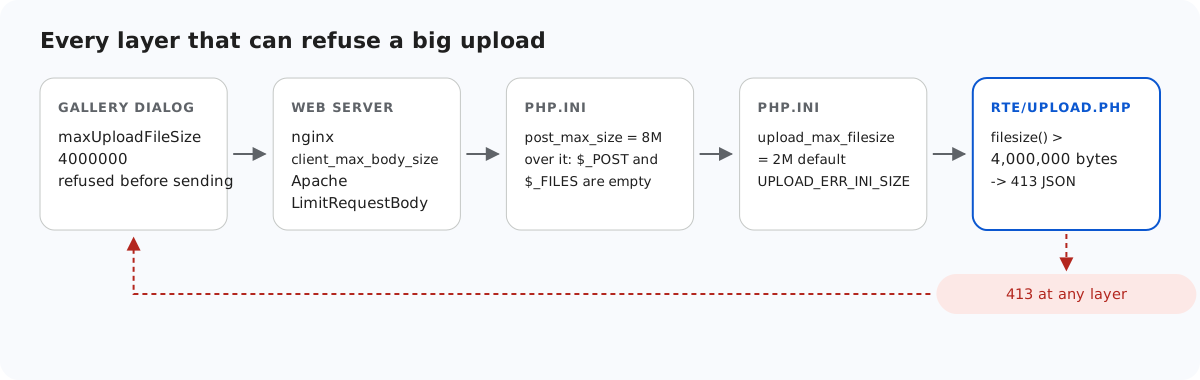
大照片的 "Upload failed"(上传失败)可能来自五个地方中的任何一个,而在 PHP 中,其中两个位于 php.ini 中,在脚本运行之前就会生效。本页按请求经过的顺序列出每一层、每一层返回的内容,以及 PHP 的一个行为——除非修改某项设置,否则它会把干净的 413 变成一个 HTML 页面。
各层的顺序
- 图片库对话框。在编辑器选项中设置
maxUploadFileSize: 4000000后,对话框会在发送之前拒绝更大的文件。一个 4.5 MB 的文件得到了 "big.jpg is 4.3 MB. The maximum allowed size is 3.8 MB." 的提示(对话框按二进制兆字节计算)。这只是为了方便用户,服务器不能依赖它。 - Web 服务器。根据 nginx 文档,
client_max_body_size的默认值为 1m,因此 2 MB 的照片在 PHP 看到之前就会被拒绝,并返回 nginx 自己的 HTML 413 页面。Apache 中对应的设置是LimitRequestBody。示例的nginx.conf.example设置了client_max_body_size 5m;。 post_max_size(默认 8M)限制整个请求体。upload_max_filesize(默认 2M)限制每个文件。- 您自己的检查:示例中为 4,000,000 字节,超出时返回 JSON 格式的 413。
要让示例的限制成为实际生效的那一个,前面的每一层都必须允许略多于 4,000,000 字节的数据。multipart 编码会在文件周围增加几百个字节。
upload_max_filesize = 5M
post_max_size = 8M
display_errors = Off
log_errors = On
脚本如何区分它们
// Over post_max_size, PHP drops the WHOLE body: $_POST and $_FILES are both empty.
$length = (int)($_SERVER['CONTENT_LENGTH'] ?? 0);
if (empty($_FILES) && empty($_POST) && $length > rte_ini_bytes('post_max_size')) {
    throw new RteHttpError(413, 'The upload is larger than the server accepts (post_max_size).');
}

$file = $_FILES['file'] ?? null;
// One file only: "file[]" arrives as nested arrays, which this refuses.
if (!is_array($file) || !is_int($file['error'] ?? null) || !is_string($file['tmp_name'] ?? null)) {
    throw new RteHttpError(400, 'No file received. Send it as the "file" field.');
}
switch ($file['error']) {
    case UPLOAD_ERR_OK:
        break;
    case UPLOAD_ERR_INI_SIZE:   // larger than upload_max_filesize
    case UPLOAD_ERR_FORM_SIZE:  // larger than a MAX_FILE_SIZE form field
        throw new RteHttpError(413, 'The image is larger than the server accepts.');
    case UPLOAD_ERR_PARTIAL:
        throw new RteHttpError(400, 'The upload was interrupted. Please try again.');
    case UPLOAD_ERR_NO_FILE:
        throw new RteHttpError(400, 'No file received.');
    default:                    // NO_TMP_DIR, CANT_WRITE, EXTENSION: server-side problems
        error_log('rte upload: UPLOAD_ERR code ' . $file['error']);
        throw new RteHttpError(500, 'The server could not store the upload.');
}
if (!is_uploaded_file($file['tmp_name'])) {
    throw new RteHttpError(400, 'No file received.');
}

$size = filesize($file['tmp_name']);
if ($size === false || $size === 0) {
    throw new RteHttpError(400, 'The file is empty.');
}
if ($size > RTE_MAX_BYTES) {
    throw new RteHttpError(413, 'Images can be at most 4,000,000 bytes.');
}
超过 upload_max_filesize 时,PHP 仍会运行脚本,$_FILES['file']['error'] 为 UPLOAD_ERR_INI_SIZE。我们向一个使用 PHP 默认值 2M 的服务器发送了 3 MB 的文件,得到了 413 {"error":"The image is larger than the server accepts."}。
超过 post_max_size 时,PHP 会丢弃整个请求体:$_POST 和 $_FILES 都是空数组,就好像什么都没有发送一样。脚本仍会运行,而 $_SERVER['CONTENT_LENGTH'] 中仍然保存着真实的大小。只有结合这两点才能知道发生了什么,因此示例会最先检查它。如果省略这项检查,超出限制的上传看起来就像“没有收到文件”。
display_errors 陷阱
当请求超过 post_max_size 时,PHP 还会发出一个警告,而且是在脚本的第一行之前发出的。如果开启了 display_errors(这是未加载 php.ini 时 PHP 的内置默认值,也是 php.ini-development 中的设置),这个警告就会成为响应体的开头。随后您的 http_response_code(413) 会因 "Cannot modify header information" 而失败,浏览器收到的是:
HTTP/1.1 200 OK
Content-type: text/html; charset=UTF-8

<br />
<b>Warning</b>:  POST Content-Length of 9000204 bytes exceeds the limit of 8388608 bytes in <b>Unknown</b> on line <b>0</b><br />
...
{"error":"The upload is larger than the server accepts (post_max_size)."}
脚本无法修复这个问题,因为输出在脚本开始之前就已经发送了。请关闭错误显示,改为记录到日志。在我们的测试中,在 PHP 内置服务器下使用 -d display_errors=stderr 并没有帮助。只有 -d display_errors=0 才能得到干净的 HTTP/1.1 413 和 Content-Type: application/json,此时警告会写入服务器日志。php.ini-production 中已经设置了 display_errors = Off。
临时文件夹与 open_basedir
在脚本运行之前,PHP 会把每个上传写入一个临时文件,位于 upload_tmp_dir 或系统临时文件夹中。如果您使用了 open_basedir 却没有包含该文件夹,那么无论大小如何,每次上传都会失败。日志中会出现 "open_basedir restriction in effect" 和 "unable to create a temporary file",脚本看到的是 UPLOAD_ERR_NO_TMP_DIR,示例对此返回 500。我们把临时文件夹加入 open_basedir 之后,全部 35 项契约检查都通过了。在 Windows 上,命令行中的 -d open_basedir=A;B 会悄悄地只保留 A,因为 ; 是 ini 注释的开头。请给值加上引号:-d 'open_basedir="A;B"'。
测试
用 php -d upload_max_filesize=5M -d display_errors=0 -d log_errors=1 -S localhost:5201 router.php 启动本指南的示例项目,然后分别发送一个超过示例限制的文件和一个超过 post_max_size 的文件:
head -c 4500000 /dev/zero > big.jpg
curl -F "file=@big.jpg" http://localhost:5201/rte/upload
{"error":"Images can be at most 4,000,000 bytes."}

head -c 9000000 /dev/zero > huge.jpg
curl -F "file=@huge.jpg" http://localhost:5201/rte/upload
{"error":"The upload is larger than the server accepts (post_max_size)."}
两个响应都是带 JSON 响应体的 HTTP 413。要观察这个陷阱,请在不带 -d display_errors=0 的情况下重新启动服务器,再发送一次 huge.jpg。在没有 php.ini 或使用 php.ini-development 的 PHP 上,HTML 警告会出现在 JSON 之前。
其他平台的同一指南
JavaScript · Next.js · ASP.NET Core · MVC 5 · Web Forms