Razor Pages 中的安全图片上传:防伪造验证与来源检查
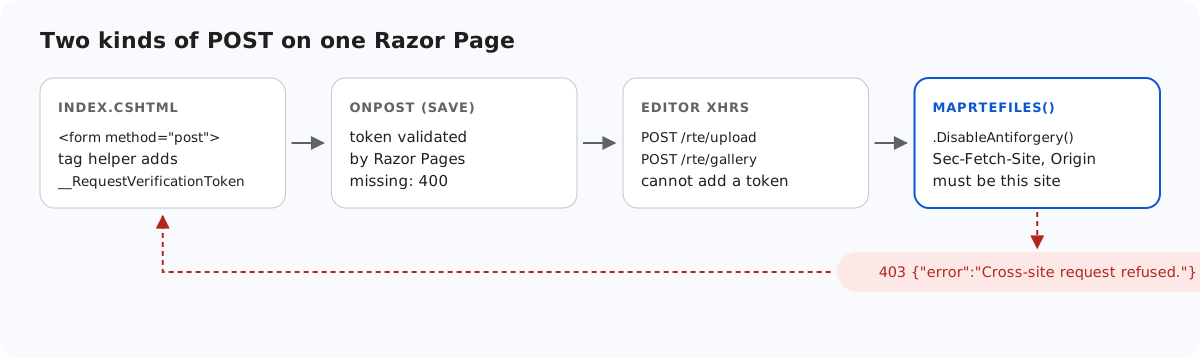
Razor Pages 用防伪造令牌保护每一个 POST 处理程序,大多数 Razor Pages 开发者从不需要考虑这一点,因为 <form> 标记帮助程序会替他们添加令牌。但编辑器的图片上传请求和 New folder 请求不是表单:它们是编辑器自己构造的 XHR,当前版本无法为它们添加令牌。本页介绍示例如何保持页面受保护、对这些请求改用什么方法,以及如果仍要使用令牌需要什么条件。
Razor Pages 检查什么
对页面处理程序发送 POST 时,Razor Pages 会比较两个值:一个 Cookie 和一个请求令牌,后者默认以表单字段 __RequestVerificationToken 或标头 RequestVerificationToken 的形式到达。我们在 .NET 8 中打印了 AntiforgeryOptions 的默认值:就是这两个名称,Cookie 上设置了 SameSite=Strict。在示例中,页面的 Save 表单能通过检查,而直接向页面发送的 curl -d "Html=x" 会得到 400。
// Razor Pages validates the antiforgery token on this POST by default; the <form> tag helper
// in Index.cshtml adds the hidden __RequestVerificationToken field. Save Html to your database here.
public void OnPost() => Message = $"Saved {Html?.Length ?? 0} characters of HTML.";
为什么编辑器的请求没有令牌
上传请求来自 rte-files.js,New folder 请求来自图片库插件。两者都自己创建 FormData 和 XMLHttpRequest,在当前版本中都没有添加额外标头或字段的选项。全局修改 XMLHttpRequest 来注入令牌会改变页面上的每一个请求,所以示例没有这样做。
剩下的做法是把这三个路由作为页面之外的端点,并显式关闭令牌验证。在 .NET 8 中,对绑定 IFormFile 或 [FromForm] 的端点必须这样做:没有 .DisableAntiforgery() 时,缺少 app.UseAntiforgery() 的 Razor Pages 应用会返回 500,有它时则返回 400。
// Binding [FromForm] or IFormFile makes .NET 8 demand an antiforgery token on these endpoints.
// The editor's XHRs cannot send one, so it is switched off here and RteFiles checks the
// request's origin instead (see RequireSameOrigin). guide-notes.md has the details.
rte.MapPost("/gallery", (HttpContext http, [FromForm] string? action, [FromForm] string? folder, [FromForm] string? name) =>
    Json(RteFiles.CreateFolder(http, action, folder, name)))
    .DisableAntiforgery();
代替令牌的检查
// CSRF: the editor's upload and create-folder requests are XHRs that carry no antiforgery token,
// so these POSTs refuse requests that a browser marks as coming from another site instead.
// Browsers send Sec-Fetch-Site and Origin on these requests; tools like curl send neither.
static void RequireSameOrigin(HttpRequest request)
{
    var site = request.Headers["Sec-Fetch-Site"].ToString();
    var origin = request.Headers.Origin.ToString();
    var foreign = site is "cross-site" or "same-site"
        || (origin.Length > 0 && !(Uri.TryCreate(origin, UriKind.Absolute, out var o)
            && string.Equals(o.Authority, request.Host.Value, StringComparison.OrdinalIgnoreCase)));
    if (foreign) throw new RteError(403, "Cross-site request refused.");
}
跨站请求伪造是指其他站点上的页面让用户的浏览器向您的站点发送 POST。浏览器会为这类请求打上标记:Sec-Fetch-Site 表明请求来自同源、同站还是其他站点,Origin 给出页面的源。其他站点上的脚本无法设置这两个标头。因此,当 Sec-Fetch-Site 为 cross-site 或 same-site,或者 Origin 是其他主机时,上传和 New folder 路由会返回 403。在 Chromium 中,来自示例自身页面的上传都能通过。curl 或服务器代码发出的请求两个标头都不发送,因此会被放行,因为它们无法携带用户的 Cookie。
依赖这项检查之前,需要了解两点:
- 在反向代理之后,
Request.Host必须是公开的主机名。请添加UseForwardedHeaders,否则检查会拒绝您自己的页面。 same-site是有意拒绝的:blog.example.com这样的同级子域名是另一个应用,即使它与您共享 Cookie。
改用令牌
如果 rte-files.js 和图片库插件能够接受额外的请求标头,页面就可以把 IAntiforgery.GetAndStoreTokens(HttpContext).RequestToken 得到的请求令牌放在 RequestVerificationToken 标头中传递。然后您可以删除 .DisableAntiforgery() 并添加 app.UseAntiforgery(),端点就会像页面一样验证令牌。当前版本没有这样的选项,因此示例无法演示这种做法。
其他检查
来源检查只是多项检查中的第一项。之后 RteFiles.Save 检查文件夹、大小、扩展名和文件开头的字节,以生成的名称保存文件,而该文件夹只以五种内容类型和 nosniff 提供文件。ASP.NET Core 中的安全图片上传逐一介绍了这些检查;本示例中的代码与之相同。
测试
用 dotnet run 运行本指南的示例项目,然后假装成其他站点,并在不带令牌的情况下向页面发送 POST:
curl -H "Origin: https://evil.example" -F "action=create-folder" -F "folder=" -F "name=x" http://localhost:5303/rte/gallery
{"error":"Cross-site request refused."}

curl -s -o /dev/null -w "%{http_code}\n" -d "Html=x" http://localhost:5303/
400
第一个是示例返回的 403。第二个是 Razor Pages 自己对页面执行的防伪造检查。
其他平台的同一指南
JavaScript · Next.js · PHP · ASP.NET Core · MVC 5 · Web Forms