Secure image upload in Razor Pages: antiforgery and origin
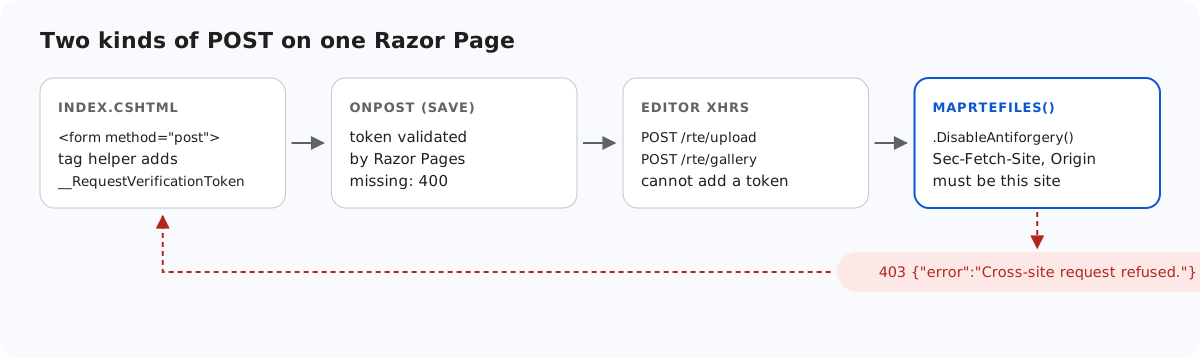
Razor Pages protects every POST handler with an antiforgery token, and most Razor Pages developers never think about it because the <form> tag helper adds the token for them. The editor's image uploads and New folder requests are not forms: they are XHRs the editor builds itself, and the current release cannot add a token to them. This page shows how the sample keeps the page protected, what it does for those requests instead, and what would be needed to use the token after all.
What Razor Pages checks
On a POST to a page handler, Razor Pages compares two values: a cookie and a request token, which by default arrives as the form field __RequestVerificationToken or the header RequestVerificationToken. We printed the defaults of AntiforgeryOptions in .NET 8: those two names, and SameSite=Strict on the cookie. In the sample, the page's Save form passes the check and a bare curl -d "Html=x" to the page gets a 400.
// Razor Pages validates the antiforgery token on this POST by default; the <form> tag helper
// in Index.cshtml adds the hidden __RequestVerificationToken field. Save Html to your database here.
public void OnPost() => Message = $"Saved {Html?.Length ?? 0} characters of HTML.";
Why the editor's requests have no token
The upload request comes from rte-files.js and the New folder request from the gallery plugin. Both create their own FormData and XMLHttpRequest, and neither, in the current release, has an option for extra headers or fields. Patching XMLHttpRequest globally to inject the token would change every request on the page, so the sample does not do it.
That leaves the three routes as endpoints outside the page, with token validation turned off explicitly. In .NET 8 that is required for endpoints that bind IFormFile or [FromForm]: without .DisableAntiforgery(), a Razor Pages app answered 500 when app.UseAntiforgery() was missing, and 400 when it was present.
// Binding [FromForm] or IFormFile makes .NET 8 demand an antiforgery token on these endpoints.
// The editor's XHRs cannot send one, so it is switched off here and RteFiles checks the
// request's origin instead (see RequireSameOrigin). guide-notes.md has the details.
rte.MapPost("/gallery", (HttpContext http, [FromForm] string? action, [FromForm] string? folder, [FromForm] string? name) =>
    Json(RteFiles.CreateFolder(http, action, folder, name)))
    .DisableAntiforgery();
The check that replaces the token
// CSRF: the editor's upload and create-folder requests are XHRs that carry no antiforgery token,
// so these POSTs refuse requests that a browser marks as coming from another site instead.
// Browsers send Sec-Fetch-Site and Origin on these requests; tools like curl send neither.
static void RequireSameOrigin(HttpRequest request)
{
    var site = request.Headers["Sec-Fetch-Site"].ToString();
    var origin = request.Headers.Origin.ToString();
    var foreign = site is "cross-site" or "same-site"
        || (origin.Length > 0 && !(Uri.TryCreate(origin, UriKind.Absolute, out var o)
            && string.Equals(o.Authority, request.Host.Value, StringComparison.OrdinalIgnoreCase)));
    if (foreign) throw new RteError(403, "Cross-site request refused.");
}
A cross-site request forgery is a page on another site making the user's browser post to yours. Browsers label such requests: Sec-Fetch-Site says whether the request comes from the same origin, the same site or another site, and Origin names the page's origin. Script on the other site cannot set either header. So the upload and New folder routes answer 403 when Sec-Fetch-Site is cross-site or same-site, or Origin is a different host. Uploads from the sample's own page passed in Chromium. Requests from curl or server code send neither header and are allowed, since they cannot carry the user's cookies.
Two things to know before you rely on it:
- Behind a reverse proxy,
Request.Hostmust be the public host. AddUseForwardedHeaders, or the check refuses your own pages. same-siteis refused on purpose: a sibling subdomain such asblog.example.comis a different application, even if it shares cookies.
Using the token instead
If rte-files.js and the gallery plugin could take extra request headers, the page could pass the request token from IAntiforgery.GetAndStoreTokens(HttpContext).RequestToken in the RequestVerificationToken header. Then you would remove .DisableAntiforgery() and add app.UseAntiforgery(), and the endpoints would validate the token like the page does. The current release has no such option, so this is not something the sample can show working.
The other checks
Origin is the first of several checks. After it, RteFiles.Save checks the folder, the size, the extension and the first bytes, stores the file under a generated name, and the folder is served with only five content types and nosniff. Secure image upload in ASP.NET Core goes through them; the code is the same in this sample.
Test it
Run the sample project for this guide with dotnet run, then pretend to be another site and post to the page without a token:
curl -H "Origin: https://evil.example" -F "action=create-folder" -F "folder=" -F "name=x" http://localhost:5303/rte/gallery
{"error":"Cross-site request refused."}

curl -s -o /dev/null -w "%{http_code}\n" -d "Html=x" http://localhost:5303/
400
The first is the sample's 403. The second is Razor Pages' own antiforgery check on the page.
The same guide for other platforms
JavaScript · Next.js · PHP · ASP.NET Core · MVC 5 · Web Forms