Next.js 中的安全图片上传
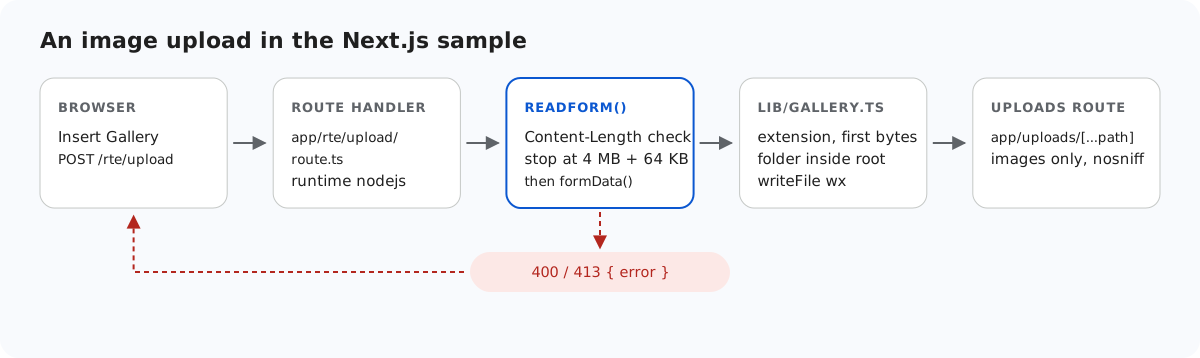
Next.js 为 Server Actions 提供的保护,路由处理程序享受不到,而 RichTextEditor 的上传请求发送到的正是路由处理程序。本页介绍 Next.js 示例自己补上的保护:防范跨站 POST 的 Origin 检查、写入之前的文件检查,以及一个提供上传文件的路由,它不会让您的域名沦为文件托管服务。
路由处理程序没有 Origin 检查
Next.js 的数据安全指南提到,Server Actions 会把 Origin 标头与 Host(或 X-Forwarded-Host)进行比较,不一致时中止请求。路由处理程序不做这项检查。在添加检查之前,我们发送了一个带有 Origin: https://evil.example 的 POST /rte/gallery,示例照样创建了文件夹:200。如果您的登录使用 Cookie,任何其他站点都能让已登录用户的浏览器做同样的事。现在示例会拒绝这类请求:
// Next.js checks the Origin of Server Actions, not of route handlers. A browser sends Origin
// with these POSTs, so refuse one from another site. Requests without Origin (curl) pass.
export function checkOrigin(request: Request): void {
  const origin = request.headers.get("origin");
  if (!origin) return;
  const host = request.headers.get("x-forwarded-host") ?? request.headers.get("host");
  let originHost: string | null = null;
  try {
    originHost = new URL(origin).host;
  } catch {}
  if (originHost !== host) throw new GalleryError(403, "Cross-site request refused.");
}
两个 POST 处理程序都会先调用 checkOrigin(request),然后才读取请求体。我们确认过,Chromium 在编辑器自己的上传请求中会发送 Origin: http://localhost:5102,因此这些请求能够通过。完全没有 Origin 的请求(例如 curl 或服务器之间的调用)也能通过。这类请求不是跨站的浏览器请求,而且您的登录检查仍然适用于它们。沙盒页面发送的 Origin: null 会被拒绝。如果位于会更改主机名的反向代理之后,请确保代理设置了 X-Forwarded-Host,否则检查也会拒绝您自己的页面。
写入前检查什么
顶部的示意图展示了上传的检查顺序。通过 Origin 检查后,readForm() 限制请求体的大小(见 Next.js 中的图片上传大小限制),然后由 lib/gallery.ts 检查文件:
// Allowed extensions, each with a check of the file's first bytes (its signature).
const SIGNATURES: Record<string, (bytes: Buffer) => boolean> = {
  ".jpg": (b) => hex(b, 0, 3) === "ffd8ff",
  ".jpeg": (b) => hex(b, 0, 3) === "ffd8ff",
  ".png": (b) => hex(b, 0, 8) === "89504e470d0a1a0a",
  ".gif": (b) => ascii(b, 0, 6) === "GIF87a" || ascii(b, 0, 6) === "GIF89a",
  ".webp": (b) => ascii(b, 0, 4) === "RIFF" && ascii(b, 8, 12) === "WEBP",
};
const hex = (bytes: Buffer, start: number, end: number) => bytes.subarray(start, end).toString("hex");
const ascii = (bytes: Buffer, start: number, end: number) => bytes.subarray(start, end).toString("latin1");

// True for "chair.jpg", false for ".chair.jpg", "chair.svg" or "chair".
export function isImageName(name: string): boolean {
  return !name.startsWith(".") && Object.hasOwn(SIGNATURES, extensionOf(name));
}

// A folder or file name: 1-64 letters, digits, space, - _ . and not starting with a dot.
// Also refused: a trailing dot or space (Windows drops them, so "a." would become "a")
// and Windows device names such as CON or NUL.
export function isValidName(name: unknown): name is string {
  return (
    typeof name === "string" &&
    /^[A-Za-z0-9 _.-]{1,64}$/.test(name) &&
    !name.startsWith(".") &&
    !/[. ]$/.test(name) &&
    !/^(con|prn|aux|nul|com[1-9]|lpt[1-9])(\.|$)/i.test(name)
  );
}- 扩展名必须在允许列表中:.jpg、.jpeg、.png、.gif 或 .webp。不允许 SVG,因为它可以携带脚本。
- 文件开头的字节必须与扩展名相符。
formData()返回的File.type从不使用:它只是浏览器声称的类型。 - 文件夹必须是有效的虚拟路径,并且其真实路径位于
uploads/内,与 Node.js 中的图片库文件夹中的做法相同。 - 保存的文件名由服务器生成,
writeFile以"wx"运行,因此绝不会覆盖已有文件。
签名检查只能证明文件的开头是什么,不能证明它是一张图片。以 JPEG 字节开头、后面接着 HTML 的文件能够通过检查。正因为如此,文件的提供方式才至关重要。
不使用 public/ 提供上传文件
上传文件不能放进 public/,因为 next start 只提供构建时就已存在的文件。因此改由 app/uploads/[...path]/route.ts 提供,这也提供了一个可以放置规则的地方,而 public/ 做不到这一点:
// /uploads/<parts> -> the image file on disk, or a 404 GalleryError.
export async function resolveUpload(parts: string[]): Promise<string> {
  const name = parts.at(-1) ?? "";
  if (!isImageName(name) || /[\\/\0]/.test(name)) {
    throw new GalleryError(404, "Not found.");
  }
  const dir = await resolveFolder(UPLOADS_DIR, parts.slice(0, -1).join("/")).catch(() => {
    throw new GalleryError(404, "Not found.");
  });
  const file = path.join(dir, name);
  const info = await lstat(file).catch(() => null);
  if (!info || !info.isFile()) {
    throw new GalleryError(404, "Not found.");
  }
  return file;
}
只提供图片文件名,并且只从通过相同路径检查的文件夹中提供。我们尝试了 stray.html、.hidden.png、.secret/a.png、..%2f..%2fpackage.png、..%5cpackage.png 和 a%00.png:全部得到 404。Next.js 在路由看到 [...path] 路径段之前就已经对它们解码,因此 %2f 会以真正的 / 出现在路径段内部,文件名检查会拒绝它。放在 uploads/ 中的 Windows 目录联接(junction)同样被拒绝,因为检查比较的是真实路径。每张图片发送时都带有 X-Content-Type-Options: nosniff,因此浏览器会保持 image/* 类型,不会把文件当作 HTML 运行。
三个处理程序都导出了 runtime = "nodejs"。它们需要 node:fs,而 Next.js 的 Edge 运行时文档写得很清楚:在那里无法读写文件系统。
示例留给您处理的部分
- 谁可以上传。示例没有登录功能。
lib/root-for.ts是放置每个用户根目录逻辑的地方,共享的图片库也已经为此让uploads/users/无法被访问。 - 谁可以查看图片。
/uploads/...是公开的。如果图片是私有的,请在 uploads 路由中加入会话检查。 - 配额,以及在需要确认图片完整时,用图片库对图片进行解码。
测试
用 npm run build 和 npm start 启动本指南的示例项目,然后执行:
curl -H "Origin: https://evil.example" -F action=create-folder -F folder= -F name=x http://localhost:5102/rte/gallery
{"error":"Cross-site request refused."}

printf '<?php echo 1; ?>' > fake.jpg
curl -F "file=@fake.jpg" http://localhost:5102/rte/upload
{"error":"The file content is not a valid JPG image."}

curl -F "file=@photo.jpg;filename=x.svg" http://localhost:5102/rte/upload
{"error":"Only .jpg, .jpeg, .png, .gif and .webp images can be uploaded."}
状态码分别为 403、400 和 400。在图片库对话框中,被拒绝的文件会显示 "Upload failed for <name>.":对话框不显示服务器返回的消息。
其他平台的同一指南
JavaScript · PHP · ASP.NET Core · Razor Pages · MVC 5 · Web Forms