ASP.NET Web Forms 中的安全图片上传
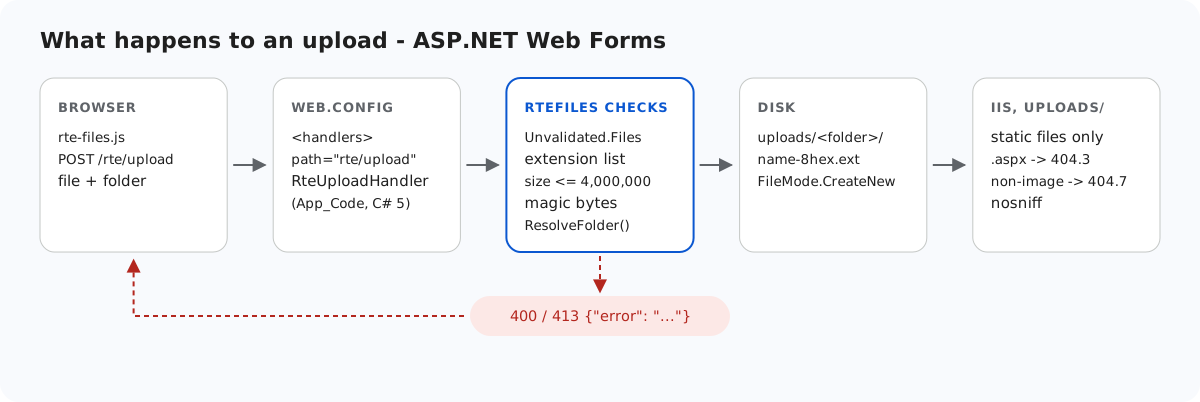
ASP.NET 站点内的上传文件夹,IIS 会毫无顾忌地运行其中的代码。如果某天有 .aspx 文件因为程序缺陷、FTP 或后来的改动落入其中,IIS 就会编译并运行它。本页介绍 Web Forms 示例在写入任何字节之前所做的检查,以及让 uploads/ 始终只提供静态文件的 web.config 配置块——即使这些检查将来被绕过也同样有效。每一层我们都在 IIS Express 上测试过。
写入之前
StorageRoot root = GetRoot(context);   // 401 here first in per-user mode
if (file == null || file.ContentLength == 0)
    throw new RteException(400, "No file was uploaded.");

// FileName is whatever the browser sent (old IE sends a full path). Don't feed it
// to Path.GetFileName: on .NET Framework that throws on characters like " < > |.
string clientName = file.FileName ?? "";
clientName = clientName.Substring(Math.Max(clientName.LastIndexOf('/'), clientName.LastIndexOf('\\')) + 1);
int dot = clientName.LastIndexOf('.');
string ext = dot >= 0 ? clientName.Substring(dot).ToLowerInvariant() : "";
if (Array.IndexOf(ImageExtensions, ext) < 0)
    throw new RteException(400, "Only .jpg, .jpeg, .png, .gif and .webp images can be uploaded.");
if (file.ContentLength > MaxUploadBytes)
    throw new RteException(413, "The image is larger than the 4 MB (4,000,000 bytes) limit.");

string dir = ResolveFolder(root, folder ?? "");

byte[] data = new byte[file.ContentLength];
Stream input = file.InputStream;
int read = 0;
while (read < data.Length)
{
    int n = input.Read(data, read, data.Length - read);
    if (n <= 0) break;
    read += n;
}
// file.ContentType is chosen by the browser (or the attacker), so look at the bytes.
if (read != data.Length || !SignatureMatches(ext, data))
throw new RteException(400, "The file is not a valid " + ext.Substring(1).ToUpperInvariant() + " image.");- 扩展名允许列表:.jpg、.jpeg、.png、.gif、.webp。
.svg会被拒绝,因为它可以携带脚本。.php或.aspx无论字节内容是什么都会被拒绝。 - 大小:4,000,000 字节,超出时返回 JSON 格式的 413。
- 检查文件签名,而不是
ContentType。HttpPostedFile.ContentType只是浏览器发送的值。我们提交了标记为text/html的 PNG 字节,它显示的就是这个值。示例忽略它,而是把文件开头的字节与扩展名对应的签名进行比较:
static bool SignatureMatches(string ext, byte[] d)
{
    switch (ext)
    {
        case ".jpg":
        case ".jpeg":
            return d.Length >= 3 && d[0] == 0xFF && d[1] == 0xD8 && d[2] == 0xFF;
        case ".png":
            return d.Length >= 8 && d[0] == 0x89 && d[1] == 0x50 && d[2] == 0x4E && d[3] == 0x47
                && d[4] == 0x0D && d[5] == 0x0A && d[6] == 0x1A && d[7] == 0x0A;
        case ".gif":
            return d.Length >= 6 && d[0] == 0x47 && d[1] == 0x49 && d[2] == 0x46 && d[3] == 0x38;
        case ".webp":
            return d.Length >= 12 && Encoding.ASCII.GetString(d, 0, 4) == "RIFF"
                && Encoding.ASCII.GetString(d, 8, 4) == "WEBP";
    }
    return false;
}
名为 holiday.jpg、内容是 PHP 源代码的文件无法通过这项检查。但末尾追加了其他内容的真实 JPEG 仍然能通过。签名只能证明类型,不能证明文件无害,所以下文还要锁定文件夹本身。
同一段代码中还有两个 .NET Framework 细节。客户端文件名从不传给 Path.GetFileName,因为在 .NET Framework 4.8 上,它遇到 < 或 | 会抛出 ArgumentException。上传处理程序还读取 Request.Unvalidated.Files,因为请求验证也覆盖文件名:否则名为 <script>x.png 的文件会导致 HTML 500。文件名只保留 a-z0-9-,并加上 8 个随机十六进制字符,因此客户端选择的任何内容都不会写到磁盘上。
可以写到哪里
folder 字段与图片库使用同一个 ResolveFolder。每一段都必须是有效的文件夹名,Path.GetFullPath 的结果必须位于根目录之内。代码见 Web Forms 中的图片库文件夹。在契约测试中,带 folder=../ 的上传得到 400,不存在的文件夹得到 404。
uploads/ 只提供文件,不运行任何内容
IIS 根据处理程序映射而不是文件夹来决定运行什么。为了验证,我们在站点根目录下放了一个只有一行 <%= 6*7 %> 的页面 probe-root.aspx。请求它返回了 42:它被执行了。示例的 web.config 阻止了 uploads/ 中发生这种情况:
<!-- Uploaded files are served as static files and nothing else. Clearing the handler list
     means that even if a .aspx, .ashx or .config ever lands in uploads/, IIS will not run
     it - it gets 404, not executed. The extension allow-list also refuses to serve
     anything that is not an image (.html, .svg, .txt ...), wherever it came from. -->
<location path="uploads">
  <system.webServer>
    <handlers>
      <clear />
      <add name="StaticFile" path="*" verb="GET,HEAD" modules="StaticFileModule" resourceType="File" requireAccess="Read" />
    </handlers>
    <security>
      <requestFiltering>
        <fileExtensions allowUnlisted="false">
          <add fileExtension=".jpg" allowed="true" />
          <add fileExtension=".jpeg" allowed="true" />
          <add fileExtension=".png" allowed="true" />
          <add fileExtension=".gif" allowed="true" />
          <add fileExtension=".webp" allowed="true" />
        </fileExtensions>
      </requestFiltering>
    </security>
    <httpProtocol>
      <customHeaders>
        <add name="X-Content-Type-Options" value="nosniff" />
      </customHeaders>
    </httpProtocol>
  </system.webServer>
</location>
<clear />加上仅保留StaticFile。在加入扩展名列表之前,uploads/中同样的.aspx和一个.ashx返回 404.3。既没有运行它们的处理程序,也没有把它们作为文本发送的 MIME 类型。fileExtensions allowUnlisted="false"。有了允许列表后,uploads/probe.aspx和保存为uploads/probe.txt的 HTML 载荷都返回 404.7,而.png和.webp能正常提供。- 提供的图片带有
X-Content-Type-Options: nosniff,因此浏览器不会根据内容猜测成其他类型。
在 IIS 的 applicationhost.config 中,handlers 节默认是锁定的,但其中的 <location path="" overrideMode="Allow"> 块为站点解除了锁定,因此 web.config 可以修改它。我们在 IIS Express 的模板中确认了这一点,没有在完整的 IIS 服务器上测试。在锁定了该节的主机上,站点会以 500.19 配置错误失败,而不会悄悄地运行脚本。
测试
在端口 5401 上运行本指南的示例项目,然后执行:
echo "<script>alert(1)</script>" > fake.png
curl -F "file=@fake.png" http://localhost:5401/rte/upload
{"error":"The file is not a valid PNG image."}

curl -F "file=@fake.png;filename=x.svg" http://localhost:5401/rte/upload
{"error":"Only .jpg, .jpeg, .png, .gif and .webp images can be uploaded."}
两个响应都是 HTTP 400。要查看文件夹锁定的效果,可以把任意 .aspx 复制到 uploads\ 并请求它。您会看到 IIS 的 404.7 页面,而不是该页面的输出。在图片库对话框中,被拒绝的文件会显示 "Upload failed for <name>."。对话框使用的是自己的消息,而不是服务器返回的文本。
其他平台的同一指南
JavaScript · Next.js · PHP · ASP.NET Core · Razor Pages · MVC 5