Add an image gallery to RichTextEditor in Angular
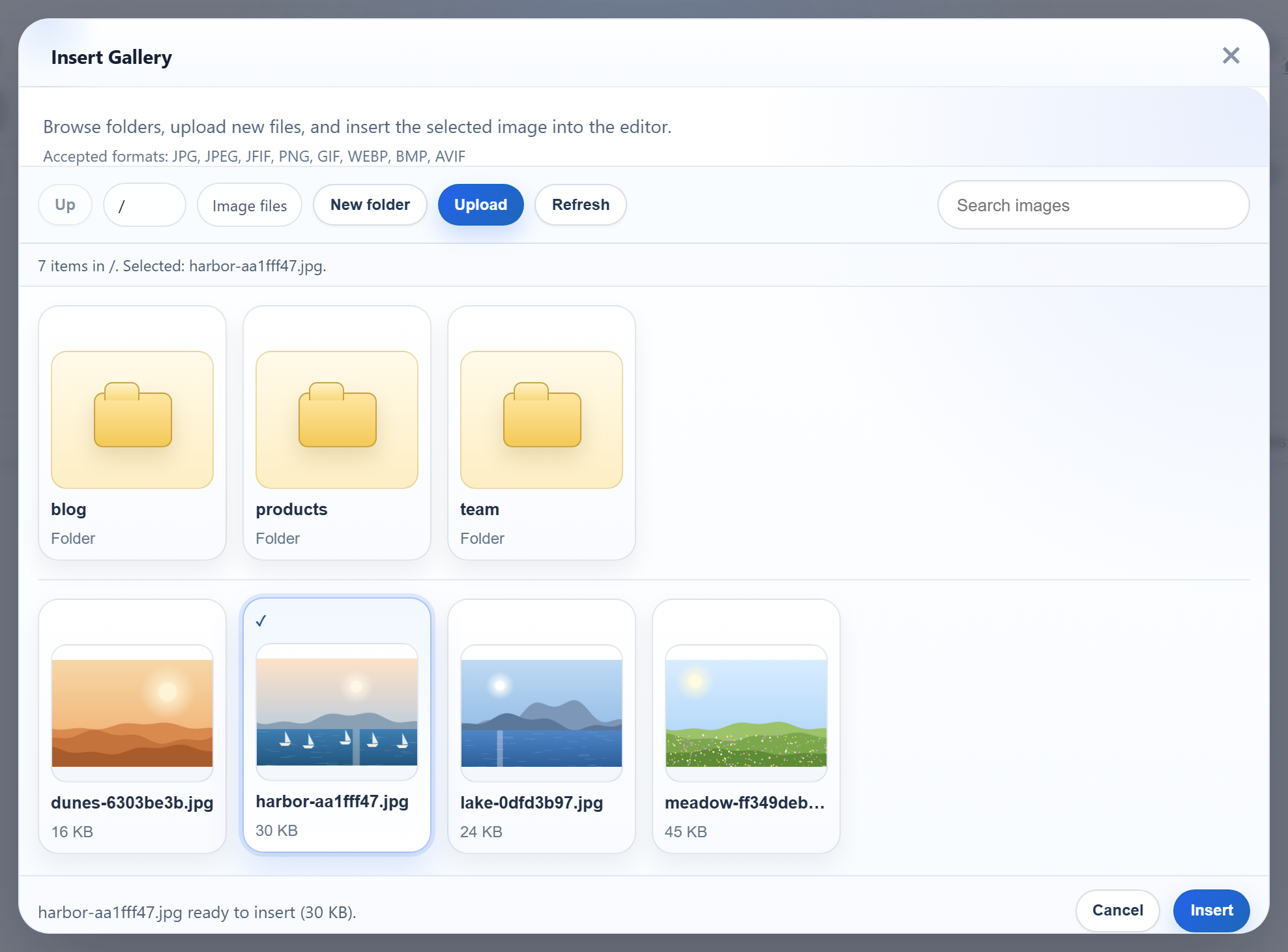
RichTextEditor's Insert Gallery dialog needs the same three things in Angular as in any single-page app: the editor scripts loaded before the app, a component that creates and destroys the editor at the right moments, and a dev server that forwards the dialog's requests to your API. This page shows how that looks in an Angular 22 standalone component, tested against the Express sample with ng serve.
Load the editor scripts in index.html
The editor is a set of classic browser scripts that define a global RichTextEditor. Put them in src/index.html, ahead of the Angular bundle:
<!-- Plain browser scripts from public/, loaded before the Angular bundle. -->
<link rel="stylesheet" href="/richtexteditor/rte_theme_default.css">
<script src="/richtexteditor/rte.js"></script>
<script src="/richtexteditor/plugins/all_plugins.js"></script>
<script src="/rte-files.js"></script>
The files sit in public/richtexteditor/. In a new Angular project, angular.json already copies everything in public/ into the build as static assets, so no change is needed there. The sample keeps the editor as separate files under /richtexteditor/, the way the download ships them. It does not use the "scripts" array of angular.json, which bundles scripts into one file. We did not test the editor that way.
The component
// RichTextEditor is the global from the scripts in index.html.
declare const RichTextEditor: new (element: HTMLElement, options: object) => EditorInstance;
type EditorInstance = { setHTMLCode(html: string): void; getHTMLCode(): string; destroy(): void };

@Component({
  selector: 'app-rich-text-editor',
  template: `<div #container></div>`,
})
export class RichTextEditorComponent implements AfterViewInit, OnDestroy {
  readonly options = input.required<object>();
  readonly initialHtml = input('');
  private readonly container = viewChild.required<ElementRef<HTMLDivElement>>('container');
  private editor?: EditorInstance;

  ngAfterViewInit(): void {
    this.editor = new RichTextEditor(this.container().nativeElement, this.options());
    this.editor.setHTMLCode(this.initialHtml());
  }

  ngOnDestroy(): void {
    this.editor?.destroy();
    this.editor = undefined;
  }

  getHTML(): string {
    return this.editor?.getHTMLCode() ?? '';
  }
}
declare const RichTextEditortells TypeScript about the global, with only the three methods the component uses.viewChild.requiredgives thedivfrom the template.ngAfterViewInitis the first hook where it exists, so the editor is created there.ngOnDestroycallsdestroy(), so the editor goes away with the component, for example on a route change or when an@ifturns false. The sample has a single page, so our browser check did not exercise this hook.- Signal inputs (
input.required,input) carry the options and the starting HTML. They are read once, at creation.
The project was created with ng new --minimal --zoneless. The editor worked without zone.js: it handles its own DOM events, and nothing in the component relies on change detection. The app passes the options and reads the HTML through a template reference:
const options = {
  toolbar: 'full',
  galleryEndpoint: '/rte/gallery', // forwarded to Express by src/proxy.conf.json
  maxUploadFileSize: 4000000,
};
The sample's Show HTML button calls editor.getHTML() and printed <p>Hello from Angular.</p>.
Forward /rte/ and /uploads/ during development
ng serve serves the app on port 5113. The proxy file sends the gallery and upload routes and the images to the Express sample on port 5101:
{
  "/rte/": { "target": "http://localhost:5101", "secure": false },
  "/uploads/": { "target": "http://localhost:5101", "secure": false }
}
The sample sets it once in angular.json, under projects.frontend-angular.architect.serve.options, as "proxyConfig": "src/proxy.conf.json". We also ran it as ng serve --proxy-config src/proxy.conf.json, with the same result. Angular's dev server is built on Vite. Angular converts keys that contain glob characters, such as /api/**, to regular expressions, and passes plain keys on to Vite unchanged. Vite matches those by prefix, so keep the trailing slash. With "/rte/", /rte-files.js was not forwarded: ng serve served the app's own copy from public/, with no X-Powered-By: Express header.
The proxy is for ng serve only. A production build has no proxy: serve it and the API from one origin.
What the dialog shows
The picture at the top is the dialog in this Angular app, listing the folders and images of the Express server described in the Node.js gallery guide. As in every framework, the released gallery's hint lists JFIF, BMP and AVIF, which the server refuses. A refused upload shows the dialog's own "Upload failed for <name>." message.
Test it
Download the sample project for this guide and the Express sample, and start Express first. Then, in the Angular project:
npm install
npm start
  ➜  Local:   http://localhost:5113/

curl "http://localhost:5113/rte/gallery?folder="
{"currentFolder":"","currentFolderDisplay":"/","parentFolder":null,"folders":[...],"images":[...]}
npm start first copies the editor files into public/. Set RTE_DIR to your editor folder, or put the folder in public/richtexteditor yourself. Open http://localhost:5113 and click Insert Gallery. We ran the whole sequence in Chromium with Angular 22.2: the list matched the server, New folder and Upload worked through the proxy, and Insert put the image into the text.