Add an image gallery to RichTextEditor in React
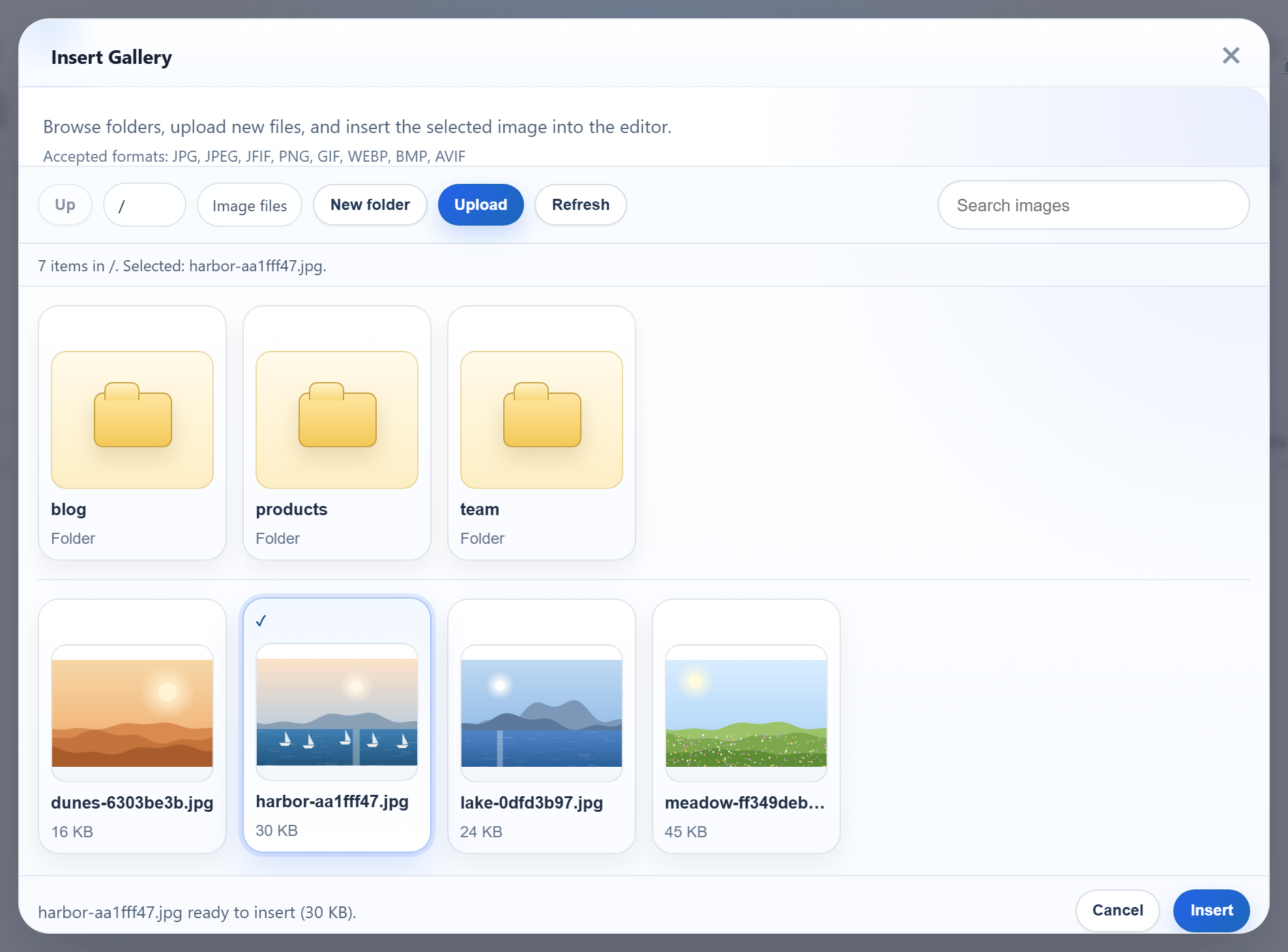
RichTextEditor's Insert Gallery dialog works the same in a React app as on a plain page. What changes is the wiring: the editor is a browser script that React does not manage, the component has to clean it up, and during development the dialog's requests have to reach your API server through the dev server. This page shows a Vite + React setup that does all three, tested against the Express sample.
Load the editor scripts before the app
The editor ships as plain scripts that define window.RichTextEditor. In a Vite app, the simplest correct place for them is index.html, ahead of the module script that starts React:
<!-- Plain browser scripts from public/, loaded before the React bundle. -->
<link rel="stylesheet" href="/richtexteditor/rte_theme_default.css">
<script src="/richtexteditor/rte.js"></script>
<script src="/richtexteditor/plugins/all_plugins.js"></script>
<script src="/rte-files.js"></script>
The files live in public/richtexteditor/, which Vite serves as they are. rte-files.js connects the editor's upload hooks to /rte/upload. Without it, the gallery can browse but its Upload button has nothing to call. Classic scripts in <head> run before the module bundle, so window.RichTextEditor exists by the time any component mounts.
The component
// window.RichTextEditor comes from the scripts in index.html.
export default function RichTextEditor({ options, initialHtml = "", editorRef }) {
  const container = useRef(null);

  useEffect(() => {
    const editor = new window.RichTextEditor(container.current, options);
    editor.setHTMLCode(initialHtml);
    if (editorRef) editorRef.current = editor;
    // Runs on unmount, and once in development: Strict Mode mounts, unmounts, mounts again.
    return () => {
      if (editorRef) editorRef.current = null;
      editor.destroy();
    };
  }, []); // create once; options are read at creation

  return <div ref={container} />;
}
The editor is created once, in useEffect, on the div the ref points to. The cleanup calls destroy(). That matters in development, because React's Strict Mode mounts every component, unmounts it and mounts it again. With the cleanup, the first editor is destroyed before the second is created. Our browser check, with <StrictMode> on, found exactly one editor on the page, and the editor's trial notice appeared twice in the console: one per creation. Leaving the cleanup out is easy to miss. When we created a second editor on the same div without destroy(), the page still showed one editor, but the first instance was never cleaned up.
The empty dependency list is deliberate. The options are read when the editor is created, so re-creating the editor on every render would lose what the user typed. To read the content, keep the instance in a ref and call getHTMLCode():
const options = {
  toolbar: "full",
  galleryEndpoint: "/rte/gallery", // forwarded to Express by vite.config.js
  maxUploadFileSize: 4000000,
};
In the sample, a Show HTML button calls editor.current.getHTMLCode() and printed <p>Hello from React.</p>. After an image is inserted from the gallery, the HTML contains <img src="/uploads/...">.
Reach the API server in development
galleryEndpoint: "/rte/gallery" is relative to the page, and the page comes from Vite. Vite's dev proxy forwards /rte/ (the gallery and upload routes) and /uploads/ (the images) to the Express sample on port 5101:
// /rte/ and /uploads/ go to the Express sample (node-express, port 5101).
// Keep the trailing slashes: "/rte" alone would also catch /rte-files.js.
proxy: {
  "/rte/": "http://localhost:5101",
  "/uploads/": "http://localhost:5101",
},
The browser sees one origin, so there are no CORS headers to set and no absolute URLs in the editor options. Keep the trailing slashes. Vite matches a plain key as a prefix of the URL, so a key of "/rte" also matches /rte-files.js. We tried it: with "/rte", /rte-files.js came back with X-Powered-By: Express, served by the API server instead of the app. With "/rte/", Vite served its own copy.
The proxy is a development feature. In production, serve the built app and the API from one origin, for example with Express serving dist/ next to the routes, or behind one reverse proxy.
What the dialog shows
The picture at the top is the dialog in this React app, with the folders and images from the Express server. The server side is the same as in the Node.js gallery guide. Two limitations come from the released gallery, not from React. The format hint lists JFIF, BMP and AVIF, which the sample server refuses. And a refused file shows "Upload failed for <name>." instead of the server's message.
Test it
Download the sample project for this guide and the Express sample. Copy the richtexteditor folder from the editor download into the Express sample, or set RTE_DIR, and start it with npm install and npm start. Then, in the React project:
npm install
npm run dev
  VITE v8.3.5  ready in 440 ms
  ➜  Local:   http://localhost:5111/

curl "http://localhost:5111/rte/gallery?folder="
{"currentFolder":"","currentFolderDisplay":"/","parentFolder":null,"folders":[...],"images":[...]}
npm run dev first copies the editor files into public/. Set RTE_DIR to your editor folder, or put the folder in public/richtexteditor yourself. Open http://localhost:5111, click Insert Gallery, pick an image and click Insert.