ASP.NET MVC 5 での安全な画像アップロード
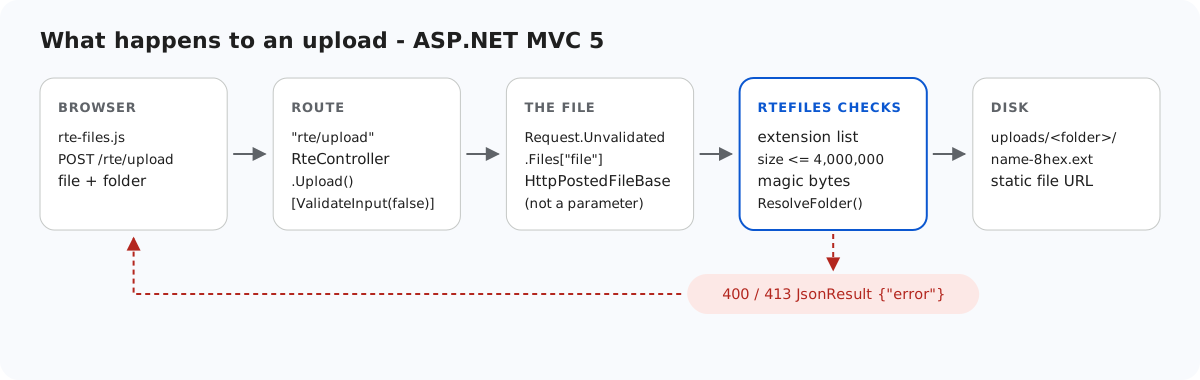
MVC 5 のアップロードアクションは、URL にアクセスできる人なら誰からでもファイルを受け取り、サイトのフォルダーに書き込みます。このページでは、サンプルの RteController.Upload が書き込み前にチェックすることと、そのうち MVC のモデルバインドが知らないうちにスキップしてしまうチェックについて説明します。また、web.config によって uploads/ で決してコードが実行されないようにする方法と、MVC プロジェクトのファイルをデプロイした場合に IIS がどのファイルを配信してしまうかも取り上げます。ここでの結果はすべて IIS Express で計測したものです。
500 を出さずにファイルを取得する
[HttpPost]
public ActionResult Upload()
{
    try
    {
        // Not action parameters: MVC binds HttpPostedFileBase from the *validated*
        // Request.Files even under [ValidateInput(false)], so a file named "<b>.png"
        // would fail with an HTML 500 before this code runs.
        HttpPostedFileBase file = Request.Unvalidated.Files["file"];
        string folder = Request.Unvalidated.Form["folder"];
        string url = RteFiles.SaveUpload(HttpContext, file, folder);
        return JsonStatus(200, new { url = url });
    }
    catch (RteException ex)
    {
        return JsonStatus(ex.Status, new { error = ex.Message });
    }
}
コントローラーの [ValidateInput(false)] は、MVC がバインドする値について ASP.NET の要求の検証を無効にします。代わりにサンプル独自のルールがそれらの値をチェックします。ただし、これは HttpPostedFileBase のアクションパラメーターには適用されません。Upload(HttpPostedFileBase file, string folder) の場合、<script>x.png という名前のファイルは、依然として HTML の 500「A potentially dangerous Request.Files value was detected from the client」になりました。リクエストは拒否されているので、これはセキュリティホールではありません。しかし、その拒否はエラー処理が一切関知しない HTML ページになります。Request.Unvalidated.Files["file"] を読み取れば同じ HttpPostedFileBase が得られ、その後は以下のチェックが判断します。
RteFiles がチェックすること
StorageRoot root = GetRoot(context);   // 401 here first in per-user mode
if (file == null || file.ContentLength == 0)
    throw new RteException(400, "No file was uploaded.");

// FileName is whatever the browser sent (old IE sends a full path). Don't feed it
// to Path.GetFileName: on .NET Framework that throws on characters like " < > |.
string clientName = file.FileName ?? "";
clientName = clientName.Substring(Math.Max(clientName.LastIndexOf('/'), clientName.LastIndexOf('\\')) + 1);
int dot = clientName.LastIndexOf('.');
string ext = dot >= 0 ? clientName.Substring(dot).ToLowerInvariant() : "";
if (Array.IndexOf(ImageExtensions, ext) < 0)
    throw new RteException(400, "Only .jpg, .jpeg, .png, .gif and .webp images can be uploaded.");
if (file.ContentLength > MaxUploadBytes)
    throw new RteException(413, "The image is larger than the 4 MB (4,000,000 bytes) limit.");

string dir = ResolveFolder(root, folder ?? "");

byte[] data = new byte[file.ContentLength];
Stream input = file.InputStream;
int read = 0;
while (read < data.Length)
{
    int n = input.Read(data, read, data.Length - read);
    if (n <= 0) break;
    read += n;
}
// file.ContentType is chosen by the browser (or the attacker), so look at the bytes.
if (read != data.Length || !SignatureMatches(ext, data))
throw new RteException(400, "The file is not a valid " + ext.Substring(1).ToUpperInvariant() + " image.");- 拡張子:.jpg、.jpeg、.png、.gif、.webp のいずれか。
.svg、.php、.aspxは、内容にかかわらず 400 になります。 - サイズ:4,000,000 バイトまで。それより大きなファイルは JSON の 413 になります。
- 内容:
HttpPostedFileBase.ContentTypeはブラウザーの申告にすぎず、text/htmlとして POST した PNG のバイト列は、まさにその値で届きました。そのため、先頭バイトを拡張子のシグネチャ(JPEG はFF D8 FF、PNG は89 50 4E 47 0D 0A 1A 0A、GIF はGIF8、WEBP はRIFF….WEBP)と比較します。 - 名前:.NET Framework の
Path.GetFileNameは<や|で例外をスローするため、クライアントのファイル名は最後のスラッシュの位置で自前の処理で切り取ります。その後、a-z0-9-だけに絞り込み、ランダムな 16 進数 8 文字を加えます。FileMode.CreateNewにより、ファイルが上書きされることはありません。 - フォルダー:各セグメントが有効なフォルダー名で、完全なパスが
Server.MapPath("~/uploads")の中にとどまっていなければなりません。契約テストではfolder=../は 400 になりました。
// Turns a virtual folder ("", "products", "products/2026") into a directory inside the
// root. Every segment must be a valid folder name, which already rules out "..", ".",
// empty segments, "\", ":", drive letters, NUL and leading "/". The resolved path is
// then checked against the root anyway, so a mistake in the rules cannot escape it.
static string ResolveFolder(StorageRoot root, string folder)
{
    if (folder.Length > 0)
    {
        foreach (string segment in folder.Split('/'))
        {
            if (!IsValidName(segment))
                throw new RteException(400, "Invalid folder.");
        }
    }

    string full = Path.GetFullPath(Path.Combine(root.Dir, folder.Replace('/', '\\')));
    if (!(full.TrimEnd('\\') + "\\").StartsWith(root.Dir, StringComparison.OrdinalIgnoreCase))
        throw new RteException(400, "Invalid folder.");
    if (!Directory.Exists(full))
        throw new RteException(404, "Folder not found.");
    return full;
}
uploads/ では決してコードを実行しない
シグネチャが一致しても、証明されるのはファイルが画像のように始まることだけです。フォルダーが 2 つ目の鍵になります。
<!-- Uploaded files are served as static files and nothing else. Clearing the handler list
     means that even if a .aspx, .ashx or .config ever lands in uploads/, IIS will not run
     it - it gets 404, not executed. The extension allow-list also refuses to serve
     anything that is not an image (.html, .svg, .txt ...), wherever it came from. -->
<location path="uploads">
  <system.webServer>
    <handlers>
      <clear />
      <add name="StaticFile" path="*" verb="GET,HEAD" modules="StaticFileModule" resourceType="File" requireAccess="Read" />
    </handlers>
    <security>
      <requestFiltering>
        <fileExtensions allowUnlisted="false">
          <add fileExtension=".jpg" allowed="true" />
          <add fileExtension=".jpeg" allowed="true" />
          <add fileExtension=".png" allowed="true" />
          <add fileExtension=".gif" allowed="true" />
          <add fileExtension=".webp" allowed="true" />
        </fileExtensions>
      </requestFiltering>
    </security>
    <httpProtocol>
      <customHeaders>
        <add name="X-Content-Type-Options" value="nosniff" />
      </customHeaders>
    </httpProtocol>
  </system.webServer>
</location>
MVC のサンプルでテストしました。サイトのルートに置いた 1 行の <%= 6*7 %> のページは 42 を返したので、実行されたことになります。同じファイルを uploads/ に置くと 404.7(許可されていない拡張子)になりました。ハンドラーの一覧を消去しただけで許可リストがない場合、そこに置いた .aspx は 404.3 になりました。これは同じブロックを使う Web Forms のサンプルで計測したものです。配信される画像には X-Content-Type-Options: nosniff が付きます。/uploads/ 以下の既存のファイルは、ルートが試される前に IIS が配信するため、MVC のルーティングが干渉することはありません。
MVC のフォルダーがほかに公開してしまうもの
run.ps1 と同じようにプロジェクトのフォルダーからサイトを実行し、いくつかのプロジェクトファイルをリクエストしました。
| URL | レスポンス |
|---|---|
/RteFiles.cs、/RteMvc5Sample.csproj | 404.7(IIS がこれらの拡張子を拒否) |
/web.config、/bin/RteMvc5Sample.dll | 404.8(非表示のセグメント) |
/Views/Home/Index.cshtml | 404(Views/web.config の BlockViewHandler) |
/obj/project.assets.json | 200。ローカルのパスとパッケージの一覧が含まれる |
デプロイするのは bin\、Views\、Global.asax、web.config、rte-files.js で、obj\ は決してデプロイしないでください。サンプルが bin や App_Data という名前のギャラリーフォルダーを拒否するのも、同じ非表示のセグメントのルールによるものです。uploads/bin/ に置いた画像は 404.8 になりました。
テストする
このガイドのサンプルプロジェクトをポート 5402 で実行した状態で、以下を実行します。
echo "<script>alert(1)</script>" > fake.png
curl -F "file=@fake.png" http://localhost:5402/rte/upload
{"error":"The file is not a valid PNG image."}

curl -F "file=@fake.png;filename=x.svg" http://localhost:5402/rte/upload
{"error":"Only .jpg, .jpeg, .png, .gif and .webp images can be uploaded."}
どちらのレスポンスも JSON 付きの HTTP 400 です。ギャラリーダイアログで同じファイルを送ると、サーバーのテキストではなく、ダイアログ独自の「Upload failed for <name>.」というメッセージが表示されます。
ほかのプラットフォーム向けの同じガイド
JavaScript · Next.js · PHP · ASP.NET Core · Razor Pages · Web Forms