Secure image uploads in ASP.NET MVC 5
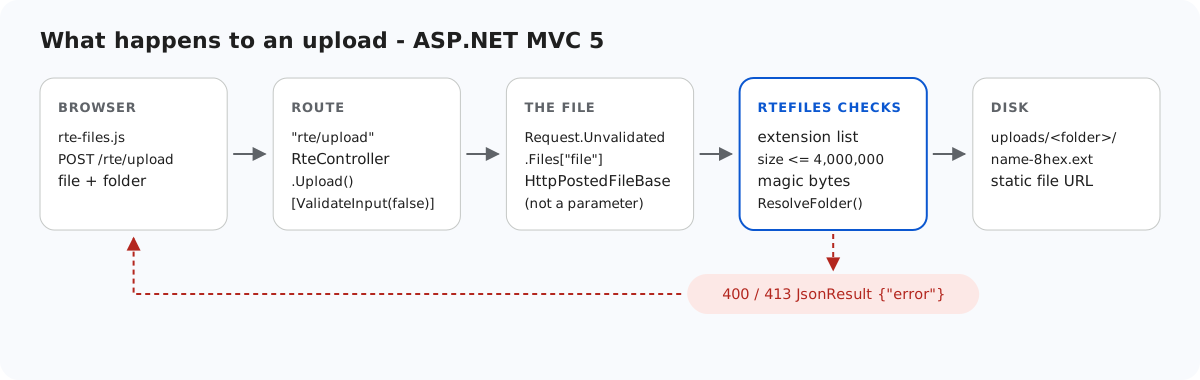
An MVC 5 upload action takes a file from anyone who can reach the URL and writes it into a folder of your site. This page goes through what the sample's RteController.Upload checks before writing, and which of those checks MVC model binding can quietly skip. It also covers how web.config keeps uploads/ from ever running code, and which files of an MVC project IIS would serve if you deployed them. Every result here was measured on IIS Express.
Getting the file without a 500
[HttpPost]
public ActionResult Upload()
{
    try
    {
        // Not action parameters: MVC binds HttpPostedFileBase from the *validated*
        // Request.Files even under [ValidateInput(false)], so a file named "<b>.png"
        // would fail with an HTML 500 before this code runs.
        HttpPostedFileBase file = Request.Unvalidated.Files["file"];
        string folder = Request.Unvalidated.Form["folder"];
        string url = RteFiles.SaveUpload(HttpContext, file, folder);
        return JsonStatus(200, new { url = url });
    }
    catch (RteException ex)
    {
        return JsonStatus(ex.Status, new { error = ex.Message });
    }
}
[ValidateInput(false)] on the controller turns off ASP.NET request validation for the values MVC binds. The sample's own rules check those values instead. That does not cover an HttpPostedFileBase action parameter. With Upload(HttpPostedFileBase file, string folder), a file named <script>x.png still produced HTML 500 "A potentially dangerous Request.Files value was detected from the client". That is not a hole, because the request was refused. But the refusal is an HTML page your error handling never sees. Reading Request.Unvalidated.Files["file"] gives the same HttpPostedFileBase, and the checks below then decide.
What RteFiles checks
StorageRoot root = GetRoot(context);   // 401 here first in per-user mode
if (file == null || file.ContentLength == 0)
    throw new RteException(400, "No file was uploaded.");

// FileName is whatever the browser sent (old IE sends a full path). Don't feed it
// to Path.GetFileName: on .NET Framework that throws on characters like " < > |.
string clientName = file.FileName ?? "";
clientName = clientName.Substring(Math.Max(clientName.LastIndexOf('/'), clientName.LastIndexOf('\\')) + 1);
int dot = clientName.LastIndexOf('.');
string ext = dot >= 0 ? clientName.Substring(dot).ToLowerInvariant() : "";
if (Array.IndexOf(ImageExtensions, ext) < 0)
    throw new RteException(400, "Only .jpg, .jpeg, .png, .gif and .webp images can be uploaded.");
if (file.ContentLength > MaxUploadBytes)
    throw new RteException(413, "The image is larger than the 4 MB (4,000,000 bytes) limit.");

string dir = ResolveFolder(root, folder ?? "");

byte[] data = new byte[file.ContentLength];
Stream input = file.InputStream;
int read = 0;
while (read < data.Length)
{
    int n = input.Read(data, read, data.Length - read);
    if (n <= 0) break;
    read += n;
}
// file.ContentType is chosen by the browser (or the attacker), so look at the bytes.
if (read != data.Length || !SignatureMatches(ext, data))
throw new RteException(400, "The file is not a valid " + ext.Substring(1).ToUpperInvariant() + " image.");- Extension: .jpg, .jpeg, .png, .gif or .webp.
.svg,.phpand.aspxget 400 whatever they contain. - Size: up to 4,000,000 bytes. Larger files get a JSON 413.
- Content:
HttpPostedFileBase.ContentTypeis the browser's claim, and PNG bytes posted astext/htmlarrived as exactly that. So the first bytes are compared with the extension's signature (JPEGFF D8 FF, PNG89 50 4E 47 0D 0A 1A 0A, GIFGIF8, WEBPRIFF….WEBP). - Name: the client's file name is cut at the last slash by hand, because .NET Framework's
Path.GetFileNamethrows on<and|. It is then reduced toa-z0-9-with 8 random hex characters added.FileMode.CreateNewnever overwrites a file. - Folder: each segment must be a valid folder name, and the full path must stay inside
Server.MapPath("~/uploads").folder=../got 400 in the contract test.
// Turns a virtual folder ("", "products", "products/2026") into a directory inside the
// root. Every segment must be a valid folder name, which already rules out "..", ".",
// empty segments, "\", ":", drive letters, NUL and leading "/". The resolved path is
// then checked against the root anyway, so a mistake in the rules cannot escape it.
static string ResolveFolder(StorageRoot root, string folder)
{
    if (folder.Length > 0)
    {
        foreach (string segment in folder.Split('/'))
        {
            if (!IsValidName(segment))
                throw new RteException(400, "Invalid folder.");
        }
    }

    string full = Path.GetFullPath(Path.Combine(root.Dir, folder.Replace('/', '\\')));
    if (!(full.TrimEnd('\\') + "\\").StartsWith(root.Dir, StringComparison.OrdinalIgnoreCase))
        throw new RteException(400, "Invalid folder.");
    if (!Directory.Exists(full))
        throw new RteException(404, "Folder not found.");
    return full;
}
uploads/ never runs code
A matching signature only proves the file starts like an image. The folder is the second lock:
<!-- Uploaded files are served as static files and nothing else. Clearing the handler list
     means that even if a .aspx, .ashx or .config ever lands in uploads/, IIS will not run
     it - it gets 404, not executed. The extension allow-list also refuses to serve
     anything that is not an image (.html, .svg, .txt ...), wherever it came from. -->
<location path="uploads">
  <system.webServer>
    <handlers>
      <clear />
      <add name="StaticFile" path="*" verb="GET,HEAD" modules="StaticFileModule" resourceType="File" requireAccess="Read" />
    </handlers>
    <security>
      <requestFiltering>
        <fileExtensions allowUnlisted="false">
          <add fileExtension=".jpg" allowed="true" />
          <add fileExtension=".jpeg" allowed="true" />
          <add fileExtension=".png" allowed="true" />
          <add fileExtension=".gif" allowed="true" />
          <add fileExtension=".webp" allowed="true" />
        </fileExtensions>
      </requestFiltering>
    </security>
    <httpProtocol>
      <customHeaders>
        <add name="X-Content-Type-Options" value="nosniff" />
      </customHeaders>
    </httpProtocol>
  </system.webServer>
</location>
We tested it on the MVC sample. A one-line <%= 6*7 %> page at the site root returned 42, so it ran. The same file in uploads/ answered 404.7 (extension not allowed). With only the handler list cleared and no allow-list, a .aspx there answered 404.3. We measured that on the Web Forms sample, which uses the same block. Served images carry X-Content-Type-Options: nosniff. MVC routing does not interfere, because existing files under /uploads/ are served by IIS before any route is tried.
What else an MVC folder exposes
With the site running from the project folder, as run.ps1 does, we requested a few project files:
| URL | Answer |
|---|---|
/RteFiles.cs, /RteMvc5Sample.csproj | 404.7 (IIS refuses these extensions) |
/web.config, /bin/RteMvc5Sample.dll | 404.8 (hidden segments) |
/Views/Home/Index.cshtml | 404 (the BlockViewHandler in Views/web.config) |
/obj/project.assets.json | 200, with your local paths and package list |
Deploy bin\, Views\, Global.asax, web.config and rte-files.js, and never obj\. The same hidden-segment rule is why the sample refuses gallery folders named bin or App_Data: an image in uploads/bin/ answered 404.8.
Test it
With the sample project for this guide running on port 5402:
echo "<script>alert(1)</script>" > fake.png
curl -F "file=@fake.png" http://localhost:5402/rte/upload
{"error":"The file is not a valid PNG image."}

curl -F "file=@fake.png;filename=x.svg" http://localhost:5402/rte/upload
{"error":"Only .jpg, .jpeg, .png, .gif and .webp images can be uploaded."}
Both answers are HTTP 400 with JSON. In the gallery dialog, the same files produce the dialog's own "Upload failed for <name>." message, not the server's text.
The same guide for other platforms
JavaScript · Next.js · PHP · ASP.NET Core · Razor Pages · Web Forms