Node.js での安全な画像アップロード
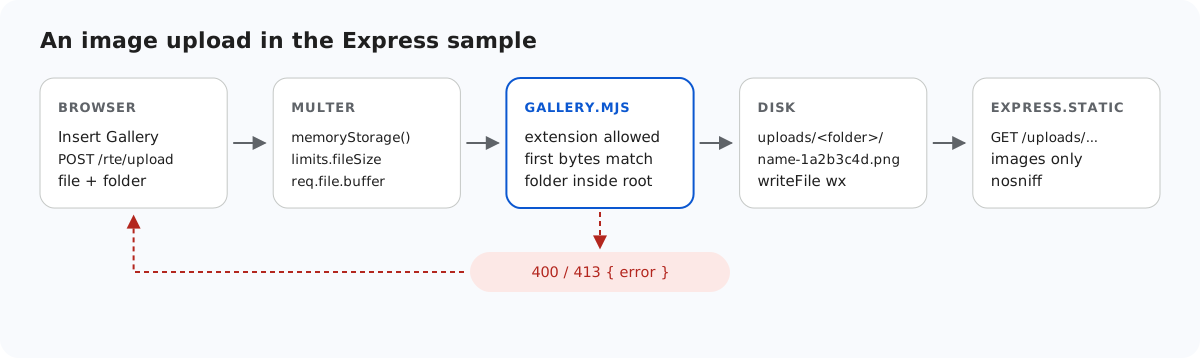
画像アップロードのエンドポイントは、誰でもサーバーにファイルを置き、それを自分のドメインから配信させることができる仕組みです。このページでは、Express のサンプルがファイルを書き込む前に何をチェックするか、その後ファイルをどのように配信するか、そしてチェックでは証明できないことを、各部分のテストに使ったリクエストとともに説明します。
書き込む前にサーバーがチェックすること
ページ上部の図は、その順序を示しています。multer がフォームをメモリに読み込みます(制限については Node.js での画像アップロードのサイズ制限を参照してください)。次に saveImage() が 3 つのチェックを行い、その後で初めてディスクに触れます。
// Allowed extensions, each with a check of the file's first bytes (its signature).
const SIGNATURES = {
  ".jpg": (b) => hex(b, 0, 3) === "ffd8ff",
  ".jpeg": (b) => hex(b, 0, 3) === "ffd8ff",
  ".png": (b) => hex(b, 0, 8) === "89504e470d0a1a0a",
  ".gif": (b) => ascii(b, 0, 6) === "GIF87a" || ascii(b, 0, 6) === "GIF89a",
  ".webp": (b) => ascii(b, 0, 4) === "RIFF" && ascii(b, 8, 12) === "WEBP",
};
const hex = (bytes, start, end) => bytes.subarray(start, end).toString("hex");
const ascii = (bytes, start, end) => bytes.subarray(start, end).toString("latin1");

// True for "chair.jpg", false for ".chair.jpg", "chair.svg" or "chair".
export function isImageName(name) {
  return !name.startsWith(".") && Object.hasOwn(SIGNATURES, extensionOf(name));
}

export class GalleryError extends Error {
  constructor(status, message) {
    super(message);
    this.status = status;
  }
}

// A folder or file name: 1-64 letters, digits, space, - _ . and not starting with a dot.
// Also refused: a trailing dot or space (Windows drops them, so "a." would become "a")
// and Windows device names such as CON or NUL.
export function isValidName(name) {
  return (
    typeof name === "string" &&
    /^[A-Za-z0-9 _.-]{1,64}$/.test(name) &&
    !name.startsWith(".") &&
    !/[. ]$/.test(name) &&
    !/^(con|prn|aux|nul|com[1-9]|lpt[1-9])(\.|$)/i.test(name)
  );
}- 拡張子は .jpg、.jpeg、.png、.gif、.webp のいずれかでなければなりません。これは許可リストなので、サーバーが個別に把握していなくても、.svg、.html、.php は拒否されます。SVG はスクリプトを含められるため、意図的に除外しています。
- 先頭バイトはその拡張子と一致しなければなりません。JPEG は
FF D8 FF、PNG は 8 バイトのシグネチャ、GIF はGIF87aまたはGIF89a、WebP はRIFF…WEBPです。holiday.jpgに名前を変えたスクリプトは、ここで失敗します。multer のreq.file.mimetypeはまったく使いません。これはブラウザーが送信したContent-Typeであり、ブラウザーは何でも送信できるからです。 - フォルダーは、ストレージルート内の有効な仮想パスでなければなりません(Node.js のギャラリーフォルダーを参照してください)。
// Checks the name and the bytes, stores the file under a new random name, returns its URL.
export async function saveImage(root, folder, originalName, bytes) {
  const ext = extensionOf(originalName);
  const matches = Object.hasOwn(SIGNATURES, ext) && SIGNATURES[ext];
  if (!matches) {
    throw new GalleryError(400, "Only .jpg, .jpeg, .png, .gif and .webp images can be uploaded.");
  }
  if (bytes.length > MAX_BYTES) {
    throw new GalleryError(413, "The image is larger than 4,000,000 bytes.");
  }
  if (!matches(bytes)) {
    throw new GalleryError(400, "The file content is not a valid " + ext.slice(1).toUpperCase() + " image.");
  }

  if (isUsersFolder(root, folder)) throw new GalleryError(404, "Folder not found.");
  const dir = await resolveFolder(root, folder);
  const storedName = baseNameOf(originalName) + "-" + randomBytes(4).toString("hex") + ext;
  const file = path.join(dir, storedName);
  await writeFile(file, bytes, { flag: "wx" }); // "wx" fails instead of overwriting
  return publicUrl(file);
}元のファイル名がそのまま保存名になることはありません。a-z、0-9、- だけに絞り込んで 40 文字に切り詰め、その後にランダムな 16 進数 8 文字を付けます。拡張子は許可リストのものを小文字にして使います。"wx" フラグで書き込むため、既存のファイルが置き換えられることはありません。
チェックでは証明できないこと
シグネチャのチェックでわかるのはファイルの始まり方であり、その後に何が続くかではありません。当社のテストでは、JPEG のバイト列 FF D8 FF E0 で始まり、その後に <html><script>alert(1)</script> が続く polyglot.jpg というファイルをアップロードしたところ、受け付けられました。これは想定どおりです。ファイル全体が有効な画像であることを証明するには、sharp などの画像ライブラリでデコードする必要があり、中に隠されたものを取り除きたい場合は再エンコードも必要です。サンプルではそこまで行いません。このようなファイルを無害にするのは、その配信方法です。
ファイルの配信方法
// Uploaded images. Only image files inside uploads/ are served (isServableUpload), so a
// stray .html or .svg, or a link to another folder, is never served from your site.
// dotfiles "ignore" answers 404 for .files and anything inside a .folder (Express 5's
// default, written out because Express 4 served files inside .folders).
// nosniff stops the browser from guessing a content type other than the image's own.
app.use(
  "/uploads",
  async (req, res, next) => ((await isServableUpload(req.path)) ? next() : res.status(404).end()),
  express.static(UPLOADS_DIR, {
    dotfiles: "ignore",
    index: false,
    setHeaders: (res) => res.setHeader("X-Content-Type-Options", "nosniff"),
  }),
);

// The editor, the shared browser file and the demo page.
if (EDITOR_DIR) app.use("/richtexteditor", express.static(EDITOR_DIR));
app.get("/rte-files.js", (req, res) => res.sendFile(RTE_FILES_JS));
app.use(express.static(path.join(import.meta.dirname, "public")));isServableUpload()は、実際のパスがuploads/の中にある画像ファイル名だけを通します。uploads/に手作業でstray.htmlを置いたところ 404 になり、外部のフォルダーへのリンクも 404 になりました。dotfiles: "ignore"は、このチェックで対応できないもの、つまりドットで始まるフォルダー内の.secret/a.jpgのようなファイルに対応します。これは 404 になりました。Express 5 は既定でこのように動作します。当社のテストでは、Express 4.22 はuploads/.secret/a.txtを 200 で配信したため、サンプルではこのオプションを明示しています。X-Content-Type-Options: nosniffは、サーバーが送信したContent-Typeをそのまま使うようブラウザーに指示します。上記のポリグロットファイルはnosniff付きのContent-Type: image/jpegで返されたため、ブラウザーはこれを画像として扱い、スクリプトを実行することはありません。
サンプルが対応していないこと
- アップロードできるユーザー。ログインの仕組みはありません。サーバーは既定で
127.0.0.1で待ち受けるため(HOSTで変更できます)、試している間に自分のマシンの外からアクセスされることはありません。ログイン処理を組み込む場所は、Node.js でのユーザーごとの画像フォルダーで紹介しています。 - CSRF。Express には、2 つの POST ルートを守る組み込みの保護機能がありません。ログインに Cookie を使っている場合、別のサイトがサインイン中のユーザーのブラウザーからこれらのルートに POST させることができます。Next.js のサンプルのように
Originヘッダーをチェックするか、CSRF トークンを使ってください。 - 容量の上限。1 人のユーザーが 4 MB ずつディスクを使い切ることを防ぐ仕組みはありません。
テストする
このガイドのサンプルプロジェクトを npm start で起動し、このページのファイルを送信します。
printf '<?php echo 1; ?>' > fake.jpg
curl -F "file=@fake.jpg" http://localhost:5101/rte/upload
{"error":"The file content is not a valid JPG image."}

curl -F "file=@photo.jpg;filename=x.svg" http://localhost:5101/rte/upload
{"error":"Only .jpg, .jpeg, .png, .gif and .webp images can be uploaded."}

curl -F "file=@photo.jpg" http://localhost:5101/rte/upload
{"url":"/uploads/photo-05a3e02b.jpg"}

curl -I http://localhost:5101/uploads/photo-05a3e02b.jpg
HTTP/1.1 200 OK
X-Content-Type-Options: nosniff
Content-Type: image/jpeg
最初の 2 つのレスポンスは HTTP 400 です。ギャラリーダイアログで同じ偽のファイルを送ると、「Upload failed for fake.jpg.」と表示されます。ダイアログはサーバーのメッセージではなく、独自のテキストを表示します。
ほかのプラットフォーム向けの同じガイド
Next.js · PHP · ASP.NET Core · Razor Pages · MVC 5 · Web Forms