Secure image uploads in Node.js
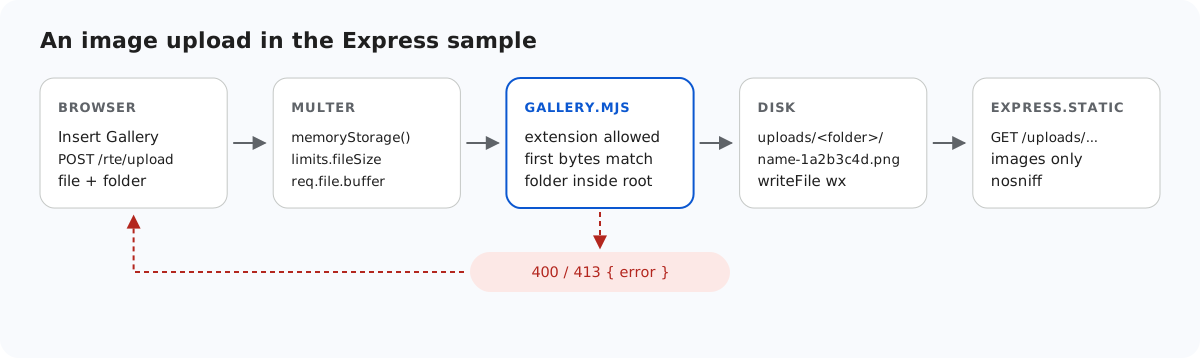
An image upload endpoint is a way for anyone to put a file on your server and then have your own domain serve it back. This page goes through what the Express sample checks before it writes a file, how it serves the files afterwards, and what the checks cannot prove, with the requests we used to test each part.
What the server checks before it writes
The diagram at the top shows the order. multer reads the form into memory (its limits are in image upload size limits in Node.js). Then saveImage() runs three checks, and only then does anything touch the disk:
// Allowed extensions, each with a check of the file's first bytes (its signature).
const SIGNATURES = {
  ".jpg": (b) => hex(b, 0, 3) === "ffd8ff",
  ".jpeg": (b) => hex(b, 0, 3) === "ffd8ff",
  ".png": (b) => hex(b, 0, 8) === "89504e470d0a1a0a",
  ".gif": (b) => ascii(b, 0, 6) === "GIF87a" || ascii(b, 0, 6) === "GIF89a",
  ".webp": (b) => ascii(b, 0, 4) === "RIFF" && ascii(b, 8, 12) === "WEBP",
};
const hex = (bytes, start, end) => bytes.subarray(start, end).toString("hex");
const ascii = (bytes, start, end) => bytes.subarray(start, end).toString("latin1");

// True for "chair.jpg", false for ".chair.jpg", "chair.svg" or "chair".
export function isImageName(name) {
  return !name.startsWith(".") && Object.hasOwn(SIGNATURES, extensionOf(name));
}

export class GalleryError extends Error {
  constructor(status, message) {
    super(message);
    this.status = status;
  }
}

// A folder or file name: 1-64 letters, digits, space, - _ . and not starting with a dot.
// Also refused: a trailing dot or space (Windows drops them, so "a." would become "a")
// and Windows device names such as CON or NUL.
export function isValidName(name) {
  return (
    typeof name === "string" &&
    /^[A-Za-z0-9 _.-]{1,64}$/.test(name) &&
    !name.startsWith(".") &&
    !/[. ]$/.test(name) &&
    !/^(con|prn|aux|nul|com[1-9]|lpt[1-9])(\.|$)/i.test(name)
  );
}- The extension must be .jpg, .jpeg, .png, .gif or .webp. This is an allow list, so .svg, .html and .php are refused without the server having to know about them. SVG is left out on purpose: it can contain script.
- The first bytes must match that extension:
FF D8 FFfor JPEG, the 8-byte PNG signature,GIF87aorGIF89a, andRIFF…WEBP. A script renamed toholiday.jpgfails here. multer'sreq.file.mimetypeis not used at all: it is theContent-Typethe browser sent, and the browser can send anything. - The folder must be a valid virtual path inside the storage root (see gallery folders in Node.js).
// Checks the name and the bytes, stores the file under a new random name, returns its URL.
export async function saveImage(root, folder, originalName, bytes) {
  const ext = extensionOf(originalName);
  const matches = Object.hasOwn(SIGNATURES, ext) && SIGNATURES[ext];
  if (!matches) {
    throw new GalleryError(400, "Only .jpg, .jpeg, .png, .gif and .webp images can be uploaded.");
  }
  if (bytes.length > MAX_BYTES) {
    throw new GalleryError(413, "The image is larger than 4,000,000 bytes.");
  }
  if (!matches(bytes)) {
    throw new GalleryError(400, "The file content is not a valid " + ext.slice(1).toUpperCase() + " image.");
  }

  if (isUsersFolder(root, folder)) throw new GalleryError(404, "Folder not found.");
  const dir = await resolveFolder(root, folder);
  const storedName = baseNameOf(originalName) + "-" + randomBytes(4).toString("hex") + ext;
  const file = path.join(dir, storedName);
  await writeFile(file, bytes, { flag: "wx" }); // "wx" fails instead of overwriting
  return publicUrl(file);
}
The original file name never becomes the stored name. It is reduced to a-z, 0-9 and -, cut to 40 characters, and followed by eight random hex characters. The original extension comes from the allow list, lower-cased. Writing with the "wx" flag means an existing file is never replaced.
What the checks cannot prove
A signature check tells you how a file starts, not what follows. We uploaded a file named polyglot.jpg that starts with the JPEG bytes FF D8 FF E0 and continues with <html><script>alert(1)</script>. It was accepted. That is expected: proving a file is a whole valid image means decoding it, with an image library such as sharp, and re-encoding it if you want to remove anything hidden in it. The sample does not do that. What makes such a file harmless is how it is served.
How the files are served
// Uploaded images. Only image files inside uploads/ are served (isServableUpload), so a
// stray .html or .svg, or a link to another folder, is never served from your site.
// dotfiles "ignore" answers 404 for .files and anything inside a .folder (Express 5's
// default, written out because Express 4 served files inside .folders).
// nosniff stops the browser from guessing a content type other than the image's own.
app.use(
  "/uploads",
  async (req, res, next) => ((await isServableUpload(req.path)) ? next() : res.status(404).end()),
  express.static(UPLOADS_DIR, {
    dotfiles: "ignore",
    index: false,
    setHeaders: (res) => res.setHeader("X-Content-Type-Options", "nosniff"),
  }),
);

// The editor, the shared browser file and the demo page.
if (EDITOR_DIR) app.use("/richtexteditor", express.static(EDITOR_DIR));
app.get("/rte-files.js", (req, res) => res.sendFile(RTE_FILES_JS));
app.use(express.static(path.join(import.meta.dirname, "public")));isServableUpload()lets through only image file names whose real path is insideuploads/. We put astray.htmlintouploads/by hand. It got a 404, and so did a link to a folder outside.dotfiles: "ignore"covers what that check does not: a file such as.secret/a.jpginside a dot-folder. It got a 404. Express 5 does that by default. Express 4.22 serveduploads/.secret/a.txtwith a 200 in our test, so the sample writes the option out.X-Content-Type-Options: nosnifftells the browser to keep theContent-Typethe server sent. The polyglot above came back asContent-Type: image/jpegwithnosniff, so a browser treats it as a picture and never runs its script.
What the sample leaves to you
- Who may upload. There is no login. The server listens on
127.0.0.1by default (HOSTchanges that), so nothing outside your machine can reach it while you try it. Per-user image folders in Node.js shows where your login plugs in. - CSRF. Express has no built-in protection for the two POST routes. If your login uses cookies, another site can make a signed-in user's browser post to them. Check the
Originheader, as the Next.js sample does, or use a CSRF token. - Quotas. Nothing stops one user from filling the disk 4 MB at a time.
Test it
Start the sample project for this guide with npm start and send it the files from this page:
printf '<?php echo 1; ?>' > fake.jpg
curl -F "file=@fake.jpg" http://localhost:5101/rte/upload
{"error":"The file content is not a valid JPG image."}

curl -F "file=@photo.jpg;filename=x.svg" http://localhost:5101/rte/upload
{"error":"Only .jpg, .jpeg, .png, .gif and .webp images can be uploaded."}

curl -F "file=@photo.jpg" http://localhost:5101/rte/upload
{"url":"/uploads/photo-05a3e02b.jpg"}

curl -I http://localhost:5101/uploads/photo-05a3e02b.jpg
HTTP/1.1 200 OK
X-Content-Type-Options: nosniff
Content-Type: image/jpeg
The first two answers are HTTP 400. In the gallery dialog, the same fake file shows "Upload failed for holiday.jpg." The dialog uses its own text, not the server's message.
The same guide for other platforms
Next.js · PHP · ASP.NET Core · Razor Pages · MVC 5 · Web Forms