在 Node.js 中为富文本编辑器添加图片库
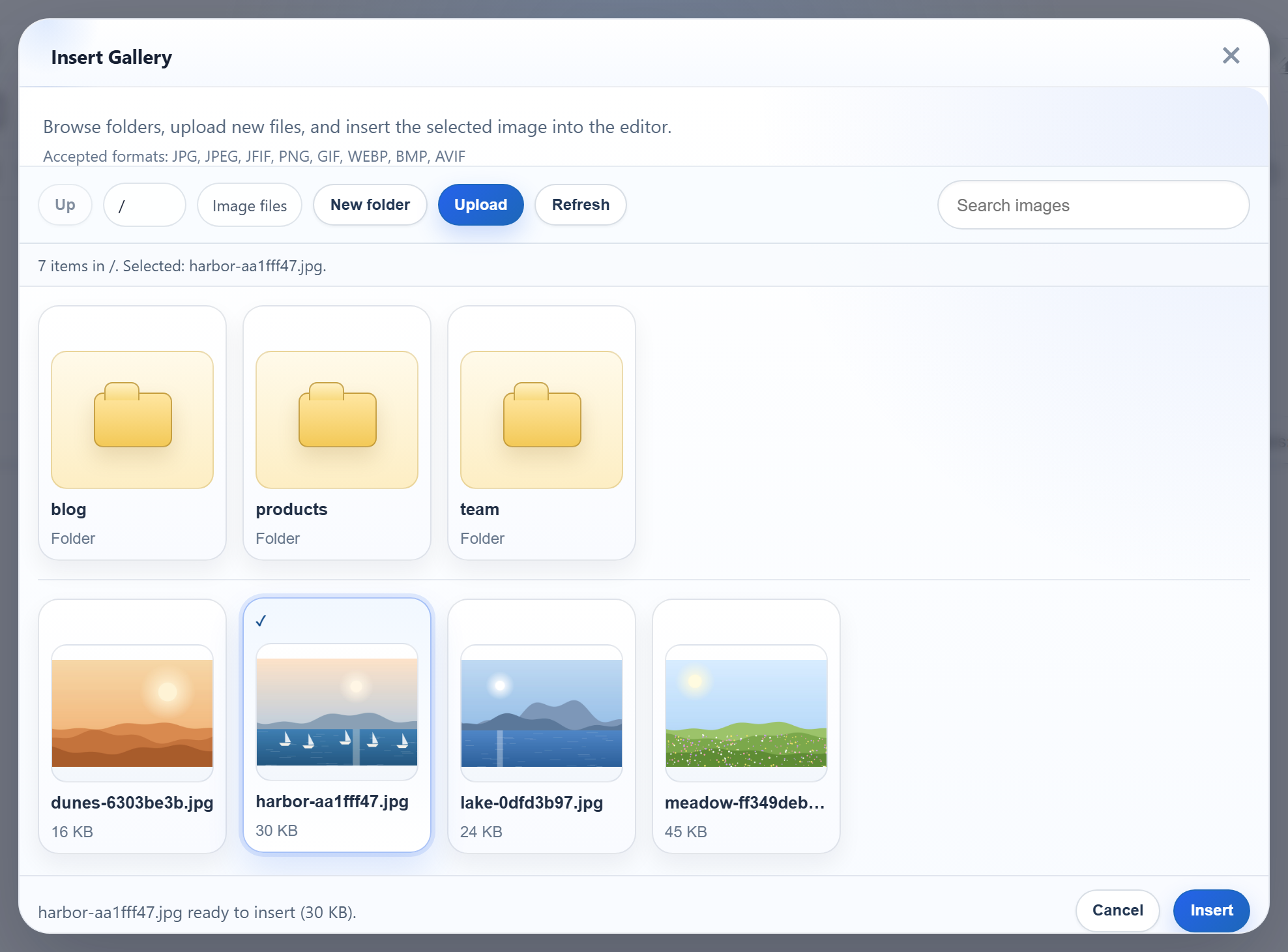
RichTextEditor 的 Insert Gallery 对话框可以显示服务器上已有的图片,这样用户可以直接选择现有图片,而不必重新上传。对话框只需要一个以 JSON 返回文件夹列表的 URL。本页只用 node:fs 在 Express 5 中构建这个端点,并把对话框连接到它。
让对话框指向服务器
只需一个编辑器选项,就能让图片库从内置的示例图片切换到您的服务器:
<div id="editor"><p>Hello from Express.</p></div>
<script>
  var editor = new RichTextEditor("#editor", {
    toolbar: "full",
    galleryEndpoint: "/rte/gallery",
    maxUploadFileSize: 4000000
  });
</script>
设置 galleryEndpoint 后,对话框打开时会发送 GET /rte/gallery?folder=,用户打开某个文件夹时则再次发送带 ?folder=blog 的请求。对话框的 Upload 按钮需要上传指南中的 rte-files.js。没有它,对话框只能浏览。
端点返回什么
列表给出当前文件夹、它的父文件夹、子文件夹和图片。每张图片都有一个编辑器可以插入的 URL、一个显示名称、所在文件夹以及以字节为单位的大小。下面是示例返回的真实响应:
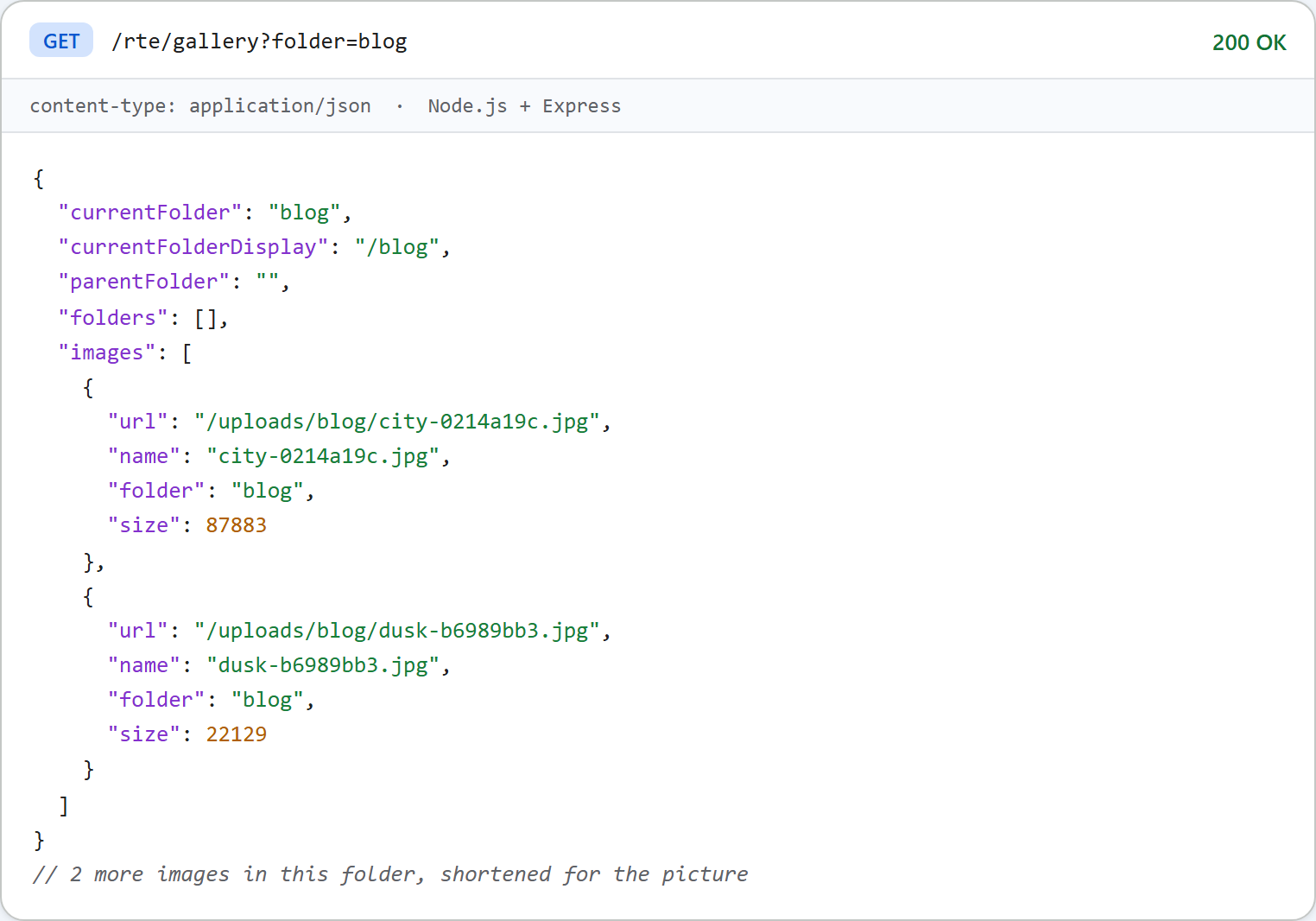
在根目录下,parentFolder 为 null。对话框据此禁用 Up 按钮。文件夹是以 / 分隔的虚拟路径,例如 blog/2026,绝不是磁盘路径。
路由与列表
Express 路由只有一行。Express 5 会把 async 处理程序中的错误交给错误处理中间件:
// Every /rte request gets its storage root first, before multer reads the body.
app.use("/rte", (req, res, next) => {
  req.storageRoot = rootFor(req);
  next();
});

// GET /rte/gallery?folder=products  -> listing
app.get("/rte/gallery", async (req, res) => {
  res.json(await listFolder(req.storageRoot, req.query.folder ?? ""));
});

// POST /rte/gallery  action=create-folder, folder, name  -> listing of the parent folder
app.post("/rte/gallery", parseForm.none(), async (req, res) => {
  const { action, folder, name } = req.body ?? {};
  if (action !== "create-folder") throw new GalleryError(400, "Unknown action.");
  res.json(await createFolder(req.storageRoot, folder ?? "", name));
});

// POST /rte/upload  file, folder  -> { url }
app.post("/rte/upload", parseForm.single("file"), async (req, res) => {
  if (!req.file) throw new GalleryError(400, "No file was uploaded.");
  const url = await saveImage(req.storageRoot, req.body.folder ?? "", req.file.originalname, req.file.buffer);
  res.json({ url });
});
gallery.mjs 中的 listFolder() 用 readdir(dir, { withFileTypes: true }) 读取文件夹并构造 JSON:
// The JSON the gallery dialog reads (see CONTRACT.md).
export async function listFolder(root, folder = "") {
  if (isUsersFolder(root, folder)) throw new GalleryError(404, "Folder not found.");
  const dir = await resolveFolder(root, folder);
  const entries = await readdir(dir, { withFileTypes: true });
  const join = (name) => (folder ? folder + "/" + name : name);

  const folders = entries
    .filter((entry) => entry.isDirectory() && isValidName(entry.name) && !isUsersFolder(root, join(entry.name)))
    .map((entry) => ({ folder: join(entry.name), name: entry.name }));

  const images = [];
  for (const entry of entries) {
    if (!entry.isFile() || !isImageName(entry.name)) continue;
    const file = path.join(dir, entry.name);
    const { size } = await lstat(file);
    images.push({ url: publicUrl(file), name: entry.name, folder, size });
  }

  return {
    currentFolder: folder,
    currentFolderDisplay: "/" + folder,
    parentFolder: folder === "" ? null : folder.split("/").slice(0, -1).join("/"),
    folders: folders.sort(byName),
    images: images.sort(byName),
  };
}

// Plain lower-case comparison, so every server sample sorts the same way.
function byName(a, b) {
  const x = a.name.toLowerCase();
  const y = b.name.toLowerCase();
  return x < y ? -1 : x > y ? 1 : 0;
}
其中有几个关键的选择:
- 只列出带图片扩展名的文件,不列出任何以点开头的内容。
- 只列出名称有效的文件夹,因此对话框显示的每个文件夹都能打开。
- 排序使用简单的小写比较,而不是
localeCompare。这样在每台机器上、在编写示例的每种语言中,顺序都相同。 - URL 由
uploads/之下的路径构造,每一部分都经过encodeURIComponent。名为My Photos的文件夹会得到/uploads/My%20Photos/...。
在这一切之前,resolveFolder() 会把 ?folder= 转换为磁盘路径,并拒绝任何会离开 uploads/ 的值。Node.js 中的图片库文件夹详细介绍了这项检查。
查询字符串可能是数组
Express 会把 ?folder=a&folder=b 解析为 ["a", "b"],在 Express 4 和 Express 5 中都是如此。Express 5 改变的是嵌套语法:在我们的测试中,?a[b]=1 在 Express 4.22 上得到 { a: { b: "1" } },在 Express 5.3 上得到 { "a[b]": "1" },因为 Express 5 默认使用简单查询解析器。无论哪种情况,req.query.folder 都不一定是字符串。resolveFolder() 会以 400 拒绝任何不是字符串的值,因此数组永远不会到达 path.resolve。
对话框显示什么、不显示什么
顶部的图片是这个服务器上的对话框:根目录下有三个文件夹和四张图片,其中一张处于选中状态。有两个限制值得了解:
- 已发布版本的图片库提示中,列出的接受格式为 "JPG, JPEG, JFIF, PNG, GIF, WEBP, BMP, AVIF"。而这个服务器只接受 .jpg、.jpeg、.png、.gif 和 .webp。在对话框中选择的 .bmp 文件会被发送,然后以 400 被拒绝,对话框提示 "Upload failed for <name>."。
- 缩略图就是从
/uploads/加载的完整图片。包含许多大照片的文件夹会把它们全部加载。示例不会生成较小的副本。
测试
用 npm install 和 npm start 启动本指南的示例项目,把一张图片上传到某个文件夹,然后请求列表:
curl -F "file=@photo.jpg" -F "folder=blog" http://localhost:5101/rte/upload
{"url":"/uploads/blog/photo-ce99c014.jpg"}

curl "http://localhost:5101/rte/gallery?folder=blog"
{"currentFolder":"blog","currentFolderDisplay":"/blog","parentFolder":"","folders":[],"images":[...]}

curl "http://localhost:5101/rte/gallery?folder=../"
{"error":"Invalid folder."}
最后一个响应是 400。然后打开 http://localhost:5101,点击工具栏中的 Insert Gallery,打开 blog 文件夹,就能在列表中看到刚上传的图片。
其他平台的同一指南
Next.js · PHP · ASP.NET Core · Razor Pages · Blazor · MVC 5 · Web Forms