在 PHP 中为富文本编辑器添加图片库
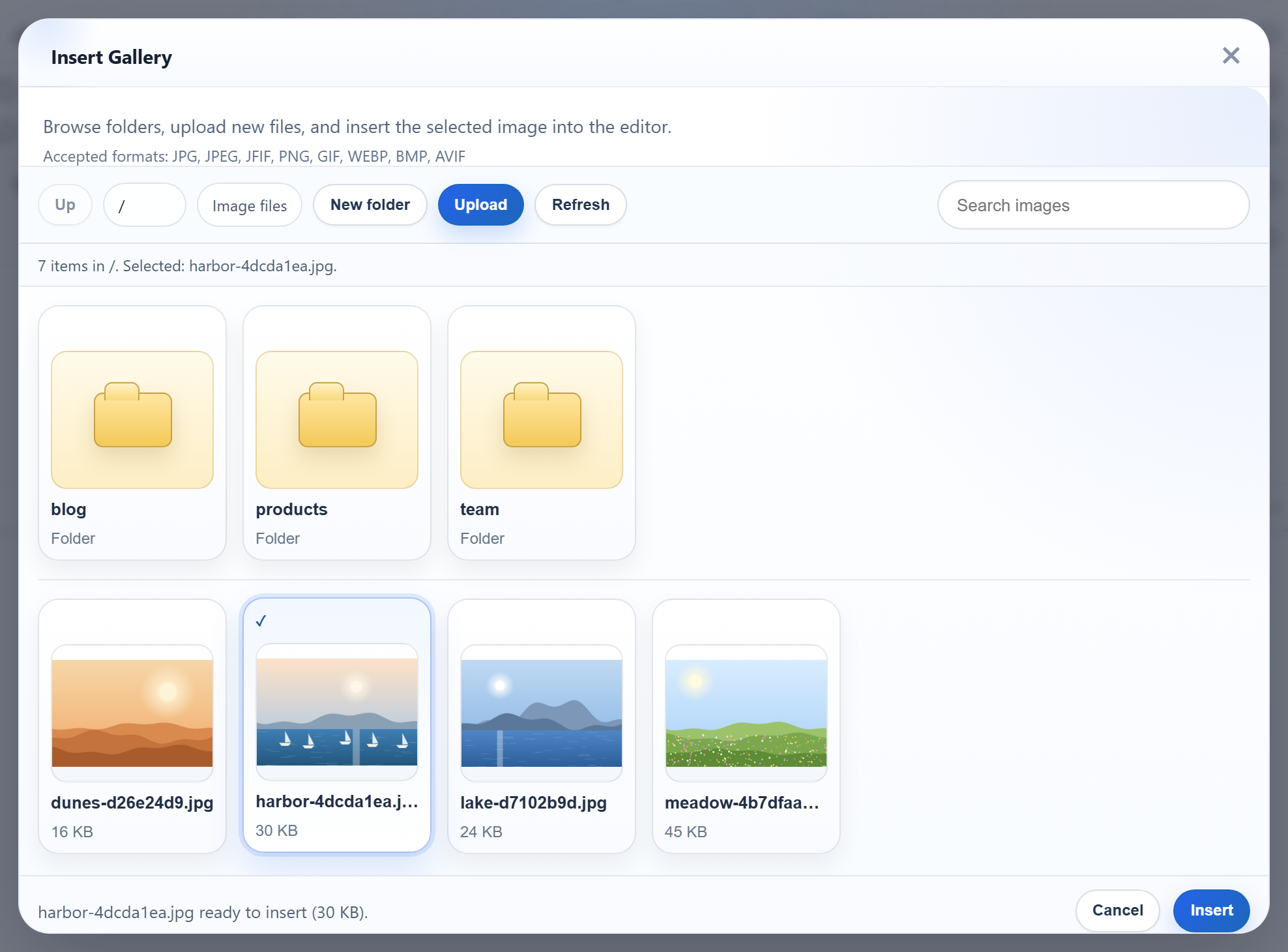
编辑器的 Insert Gallery 对话框可以显示服务器上已有的图片,这样用户可以直接选择图片,而不必重复上传同一张图片。它只需要一个返回 JSON 的 URL。本页用纯 PHP 8 实现这个端点:一个脚本用 scandir() 读取 uploads/ 下的文件夹,并列出其中的子文件夹和图片。
启用图片库
创建编辑器时设置 galleryEndpoint。此后对话框每次打开或切换文件夹时,都会向该 URL 请求列表。
<link rel="stylesheet" href="/richtexteditor/rte_theme_default.css">
<script src="/richtexteditor/rte.js"></script>
<script src="/richtexteditor/plugins/all_plugins.js"></script>
<script src="/rte-files.js"></script>
<script>
    new RichTextEditor("#editor", {
        toolbar: "full",
        galleryEndpoint: "/rte/gallery",
        maxUploadFileSize: 4000000     // same limit as rte/upload.php, checked before sending
    });
</script>
rte-files.js 是一个很小的浏览器端文件,负责把对话框中的上传发送到 /rte/upload。图片上传指南介绍了它的服务器端实现。
路由
GET /rte/gallery?folder=blog 返回一个文件夹的列表。脚本很短,因为工作都由两个辅助函数完成:
if ($method === 'GET') {
    return rte_listing(rte_resolve_folder($_GET['folder'] ?? ''));
}
rte_resolve_folder() 把查询字符串中的虚拟文件夹转换为存储根目录内的真实目录,或者返回 400 或 404。文件夹指南对此做了说明。rte_listing() 负责构造 JSON。
图片库收到什么
对话框需要当前文件夹、它的父文件夹(根目录下为 null)、子文件夹,以及带有 URL 和大小的图片:
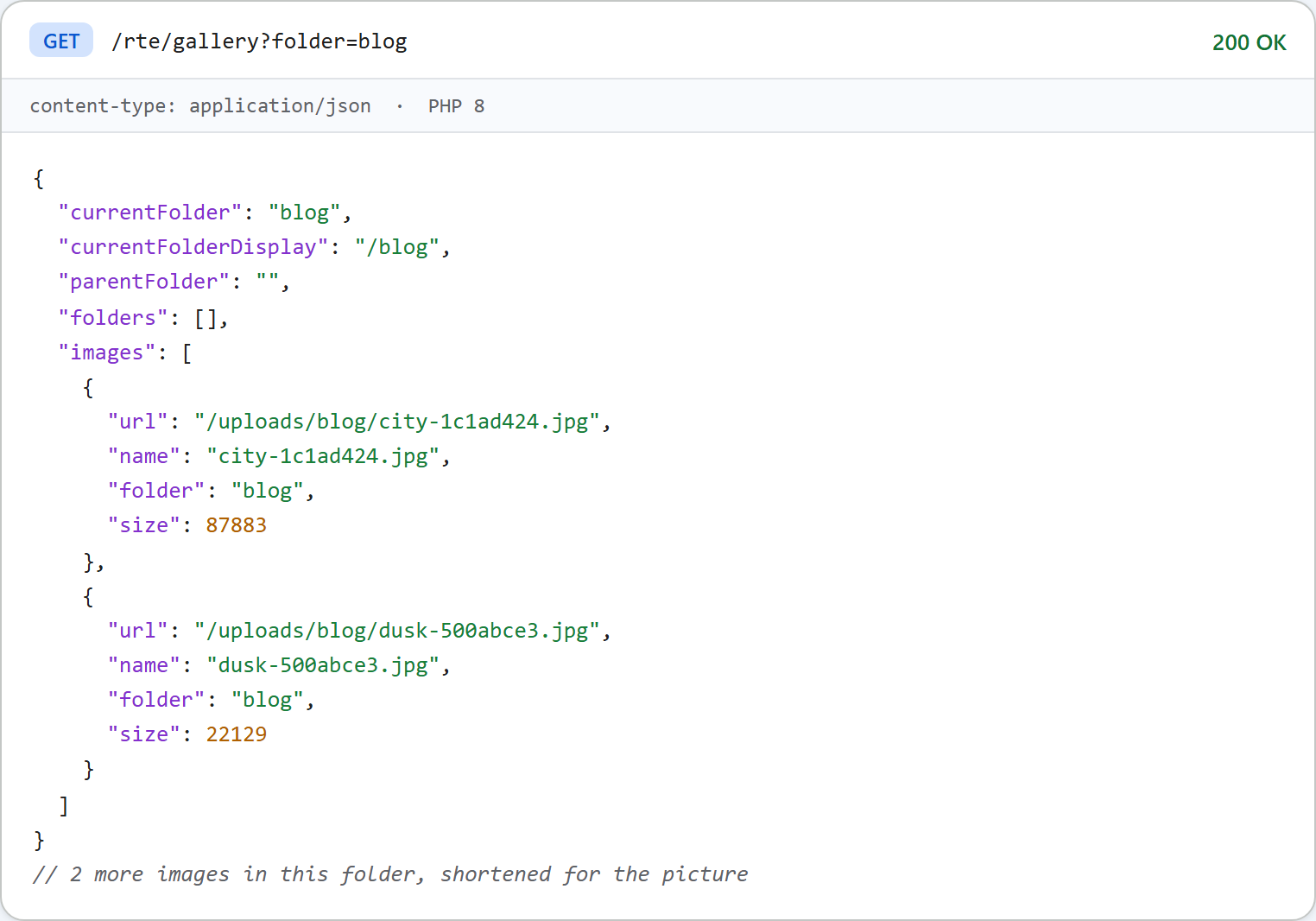
生成它的代码如下:
// The listing for one folder, in the shape the gallery dialog expects.
function rte_listing(array $folder): array
{
    $folders = [];
    $images = [];
    $names = scandir($folder['dir']);
    if ($names === false) {
        throw new RteHttpError(500, 'The folder cannot be read.');
    }
    foreach ($names as $name) {
        if ($name === '' || $name[0] === '.') {
            continue; // ".", "..", and hidden files such as .htaccess
        }
        $path = $folder['dir'] . DIRECTORY_SEPARATOR . $name;
        // Skip symlinks and Windows junctions. is_link() alone is not enough: PHP 8.2 on
        // Windows returns false for a junction, so also require realpath() to be unchanged.
        $real = realpath($path);
        $same = DIRECTORY_SEPARATOR === '\\' ? strcasecmp($real ?: '', $path) === 0 : $real === $path;
        if (is_link($path) || !$same) {
            continue;
        }
        $segments = [...$folder['segments'], $name];
        if (is_dir($path)) {
            if (rte_is_valid_name($name) && !rte_is_reserved($segments)) { // only folders the routes accept back
                $folders[] = ['folder' => implode('/', $segments), 'name' => $name];
            }
        } elseif (is_file($path) && in_array(rte_extension($name), RTE_IMAGE_EXTENSIONS, true)) {
            $images[] = [
                'url' => rte_url($folder['root'], $segments),
                'name' => $name,
                'folder' => $folder['virtual'],
                'size' => (int)filesize($path),
            ];
        }
    }
    $byName = fn(array $a, array $b): int => strcasecmp($a['name'], $b['name']) ?: strcmp($a['name'], $b['name']);
    usort($folders, $byName);
    usort($images, $byName);

    $virtual = $folder['virtual'];
    $parent = null;
    if ($virtual !== '') {
        $cut = strrpos($virtual, '/');
        $parent = $cut === false ? '' : substr($virtual, 0, $cut);
    }
    return [
        'currentFolder' => $virtual,
        'currentFolderDisplay' => '/' . $virtual,
        'parentFolder' => $parent,
        'folders' => $folders,
        'images' => $images,
    ];
}
其中有几个值得了解的选择:
- 以点开头的名称会被跳过,因此
uploads/.htaccess永远不会出现。 - 只列出
.jpg .jpeg .png .gif .webp文件。文件夹中的其他内容都不可见。 - 符号链接和 Windows 目录联接(junction)会被跳过。在我们的测试中,Windows 上 PHP 8.2 的
is_link()对目录联接返回false,因此代码还会检查realpath()是否保持路径不变。 - 图片 URL 的每一部分都经过
rawurlencode(),因此my photo.jpg会列为/uploads/products/my%20photo.jpg。 - 文件夹和图片按名称排序,使用
strcasecmp(),不区分大小写。
对话框提供的格式与服务器接受的格式
已发布版本的图片库对话框列出的接受格式为 "JPG, JPEG, JFIF, PNG, GIF, WEBP, BMP, AVIF",它的文件选择器也提供这些格式。这个服务器只接受其中五种:.jpg .jpeg .png .gif .webp。如果用户选择了 .bmp 文件,对话框会发送它,服务器返回 400 {"error":"Only .jpg, .jpeg, .png, .gif and .webp images can be uploaded."},对话框显示 "Upload failed for photo.bmp."。服务器给出的原因在响应体中,可以在浏览器的开发者工具中查看。
大小则不同:设置 maxUploadFileSize: 4000000 后,对话框会在发送之前拒绝过大的文件。一个 4.5 MB 的文件得到了 "big.jpg is 4.3 MB. The maximum allowed size is 3.8 MB." 的提示(对话框按二进制兆字节计算)。
提供图片
列表中的 URL 指向 /uploads/...,因此这些 URL 必须能返回文件。在示例项目中,router.php 为 PHP 内置服务器提供这些文件。它只发送图片扩展名的文件,使用固定的 Content-Type 和 X-Content-Type-Options: nosniff,并且从不运行该文件夹中的任何内容。在 Apache 或 nginx 上,由 Web 服务器直接提供这些文件。请保留禁止执行的规则,见安全上传指南。
测试
用 php -d upload_max_filesize=5M -d display_errors=0 -d log_errors=1 -S localhost:5201 router.php 启动本指南的示例项目,然后请求列表:
curl "http://localhost:5201/rte/gallery?folder=team"
{"currentFolder":"team","currentFolderDisplay":"/team","parentFolder":"","folders":[],"images":[]}

curl "http://localhost:5201/rte/gallery?folder=blog/2027"
{"error":"Folder not found."}
第二个请求得到 HTTP 404。打开 http://localhost:5201/ 并点击 Insert Gallery:对话框会显示根目录下的文件夹和图片,点击文件夹即可打开它。
其他平台的同一指南
JavaScript · Next.js · ASP.NET Core · Razor Pages · Blazor · MVC 5 · Web Forms