Secure image uploads in Next.js
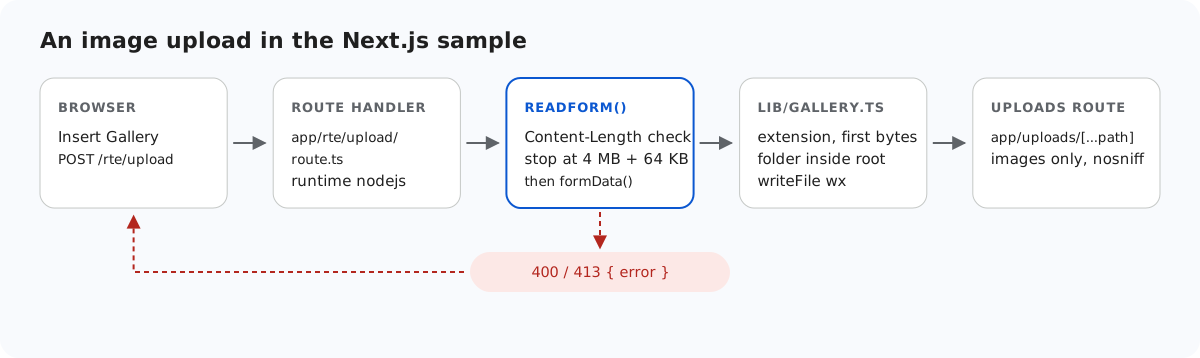
Next.js protects Server Actions in ways that route handlers do not get, and RichTextEditor's uploads go to route handlers. This page goes through what the Next.js sample adds itself: an Origin check against cross-site posts, the file checks before anything is written, and a route that serves uploads without turning your domain into a file host.
Route handlers get no Origin check
The Next.js data security guide says Server Actions compare the Origin header with the Host (or X-Forwarded-Host) and abort the request if they differ. Route handlers do no such thing. Before we added a check, we sent POST /rte/gallery with Origin: https://evil.example and the sample created the folder: 200. If your login uses cookies, any other site could make a signed-in user's browser do that. The sample now refuses it:
// Next.js checks the Origin of Server Actions, not of route handlers. A browser sends Origin
// with these POSTs, so refuse one from another site. Requests without Origin (curl) pass.
export function checkOrigin(request: Request): void {
  const origin = request.headers.get("origin");
  if (!origin) return;
  const host = request.headers.get("x-forwarded-host") ?? request.headers.get("host");
  let originHost: string | null = null;
  try {
    originHost = new URL(origin).host;
  } catch {}
  if (originHost !== host) throw new GalleryError(403, "Cross-site request refused.");
}
Both POST handlers call checkOrigin(request) first, before the body is read. We checked that Chromium sends Origin: http://localhost:5102 with the editor's own uploads, so they pass. A request with no Origin at all, such as curl or server-to-server code, also passes. That is not a cross-site browser request, and your login check still applies to it. Origin: null, which sandboxed pages send, is refused. Behind a reverse proxy that changes the host name, make sure it sets X-Forwarded-Host, or the check refuses your own pages too.
What is checked before writing
The diagram at the top shows the order for an upload. After the Origin check, readForm() limits the body size (see image upload size limits in Next.js), and then lib/gallery.ts checks the file:
// Allowed extensions, each with a check of the file's first bytes (its signature).
const SIGNATURES: Record<string, (bytes: Buffer) => boolean> = {
  ".jpg": (b) => hex(b, 0, 3) === "ffd8ff",
  ".jpeg": (b) => hex(b, 0, 3) === "ffd8ff",
  ".png": (b) => hex(b, 0, 8) === "89504e470d0a1a0a",
  ".gif": (b) => ascii(b, 0, 6) === "GIF87a" || ascii(b, 0, 6) === "GIF89a",
  ".webp": (b) => ascii(b, 0, 4) === "RIFF" && ascii(b, 8, 12) === "WEBP",
};
const hex = (bytes: Buffer, start: number, end: number) => bytes.subarray(start, end).toString("hex");
const ascii = (bytes: Buffer, start: number, end: number) => bytes.subarray(start, end).toString("latin1");

// True for "chair.jpg", false for ".chair.jpg", "chair.svg" or "chair".
export function isImageName(name: string): boolean {
  return !name.startsWith(".") && Object.hasOwn(SIGNATURES, extensionOf(name));
}

// A folder or file name: 1-64 letters, digits, space, - _ . and not starting with a dot.
// Also refused: a trailing dot or space (Windows drops them, so "a." would become "a")
// and Windows device names such as CON or NUL.
export function isValidName(name: unknown): name is string {
  return (
    typeof name === "string" &&
    /^[A-Za-z0-9 _.-]{1,64}$/.test(name) &&
    !name.startsWith(".") &&
    !/[. ]$/.test(name) &&
    !/^(con|prn|aux|nul|com[1-9]|lpt[1-9])(\.|$)/i.test(name)
  );
}- The extension must be on the allow list: .jpg, .jpeg, .png, .gif or .webp. SVG is left out because it can carry script.
- The first bytes must match the extension.
File.typefromformData()is never used: it is whatever the browser claimed. - The folder must be a valid virtual path whose real path is inside
uploads/, as in gallery folders in Node.js. - The stored name is generated, and
writeFileruns with"wx"so it never overwrites.
A signature check proves how a file starts, not that it is a picture. A file that begins with JPEG bytes and continues with HTML passes. That is why the way files are served matters.
Serving uploads without public/
Uploads cannot go into public/, because next start serves only the files that were there at build time. They are served by app/uploads/[...path]/route.ts instead, which gives you a place to put rules that public/ would not have:
// /uploads/<parts> -> the image file on disk, or a 404 GalleryError.
export async function resolveUpload(parts: string[]): Promise<string> {
  const name = parts.at(-1) ?? "";
  if (!isImageName(name) || /[\\/\0]/.test(name)) {
    throw new GalleryError(404, "Not found.");
  }
  const dir = await resolveFolder(UPLOADS_DIR, parts.slice(0, -1).join("/")).catch(() => {
    throw new GalleryError(404, "Not found.");
  });
  const file = path.join(dir, name);
  const info = await lstat(file).catch(() => null);
  if (!info || !info.isFile()) {
    throw new GalleryError(404, "Not found.");
  }
  return file;
}
Only image names are served, and only from a folder that passes the same path checks. We tried stray.html, .hidden.png, .secret/a.png, ..%2f..%2fpackage.png, ..%5cpackage.png and a%00.png: all got 404. Next.js decodes the [...path] segments before the route sees them, so %2f arrives as a real / inside a segment, and the name check refuses it. A Windows junction placed in uploads/ was refused too, because the check compares real paths. Every image goes out with X-Content-Type-Options: nosniff, so a browser keeps the image/* type and does not run a file as HTML.
All three handlers export runtime = "nodejs". They need node:fs, and the Next.js Edge runtime documentation is plain about it: you cannot read or write the file system there.
What the sample leaves to you
- Who may upload. The sample has no login.
lib/root-for.tsis where a per-user root would go, and the shared gallery already keepsuploads/users/out of reach for that. - Who may see an image.
/uploads/...is public. Add your session check to the uploads route if images are private. - Quotas, and decoding images with a library if you need to know they are complete pictures.
Test it
Start the sample project for this guide with npm run build and npm start, then:
curl -H "Origin: https://evil.example" -F action=create-folder -F folder= -F name=x http://localhost:5102/rte/gallery
{"error":"Cross-site request refused."}

printf '<?php echo 1; ?>' > fake.jpg
curl -F "file=@fake.jpg" http://localhost:5102/rte/upload
{"error":"The file content is not a valid JPG image."}

curl -F "file=@photo.jpg;filename=x.svg" http://localhost:5102/rte/upload
{"error":"Only .jpg, .jpeg, .png, .gif and .webp images can be uploaded."}
The statuses are 403, 400 and 400. In the gallery dialog, a refused file shows "Upload failed for <name>.": the dialog does not display the server's message.
The same guide for other platforms
JavaScript · PHP · ASP.NET Core · Razor Pages · MVC 5 · Web Forms