Image upload size limits in PHP
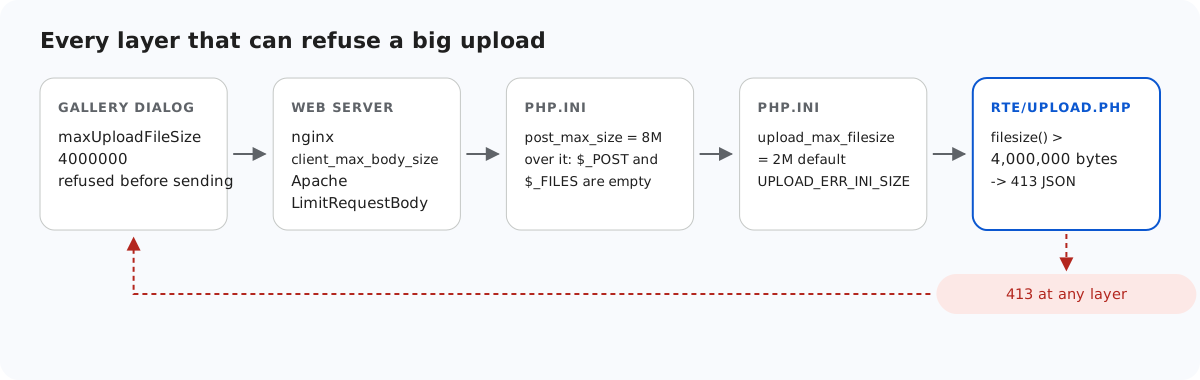
"Upload failed" for a large photo can come from any of five places, and in PHP two of them sit in php.ini and act before your script runs. This page lists each layer in the order a request meets it, what each one sends back, and one PHP behaviour that turns a clean 413 into an HTML page unless you change a setting.
The layers, in order
- The gallery dialog. With
maxUploadFileSize: 4000000in the editor options, the dialog refuses a larger file before sending it. A 4.5 MB file gave "big.jpg is 4.3 MB. The maximum allowed size is 3.8 MB." (the dialog counts in binary megabytes). This is a convenience. The server cannot rely on it. - The web server. The nginx documentation gives
client_max_body_sizea default of 1m, so a 2 MB photo is refused before PHP sees it, with nginx's own HTML 413 page. Apache's equivalent isLimitRequestBody. The sample'snginx.conf.examplesetsclient_max_body_size 5m;. post_max_size(8M by default) limits the whole request body.upload_max_filesize(2M by default) limits each file.- Your own check: 4,000,000 bytes in the sample, answered with a JSON 413.
For the sample's limit to be the one that applies, every earlier layer must allow a little more than 4,000,000 bytes. The multipart encoding adds a few hundred bytes around the file.
upload_max_filesize = 5M
post_max_size = 8M
display_errors = Off
log_errors = On
How the script tells them apart
// Over post_max_size, PHP drops the WHOLE body: $_POST and $_FILES are both empty.
$length = (int)($_SERVER['CONTENT_LENGTH'] ?? 0);
if (empty($_FILES) && empty($_POST) && $length > rte_ini_bytes('post_max_size')) {
    throw new RteHttpError(413, 'The upload is larger than the server accepts (post_max_size).');
}

$file = $_FILES['file'] ?? null;
// One file only: "file[]" arrives as nested arrays, which this refuses.
if (!is_array($file) || !is_int($file['error'] ?? null) || !is_string($file['tmp_name'] ?? null)) {
    throw new RteHttpError(400, 'No file received. Send it as the "file" field.');
}
switch ($file['error']) {
    case UPLOAD_ERR_OK:
        break;
    case UPLOAD_ERR_INI_SIZE:   // larger than upload_max_filesize
    case UPLOAD_ERR_FORM_SIZE:  // larger than a MAX_FILE_SIZE form field
        throw new RteHttpError(413, 'The image is larger than the server accepts.');
    case UPLOAD_ERR_PARTIAL:
        throw new RteHttpError(400, 'The upload was interrupted. Please try again.');
    case UPLOAD_ERR_NO_FILE:
        throw new RteHttpError(400, 'No file received.');
    default:                    // NO_TMP_DIR, CANT_WRITE, EXTENSION: server-side problems
        error_log('rte upload: UPLOAD_ERR code ' . $file['error']);
        throw new RteHttpError(500, 'The server could not store the upload.');
}
if (!is_uploaded_file($file['tmp_name'])) {
    throw new RteHttpError(400, 'No file received.');
}

$size = filesize($file['tmp_name']);
if ($size === false || $size === 0) {
    throw new RteHttpError(400, 'The file is empty.');
}
if ($size > RTE_MAX_BYTES) {
    throw new RteHttpError(413, 'Images can be at most 4,000,000 bytes.');
}
Over upload_max_filesize, PHP still runs the script, and $_FILES['file']['error'] is UPLOAD_ERR_INI_SIZE. We sent a 3 MB file to a server running with PHP's default of 2M and got 413 {"error":"The image is larger than the server accepts."}.
Over post_max_size, PHP throws away the entire body: $_POST and $_FILES are both empty arrays, as if nothing had been sent. The script still runs, and $_SERVER['CONTENT_LENGTH'] still holds the real size. That combination is the only way to know what happened, so the sample checks it before anything else. If you skip this check, an over-limit upload looks like "no file received".
The display_errors trap
When a request is over post_max_size, PHP also raises a warning, and it does so before the first line of your script. With display_errors on, which is PHP's built-in default when no php.ini is loaded and is also the setting in php.ini-development, that warning becomes the start of the response body. Your http_response_code(413) then fails with "Cannot modify header information", and the browser receives this:
HTTP/1.1 200 OK
Content-type: text/html; charset=UTF-8

<br />
<b>Warning</b>:  POST Content-Length of 9000204 bytes exceeds the limit of 8388608 bytes in <b>Unknown</b> on line <b>0</b><br />
...
{"error":"The upload is larger than the server accepts (post_max_size)."}
A script cannot repair this, because the output was sent before the script started. Turn displayed errors off and log them instead. Under PHP's built-in server, -d display_errors=stderr did not help in our test. Only -d display_errors=0 gave a clean HTTP/1.1 413 with Content-Type: application/json, and the warning then went to the server log. php.ini-production already has display_errors = Off.
The temporary folder and open_basedir
PHP writes every upload to a temporary file before your script runs, in upload_tmp_dir or the system temp folder. If you use open_basedir and leave that folder out, every upload fails, whatever its size. The log shows "open_basedir restriction in effect" and "unable to create a temporary file", and the script sees UPLOAD_ERR_NO_TMP_DIR, which the sample answers with a 500. After we added the temp folder to open_basedir, all 35 contract checks passed. On Windows, -d open_basedir=A;B on the command line silently keeps only A, because ; starts an ini comment. Quote the value: -d 'open_basedir="A;B"'.
Test it
Start the sample project for this guide with php -d upload_max_filesize=5M -d display_errors=0 -d log_errors=1 -S localhost:5201 router.php, then send one file over the sample's limit and one over post_max_size:
head -c 4500000 /dev/zero > big.jpg
curl -F "file=@big.jpg" http://localhost:5201/rte/upload
{"error":"Images can be at most 4,000,000 bytes."}

head -c 9000000 /dev/zero > huge.jpg
curl -F "file=@huge.jpg" http://localhost:5201/rte/upload
{"error":"The upload is larger than the server accepts (post_max_size)."}
Both answers are HTTP 413 with a JSON body. To see the trap, start the server again without -d display_errors=0 and send huge.jpg once more. On a PHP with no php.ini, or with php.ini-development, the HTML warning arrives in front of the JSON.
The same guide for other platforms
JavaScript · Next.js · ASP.NET Core · MVC 5 · Web Forms