Image upload size limits in Node.js
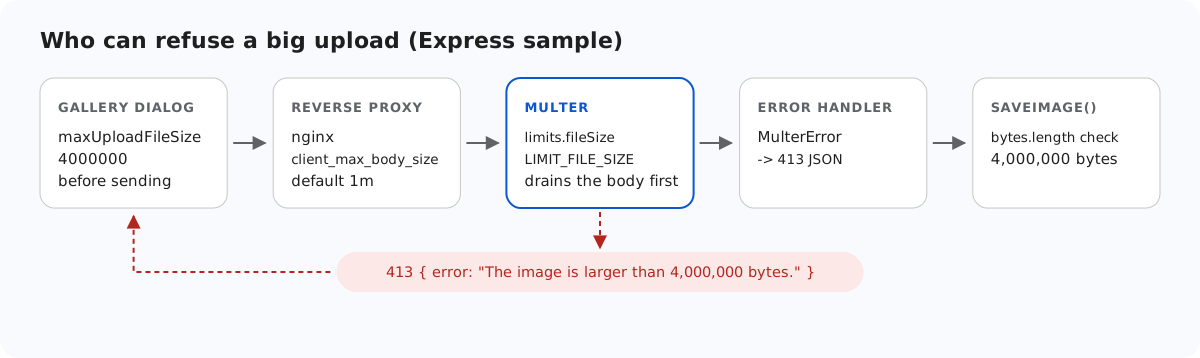
A photo straight from a phone is often larger than the limit you had in mind. In a Node.js setup, up to five places can refuse it, each with a different answer. This page goes through them in the order a request meets them, shows how the Express sample turns multer's limit into a clean JSON 413, and covers one multer behaviour that decides how much of a huge upload your server reads anyway.
The layers, in order
- The gallery dialog. With
maxUploadFileSize: 4000000in the editor options, the dialog refuses a larger file before sending it. A 4.5 MB file gave "big.jpg is 4.3 MB. The maximum allowed size is 3.8 MB." (the dialog counts in binary megabytes), and no request was sent. This is a convenience. Anyone can call the URL without the dialog. - A reverse proxy, if you have one. The nginx documentation gives
client_max_body_sizea default of 1m, so behind a default nginx a 2 MB photo never reaches Node. nginx answers with its own HTML 413 page, which the dialog reports as a failed upload. - multer's
limits, which you set. Its own defaults forfileSize,files,fieldsandpartsareInfinity, and with memory storage that means the whole file in memory. - The error middleware, which turns multer's error into the JSON the browser expects.
- The sample's own check in
saveImage(), which is the same 4,000,000 bytes and only matters if the multer limit is ever raised.
For the sample's message to be the one people see, every earlier layer must allow a little more than 4,000,000 bytes. The multipart encoding adds a few hundred bytes around the file.
multer's limit
// multer is the multipart parser most Express apps already use. Memory storage keeps the
// file in req.file.buffer, so its bytes can be checked before anything touches the disk;
// the limits keep that buffer small. multer allows exactly fileSize bytes and fails with
// LIMIT_FILE_SIZE above that (turned into a 413 in the error handler below).
const parseForm = multer({
  storage: multer.memoryStorage(),
  limits: { fileSize: MAX_BYTES, files: 1, fields: 10, fieldSize: 1024, parts: 12 },
  defParamCharset: "utf8", // file names are sent as UTF-8; multer's default is latin1
});
fileSize is the largest size allowed, not the first one refused. We sent a file of exactly 4,000,000 bytes and it was stored. 4,000,001 bytes was refused. The other limits are there because memory storage keeps everything: one file, ten text fields of at most 1,024 bytes, twelve parts in all. multer's default fieldSize is 1 MB per text field.
From MulterError to a 413
When a file goes over fileSize, multer calls next(err) with a MulterError. Its code is "LIMIT_FILE_SIZE", its message is "File too large" and its field is "file". Without an error handler, we got Express's default: status 500 with an HTML page, and unless NODE_ENV=production is set, that page includes the stack trace. The sample's error middleware checks the code:
// Express 5 sends errors thrown in async handlers here, so the routes need no try/catch.
app.use((err, req, res, next) => {
  if (err instanceof GalleryError) {
    return res.status(err.status).json({ error: err.message });
  }
  if (err instanceof multer.MulterError) {
    const tooBig = err.code === "LIMIT_FILE_SIZE";
    return res
      .status(tooBig ? 413 : 400)
      .json({ error: tooBig ? "The image is larger than 4,000,000 bytes." : "Invalid upload: " + err.message });
  }
  console.error(err);
  res.status(500).json({ error: "Server error." });
});
Every other multer error (LIMIT_FILE_COUNT for a second file, LIMIT_UNEXPECTED_FILE for a file under another field name) becomes a 400 with multer's message. Check err.code, not the message text.
multer reads the rest of the body first
multer does not send the 413 the moment the limit is crossed. On an error it reads and discards the rest of the request before it calls next(err). A comment in multer's source gives the reason: closing the connection while the client is still sending causes EPIPE errors in the client. We measured it: for a 20 MB upload sent without a Content-Length, the client had sent all 20,000,000 bytes before the 413 came back. The Next.js sample, which stops reading at its limit, answered after about 4.9 MB.
Memory is safe, because the extra bytes are thrown away. Bandwidth and time are not: a 1 GB upload is read to the end. If that matters, refuse large bodies before Node, at the reverse proxy, or check req.headers["content-length"] in a middleware before multer. A Content-Length check alone does not cover chunked requests, which carry no length.
Test it
Start the sample project for this guide with npm start, make a file over the limit and send it:
head -c 4500000 /dev/zero > big.jpg
curl -F "file=@big.jpg" http://localhost:5101/rte/upload
{"error":"The image is larger than 4,000,000 bytes."}
The status is 413. The file is all zeros, so it would also fail the JPEG signature check, but multer's limit comes first. To see the dialog's own check, pick a file over 4,000,000 bytes in the gallery's Upload button. The dialog shows the size message and sends nothing.
The same guide for other platforms
Next.js · PHP · ASP.NET Core · MVC 5 · Web Forms