Upload size limits in ASP.NET Web Forms on IIS
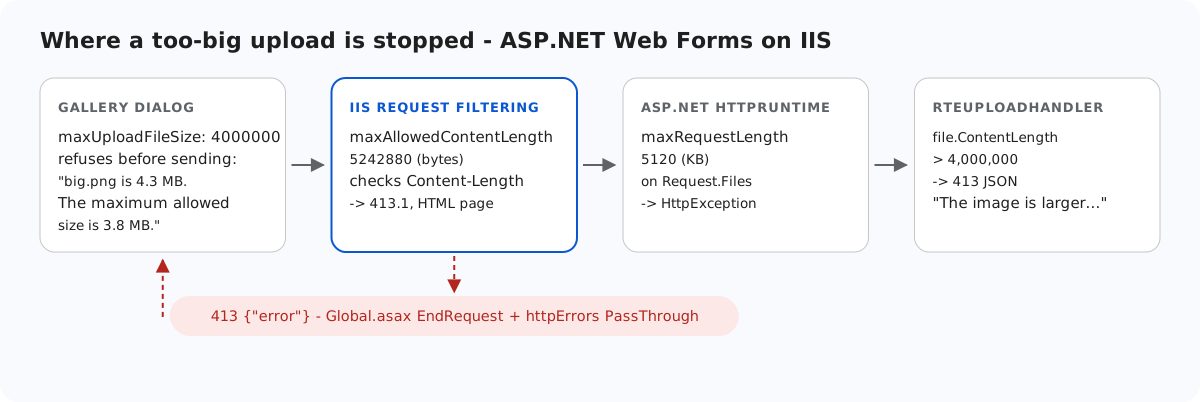
On IIS, an ASP.NET Web Forms upload passes two size limits before your code sees it. They use different units, and each produces a different error page, neither of them JSON. This page lists every layer that can refuse a big image, the settings the sample uses, and the two extra pieces (a Global.asax hook and one httpErrors line) that make every rejection come back as JSON. The second piece matters only for remote visitors.
The layers, in order
- The gallery dialog. With
maxUploadFileSize: 4000000it refuses a larger file before sending anything. A 4,500,008-byte file got "big.png is 4.3 MB. The maximum allowed size is 3.8 MB." The dialog counts binary megabytes, and no request reached the server. This is a convenience, and the server cannot rely on it. - IIS request filtering:
maxAllowedContentLength, in bytes. The default is 30,000,000. IIS checks it against Content-Length before ASP.NET runs. - ASP.NET:
<httpRuntime maxRequestLength>, in kilobytes. The default is 4096, which is 4,194,304 bytes (new HttpRuntimeSection().MaxRequestLengthprinted 4096 on our machine). It is enforced when the body is first read. - The handler's own check: 4,000,000 bytes per file, answered with a JSON 413.
<!-- maxRequestLength is in KILOBYTES (default 4096 = 4,194,304 bytes). 5120 KB = 5,242,880
     bytes: comfortably above the 4,000,000-byte image limit plus multipart overhead, so a
     file that is slightly too big still reaches the handler and gets its JSON 413. -->
<httpRuntime targetFramework="4.8" maxRequestLength="5120" /><requestFiltering>
<!-- maxAllowedContentLength is in BYTES (default 30,000,000). Same 5,242,880 bytes as
maxRequestLength above. IIS checks this one first, before ASP.NET runs. -->
<requestLimits maxAllowedContentLength="5242880" />
</requestFiltering>Both are set to the same 5,242,880 bytes, once as 5120 KB and once in bytes. The default 4096 KB would also fit a 4,000,000-byte image plus its few hundred bytes of multipart overhead. The extra room means a file that is a little too big still reaches the handler and gets its specific message.
What each layer sends back
| Upload | Refused by | Answer without the extra pieces |
|---|---|---|
| 4,500,008 bytes | the handler | 413 {"error":"The image is larger than the 4 MB (4,000,000 bytes) limit."} |
| 6,000,008 bytes | IIS request filtering | 413.1 "Request Entity Too Large", an IIS HTML page |
6,000,008 bytes, with maxAllowedContentLength raised to 50,000,000 | ASP.NET | HTML 500 "Maximum request length exceeded." |
Older guides describe IIS's rejection as 404.13. IIS 7 and 8 used that code, but IIS Express 10 gave 413.1 here. The sample handles both.
Turning the IIS page into JSON
Request filtering rejects the request before any handler runs, but the managed Application_EndRequest event still fires for it:
// Optional: makes "request too large" from IIS come back as JSON on /rte/ routes.
void Application_EndRequest(object sender, EventArgs e)
{
    RteFiles.RewriteTooLarge(Context);
}// Call from Application_EndRequest (Global.asax). A body over maxAllowedContentLength is
// rejected by IIS request filtering before any handler runs - HTTP 413.1 with an HTML
// page (404.13 on IIS 7/8) - but EndRequest still runs, so the /rte/ routes can answer
// in JSON instead. The substatus check leaves the handlers' own 413s alone.
public static void RewriteTooLarge(HttpContext context)
{
HttpResponse response = context.Response;
bool rejectedByIis = (response.StatusCode == 413 && response.SubStatusCode == 1)
|| (response.StatusCode == 404 && response.SubStatusCode == 13);
if (rejectedByIis
&& context.Request.AppRelativeCurrentExecutionFilePath.StartsWith("~/rte/", StringComparison.OrdinalIgnoreCase))
{
WriteError(context, 413, "The upload is larger than the server allows.");
}
}The substatus check matters. Our first version matched every 413 on /rte/, and it overwrote the handler's own, more precise 413 message.
This worked locally and still failed for remote visitors. IIS Express and IIS default to errorMode="DetailedLocalOnly". We set errorMode="Custom", which is what a remote visitor gets. The JSON written in EndRequest was then replaced by IIS's "The page was not displayed because the request entity is too large." Adding this block fixed it, and the contract test still passed:
<!-- /rte/ always answers in JSON. With errorMode="Custom" (what remote visitors get by
     default) IIS would otherwise swap its own HTML page in for the 413 that Global.asax
     writes when request filtering rejects an oversized upload. -->
<location path="rte">
  <system.webServer>
    <httpErrors existingResponse="PassThrough" />
  </system.webServer>
</location>
The ASP.NET limit is handled in the upload handler itself. Request.Files is read inside a try, and an HttpException with WebEventCodes.RuntimeErrorPostTooLarge becomes a JSON 413. With the IIS limit raised so that ASP.NET's limit applied first, a 6 MB upload got that JSON instead of the HTML 500. With the shipped settings, only an upload without a Content-Length header (chunked) should take that path. We did not test one.
Test it
With the sample project for this guide running on port 5401 (run.ps1):
head -c 4500000 /dev/zero > four.jpg     # then make it start like a JPEG:
printf '\xff\xd8\xff' | cat - four.jpg > big.jpg
curl -F "file=@big.jpg" http://localhost:5401/rte/upload
{"error":"The image is larger than the 4 MB (4,000,000 bytes) limit."}

head -c 6000000 /dev/urandom > huge.jpg
curl -F "file=@huge.jpg" http://localhost:5401/rte/upload
{"error":"The upload is larger than the server allows."}
Both are HTTP 413 with JSON. The first came from the handler and the second from the Global.asax hook. Delete Global.asax and send huge.jpg again to see IIS's 413.1 page.
The same guide for other platforms
JavaScript · Next.js · PHP · ASP.NET Core · MVC 5