Upload size limits in ASP.NET Core: Kestrel, IIS and MVC
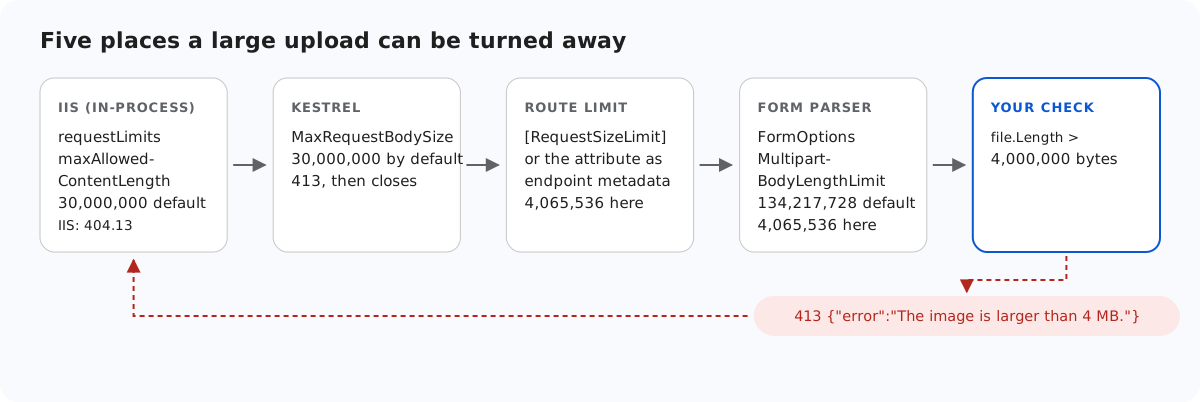
A large photo can be turned away in five places in ASP.NET Core, and only the last one is your code. The others answer in their own way: a 413 with no body, a ProblemDetails 400 from MVC, an IIS error page, or a dropped connection that the browser reports as a network error. This page lists the layers in the order a request meets them, with what each one sent back when we tested it.
The layers, in order
- The editor. With
maxUploadFileSize: 4000000in the options, the gallery refuses a larger file before sending it. A 4.5 MB file gave "big.jpg is 4.3 MB. The maximum allowed size is 3.8 MB." The dialog counts in binary megabytes. The server cannot rely on this. - IIS, if the app runs in-process behind it. According to Microsoft's documentation, request filtering rejects bodies over
maxAllowedContentLength(in bytes, 30,000,000 by default) with IIS's own 404.13 page, before ASP.NET Core runs. We did not test IIS for this page. - Kestrel's
MaxRequestBodySize, 30,000,000 bytes by default. A 31,000,000-byte upload got 413. - The route's own limit.
[RequestSizeLimit]replaces Kestrel's limit for one action. In a Minimal API the same attribute works as endpoint metadata. - The multipart parser.
FormOptions.MultipartBodyLengthLimitis 134,217,728 bytes by default. Set it per action with[RequestFormLimits], or per endpoint with.WithFormOptions. - Your check: 4,000,000 bytes in the sample, answered with a JSON 413.
The code
public const long MaxFileBytes = 4_000_000;
// The request is a little bigger than the file: multipart boundaries, headers, the "folder" field.
public const long MaxRequestBytes = MaxFileBytes + 64 * 1024;
The request limit is the file limit plus 64 KB for the multipart boundaries and the folder field. That gap is deliberate: a file slightly over 4,000,000 bytes still reaches the code and gets a readable answer.
// POST /rte/upload   file, folder
[HttpPost("upload")]
[RequestSizeLimit(RteFiles.MaxRequestBytes)]                              // the whole request body
[RequestFormLimits(MultipartBodyLengthLimit = RteFiles.MaxRequestBytes)]  // the multipart parser
public async Task<IActionResult> Upload(IFormFile? file, [FromForm] string? folder) =>
Send(await RteFiles.Save(HttpContext, file, folder));rte.MapPost("/upload", async (HttpContext http, IFormFile? file, [FromForm] string? folder) =>
Json(await RteFiles.Save(http, file, folder)))
.DisableAntiforgery()
// Kestrel accepts 30,000,000-byte bodies by default; this route needs ~4 MB.
.WithMetadata(new RequestSizeLimitAttribute(RteFiles.MaxRequestBytes))
.WithFormOptions(multipartBodyLengthLimit: RteFiles.MaxRequestBytes);What the browser sees
When a request is over the route limit, Kestrel answers 413 and closes the connection while the browser is still sending. We sent 10 MB from Chromium with an XHR, bypassing the editor's own check, in all four ASP.NET Core samples. Every time the XHR ended in onerror with status 0, never with a 413. rte-files.js then reports "The server could not be reached." curl, which waits for the answer, did see the 413. So the editor's maxUploadFileSize is what gives users a useful message for large files. Keep it equal to the server's limit.
MVC answers 400, not 413
In a Minimal API, a body over the route limit fails during parameter binding, and the endpoint answers 413 with an empty body. In an [ApiController] it fails during model binding instead, and the automatic model validation answers with a ProblemDetails 400:
{"type":"https://tools.ietf.org/html/rfc9110#section-15.5.1","title":"One or more validation errors occurred.","status":400,
 "errors":{"":["Failed to read the request form. Request body too large. The max request body size is 4065536 bytes."]}}
A 4,100,000-byte file gave the same answer, because with the multipart framing the request was just over 4,065,536 bytes. The {"error": ...} 413 from the sample's own check needs the whole request to fit under the route limit, which a 4,050,000-byte file does.
Over MultipartBodyLengthLimit, with the request limit turned off, a Minimal API endpoint answered 400 as well (135,000,000-byte upload against the default 134,217,728).
Raising the limit
Change MaxFileBytes in RteFiles.cs and maxUploadFileSize on the page together. MaxRequestBytes follows MaxFileBytes, so the route limit and the multipart limit move with it. Above 30,000,000 bytes, every layer in front must allow it too: Kestrel's global limit still applies to other routes, and Microsoft's documentation says IIS needs maxAllowedContentLength raised in web.config, because [RequestSizeLimit] cannot go above it.
Test it
Run the sample project for this guide with dotnet run (port 5302), and the Minimal API sample (port 5301) next to it:
head -c 4050000 /dev/zero > big.jpg
curl -F "file=@big.jpg" http://localhost:5302/rte/upload
{"error":"The image is larger than 4 MB."}

head -c 10000000 /dev/zero > huge.jpg
curl -s -w "\nHTTP %{http_code}\n" -F "file=@huge.jpg" http://localhost:5301/rte/upload

HTTP 413
The first answer is a 413 from the sample's check, on either port. The second is Kestrel's 413 with no body. Send huge.jpg to port 5302 to see MVC's 400 from above.
The same guide for other platforms
JavaScript · Next.js · PHP · MVC 5 · Web Forms