Image upload size limits in Next.js
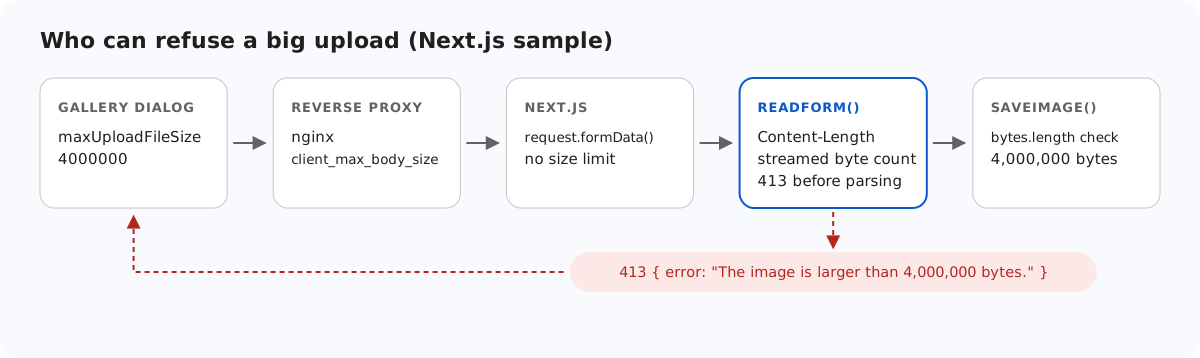
In a Next.js route handler, request.formData() is the documented way to read an upload, and nothing in Next.js limits how big that upload can be. This page shows what we measured, the small readForm() function the sample uses instead, and the other layers that can refuse a big image before your code does.
formData() reads everything
We added a temporary route handler that did nothing but await request.formData(), and sent it a 50 MB file. It answered 200 with fileSize: 50000000, and the dev server's memory (RSS) grew by about 175 MB during that one request. The route handler documentation describes formData() and mentions no size limit. It notes that, unlike Pages Router API routes, route handlers need no bodyParser configuration. So there is no config value to set. Any limit has to be in your code.
Count the bytes before parsing
readForm() in lib/gallery.ts refuses a declared Content-Length over the limit, otherwise reads the body stream and stops as soon as it passes the limit. Only a body within the limit is handed to the standard parser, through a Response:
// request.formData() reads the whole body into memory, however large. This reads at most
// MAX_BYTES plus room for the other fields, answers 413 above that, then parses it.
export async function readForm(request: Request): Promise<FormData> {
  const limit = MAX_BYTES + 64 * 1024;
  if (Number(request.headers.get("content-length")) > limit) {
    throw new GalleryError(413, TOO_BIG);
  }
  const chunks: Uint8Array[] = [];
  let size = 0;
  const reader = request.body?.getReader();
  while (reader) {
    const { done, value } = await reader.read();
    if (done) break;
    size += value.length;
    if (size > limit) {
      await reader.cancel();
      throw new GalleryError(413, TOO_BIG);
    }
    chunks.push(value);
  }
  const body = new Response(Buffer.concat(chunks), {
    headers: { "content-type": request.headers.get("content-type") ?? "" },
  });
  try {
    return await body.formData();
  } catch {
    throw new GalleryError(400, "Expected a multipart/form-data request.");
  }
}
The limit is the 4,000,000-byte file plus 64 KB for the form fields and the multipart headers around them. The Content-Length check alone would not be enough: a chunked request carries no length, and we sent one. The stream count caught it: the 413 came back after the client had sent about 4.9 MB of a 20 MB body, with no connection error on the client side, in both next dev and next start. reader.cancel() stops reading, so the rest is never buffered. For comparison, Express with multer read all 20 MB before it answered.
After parsing, saveImage() checks the file itself. That is the check that decides at exactly 4,000,000 bytes: a file of that size was stored, and one of 4,000,001 bytes was refused with a 413.
The other layers
- The gallery dialog.
maxUploadFileSize: 4000000in the editor options makes the dialog refuse a larger file before it sends anything. It shows "big.jpg is 4.3 MB. The maximum allowed size is 3.8 MB." The server cannot rely on that. - A reverse proxy. The nginx documentation gives
client_max_body_sizea default of 1m. Behind a default nginx, a 2 MB photo gets nginx's own 413 page and never reaches Next.js. - A
proxyfile (what used to be called middleware). The Next.js documentation says that when one is used, Next.js buffers the request body so both the proxy and the route can read it, up toexperimental.proxyClientMaxBodySize, 10 MB by default. Above that, the body is cut at the limit and a warning is logged. The sample has no proxy file, so we did not test this. By that description, if you add one, a body over 10 MB reaches your route handler cut short rather than refused. - Server Actions have their own
serverActions.bodySizeLimit, 1 MB by default according to the documentation. That setting is for Server Actions. It does nothing for a route handler, and the editor's uploads go to a route handler.
The diagram at the top shows the order. For the sample's 413 to be the one people get, every earlier layer must allow a little more than 4,000,000 bytes.
What the browser sees
Every refusal from the sample is an HTTP 413 with {"error":"The image is larger than 4,000,000 bytes."}. The gallery dialog shows its own text for any failed upload, "Upload failed for <name>.", so with the dialog's own size check on, people usually see the dialog's message instead.
Test it
Start the sample project for this guide with npm run build and npm start, then:
head -c 4500000 /dev/zero > big.jpg
curl -F "file=@big.jpg" http://localhost:5102/rte/upload
{"error":"The image is larger than 4,000,000 bytes."}
The status is 413. To try the chunked case, send the body without a length, for example with fetch and a ReadableStream body (duplex: "half"). The answer is the same 413, and it arrives before the upload has finished.
The same guide for other platforms
JavaScript · PHP · ASP.NET Core · MVC 5 · Web Forms