ASP.NET Core でのユーザーごとの画像フォルダー
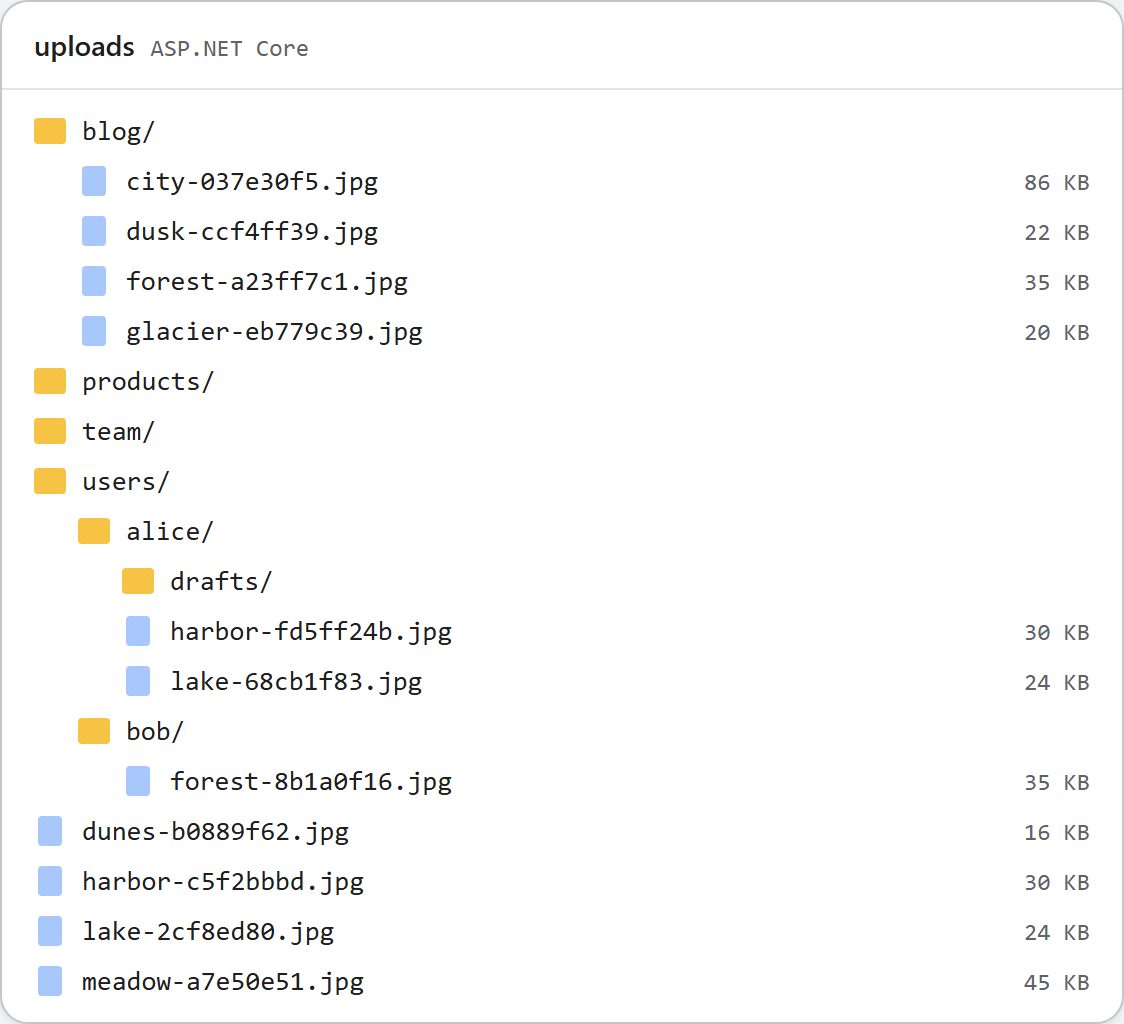
初期状態のギャラリーは全員に同じフォルダーを表示します。これは企業サイトには適しています。しかし、フォーラムや複数の顧客が使うアプリでは、各ユーザーが自分の画像だけを見られるようにすべきです。ASP.NET Core のサンプルでは、これはリクエストのファイルの置き場所を決める RootFor(HttpContext) という 1 つのメソッドで実現できます。このページでは、ユーザーごとのバージョン、それに必要なサインイン、そして公開されたままになるものを紹介します。
1 つのメソッドが決める
すべてのルート(一覧、フォルダーの作成、アップロード)は、RootFor にディスク上のフォルダーとその配信 URL を問い合わせます。コードのほかの部分は、ユーザーについて何も知りません。
// Where this request's files live. This is the only method to change for per-user folders.
//   "PerUserFolders": false (default)  everyone shares <content root>/uploads, served at /uploads
//   "PerUserFolders": true             each signed-in user gets uploads/users/<user id>
public static RteRoot RootFor(HttpContext http)
{
    var uploads = UploadsFolder(http.RequestServices.GetRequiredService<IWebHostEnvironment>());
    if (!http.RequestServices.GetRequiredService<IConfiguration>().GetValue<bool>("PerUserFolders"))
        return new RteRoot(uploads, "/uploads");

    // Use the user's id (a GUID with ASP.NET Core Identity), not the user name, which can change.
    var id = http.User.FindFirstValue(ClaimTypes.NameIdentifier)
             ?? throw new RteError(401, "Sign in to use the image gallery.");
    // The id becomes a folder name, so it must pass the same rules as any other folder name.
    if (!IsValidName(id)) throw new RteError(403, "This user id cannot be used as a folder name.");
    return new RteRoot(Path.Combine(uploads, "users", id), "/uploads/users/" + Uri.EscapeDataString(id));
}appsettings.jsonのPerUserFoldersは、既定ではfalseです。trueに設定すると、サインインした各ユーザーのギャラリーのルートがuploads/users/<id>/になります。「New folder」ボタンとアップロードはその中で動作し、フォルダーのチェックがこのルートに対して行われるため、..でその外に出ることはできません。- ID は
ClaimTypes.NameIdentifierです。ASP.NET Core Identity では、このクレームにユーザーの ID(変わることのない GUID)が入っています。ユーザー名やメールアドレスは変わる可能性があり、Windows ではAliceとaliceが 1 つのフォルダーになってしまいます。 - ユーザーがいなければギャラリーもありません。匿名のリクエストには
401 {"error":"Sign in to use the image gallery."}が返り、ダイアログはサーバーのテキストではなく、独自の「The image gallery is unavailable right now (http-401).」を表示します。 - ID はフォルダー名と同じようにチェックします。
../../xのような ID は、パスにはならず 403 になります。
サインイン
サンプルでは、ASP.NET Core Identity もサインインに使う Cookie 認証を使っています。以下のテスト用サインインは、アプリ独自のログイン処理に置き換えてください。
var builder = WebApplication.CreateBuilder(args);
builder.Services.AddControllersWithViews();
// Your app's sign-in goes here. "PerUserFolders": true in appsettings.json gives each user a folder.
builder.Services.AddAuthentication(CookieAuthenticationDefaults.AuthenticationScheme).AddCookie();
var app = builder.Build();

app.UseStaticFiles();
app.UseRteStaticFiles();          // /uploads, /richtexteditor, /rte-files.js
app.UseAuthentication();
app.UseAuthorization();

app.MapDefaultControllerRoute();  // HomeController.Index at "/", plus RteController's [Route] attributes
ログインの仕組みを作らなくてもユーザーごとのフォルダーを試せるように、サンプルではテスト専用のサインインを、Development 環境でのみマップしています。これは誰でも任意のユーザーとしてサインインさせるものなので、実際のサーバーには決して置いてはいけません。
// TEST ONLY, and mapped only in Development: /demo/sign-in?user=alice signs anyone in as anyone,
// so per-user folders can be tried without a real login. Never ship this.
if (app.Environment.IsDevelopment())
{
    app.MapGet("/demo/sign-in", async (HttpContext http, string user) =>
    {
        var identity = new ClaimsIdentity([new Claim(ClaimTypes.NameIdentifier, user)], CookieAuthenticationDefaults.AuthenticationScheme);
        await http.SignInAsync(new ClaimsPrincipal(identity));
        return Results.Redirect("/");
    });
}
Production として実行される単純な dotnet run では、/demo/sign-in は 404 を返しました。
公開されたままになるもの
ギャラリーを分けても、ファイルが非公開になるわけではありません。/uploads/users/alice/harbor-fd5ff24b.jpg は、ほかのすべてのアップロードと同じ静的ファイルのマッピングで配信され、Cookie なしのリクエストにも 200 を返しました。公開コンテンツの画像であれば、通常はそれで問題ありません。投稿の読者がその画像を読み込めなければならないからです。ファイル名のランダムな部分により URL を推測されることはありませんが、URL を共有された人は誰でも開けます。ユーザーの画像を非公開にしておく必要がある場合は、UseStaticFiles ではなく、ユーザーをチェックするエンドポイントから配信してください。サンプルにはそのようなエンドポイントは含まれていません。
また、ユーザーごとのフォルダーを有効にしても、そもそも誰がアップロードできるかは決まりません。アプリにサインインの仕組みができたら、コントローラーに [Authorize] を、または最小 API のグループに .RequireAuthorization() を追加してください。
テストする
このガイドのサンプルプロジェクトを、ユーザーごとのフォルダーを有効にして Development 環境で起動し、2 つの Cookie ファイルを使って 2 人のユーザーとして操作します。
dotnet run -- --environment Development --PerUserFolders true

curl "http://localhost:5302/rte/gallery?folder="
{"error":"Sign in to use the image gallery."}

curl -s -o /dev/null -c alice.jar "http://localhost:5302/demo/sign-in?user=alice"
curl -b alice.jar -F "file=@harbor.jpg" http://localhost:5302/rte/upload
{"url":"/uploads/users/alice/harbor-fd5ff24b.jpg"}

curl -s -o /dev/null -c bob.jar "http://localhost:5302/demo/sign-in?user=bob"
curl -b bob.jar -F "file=@forest.jpg" http://localhost:5302/rte/upload
{"url":"/uploads/users/bob/forest-8b1a0f16.jpg"}

curl -b bob.jar "http://localhost:5302/rte/gallery?folder="
{"currentFolder":"","currentFolderDisplay":"/","parentFolder":null,"folders":[],"images":[{"url":"/uploads/users/bob/forest-8b1a0f16.jpg","name":"forest-8b1a0f16.jpg","folder":"","size":36337}]}
Bob のギャラリーには Bob の画像だけが表示されます。ブラウザーで http://localhost:5302/demo/sign-in?user=alice を開いて「Insert Gallery」をクリックすると、Alice の画像とフォルダーだけが表示されます。このページ上部の画像は、その後の uploads フォルダーです。PerUserFolders が無効なときにサンプルが使う共有フォルダーと並んで、users/alice と users/bob があります。
ほかのプラットフォーム向けの同じガイド
JavaScript · PHP · MVC 5 · Web Forms