ASP.NET MVC 5 でのユーザーごとの画像フォルダー
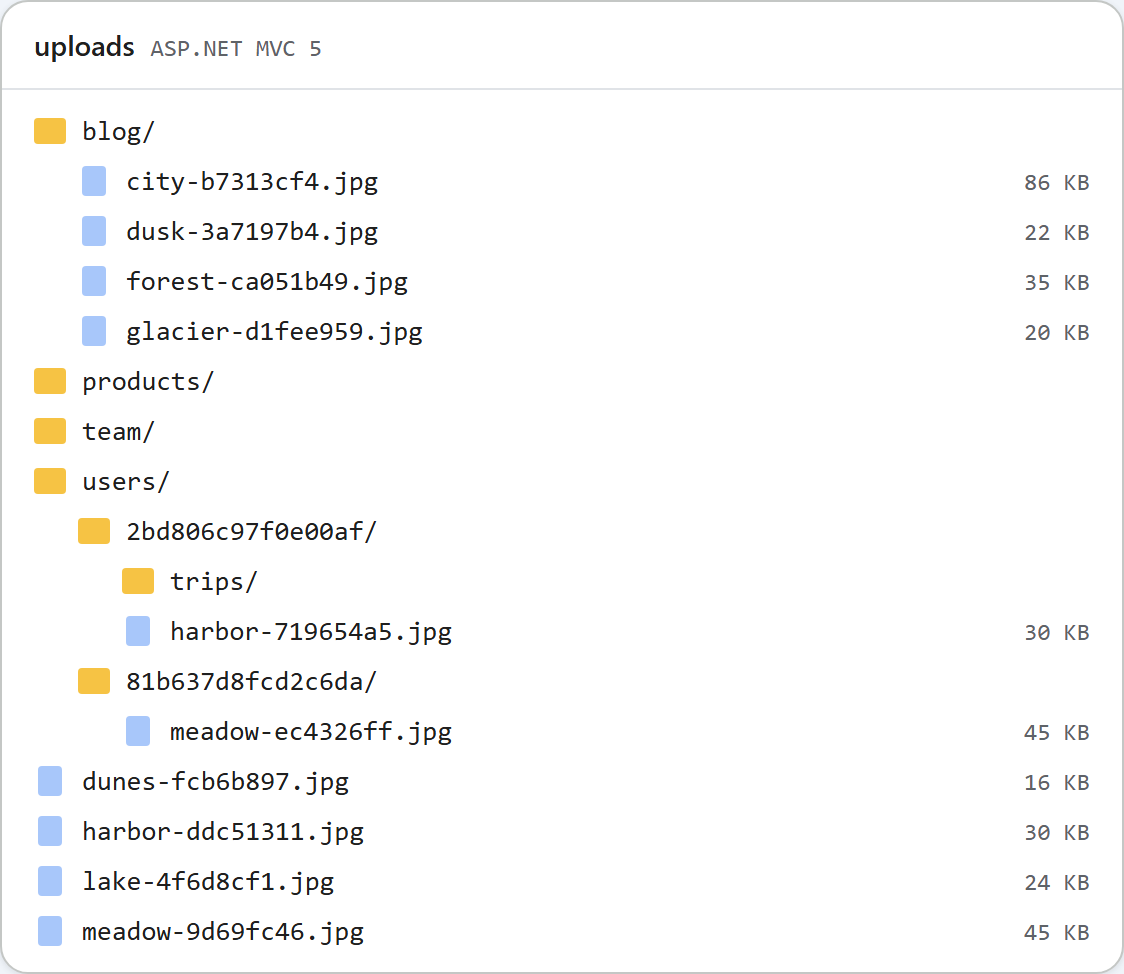
MVC 5 のサンプルでは、appSettings のスイッチを 1 つ切り替えるまで、エディターのすべてのユーザーが 1 つの uploads/ フォルダーを共有します。スイッチを有効にすると、ギャラリーとアップロードのアクションは、サインイン中のユーザーの uploads/users/<id>/ の中で動作し、匿名のリクエストには JSON の 401 を返します。この 401 をブラウザーに届けるには思ったより 1 行多く必要で、そのための道具は [Authorize] ではありません。このページではその理由を説明します。
スイッチとルート
<!-- true: each signed-in user gets uploads/users/<id>/ (see RteFiles.RootFor) -->
<add key="rte:PerUserFolders" value="false" />
RteFiles のすべての処理は、1 つのメソッドから始まります。コントローラーが自身の HttpContext(HttpContextBase)を渡し、RootFor がそのリクエストのアプリ相対のルートを返します。
// The storage root for this request, as an app-relative virtual path. Files are written
// to Server.MapPath(root) and served from the same URL, so it stays inside ~/uploads,
// which web.config locks down to static files only.
//
// Default: one shared folder. With <add key="rte:PerUserFolders" value="true" /> in
// web.config, every signed-in user gets ~/uploads/users/<id>/ and anonymous requests get
// 401. /uploads/... is still a public URL: per-user roots keep users out of each other's
// folders in the dialog, they do not make the files private.
public static string RootFor(HttpContextBase context)
{
    if (WebConfigurationManager.AppSettings["rte:PerUserFolders"] != "true")
        return "~/uploads";

    IPrincipal user = context.User;
    if (user == null || !user.Identity.IsAuthenticated)
        throw new RteException(401, "Sign in to use the image gallery.");
    return "~/uploads/users/" + FolderIdFor(user.Identity.Name);
}

// A folder name for a user: the same user always gets the same folder, and nothing the
// user typed reaches the disk path (a name like "DOMAIN\bob" or "a@b.com" is not a folder name).
// If your users have a numeric id in your database, return that instead.
static string FolderIdFor(string userName)
{
    using (SHA256 sha = SHA256.Create())
    {
        byte[] hash = sha.ComputeHash(Encoding.UTF8.GetBytes(userName.ToLowerInvariant()));
        return BitConverter.ToString(hash, 0, 8).Replace("-", "").ToLowerInvariant();
    }
}
一覧の作成、フォルダーの作成、アップロードは、いずれもそのルートの中でパスを解決し、画像の URL もそこから作られます。そのため、スイッチを有効にしても、ほかには何も変わりません。フォルダー名は User.Identity.Name から導き出したもの(その SHA-256 の 16 進数 16 文字)で、入力された名前をそのまま使うことはありません。ユーザーにデータベースの ID がある場合は、代わりにそれを返してください。
[Authorize] を使わない理由
サインインを必須にするには、RteController に [Authorize] を付けるのが当然の方法に思えます。しかし Forms 認証の下では、これではダイアログに 401 が返りません。使い捨てのアクションに [Authorize] を付けて匿名でリクエストしたところ、X-Requested-With: XMLHttpRequest ヘッダーの有無にかかわらず、レスポンスは /Account/SignIn?ReturnUrl=%2fProbe%2fSecret への 302 でした。[Authorize] は 401 を返しますが、FormsAuthenticationModule がすべての 401 を loginUrl へのリダイレクトに書き換えるからです。ダイアログのリクエストはそのリダイレクトをたどってサインインページの HTML を受け取り、その解析に失敗します。
そこで、RootFor は RteException(401, …) をスローし、コントローラーの JSON ヘルパーがそのステータスを維持します。
// Json() refuses GET unless told otherwise (JsonRequestBehavior.DenyGet is the default)
// and caps output at 2,097,152 characters; both are lifted here. Property names are
// written as declared, so the anonymous objects in RteFiles produce camelCase JSON.
JsonResult JsonStatus(int status, object data)
{
    Response.StatusCode = status;
    // Without this, IIS replaces 4xx bodies with its own error page for remote users.
    Response.TrySkipIisCustomErrors = true;
    // Forms authentication would turn a 401 into a 302 to the login page; keep the 401.
    Response.SuppressFormsAuthenticationRedirect = true;
    Response.Cache.SetCacheability(HttpCacheability.NoCache);
    Response.Cache.SetNoStore();
    return new JsonResult
    {
        Data = data,
        JsonRequestBehavior = JsonRequestBehavior.AllowGet,
        MaxJsonLength = int.MaxValue
    };
}
SuppressFormsAuthenticationRedirect = true を指定すると、匿名の GET /rte/gallery は 401 {"error":"Sign in to use the image gallery."} を返しました。アップロードはファイルを読み取る前に RootFor を呼び出すので、匿名のアップロードにも同じ 401 が返ります。
サインイン
RootFor が読み取るのは User だけなので、OWIN の Cookie を使う ASP.NET Identity、Forms 認証、Windows 認証のいずれでも動作します。サンプルでは Forms 認証を使っています。
<!-- Any ASP.NET sign-in works (Forms, Windows, OWIN cookies): RootFor only reads
     HttpContext.User. AccountController.SignIn is a demo stand-in for your real login. -->
<authentication mode="Forms">
  <forms loginUrl="~/Account/SignIn" name=".RTEDEMO" />
</authentication>
AccountController.SignIn は、入力された名前であれば何でもパスワードなしでサインインさせるデモです。その POST には [ValidateAntiForgeryToken] が付いており、スイッチが有効でない限り、コントローラー全体が 404 を返します。実際のログイン処理に置き換えてください。代わりに OWIN の Cookie 認証を使う場合は、それ自体の 401 に対するリダイレクトにも同じ注意が必要です。この組み合わせはテストしていません。
テストした内容
スイッチを有効にした状態で、スクリプトでサインインフォームを取得し、alice と bob について偽造防止トークン付きで POST し、それぞれの .RTEDEMO Cookie を使いました。
- alice のファイルは
/uploads/users/2bd806c97f0e00af/に、bob のファイルは/uploads/users/81b637d8fcd2c6da/に保存されました。 - alice の
tripsフォルダーは、alice の一覧には表示され、bob の一覧には表示されませんでした。 folder=..は 400 になりました。folder=usersは 404 になりました。ユーザーのルートはそのユーザー自身のフォルダーだからです。- alice の画像の URL は、Cookie なしのリクエストに 200 を返しました。
最後の結果は想定どおりです。/uploads/ は IIS が静的ファイルとして配信するので、URL を知っていれば誰でも画像を読み込めます。公開された記事にはそれが必要です。ユーザーごとのフォルダーは、ダイアログ上でユーザーを分けるものであり、ファイルを非公開にするものではありません。
ページ上部の画像は、テスト後のサンプルの uploads フォルダーです。スイッチを無効にして実行したときの共有フォルダーと、ユーザーごとに 1 つのフォルダーを持つ users/ があります。
テストする
このガイドのサンプルプロジェクトで rte:PerUserFolders を true に設定し、run.ps1 を起動します(ポート 5402)。
curl -i "http://localhost:5402/rte/gallery?folder="
HTTP/1.1 401 Unauthorized
{"error":"Sign in to use the image gallery."}
次に /Account/SignIn を開いてサインインし、Insert Gallery を開きます。自分専用の空のフォルダーから始まります。スイッチを false に戻すと、契約テストは 35 項目中 35 項目に合格します。
ほかのプラットフォーム向けの同じガイド
JavaScript · PHP · ASP.NET Core · Web Forms