ASP.NET Core 中每个用户的图片文件夹
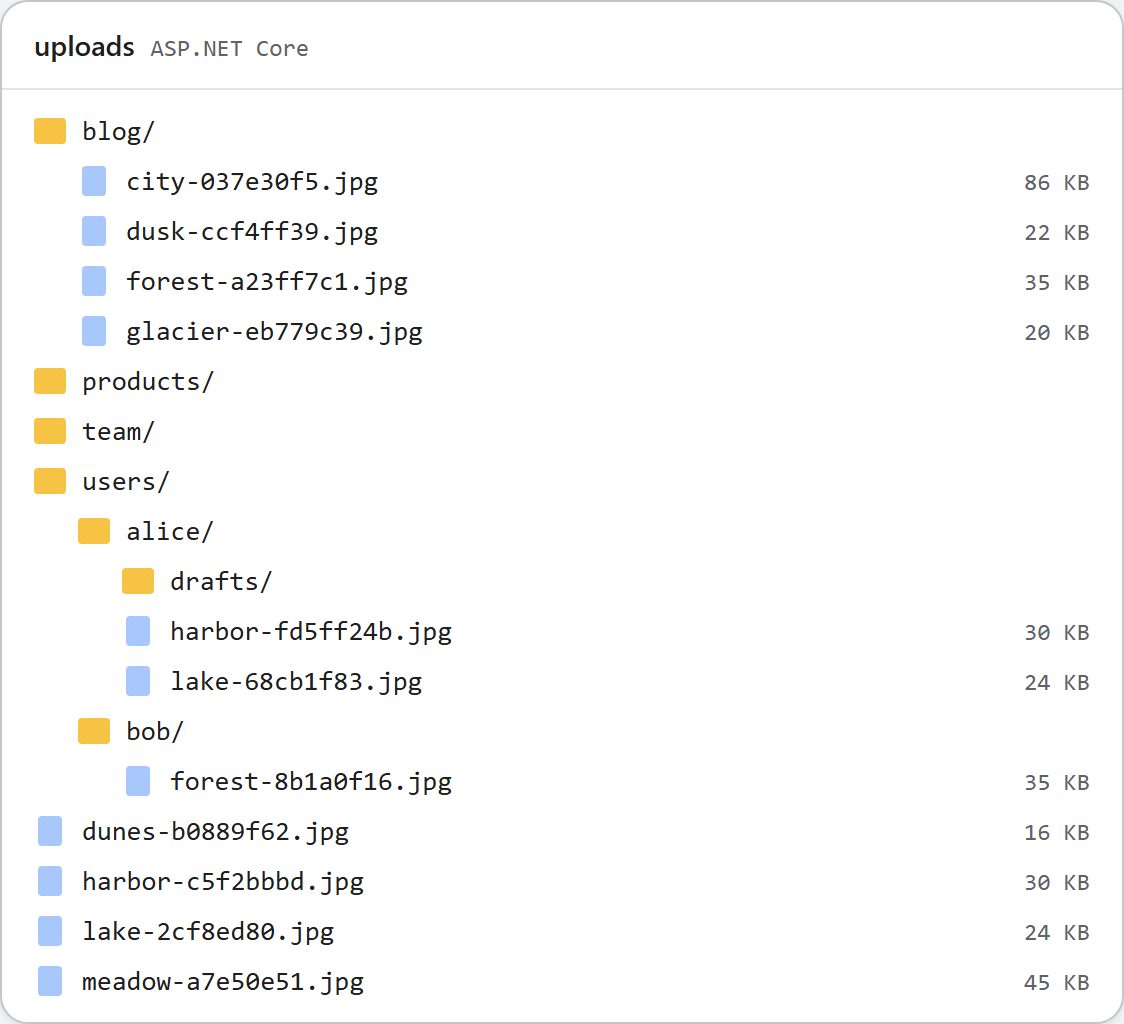
默认情况下,图片库向所有人显示相同的文件夹,这适合公司网站。但在论坛或面向多个客户的应用中,每个人都应该只看到自己的图片。在 ASP.NET Core 示例中,这只需要一个方法 RootFor(HttpContext),由它决定一个请求的文件存放在哪里。本页介绍按用户区分的版本、它所需的登录,以及哪些内容仍然是公开的。
由一个方法决定
每个路由(列表、创建文件夹、上传)都向 RootFor 询问磁盘上的文件夹以及提供该文件夹的 URL。代码的其他部分都不涉及用户。
// Where this request's files live. This is the only method to change for per-user folders.
//   "PerUserFolders": false (default)  everyone shares <content root>/uploads, served at /uploads
//   "PerUserFolders": true             each signed-in user gets uploads/users/<user id>
public static RteRoot RootFor(HttpContext http)
{
    var uploads = UploadsFolder(http.RequestServices.GetRequiredService<IWebHostEnvironment>());
    if (!http.RequestServices.GetRequiredService<IConfiguration>().GetValue<bool>("PerUserFolders"))
        return new RteRoot(uploads, "/uploads");

    // Use the user's id (a GUID with ASP.NET Core Identity), not the user name, which can change.
    var id = http.User.FindFirstValue(ClaimTypes.NameIdentifier)
             ?? throw new RteError(401, "Sign in to use the image gallery.");
    // The id becomes a folder name, so it must pass the same rules as any other folder name.
    if (!IsValidName(id)) throw new RteError(403, "This user id cannot be used as a folder name.");
    return new RteRoot(Path.Combine(uploads, "users", id), "/uploads/users/" + Uri.EscapeDataString(id));
}appsettings.json中的PerUserFolders默认为false。设为true后,每个已登录用户都以uploads/users/<id>/作为自己的图片库根目录。他们的 New folder 按钮和上传都在其中进行,而..无法离开这个目录,因为文件夹检查是针对这个根目录执行的。- id 取自
ClaimTypes.NameIdentifier。使用 ASP.NET Core Identity 时,这个声明保存的是用户的 id,一个永远不会改变的 GUID。用户名或电子邮件地址可能会变,而且在 Windows 上,Alice和alice会成为同一个文件夹。 - 没有用户,就没有图片库。匿名请求会得到
401 {"error":"Sign in to use the image gallery."},对话框显示的是它自己的 "The image gallery is unavailable right now (http-401).",而不是服务器返回的文本。 - id 会像文件夹名一样接受检查。像
../../x这样的 id 会得到 403,而不会变成路径。
登录
示例使用 Cookie 身份验证,ASP.NET Core Identity 也使用这种方案登录。您应用自己的登录功能会替代下面的测试登录。
var builder = WebApplication.CreateBuilder(args);
builder.Services.AddControllersWithViews();
// Your app's sign-in goes here. "PerUserFolders": true in appsettings.json gives each user a folder.
builder.Services.AddAuthentication(CookieAuthenticationDefaults.AuthenticationScheme).AddCookie();
var app = builder.Build();

app.UseStaticFiles();
app.UseRteStaticFiles();          // /uploads, /richtexteditor, /rte-files.js
app.UseAuthentication();
app.UseAuthorization();

app.MapDefaultControllerRoute();  // HomeController.Index at "/", plus RteController's [Route] attributes
为了在不编写登录功能的情况下试用每个用户的文件夹,示例映射了一个仅供测试的登录端点,而且只在 Development 环境中启用。它允许任何人以任何身份登录,因此绝不能出现在真实的服务器上:
// TEST ONLY, and mapped only in Development: /demo/sign-in?user=alice signs anyone in as anyone,
// so per-user folders can be tried without a real login. Never ship this.
if (app.Environment.IsDevelopment())
{
    app.MapGet("/demo/sign-in", async (HttpContext http, string user) =>
    {
        var identity = new ClaimsIdentity([new Claim(ClaimTypes.NameIdentifier, user)], CookieAuthenticationDefaults.AuthenticationScheme);
        await http.SignInAsync(new ClaimsPrincipal(identity));
        return Results.Redirect("/");
    });
}
直接用 dotnet run 运行时(以 Production 环境运行),/demo/sign-in 返回 404。
哪些内容仍然公开
独立的图片库并不会让文件变成私有的。/uploads/users/alice/harbor-fd5ff24b.jpg 与其他所有上传文件由同一个静态文件映射提供,对不带 Cookie 的请求也返回了 200。对于已发布内容中的图片,这通常是正确的:文章的读者必须能够加载其中的图片。文件名中的随机部分让任何人都无法猜出 URL,但拿到这个 URL 的人都能打开它。如果用户的图片必须保持私有,请改为通过一个检查用户身份的端点来提供,而不是使用 UseStaticFiles。示例中没有包含这样的端点。
开启每个用户的文件夹,也不决定谁可以上传。应用有了登录功能后,请在控制器上添加 [Authorize],或者在 Minimal API 组上添加 .RequireAuthorization()。
测试
在 Development 环境中启动本指南的示例项目并开启每个用户的文件夹,然后用两个 Cookie 文件模拟两个用户:
dotnet run -- --environment Development --PerUserFolders true

curl "http://localhost:5302/rte/gallery?folder="
{"error":"Sign in to use the image gallery."}

curl -s -o /dev/null -c alice.jar "http://localhost:5302/demo/sign-in?user=alice"
curl -b alice.jar -F "file=@harbor.jpg" http://localhost:5302/rte/upload
{"url":"/uploads/users/alice/harbor-fd5ff24b.jpg"}

curl -s -o /dev/null -c bob.jar "http://localhost:5302/demo/sign-in?user=bob"
curl -b bob.jar -F "file=@forest.jpg" http://localhost:5302/rte/upload
{"url":"/uploads/users/bob/forest-8b1a0f16.jpg"}

curl -b bob.jar "http://localhost:5302/rte/gallery?folder="
{"currentFolder":"","currentFolderDisplay":"/","parentFolder":null,"folders":[],"images":[{"url":"/uploads/users/bob/forest-8b1a0f16.jpg","name":"forest-8b1a0f16.jpg","folder":"","size":36337}]}
Bob 的图片库只列出了他自己的图片。在浏览器中打开 http://localhost:5302/demo/sign-in?user=alice 并点击 Insert Gallery:只会显示 Alice 的图片和文件夹。本页顶部的图片是之后的 uploads 文件夹,其中 users/alice 和 users/bob 与示例在 PerUserFolders 关闭时使用的共享文件夹并列。
其他平台的同一指南
JavaScript · PHP · MVC 5 · Web Forms