ASP.NET Web Forms でのユーザーごとの画像フォルダー
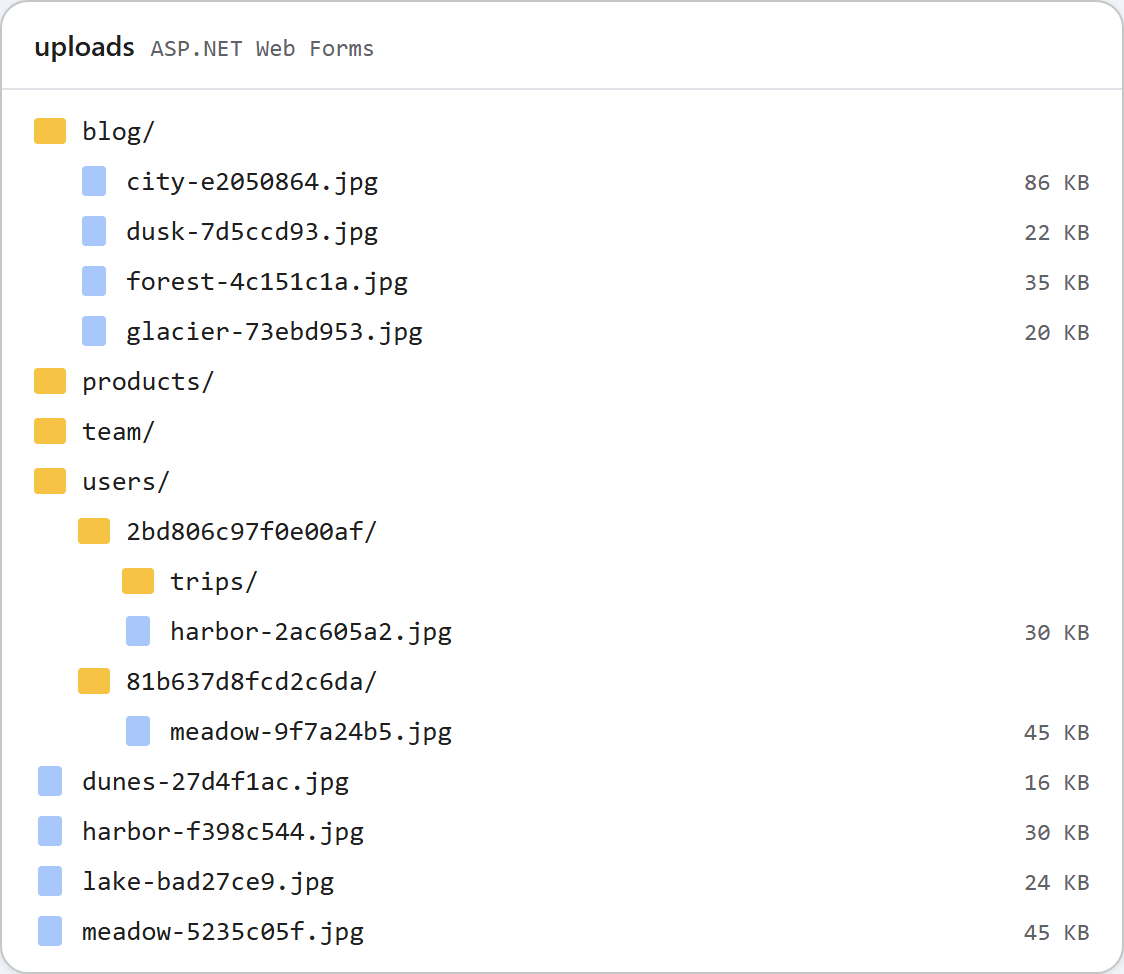
共有の uploads/ フォルダーが 1 つだけだと、エディターのユーザーは全員、ギャラリーでほかのすべてのユーザーの画像を目にします。Web Forms のサンプルでは、RteFiles.RootFor という 1 つのメソッドと、appSettings の 1 つのスイッチでこれを変えられます。スイッチを有効にすると、サインインした各ユーザーには uploads/users/<id>/ が割り当てられ、匿名のリクエストには 401 が返ります。このページでは、その変更、401 を台無しにする Forms 認証のリダイレクト、そしてユーザーごとのフォルダーでは保護できないものを紹介します。
スイッチ
<appSettings>
  <!-- true: each signed-in user gets uploads/users/<id>/ (see RteFiles.RootFor) -->
  <add key="rte:PerUserFolders" value="false" />
</appSettings>
既定では無効で、無効のときのサンプルは ギャラリーのガイドとまったく同じように動作します。この値は、ほかの appSettings の値と同様に WebConfigurationManager.AppSettings で読み取ります。
RootFor
// The storage root for this request, as an app-relative virtual path. Files are written
// to Server.MapPath(root) and served from the same URL, so it stays inside ~/uploads,
// which web.config locks down to static files only.
//
// Default: one shared folder. With <add key="rte:PerUserFolders" value="true" /> in
// web.config, every signed-in user gets ~/uploads/users/<id>/ and anonymous requests get
// 401. /uploads/... is still a public URL: per-user roots keep users out of each other's
// folders in the dialog, they do not make the files private.
public static string RootFor(HttpContext context)
{
    if (WebConfigurationManager.AppSettings["rte:PerUserFolders"] != "true")
        return "~/uploads";

    IPrincipal user = context.User;
    if (user == null || !user.Identity.IsAuthenticated)
        throw new RteException(401, "Sign in to use the image gallery.");
    return "~/uploads/users/" + FolderIdFor(user.Identity.Name);
}

// A folder name for a user: the same user always gets the same folder, and nothing the
// user typed reaches the disk path (a name like "DOMAIN\bob" or "a@b.com" is not a folder name).
// If your users have a numeric id in your database, return that instead.
static string FolderIdFor(string userName)
{
    using (SHA256 sha = SHA256.Create())
    {
        byte[] hash = sha.ComputeHash(Encoding.UTF8.GetBytes(userName.ToLowerInvariant()));
        return BitConverter.ToString(hash, 0, 8).Replace("-", "").ToLowerInvariant();
    }
}
RootFor は、アプリ相対の仮想パスを返します。ほかのすべての処理はこれを基にしています。Server.MapPath はこれを、すべてのフォルダーのチェックの基準となるディスク上のルートに変換し、VirtualPathUtility.ToAbsolute は、すべての画像の URL のプレフィックスに変換します。そのため、一覧の作成、フォルダーの作成、アップロードはすべて一緒に切り替わります。フォルダーは、ユーザーが最初にギャラリーを開いたときに作成されます。
フォルダー名は HttpContext.User から得ますが、入力されたままの形で使うことはありません。DOMAIN\bob や a@b.com のようなサインイン名は、フォルダー名として使えるものではなく、パスに入れるべきものでもありません。サンプルでは、名前を小文字にした値の SHA-256 の先頭 16 文字(16 進数)を使います。データベースにユーザーの数値の ID がある場合は、代わりにそれを返してください。
RootFor が読み取るのは context.User だけなので、Forms 認証、Windows 認証、OWIN の Cookie など、ASP.NET のどのサインイン方式でも動作します。サンプルでは、入力された名前であれば何でもパスワードなしでサインインさせるデモページ SignIn.aspx を使った Forms 認証を使っています。このページは、スイッチが有効でない限り 404 を返します。デプロイしないでください。
<!-- Any ASP.NET sign-in works (Forms, Windows, OWIN cookies): RootFor only reads
     HttpContext.User. SignIn.aspx is a demo stand-in for your real login page. -->
<authentication mode="Forms">
  <forms loginUrl="~/SignIn.aspx" name=".RTEDEMO" />
</authentication>
302 になってしまった 401
スイッチを有効にした最初のテストでは、401 が返りませんでした。匿名の GET /rte/gallery は、/SignIn.aspx?ReturnUrl=%2frte%2fgallery… への 302 として返ってきました。FormsAuthenticationModule は、すべての 401 を loginUrl へのリダイレクトに変えてしまいます。ダイアログの XMLHttpRequest は黙ってリダイレクトをたどり、サインインページの HTML を受け取って、エラーを報告します。修正は JSON を書き出す処理の 1 行で、修正後は同じリクエストが 401 {"error":"Sign in to use the image gallery."} を返しました。
public static void WriteJson(HttpContext context, int status, object value)
{
    HttpResponse response = context.Response;
    response.Clear();
    response.StatusCode = status;
    // Without this, IIS replaces 4xx/5xx bodies with its own error page when
    // <httpErrors errorMode="Custom"> is in effect (the default for remote users).
    response.TrySkipIisCustomErrors = true;
    // FormsAuthenticationModule turns every 401 into a 302 to the login page, which an
    // XMLHttpRequest follows silently and then fails to parse. Keep the 401.
    response.SuppressFormsAuthenticationRedirect = true;
    response.ContentType = "application/json";
    response.Cache.SetCacheability(HttpCacheability.NoCache);
    response.Cache.SetNoStore();
    // JavaScriptSerializer ships with .NET Framework (System.Web.Extensions) and writes
    // property names exactly as declared, so the anonymous objects above are camelCase.
    // Its default MaxJsonLength (2,097,152 chars) would fail a huge folder; lift it.
    JavaScriptSerializer serializer = new JavaScriptSerializer();
    serializer.MaxJsonLength = int.MaxValue;
    response.Write(serializer.Serialize(value));
}
アップロードも最初に RootFor に問い合わせるので、匿名のアップロードは「No file was uploaded.」ではなく 401 になります。
テストした内容
スイッチを有効にした状態で、スクリプトで SignIn.aspx から alice と bob としてサインインし、それぞれの .RTEDEMO Cookie を保持して確認しました。
- alice のアップロードは
/uploads/users/2bd806c97f0e00af/…に、bob のアップロードは/uploads/users/81b637d8fcd2c6da/…に保存されました。 - alice は
tripsを作成しました。これは alice の一覧には表示され、bob の一覧には表示されませんでした。 - alice の場合、
folder=..は 400、folder=usersは 404 になりました。alice のルートは alice 自身のフォルダーなので、users/まで上がって閲覧することはできません。 - alice の画像の URL は、Cookie をまったく付けずに、ステータス 200 で読み込めました。
最後の点は設計どおりです。uploads/ 以下のファイルは、URL を知っている人なら誰にでも IIS が配信する静的ファイルであり、公開ページの画像はすべての読者に対して読み込まれなければならないからです。ユーザーごとのルートは、ダイアログ上でユーザーが互いのフォルダーに入れないようにするものであり、ファイルを非公開にするものではありません。非公開のファイルは、ユーザーをチェックするハンドラーを通して配信し、サイトのフォルダーの外に置いてください。
上の画像は、両方の実行を終えた後の uploads です。共有フォルダーはスイッチを無効にして実行したときのもので、users/ にはサインインしたユーザーごとに 1 つのフォルダーがあります。
テストする
このガイドのサンプルプロジェクトで rte:PerUserFolders を true に設定し、run.ps1 を起動します。次に、以下を実行します。
curl -i "http://localhost:5401/rte/gallery?folder="
HTTP/1.1 401 Unauthorized
{"error":"Sign in to use the image gallery."}
/SignIn.aspx を開き、任意の名前でサインインします。デモページにはサインインしたユーザーが表示され、ギャラリーは uploads/users/ 以下にある自分専用の空のフォルダーを開きます。スイッチを false に戻すと、契約テストは再び合格します(35 項目中 35 項目)。
ほかのプラットフォーム向けの同じガイド
JavaScript · PHP · ASP.NET Core · MVC 5