Per-user image folders in ASP.NET Core
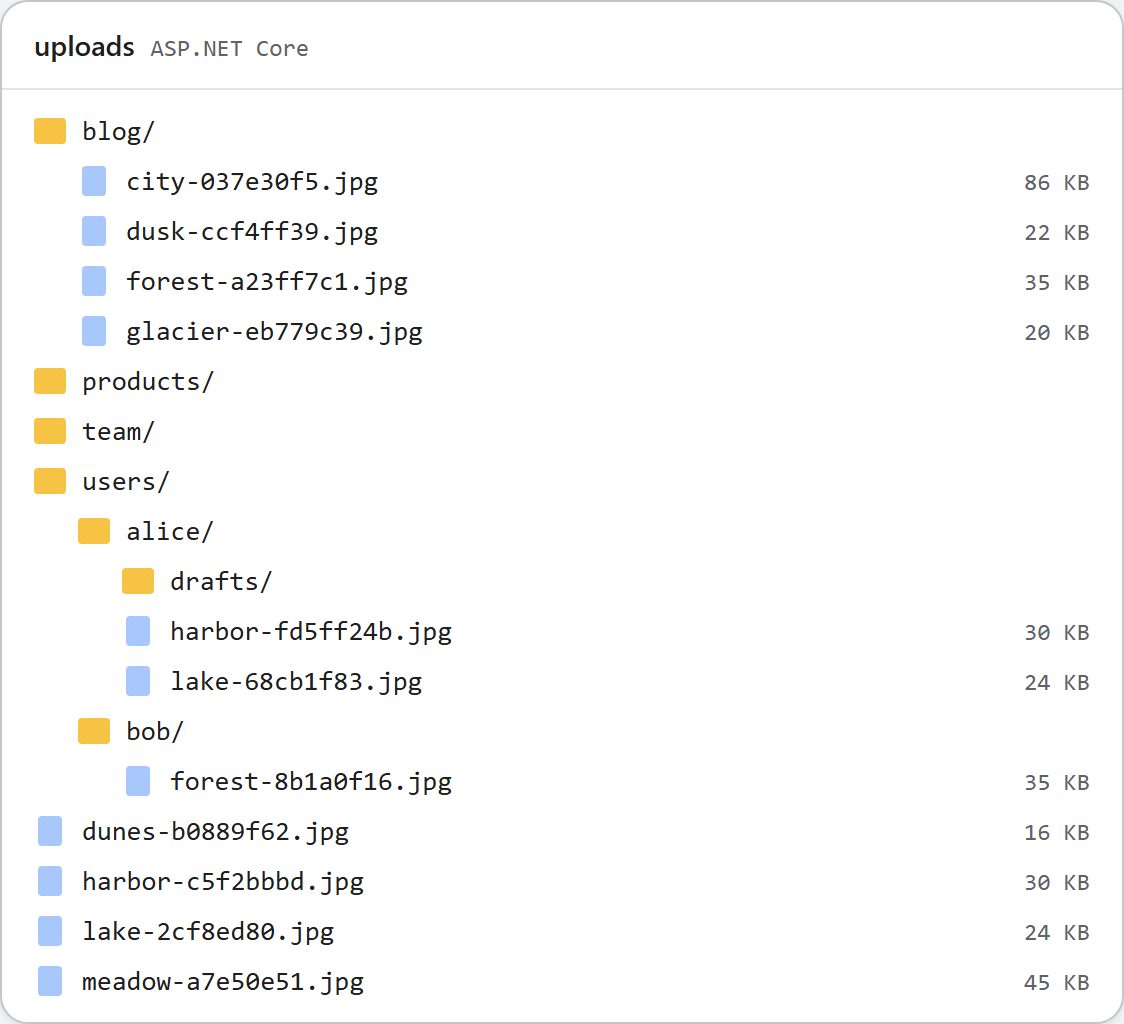
Out of the box the gallery shows everyone the same folders, which suits a company site. In a forum or a multi-customer app each person should only see their own pictures. In the ASP.NET Core samples that is one method, RootFor(HttpContext), which decides where a request's files live. This page shows the per-user version, the sign-in it needs, and what stays public.
One method decides
Every route (list, create folder, upload) asks RootFor for a folder on disk and the URL it is served at. Nothing else in the code knows about users.
// Where this request's files live. This is the only method to change for per-user folders.
//   "PerUserFolders": false (default)  everyone shares <content root>/uploads, served at /uploads
//   "PerUserFolders": true             each signed-in user gets uploads/users/<user id>
public static RteRoot RootFor(HttpContext http)
{
    var uploads = UploadsFolder(http.RequestServices.GetRequiredService<IWebHostEnvironment>());
    if (!http.RequestServices.GetRequiredService<IConfiguration>().GetValue<bool>("PerUserFolders"))
        return new RteRoot(uploads, "/uploads");

    // Use the user's id (a GUID with ASP.NET Core Identity), not the user name, which can change.
    var id = http.User.FindFirstValue(ClaimTypes.NameIdentifier)
             ?? throw new RteError(401, "Sign in to use the image gallery.");
    // The id becomes a folder name, so it must pass the same rules as any other folder name.
    if (!IsValidName(id)) throw new RteError(403, "This user id cannot be used as a folder name.");
    return new RteRoot(Path.Combine(uploads, "users", id), "/uploads/users/" + Uri.EscapeDataString(id));
}PerUserFoldersinappsettings.jsonisfalseby default. Set totrue, each signed-in user getsuploads/users/<id>/as their gallery root. Their New folder button and uploads work inside it, and..cannot leave it, because the folder check runs against this root.- The id is
ClaimTypes.NameIdentifier. With ASP.NET Core Identity that claim holds the user's id, a GUID, which never changes. A user name or e-mail address can change, and on WindowsAliceandalicewould be one folder. - No user, no gallery. An anonymous request gets
401 {"error":"Sign in to use the image gallery."}, and the dialog shows its own "The image gallery is unavailable right now (http-401)." rather than the server's text. - The id is checked like a folder name. An id such as
../../xgets a 403 instead of a path.
Sign-in
The sample uses cookie authentication, the scheme ASP.NET Core Identity also signs in with. Your app's own login replaces the test sign-in below.
var builder = WebApplication.CreateBuilder(args);
builder.Services.AddControllersWithViews();
// Your app's sign-in goes here. "PerUserFolders": true in appsettings.json gives each user a folder.
builder.Services.AddAuthentication(CookieAuthenticationDefaults.AuthenticationScheme).AddCookie();
var app = builder.Build();

app.UseStaticFiles();
app.UseRteStaticFiles();          // /uploads, /richtexteditor, /rte-files.js
app.UseAuthentication();
app.UseAuthorization();

app.MapDefaultControllerRoute();  // HomeController.Index at "/", plus RteController's [Route] attributes
To try per-user folders without building a login, the sample maps a test-only sign-in, and only in the Development environment. It signs anyone in as anyone, so it must never reach a real server:
// TEST ONLY, and mapped only in Development: /demo/sign-in?user=alice signs anyone in as anyone,
// so per-user folders can be tried without a real login. Never ship this.
if (app.Environment.IsDevelopment())
{
    app.MapGet("/demo/sign-in", async (HttpContext http, string user) =>
    {
        var identity = new ClaimsIdentity([new Claim(ClaimTypes.NameIdentifier, user)], CookieAuthenticationDefaults.AuthenticationScheme);
        await http.SignInAsync(new ClaimsPrincipal(identity));
        return Results.Redirect("/");
    });
}
With plain dotnet run, which runs as Production, /demo/sign-in answered 404.
What stays public
Separate galleries do not make the files private. /uploads/users/alice/harbor-fd5ff24b.jpg is served by the same static files mapping as every other upload, and it answered 200 to a request with no cookie. That is usually right for pictures in published content: readers of a post must be able to load its images. The random part of the file name means nobody can guess the URL, but anyone it is shared with can open it. If a user's pictures must stay private, serve them from an endpoint that checks the user instead of from UseStaticFiles. The sample does not include one.
Turning on per-user folders also does not decide who may upload at all. Add [Authorize] to the controller, or .RequireAuthorization() to the Minimal API group, once the app has sign-in.
Test it
Start the sample project for this guide in Development with per-user folders on, then work as two users with two cookie jars:
dotnet run -- --environment Development --PerUserFolders true

curl "http://localhost:5302/rte/gallery?folder="
{"error":"Sign in to use the image gallery."}

curl -s -o /dev/null -c alice.jar "http://localhost:5302/demo/sign-in?user=alice"
curl -b alice.jar -F "file=@harbor.jpg" http://localhost:5302/rte/upload
{"url":"/uploads/users/alice/harbor-fd5ff24b.jpg"}

curl -s -o /dev/null -c bob.jar "http://localhost:5302/demo/sign-in?user=bob"
curl -b bob.jar -F "file=@forest.jpg" http://localhost:5302/rte/upload
{"url":"/uploads/users/bob/forest-8b1a0f16.jpg"}

curl -b bob.jar "http://localhost:5302/rte/gallery?folder="
{"currentFolder":"","currentFolderDisplay":"/","parentFolder":null,"folders":[],"images":[{"url":"/uploads/users/bob/forest-8b1a0f16.jpg","name":"forest-8b1a0f16.jpg","folder":"","size":36337}]}
Bob's gallery lists only his picture. In a browser, open http://localhost:5302/demo/sign-in?user=alice and click Insert Gallery: it shows Alice's pictures and folders only. The picture at the top of this page is the uploads folder afterwards, with users/alice and users/bob beside the shared folders the sample uses while PerUserFolders is off.
The same guide for other platforms
JavaScript · PHP · MVC 5 · Web Forms