Per-user image folders in ASP.NET MVC 5
In the MVC 5 sample, every editor user shares one uploads/ folder until you flip one appSettings switch. With it on, the gallery and upload actions work in uploads/users/<id>/ for the signed-in user and answer anonymous requests with a JSON 401. Getting that 401 to the browser takes one more line than you would expect, and [Authorize] is not the tool for it. This page shows why.
The switch and the root
<!-- true: each signed-in user gets uploads/users/<id>/ (see RteFiles.RootFor) -->
<add key="rte:PerUserFolders" value="false" />
Everything in RteFiles starts from one method. The controller passes its HttpContext (an HttpContextBase), and RootFor returns the app-relative root for that request:
// The storage root for this request, as an app-relative virtual path. Files are written
// to Server.MapPath(root) and served from the same URL, so it stays inside ~/uploads,
// which web.config locks down to static files only.
//
// Default: one shared folder. With <add key="rte:PerUserFolders" value="true" /> in
// web.config, every signed-in user gets ~/uploads/users/<id>/ and anonymous requests get
// 401. /uploads/... is still a public URL: per-user roots keep users out of each other's
// folders in the dialog, they do not make the files private.
public static string RootFor(HttpContextBase context)
{
    if (WebConfigurationManager.AppSettings["rte:PerUserFolders"] != "true")
        return "~/uploads";

    IPrincipal user = context.User;
    if (user == null || !user.Identity.IsAuthenticated)
        throw new RteException(401, "Sign in to use the image gallery.");
    return "~/uploads/users/" + FolderIdFor(user.Identity.Name);
}

// A folder name for a user: the same user always gets the same folder, and nothing the
// user typed reaches the disk path (a name like "DOMAIN\bob" or "a@b.com" is not a folder name).
// If your users have a numeric id in your database, return that instead.
static string FolderIdFor(string userName)
{
    using (SHA256 sha = SHA256.Create())
    {
        byte[] hash = sha.ComputeHash(Encoding.UTF8.GetBytes(userName.ToLowerInvariant()));
        return BitConverter.ToString(hash, 0, 8).Replace("-", "").ToLowerInvariant();
    }
}
The listing, folder creation and upload all resolve their paths inside that root, and image URLs are built from it. So nothing else changes when the switch is on. The folder name is derived from User.Identity.Name (16 hex characters of its SHA-256), never taken from it as typed. If your users have a database id, return that instead.
Why not [Authorize]
[Authorize] on RteController would be the obvious way to require sign-in. Under Forms authentication it does not give the dialog a 401. We put [Authorize] on a throwaway action and requested it anonymously. The answer was 302 to /Account/SignIn?ReturnUrl=%2fProbe%2fSecret, with or without an X-Requested-With: XMLHttpRequest header. [Authorize] returns a 401, and FormsAuthenticationModule rewrites every 401 into a redirect to loginUrl. The dialog's request follows it, gets the sign-in page's HTML, and fails to parse it.
So RootFor throws RteException(401, …), and the controller's JSON helper keeps the status:
// Json() refuses GET unless told otherwise (JsonRequestBehavior.DenyGet is the default)
// and caps output at 2,097,152 characters; both are lifted here. Property names are
// written as declared, so the anonymous objects in RteFiles produce camelCase JSON.
JsonResult JsonStatus(int status, object data)
{
    Response.StatusCode = status;
    // Without this, IIS replaces 4xx bodies with its own error page for remote users.
    Response.TrySkipIisCustomErrors = true;
    // Forms authentication would turn a 401 into a 302 to the login page; keep the 401.
    Response.SuppressFormsAuthenticationRedirect = true;
    Response.Cache.SetCacheability(HttpCacheability.NoCache);
    Response.Cache.SetNoStore();
    return new JsonResult
    {
        Data = data,
        JsonRequestBehavior = JsonRequestBehavior.AllowGet,
        MaxJsonLength = int.MaxValue
    };
}
With SuppressFormsAuthenticationRedirect = true, an anonymous GET /rte/gallery answered 401 {"error":"Sign in to use the image gallery."}. Uploads call RootFor before reading the file, so an anonymous upload gets the same 401.
Signing in
RootFor reads only User, so ASP.NET Identity with OWIN cookies, Forms authentication and Windows authentication all work. The sample uses Forms authentication:
<!-- Any ASP.NET sign-in works (Forms, Windows, OWIN cookies): RootFor only reads
     HttpContext.User. AccountController.SignIn is a demo stand-in for your real login. -->
<authentication mode="Forms">
  <forms loginUrl="~/Account/SignIn" name=".RTEDEMO" />
</authentication>
AccountController.SignIn is a demo that signs in any typed name with no password. Its POST carries [ValidateAntiForgeryToken], and the whole controller answers 404 unless the switch is on. Replace it with your real login. If you use OWIN cookie authentication instead, its own redirect for 401s needs the same care. We did not test that combination.
What we tested
With the switch on, a script fetched the sign-in form, posted it with the antiforgery token for alice and for bob, and used their .RTEDEMO cookies:
- alice's files went to
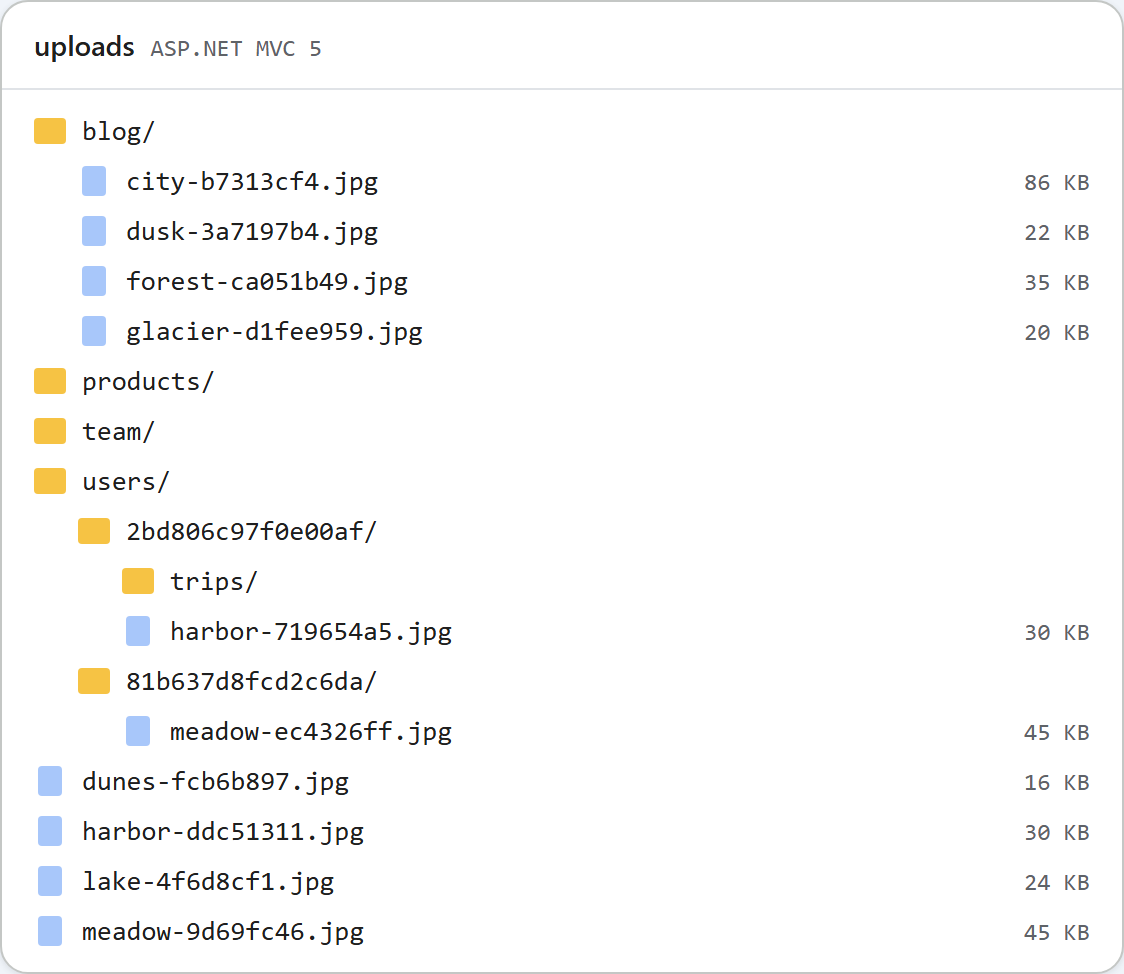
/uploads/users/2bd806c97f0e00af/and bob's to/uploads/users/81b637d8fcd2c6da/. - alice's
tripsfolder appeared in her listing and not in bob's. folder=..gave 400.folder=usersgave 404, because a user's root is their own folder.- alice's image URL returned 200 to a request with no cookie.
That last result is expected. /uploads/ is served by IIS as static files, so anyone with a URL can load the image, which is what a published article needs. Per-user folders separate users in the dialog. They do not make files private.
The picture at the top is the sample's uploads folder after the tests: the shared folders from a run with the switch off, and users/ with one folder per user.
Test it
In the sample project for this guide, set rte:PerUserFolders to true and start run.ps1 (port 5402):
curl -i "http://localhost:5402/rte/gallery?folder="
HTTP/1.1 401 Unauthorized
{"error":"Sign in to use the image gallery."}
Then open /Account/SignIn, sign in, and open Insert Gallery: it starts in your own empty folder. With the switch back on false, the contract test passes 35 of 35.
The same guide for other platforms
JavaScript · PHP · ASP.NET Core · Web Forms