Secure image uploads in ASP.NET Web Forms
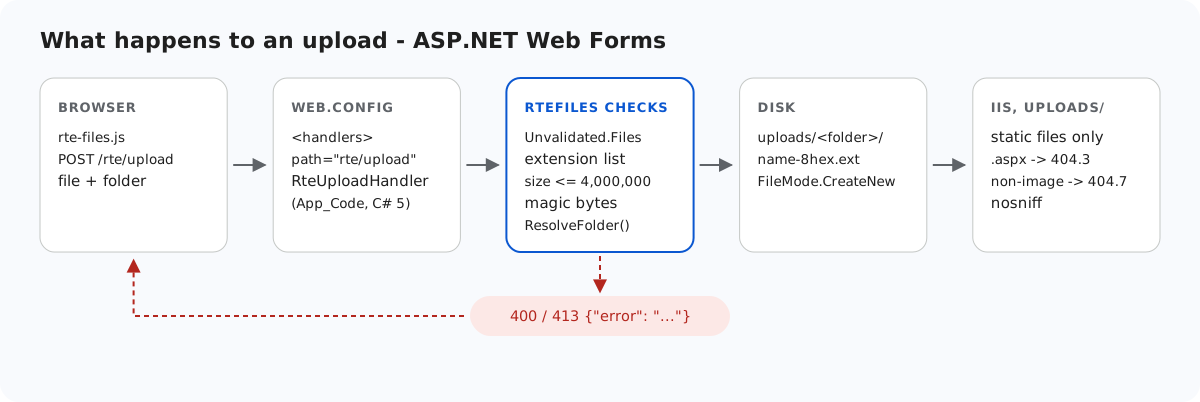
An upload folder inside an ASP.NET site is a folder IIS will happily run code from. If a .aspx file ever lands in it, through a bug, FTP or a later change, IIS compiles and runs it. This page shows the checks the Web Forms sample makes before a byte is written, and the web.config block that keeps uploads/ static even if those checks are someday bypassed. We tested each layer on IIS Express.
Before anything is written
StorageRoot root = GetRoot(context);   // 401 here first in per-user mode
if (file == null || file.ContentLength == 0)
    throw new RteException(400, "No file was uploaded.");

// FileName is whatever the browser sent (old IE sends a full path). Don't feed it
// to Path.GetFileName: on .NET Framework that throws on characters like " < > |.
string clientName = file.FileName ?? "";
clientName = clientName.Substring(Math.Max(clientName.LastIndexOf('/'), clientName.LastIndexOf('\\')) + 1);
int dot = clientName.LastIndexOf('.');
string ext = dot >= 0 ? clientName.Substring(dot).ToLowerInvariant() : "";
if (Array.IndexOf(ImageExtensions, ext) < 0)
    throw new RteException(400, "Only .jpg, .jpeg, .png, .gif and .webp images can be uploaded.");
if (file.ContentLength > MaxUploadBytes)
    throw new RteException(413, "The image is larger than the 4 MB (4,000,000 bytes) limit.");

string dir = ResolveFolder(root, folder ?? "");

byte[] data = new byte[file.ContentLength];
Stream input = file.InputStream;
int read = 0;
while (read < data.Length)
{
    int n = input.Read(data, read, data.Length - read);
    if (n <= 0) break;
    read += n;
}
// file.ContentType is chosen by the browser (or the attacker), so look at the bytes.
if (read != data.Length || !SignatureMatches(ext, data))
throw new RteException(400, "The file is not a valid " + ext.Substring(1).ToUpperInvariant() + " image.");- Extension allow-list: .jpg, .jpeg, .png, .gif, .webp. An
.svgis refused because it can carry script. A.phpor.aspxis refused whatever its bytes are. - Size: 4,000,000 bytes, answered with a JSON 413.
- Magic bytes, not
ContentType.HttpPostedFile.ContentTypeis whatever the browser sent. We posted PNG bytes labelledtext/htmland that is what it said. The sample ignores it and compares the first bytes with the extension's signature:
static bool SignatureMatches(string ext, byte[] d)
{
    switch (ext)
    {
        case ".jpg":
        case ".jpeg":
            return d.Length >= 3 && d[0] == 0xFF && d[1] == 0xD8 && d[2] == 0xFF;
        case ".png":
            return d.Length >= 8 && d[0] == 0x89 && d[1] == 0x50 && d[2] == 0x4E && d[3] == 0x47
                && d[4] == 0x0D && d[5] == 0x0A && d[6] == 0x1A && d[7] == 0x0A;
        case ".gif":
            return d.Length >= 6 && d[0] == 0x47 && d[1] == 0x49 && d[2] == 0x46 && d[3] == 0x38;
        case ".webp":
            return d.Length >= 12 && Encoding.ASCII.GetString(d, 0, 4) == "RIFF"
                && Encoding.ASCII.GetString(d, 8, 4) == "WEBP";
    }
    return false;
}
A file named holiday.jpg that contains PHP source fails this check. A real JPEG with something appended still passes. The signature proves the type, not that the file is harmless, which is why the folder itself is locked down below.
Two .NET Framework details sit in the same code. The client file name is never passed to Path.GetFileName, which throws ArgumentException on < or | on .NET Framework 4.8. The upload handler also reads Request.Unvalidated.Files, because request validation covers file names: a file named <script>x.png otherwise gave an HTML 500. The name is reduced to a-z0-9- and given 8 random hex characters, so nothing the client chose reaches the disk.
Where it can be written
The folder field goes through the same ResolveFolder as the gallery. Every segment must be a valid folder name, and the Path.GetFullPath result must stay inside the root. Gallery folders in Web Forms shows the code. In the contract test, an upload with folder=../ got 400 and a folder that does not exist got 404.
uploads/ serves files and runs nothing
IIS chooses what to run by handler mapping, not by folder. To check, we put a one-line page, <%= 6*7 %>, at the site root as probe-root.aspx. Requesting it returned 42: it ran. The sample's web.config stops that for uploads/:
<!-- Uploaded files are served as static files and nothing else. Clearing the handler list
     means that even if a .aspx, .ashx or .config ever lands in uploads/, IIS will not run
     it - it gets 404, not executed. The extension allow-list also refuses to serve
     anything that is not an image (.html, .svg, .txt ...), wherever it came from. -->
<location path="uploads">
  <system.webServer>
    <handlers>
      <clear />
      <add name="StaticFile" path="*" verb="GET,HEAD" modules="StaticFileModule" resourceType="File" requireAccess="Read" />
    </handlers>
    <security>
      <requestFiltering>
        <fileExtensions allowUnlisted="false">
          <add fileExtension=".jpg" allowed="true" />
          <add fileExtension=".jpeg" allowed="true" />
          <add fileExtension=".png" allowed="true" />
          <add fileExtension=".gif" allowed="true" />
          <add fileExtension=".webp" allowed="true" />
        </fileExtensions>
      </requestFiltering>
    </security>
    <httpProtocol>
      <customHeaders>
        <add name="X-Content-Type-Options" value="nosniff" />
      </customHeaders>
    </httpProtocol>
  </system.webServer>
</location>
<clear />plusStaticFileonly. Before the extension list was added, the same.aspxand a.ashxinsideuploads/answered 404.3. There was no handler to run them and no MIME type to send them as text.fileExtensions allowUnlisted="false". With the allow-list,uploads/probe.aspxand an HTML payload saved asuploads/probe.txtboth answered 404.7, while.pngand.webpwere served.X-Content-Type-Options: nosniffwas present on the served images, so a browser will not guess a different type from the content.
The handlers section is locked by default in IIS's applicationhost.config, but its <location path="" overrideMode="Allow"> block unlocks it for sites, which is why a web.config may change it. We checked this in IIS Express's template and did not test a full IIS server. On a host that locks it, the site fails with a 500.19 configuration error rather than quietly running scripts.
Test it
With the sample project for this guide running on port 5401:
echo "<script>alert(1)</script>" > fake.png
curl -F "file=@fake.png" http://localhost:5401/rte/upload
{"error":"The file is not a valid PNG image."}

curl -F "file=@fake.png;filename=x.svg" http://localhost:5401/rte/upload
{"error":"Only .jpg, .jpeg, .png, .gif and .webp images can be uploaded."}
Both answers are HTTP 400. To see the folder lockdown, copy any .aspx into uploads\ and request it. You get IIS's 404.7 page, not the page's output. In the gallery dialog, a rejected file shows "Upload failed for <name>.". The dialog uses its own message rather than the server's text.
The same guide for other platforms
JavaScript · Next.js · PHP · ASP.NET Core · Razor Pages · MVC 5