Node.js 中每个用户的图片文件夹
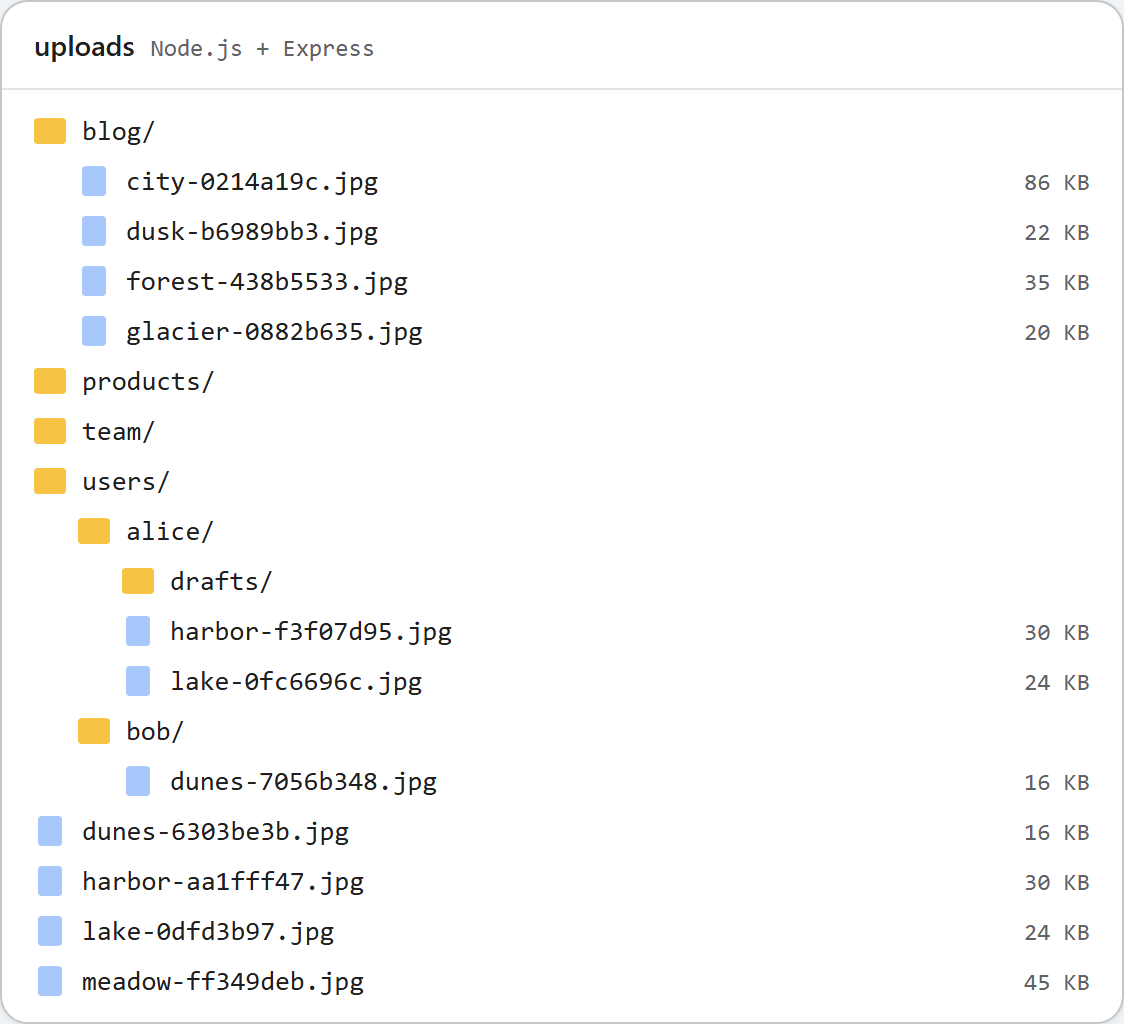
当每个人各自撰写内容时,图片库应该向每个人显示他们自己的图片,而不是所有人的图片。在 Express 示例中,这只需要修改一个函数 rootFor(req),它为每个请求选择存储根目录。本页介绍这个函数、它相对于 multer 的运行顺序,以及每个用户的文件夹不能保护什么。
由一个函数选择根目录
图片库所做的一切(列表、创建文件夹、上传)都发生在 rootFor(req) 返回的文件夹中。默认情况下,它是共享的 uploads/。设置 PER_USER=1 后,它是 uploads/users/<id>/:
// The storage root for this request. Everything the gallery lists, creates or uploads
// stays inside it. Keep it inside UPLOADS_DIR, so the /uploads URLs still work.
// PER_USER=1 gives every user uploads/users/<id>/.
const PER_USER = process.env.PER_USER === "1";

function rootFor(req) {
  if (!PER_USER) return UPLOADS_DIR;
  const user = demoUser(req); // with real logins: req.user.id from your session middleware
  if (!user) throw new GalleryError(401, "Sign in to use the gallery.");
  return path.join(UPLOADS_DIR, "users", user);
}

// Stand-in for a login, for trying PER_USER locally: /demo-login?user=alice sets a cookie.
// Anyone can set any cookie, so this is NOT authentication.
function demoUser(req) {
  const match = /(?:^|;\s*)demo_user=([a-z0-9]{1,32})(?:;|$)/.exec(req.headers.cookie ?? "");
  return match ? match[1] : null;
}
其他部分都不需要改动。Alice 的 drafts 文件夹在磁盘上是 uploads/users/alice/drafts,对话框把它称为 drafts,上传的响应是 /uploads/users/alice/drafts/forest-5e6f80c8.jpg。这个 URL 之所以可用,是因为每个用户的根目录位于 UPLOADS_DIR 内,而示例的每个 URL 都由 UPLOADS_DIR 之下的路径构造。如果返回的文件夹在它之外,URL 就会出错。
在 multer 之前,而不是之后
根目录在 /rte 上的一个中间件中选择,位于 multer 之前:
// Every /rte request gets its storage root first, before multer reads the body.
app.use("/rte", (req, res, next) => {
  req.storageRoot = rootFor(req);
  next();
});

// GET /rte/gallery?folder=products  -> listing
app.get("/rte/gallery", async (req, res) => {
  res.json(await listFolder(req.storageRoot, req.query.folder ?? ""));
});

// POST /rte/gallery  action=create-folder, folder, name  -> listing of the parent folder
app.post("/rte/gallery", parseForm.none(), async (req, res) => {
  const { action, folder, name } = req.body ?? {};
  if (action !== "create-folder") throw new GalleryError(400, "Unknown action.");
  res.json(await createFolder(req.storageRoot, folder ?? "", name));
});

// POST /rte/upload  file, folder  -> { url }
app.post("/rte/upload", parseForm.single("file"), async (req, res) => {
  if (!req.file) throw new GalleryError(400, "No file was uploaded.");
  const url = await saveImage(req.storageRoot, req.body.folder ?? "", req.file.originalname, req.file.buffer);
  res.json({ url });
});
顺序很重要。如果 rootFor() 在上传处理程序内部运行,multer 就会先从任何人(无论是否登录)那里读取最多 4,000,000 字节,然后才拒绝请求。作为中间件,它会在解析请求体之前抛出 GalleryError(401),由 Express 把错误交给错误处理中间件。请以同样的方式把您自己的登录中间件(会话、passport、JWT 检查)放在它之前。
用户 id 从哪里来
id 必须来自您的登录功能,绝不能来自浏览器发送的内容。示例的 demoUser() 读取由 /demo-login?user=alice 设置的 Cookie,这样无需登录系统就能试用两个用户。这个路由只在 PER_USER=1 时存在,并且只接受 a-z 和 0-9。任何人都可以设置任意 Cookie,所以它只是一个替身,而不是身份验证。请把这个调用替换为 req.user.id,或者您的会话中间件提供的其他值。如果这个 id 不是简单的标记(例如电子邮件地址),请先把它映射为数字 id:它会成为文件夹名。
没有用户时,每个 /rte 请求都返回 401 {"error":"Sign in to use the gallery."}。对话框随后显示 "The image gallery is unavailable right now (http-401)."。
同一磁盘上的共享文件夹和每个用户的文件夹
每个用户的根目录位于 uploads/users/ 中。如果同一个文件夹也在共享模式下使用,共享图片库就会列出 users,让任何人都能浏览所有人的文件夹。因此共享根目录把 users 视为保留名称:
// Per-user roots live in uploads/users/<id>/. The shared gallery must not show or touch them.
function isUsersFolder(root, folder) {
  return path.resolve(root) === UPLOADS_DIR && String(folder ?? "").split("/")[0].toLowerCase() === "users";
}
在共享模式下,根目录列表会省略 users,?folder=users/alice 得到 404,向其中上传也得到 404,而创建名为 users 的文件夹得到 400。比较时不区分大小写,因此 Windows 上的 Users 也在覆盖范围内。顶部的图片展示了同一磁盘上的两者:共享的 blog、products 和 team 文件夹,以及 users/alice 和 users/bob。
这不能保护什么
图片仍然是 /uploads/ 下的静态文件。我们在完全不带 Cookie 的情况下打开 Alice 的图片,得到了 200。文件名中的随机部分让 URL 难以猜测,但并不保密:它们出现在每个显示该图片的文档的 HTML 中。如果图片必须保持私有,请把 express.static 挂载替换为一个在发送文件之前检查用户的路由。
测试
用 PER_USER=1 npm start 以每个用户模式启动本指南的示例项目。在 PowerShell 中,先运行 $env:PER_USER=1,再运行 npm start。curl 的 -b 用于发送替身 Cookie:
curl "http://localhost:5101/rte/gallery?folder="
{"error":"Sign in to use the gallery."}

curl -b demo_user=bob -F "file=@photo.jpg" http://localhost:5101/rte/upload
{"url":"/uploads/users/bob/photo-cbf27791.jpg"}

curl -b demo_user=bob "http://localhost:5101/rte/gallery?folder=../alice"
{"error":"Invalid folder."}
在浏览器中打开 http://localhost:5101/demo-login?user=alice 并点击 Insert Gallery,对话框只显示 Alice 的文件夹和图片。打开 /demo-login?user=bob 后,对话框只显示 Bob 的。
其他平台的同一指南
PHP · ASP.NET Core · MVC 5 · Web Forms