PHP 中每个用户的图片文件夹
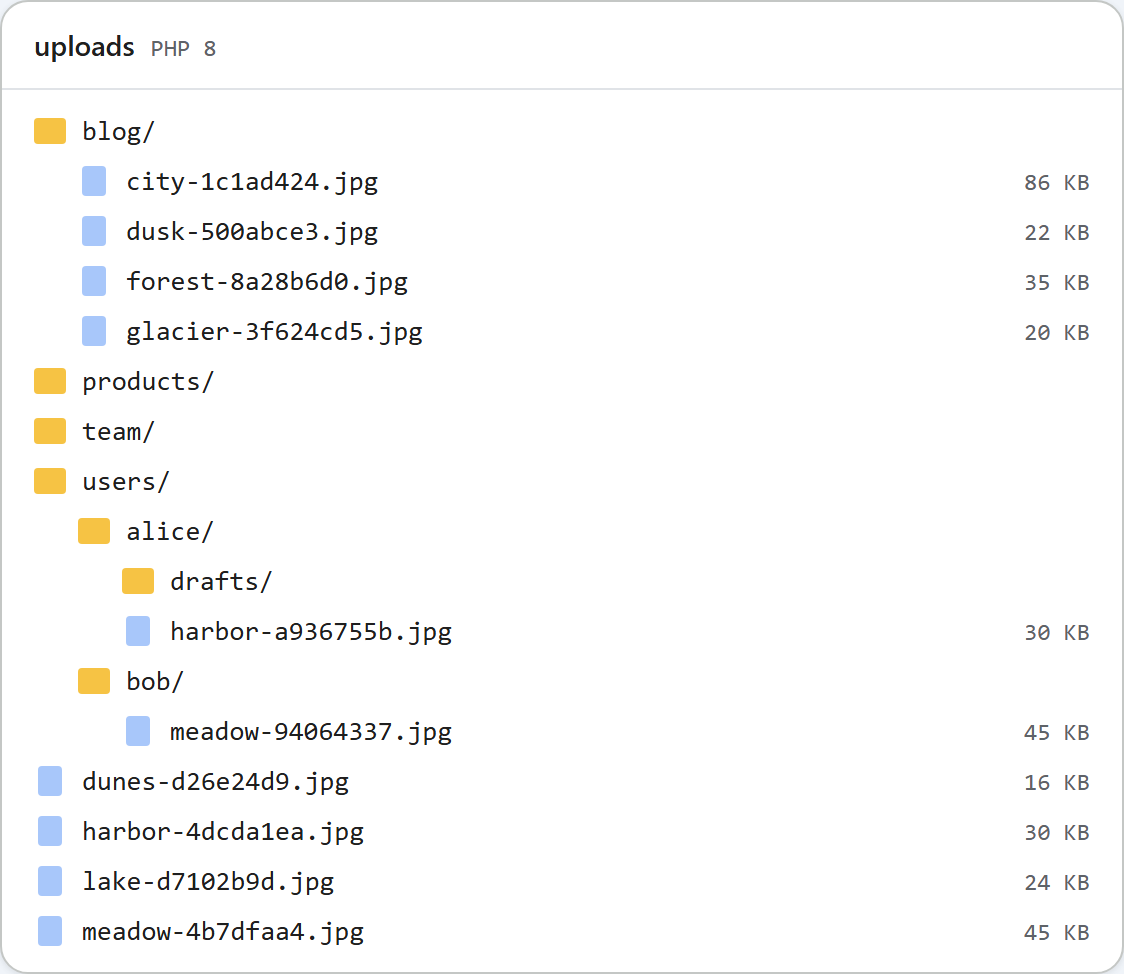
在每个人各自撰写内容的站点上,图片库应该向每个人显示他们自己的图片,而不是所有人的图片。在 PHP 示例中,这只需要修改一个函数:根据 $_SESSION 中的已登录用户,为每个请求选择存储根目录。本页介绍这个函数、如何启用它,以及它能保护什么、不能保护什么。
由一个函数决定文件存放位置
示例中的每个路由(列表、创建文件夹、上传)都从 rte_root_for_request() 获取存储根目录。默认情况下,它返回共享的 uploads/ 文件夹。在环境中设置 RTE_PER_USER=1 后,它为已登录用户返回 uploads/users/<id>/:
// The one place that decides WHERE files live.
// Returns ['dir' => folder on disk, 'url' => public URL of that folder].
// Default: one shared folder. With RTE_PER_USER=1: uploads/users/<id>/ per signed-in user.
function rte_root_for_request(): array
{
    if (getenv('RTE_PER_USER') !== '1') {
        return ['dir' => __DIR__ . '/../uploads', 'url' => '/uploads'];
    }
    $id = rte_current_user_id();
    return ['dir' => __DIR__ . '/../uploads/users/' . $id, 'url' => '/uploads/users/' . $id];
}

// In shared mode, uploads/users/ holds other people's folders: never list or open it.
function rte_is_reserved(array $segments): bool
{
    return getenv('RTE_PER_USER') !== '1' && isset($segments[0]) && strcasecmp($segments[0], 'users') === 0;
}

// The signed-in user's id, from YOUR login (here: the PHP session). Never from the request.
function rte_current_user_id(): string
{
    if (session_status() !== PHP_SESSION_ACTIVE) {
        session_start();
    }
    $id = (string)($_SESSION['user_id'] ?? '');
    // PHP locks the session file until the request ends; release it so the
    // gallery's requests do not wait for each other.
    session_write_close();
    // The id becomes a folder name, so it must be a plain token.
    if (!preg_match('/\A[A-Za-z0-9_-]{1,64}\z/', $id)) {
        throw new RteHttpError(401, 'Sign in to use the image gallery.');
    }
    return $id;
}
由于文件夹检查、列表和 move_uploaded_file() 都在这个根目录内工作,其他部分都不需要改动。用户的 drafts 文件夹在磁盘上是 uploads/users/alice/drafts,但图片库把它称为 drafts,返回的 URL 是 /uploads/users/alice/drafts/...。
用户 id 从哪里来
id 必须来自您自己的登录功能,绝不能来自请求。在示例中,它从 $_SESSION['user_id'] 读取。在它成为文件夹名之前,还会检查它是否为简单的标记。如果您的 id 是电子邮件地址,请改用数据库中的数字 id。
调用 session_write_close() 是由 PHP 的工作方式决定的。使用默认的文件会话时,PHP 会锁定会话直到请求结束,因此同一浏览器发出的图片库请求会互相等待。确定根目录只需要 id,所以读取之后立即释放会话。
没有有效会话时,每个路由都返回 401 {"error":"Sign in to use the image gallery."}。此时对话框打开时会显示 "The image gallery is unavailable right now (http-401)."。
不使用登录系统进行试用
示例项目包含 demo-login.php,用于试用两个用户。它设置的会话值与您的登录代码会设置的相同:
session_start();
session_regenerate_id(true);           // new session id at every sign-in
$user = $_GET['user'] ?? '';
if (in_array($user, ['alice', 'bob'], true)) {
    $_SESSION['user_id'] = $user;      // what rte_current_user_id() reads
} else {
    unset($_SESSION['user_id']);
}
它只能在 PHP 内置服务器下运行(会检查 PHP_SAPI),本指南的路由也不依赖它。请删除它,并在您自己的登录代码中,于密码检查之后设置 $_SESSION['user_id'],同时调用 session_regenerate_id(true)。
同一磁盘上的共享模式和每个用户模式
每个用户的文件夹位于 uploads/users/ 下。如果您在同一个文件夹上运行共享模式,所有人的文件夹都会在共享图片库中可见。因此在共享模式下,示例会在根目录列表中隐藏 users,对 ?folder=users/alice 返回 404,并拒绝创建名为 users 的文件夹。顶部的图片展示了同一磁盘上的两者:共享的 blog、products 和 team 文件夹,以及每个用户模式下的 users/alice 和 users/bob。
这不能保护什么
图片仍然作为静态文件从 /uploads/ 提供。任何拿到 Bob 图片 URL 的人,无论是否登录,都能打开它。保存的文件名中的随机部分让 URL 难以猜测,但并不能使其保密:它们会出现在每个显示该图片的文档的 HTML 中。如果图片必须保持私有,请通过一个检查会话的 PHP 脚本提供它们,并把 uploads/ 放在文档根目录之外。
测试
以每个用户模式启动本指南的示例项目。在 PowerShell 中,请改为先设置 $env:RTE_PER_USER=1。
RTE_PER_USER=1 php -d upload_max_filesize=5M -d display_errors=0 -d log_errors=1 -S localhost:5201 router.php然后用不同的 Cookie 文件以两个用户身份登录,各上传一张图片:
curl "http://localhost:5201/rte/gallery?folder="
{"error":"Sign in to use the image gallery."}

curl -c alice.txt -b alice.txt "http://localhost:5201/demo-login?user=alice"
curl -c bob.txt -b bob.txt "http://localhost:5201/demo-login?user=bob"

curl -b alice.txt -F "file=@harbor.jpg" http://localhost:5201/rte/upload
{"url":"/uploads/users/alice/harbor-a936755b.jpg"}
curl -b bob.txt -F "file=@meadow.jpg" http://localhost:5201/rte/upload
{"url":"/uploads/users/bob/meadow-94064337.jpg"}

curl -b bob.txt "http://localhost:5201/rte/gallery?folder=..%2Falice"
{"error":"Invalid folder."}
Bob 的列表中只有 meadow-94064337.jpg。Bob 按名称请求 Alice 的文件夹(?folder=drafts)会得到 404,而他自己伪造的会话 Cookie 会得到 401。在浏览器中打开 /demo-login?user=alice,再打开 Insert Gallery,即可看到 Alice 的文件夹。
其他平台的同一指南
JavaScript · ASP.NET Core · MVC 5 · Web Forms