ASP.NET Web Forms 中每个用户的图片文件夹
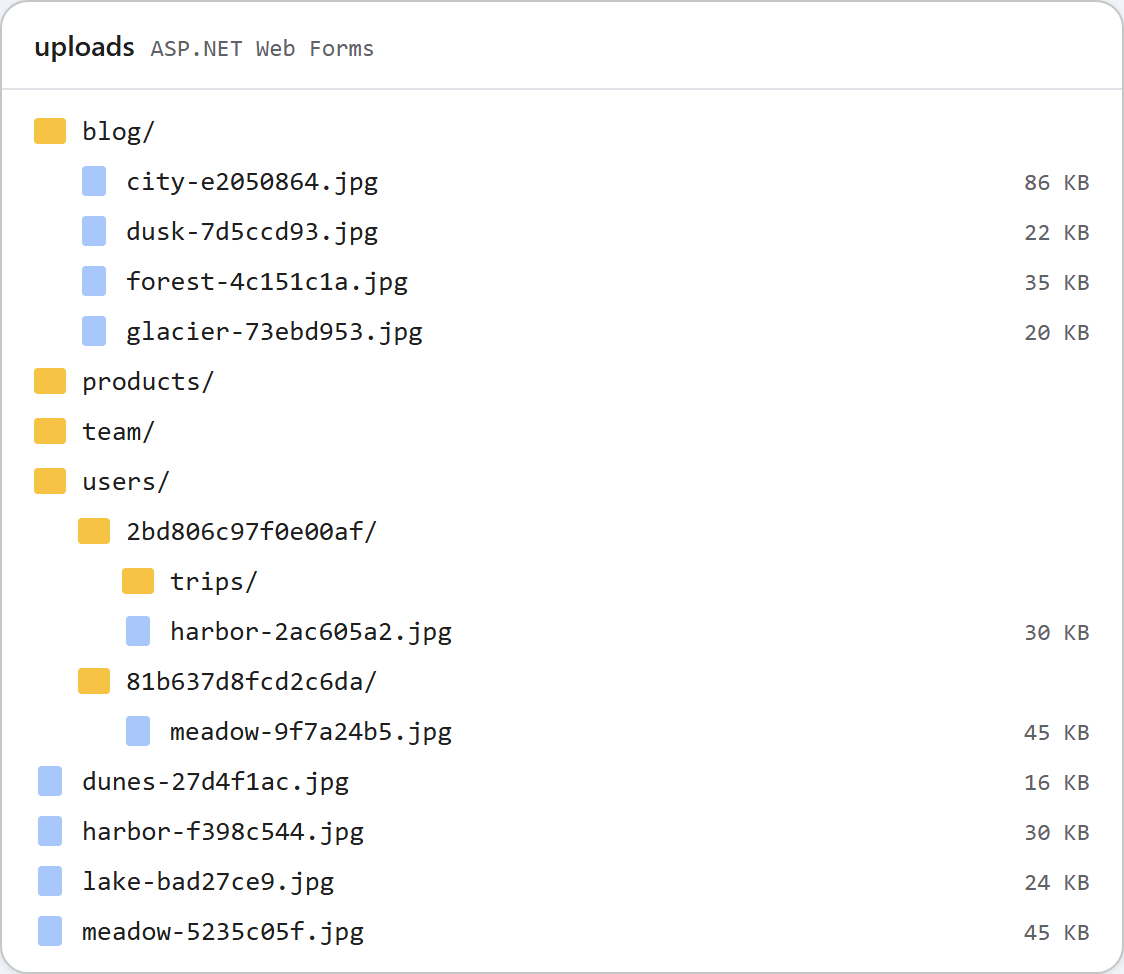
如果只有一个共享的 uploads/ 文件夹,每个编辑器用户都能在图片库中看到其他所有用户的图片。Web Forms 示例用一个方法 RteFiles.RootFor 和一个 appSettings 开关改变了这一点。打开开关后,每个已登录用户都会得到 uploads/users/<id>/,匿名请求则得到 401。本页介绍这项改动、破坏 401 的 Forms 身份验证重定向,以及每个用户的文件夹不能保护什么。
开关
<appSettings>
  <!-- true: each signed-in user gets uploads/users/<id>/ (see RteFiles.RootFor) -->
  <add key="rte:PerUserFolders" value="false" />
</appSettings>它默认关闭,关闭时示例的行为与图片库指南中完全相同。它和其他任何 appSettings 值一样,用 WebConfigurationManager.AppSettings 读取。
RootFor
// The storage root for this request, as an app-relative virtual path. Files are written
// to Server.MapPath(root) and served from the same URL, so it stays inside ~/uploads,
// which web.config locks down to static files only.
//
// Default: one shared folder. With <add key="rte:PerUserFolders" value="true" /> in
// web.config, every signed-in user gets ~/uploads/users/<id>/ and anonymous requests get
// 401. /uploads/... is still a public URL: per-user roots keep users out of each other's
// folders in the dialog, they do not make the files private.
public static string RootFor(HttpContext context)
{
    if (WebConfigurationManager.AppSettings["rte:PerUserFolders"] != "true")
        return "~/uploads";

    IPrincipal user = context.User;
    if (user == null || !user.Identity.IsAuthenticated)
        throw new RteException(401, "Sign in to use the image gallery.");
    return "~/uploads/users/" + FolderIdFor(user.Identity.Name);
}

// A folder name for a user: the same user always gets the same folder, and nothing the
// user typed reaches the disk path (a name like "DOMAIN\bob" or "a@b.com" is not a folder name).
// If your users have a numeric id in your database, return that instead.
static string FolderIdFor(string userName)
{
    using (SHA256 sha = SHA256.Create())
    {
        byte[] hash = sha.ComputeHash(Encoding.UTF8.GetBytes(userName.ToLowerInvariant()));
        return BitConverter.ToString(hash, 0, 8).Replace("-", "").ToLowerInvariant();
    }
}
RootFor 返回一个相对于应用的虚拟路径,其他一切都以它为基础。Server.MapPath 把它转换为磁盘根目录,每个文件夹都要针对这个根目录进行检查;VirtualPathUtility.ToAbsolute 把它转换为每张图片的 URL 前缀。因此列表、创建文件夹和上传会一起切换。用户第一次打开图片库时,会创建该文件夹。
文件夹名称来自 HttpContext.User,但绝不按原样使用。DOMAIN\bob 或 a@b.com 这样的登录名不是可用的文件夹名,也不适合放进路径中。示例使用小写名称的 SHA-256 的前 16 个十六进制字符。如果您的用户在数据库中有数字 id,请改为返回该 id。
RootFor 只读取 context.User,因此任何 ASP.NET 登录方式都可以使用:Forms 身份验证、Windows 身份验证或 OWIN Cookie。示例使用 Forms 身份验证,配合一个演示页面 SignIn.aspx,它无需密码,输入任何名称都能登录。除非打开开关,否则该页面返回 404。请不要部署它。
<!-- Any ASP.NET sign-in works (Forms, Windows, OWIN cookies): RootFor only reads
     HttpContext.User. SignIn.aspx is a demo stand-in for your real login page. -->
<authentication mode="Forms">
  <forms loginUrl="~/SignIn.aspx" name=".RTEDEMO" />
</authentication>
变成 302 的 401
打开开关后的第一次测试并没有返回 401。匿名的 GET /rte/gallery 返回的是重定向到 /SignIn.aspx?ReturnUrl=%2frte%2fgallery… 的 302。FormsAuthenticationModule 会把每个 401 改写为重定向到 loginUrl。对话框的 XMLHttpRequest 会悄悄跟随重定向,拿到登录页面的 HTML,然后报告错误。修复方法是在 JSON 输出代码中加一行,之后同样的请求返回了 401 {"error":"Sign in to use the image gallery."}:
public static void WriteJson(HttpContext context, int status, object value)
{
    HttpResponse response = context.Response;
    response.Clear();
    response.StatusCode = status;
    // Without this, IIS replaces 4xx/5xx bodies with its own error page when
    // <httpErrors errorMode="Custom"> is in effect (the default for remote users).
    response.TrySkipIisCustomErrors = true;
    // FormsAuthenticationModule turns every 401 into a 302 to the login page, which an
    // XMLHttpRequest follows silently and then fails to parse. Keep the 401.
    response.SuppressFormsAuthenticationRedirect = true;
    response.ContentType = "application/json";
    response.Cache.SetCacheability(HttpCacheability.NoCache);
    response.Cache.SetNoStore();
    // JavaScriptSerializer ships with .NET Framework (System.Web.Extensions) and writes
    // property names exactly as declared, so the anonymous objects above are camelCase.
    // Its default MaxJsonLength (2,097,152 chars) would fail a huge folder; lift it.
    JavaScriptSerializer serializer = new JavaScriptSerializer();
    serializer.MaxJsonLength = int.MaxValue;
    response.Write(serializer.Serialize(value));
}
上传也会先询问 RootFor,因此匿名上传得到的是 401,而不是 "No file was uploaded."。
我们测试了什么
在开关打开的情况下,一个脚本通过 SignIn.aspx 分别以 alice 和 bob 登录,保留各自的 .RTEDEMO Cookie,结果如下:
- alice 的上传保存到
/uploads/users/2bd806c97f0e00af/…,bob 的保存到/uploads/users/81b637d8fcd2c6da/…。 - alice 创建了
trips。它出现在她的列表中,而没有出现在 bob 的列表中。 - 对于 alice,
folder=..得到 400,folder=users得到 404。她的根目录就是她自己的文件夹,因此无法向上浏览到users/。 - alice 的图片 URL 在完全不带 Cookie 的情况下也能加载,状态码为 200。
最后一点是有意为之的。uploads/ 下的文件是静态文件,IIS 会把它们提供给任何拿到 URL 的人,而已发布页面中的图片必须能被每位读者加载。每个用户的根目录让用户在对话框中无法进入彼此的文件夹,但并不会让文件变成私有的。对于私有文件,请通过一个检查用户的处理程序来提供,并把它们放在站点文件夹之外。
上方的图片显示了两次运行之后的 uploads。共享文件夹来自开关关闭时的运行,users/ 中每个已登录用户各有一个文件夹。
测试
在本指南的示例项目中,把 rte:PerUserFolders 设置为 true,然后启动 run.ps1。接着执行:
curl -i "http://localhost:5401/rte/gallery?folder="
HTTP/1.1 401 Unauthorized
{"error":"Sign in to use the image gallery."}
打开 /SignIn.aspx 并以任意名称登录。演示页面会显示您的身份,图片库会打开您在 uploads/users/ 下自己的空文件夹。把开关改回 false 后,契约测试再次全部通过(35 项中的 35 项)。
其他平台的同一指南
JavaScript · PHP · ASP.NET Core · MVC 5