Per-user image folders in Node.js
When each person writes their own content, the gallery should show each of them their own images, not everyone's. In the Express sample that is a change to one function, rootFor(req), which picks the storage root for every request. This page shows that function, the order it has to run in relative to multer, and what per-user folders do not protect.
One function picks the root
Everything the gallery does (listing, creating a folder, uploading) happens inside the folder rootFor(req) returns. By default that is the shared uploads/. With PER_USER=1 it is uploads/users/<id>/:
// The storage root for this request. Everything the gallery lists, creates or uploads
// stays inside it. Keep it inside UPLOADS_DIR, so the /uploads URLs still work.
// PER_USER=1 gives every user uploads/users/<id>/.
const PER_USER = process.env.PER_USER === "1";

function rootFor(req) {
  if (!PER_USER) return UPLOADS_DIR;
  const user = demoUser(req); // with real logins: req.user.id from your session middleware
  if (!user) throw new GalleryError(401, "Sign in to use the gallery.");
  return path.join(UPLOADS_DIR, "users", user);
}

// Stand-in for a login, for trying PER_USER locally: /demo-login?user=alice sets a cookie.
// Anyone can set any cookie, so this is NOT authentication.
function demoUser(req) {
  const match = /(?:^|;\s*)demo_user=([a-z0-9]{1,32})(?:;|$)/.exec(req.headers.cookie ?? "");
  return match ? match[1] : null;
}
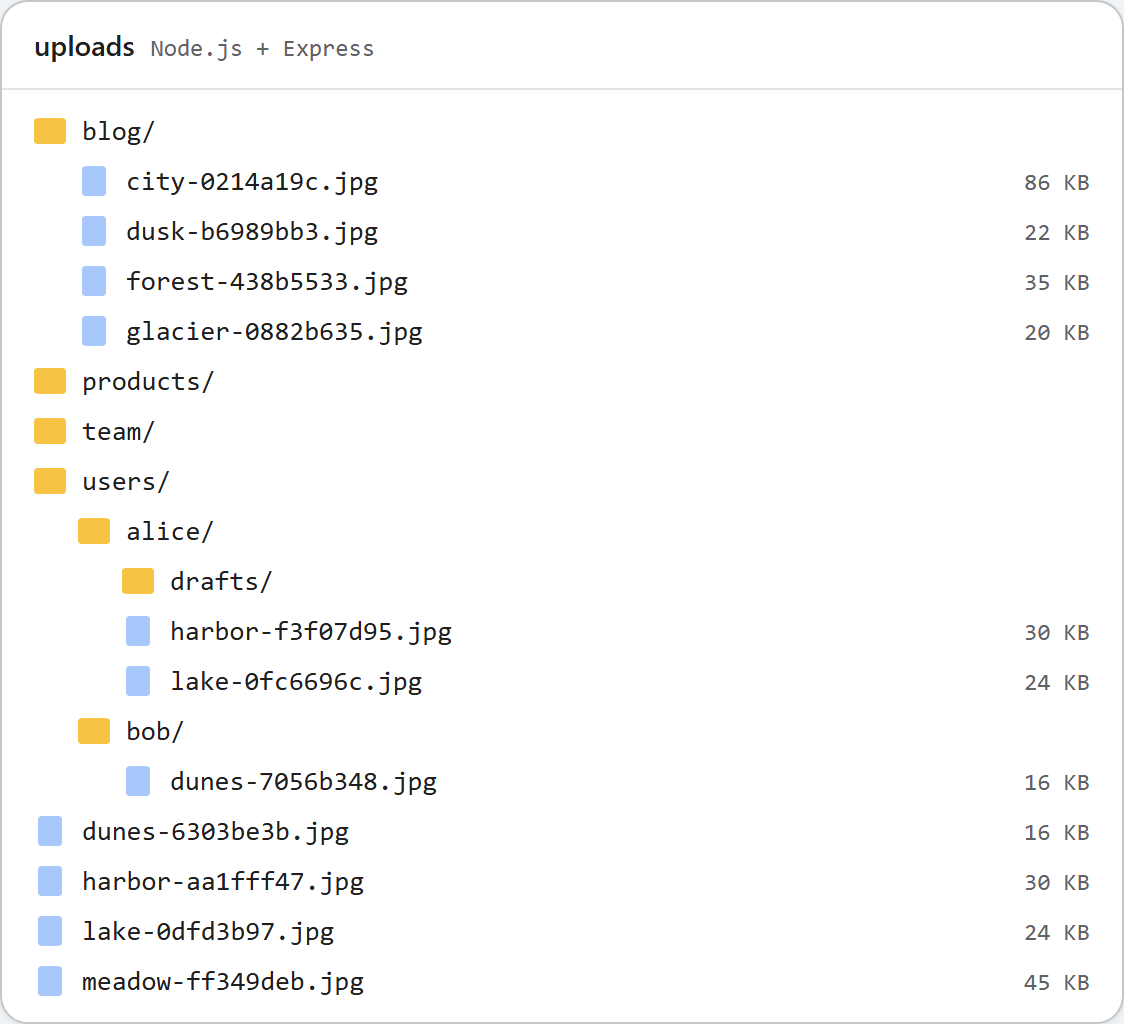
Nothing else changes. Alice's drafts folder is uploads/users/alice/drafts on disk, the dialog calls it drafts, and the upload answer is /uploads/users/alice/drafts/forest-5e6f80c8.jpg. The URL works because the per-user root is inside UPLOADS_DIR, and the sample builds every URL from the path below UPLOADS_DIR. If you return a folder outside it, the URLs come out wrong.
Before multer, not after
The root is chosen in a middleware on /rte, ahead of multer:
// Every /rte request gets its storage root first, before multer reads the body.
app.use("/rte", (req, res, next) => {
  req.storageRoot = rootFor(req);
  next();
});

// GET /rte/gallery?folder=products  -> listing
app.get("/rte/gallery", async (req, res) => {
  res.json(await listFolder(req.storageRoot, req.query.folder ?? ""));
});

// POST /rte/gallery  action=create-folder, folder, name  -> listing of the parent folder
app.post("/rte/gallery", parseForm.none(), async (req, res) => {
  const { action, folder, name } = req.body ?? {};
  if (action !== "create-folder") throw new GalleryError(400, "Unknown action.");
  res.json(await createFolder(req.storageRoot, folder ?? "", name));
});

// POST /rte/upload  file, folder  -> { url }
app.post("/rte/upload", parseForm.single("file"), async (req, res) => {
  if (!req.file) throw new GalleryError(400, "No file was uploaded.");
  const url = await saveImage(req.storageRoot, req.body.folder ?? "", req.file.originalname, req.file.buffer);
  res.json({ url });
});
The order matters. If rootFor() ran inside the upload handler, multer would first read up to 4,000,000 bytes from anyone, signed in or not, and only then would the request be refused. As a middleware, it throws GalleryError(401) before the body is parsed, and Express hands the error to the error middleware. Put your own login middleware (sessions, passport, a JWT check) in front of it in the same way.
Where the user id comes from
The id must come from your login, never from something the browser sends. The sample's demoUser() reads a cookie set by /demo-login?user=alice, so you can try two users without a login system. That route exists only with PER_USER=1 and accepts only a-z and 0-9. Anyone can set any cookie, so it is a stand-in, not authentication. Replace the call with req.user.id, or whatever your session middleware provides. If that id is not a plain token (an e-mail address, say), map it to a numeric id first: it becomes a folder name.
Without a user, every /rte request answers 401 {"error":"Sign in to use the gallery."}. The dialog then shows "The image gallery is unavailable right now (http-401)."
Shared and per-user folders on one disk
Per-user roots live in uploads/users/. If the same folder is also used in shared mode, the shared gallery would list users and let anyone browse into everyone's folders. So the shared root treats users as reserved:
// Per-user roots live in uploads/users/<id>/. The shared gallery must not show or touch them.
function isUsersFolder(root, folder) {
  return path.resolve(root) === UPLOADS_DIR && String(folder ?? "").split("/")[0].toLowerCase() === "users";
}
In shared mode the root listing leaves users out, ?folder=users/alice gets a 404, an upload into it gets a 404, and creating a folder called users gets a 400. The comparison ignores case, so Users on Windows is covered too. The picture at the top shows both on one disk: the shared blog, products and team folders, and users/alice and users/bob.
What this does not protect
The images are still static files under /uploads/. We opened Alice's picture with no cookie at all and got a 200. The random part of the name makes the URLs hard to guess, but not secret: they are in the HTML of every document that shows the picture. If images must be private, replace the express.static mount with a route that checks the user before it sends the file.
Test it
Start the sample project for this guide in per-user mode with PER_USER=1 npm start. In PowerShell, run $env:PER_USER=1 first, then npm start. curl's -b sends the stand-in cookie:
curl "http://localhost:5101/rte/gallery?folder="
{"error":"Sign in to use the gallery."}

curl -b demo_user=bob -F "file=@photo.jpg" http://localhost:5101/rte/upload
{"url":"/uploads/users/bob/photo-cbf27791.jpg"}

curl -b demo_user=bob "http://localhost:5101/rte/gallery?folder=../alice"
{"error":"Invalid folder."}
In the browser, open http://localhost:5101/demo-login?user=alice and click Insert Gallery. The dialog shows only Alice's folders and images. Open /demo-login?user=bob and the dialog shows only Bob's.
The same guide for other platforms
PHP · ASP.NET Core · MVC 5 · Web Forms