Add an image gallery to a rich text editor in PHP
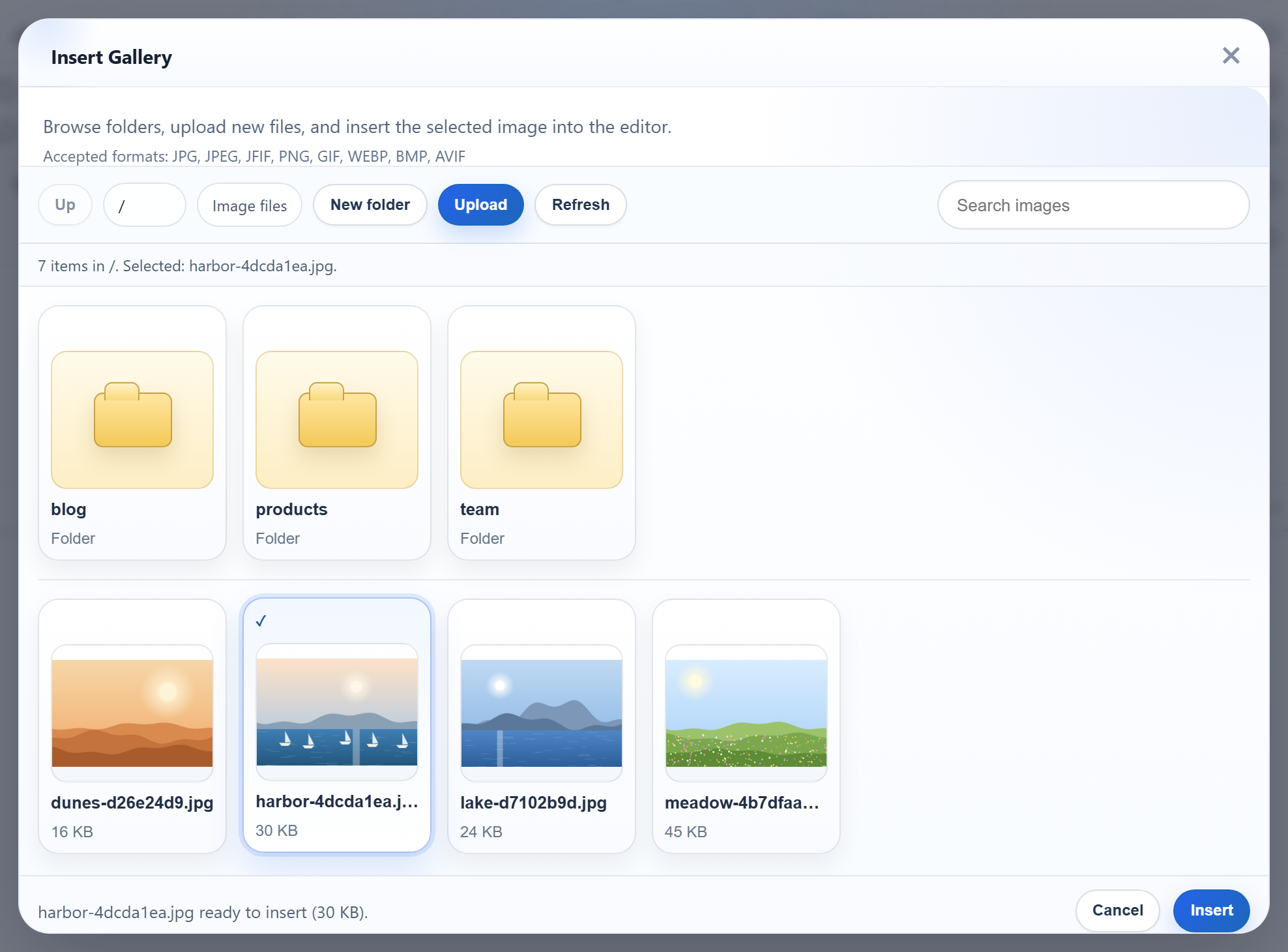
The editor's Insert Gallery dialog can show the images that are already on your server, so people pick a picture instead of uploading the same one again. All it needs is one URL that answers with JSON. This page gives you that endpoint in plain PHP 8: a script that reads a folder under uploads/ with scandir() and lists its subfolders and images.
Turn the gallery on
Set galleryEndpoint when you create the editor. The dialog then asks that URL for a listing each time it opens or changes folder.
<link rel="stylesheet" href="/richtexteditor/rte_theme_default.css">
<script src="/richtexteditor/rte.js"></script>
<script src="/richtexteditor/plugins/all_plugins.js"></script>
<script src="/rte-files.js"></script>
<script>
    new RichTextEditor("#editor", {
        toolbar: "full",
        galleryEndpoint: "/rte/gallery",
        maxUploadFileSize: 4000000     // same limit as rte/upload.php, checked before sending
    });
</script>
rte-files.js is the small browser file that sends uploads from the dialog to /rte/upload. The image upload guide shows the server side of that.
The route
GET /rte/gallery?folder=blog returns the listing of one folder. The script is short, because the work is in two helpers:
if ($method === 'GET') {
    return rte_listing(rte_resolve_folder($_GET['folder'] ?? ''));
}
rte_resolve_folder() turns the virtual folder from the query string into a real directory inside the storage root, or answers 400 or 404. The folders guide explains it. rte_listing() builds the JSON.
What the gallery receives
The dialog needs the current folder, its parent (null at the root), the subfolders, and the images with their URLs and sizes:
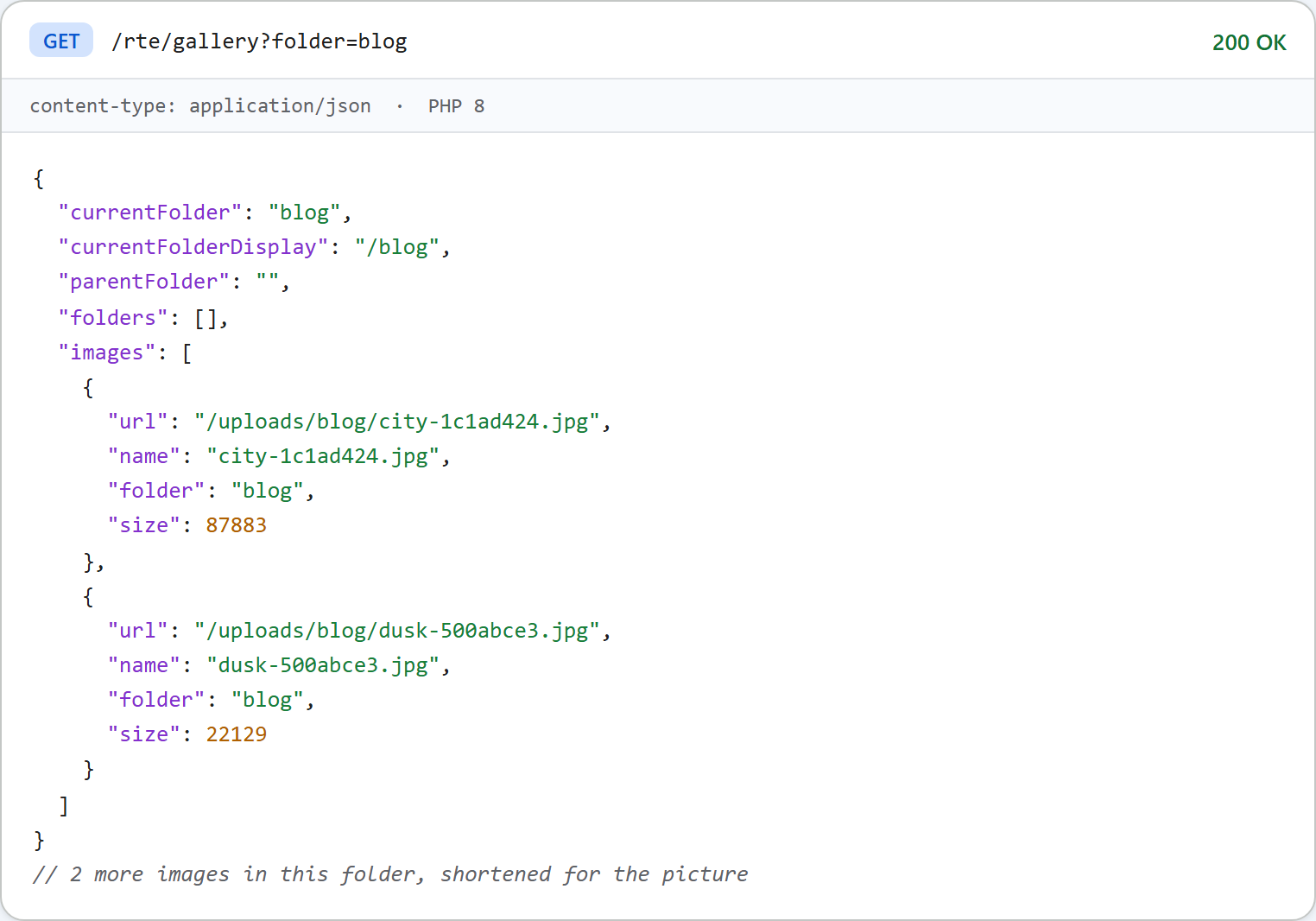
This is the code that produces it:
// The listing for one folder, in the shape the gallery dialog expects.
function rte_listing(array $folder): array
{
    $folders = [];
    $images = [];
    $names = scandir($folder['dir']);
    if ($names === false) {
        throw new RteHttpError(500, 'The folder cannot be read.');
    }
    foreach ($names as $name) {
        if ($name === '' || $name[0] === '.') {
            continue; // ".", "..", and hidden files such as .htaccess
        }
        $path = $folder['dir'] . DIRECTORY_SEPARATOR . $name;
        // Skip symlinks and Windows junctions. is_link() alone is not enough: PHP 8.2 on
        // Windows returns false for a junction, so also require realpath() to be unchanged.
        $real = realpath($path);
        $same = DIRECTORY_SEPARATOR === '\\' ? strcasecmp($real ?: '', $path) === 0 : $real === $path;
        if (is_link($path) || !$same) {
            continue;
        }
        $segments = [...$folder['segments'], $name];
        if (is_dir($path)) {
            if (rte_is_valid_name($name) && !rte_is_reserved($segments)) { // only folders the routes accept back
                $folders[] = ['folder' => implode('/', $segments), 'name' => $name];
            }
        } elseif (is_file($path) && in_array(rte_extension($name), RTE_IMAGE_EXTENSIONS, true)) {
            $images[] = [
                'url' => rte_url($folder['root'], $segments),
                'name' => $name,
                'folder' => $folder['virtual'],
                'size' => (int)filesize($path),
            ];
        }
    }
    $byName = fn(array $a, array $b): int => strcasecmp($a['name'], $b['name']) ?: strcmp($a['name'], $b['name']);
    usort($folders, $byName);
    usort($images, $byName);

    $virtual = $folder['virtual'];
    $parent = null;
    if ($virtual !== '') {
        $cut = strrpos($virtual, '/');
        $parent = $cut === false ? '' : substr($virtual, 0, $cut);
    }
    return [
        'currentFolder' => $virtual,
        'currentFolderDisplay' => '/' . $virtual,
        'parentFolder' => $parent,
        'folders' => $folders,
        'images' => $images,
    ];
}
A few choices in it are worth knowing about:
- Names starting with a dot are skipped, so
uploads/.htaccessnever shows up. - Only
.jpg .jpeg .png .gif .webpfiles are listed. Anything else in the folder stays invisible. - Symlinks and Windows junctions are skipped. On Windows, PHP 8.2's
is_link()returnedfalsefor a junction when we tested it, so the code also checks thatrealpath()leaves the path unchanged. - Each part of an image URL goes through
rawurlencode(), somy photo.jpgis listed as/uploads/products/my%20photo.jpg. - Folders and images are sorted by name without regard to case, with
strcasecmp().
Formats the dialog offers and the server accepts
The released gallery dialog lists "JPG, JPEG, JFIF, PNG, GIF, WEBP, BMP, AVIF" as accepted formats, and its file picker offers those. This server accepts five of them: .jpg .jpeg .png .gif .webp. If someone picks a .bmp file, the dialog sends it, the server answers 400 {"error":"Only .jpg, .jpeg, .png, .gif and .webp images can be uploaded."}, and the dialog shows "Upload failed for photo.bmp.". The server's reason is in the response body, which you can see in the browser's developer tools.
Size is different: with maxUploadFileSize: 4000000 the dialog refuses a large file before sending it. A 4.5 MB file gave "big.jpg is 4.3 MB. The maximum allowed size is 3.8 MB." (the dialog counts in binary megabytes).
Serving the images
The listing points at /uploads/..., so those URLs must return the files. In the sample project, router.php serves them for PHP's built-in server. It sends only image extensions, with a fixed Content-Type and X-Content-Type-Options: nosniff, and never runs anything from that folder. On Apache or nginx the web server serves them directly. Keep its no-execute rule in place, as shown in the secure upload guide.
Test it
Start the sample project for this guide with php -d upload_max_filesize=5M -d display_errors=0 -d log_errors=1 -S localhost:5201 router.php, then ask for a listing:
curl "http://localhost:5201/rte/gallery?folder=team"
{"currentFolder":"team","currentFolderDisplay":"/team","parentFolder":"","folders":[],"images":[]}

curl "http://localhost:5201/rte/gallery?folder=blog/2027"
{"error":"Folder not found."}
The second request gets HTTP 404. Open http://localhost:5201/ and click Insert Gallery: the dialog shows the root's folders and images, and clicking a folder opens it.
The same guide for other platforms
JavaScript · Next.js · ASP.NET Core · Razor Pages · Blazor · MVC 5 · Web Forms