ASP.NET Web Forms 中的图片库文件夹:安全地浏览和创建
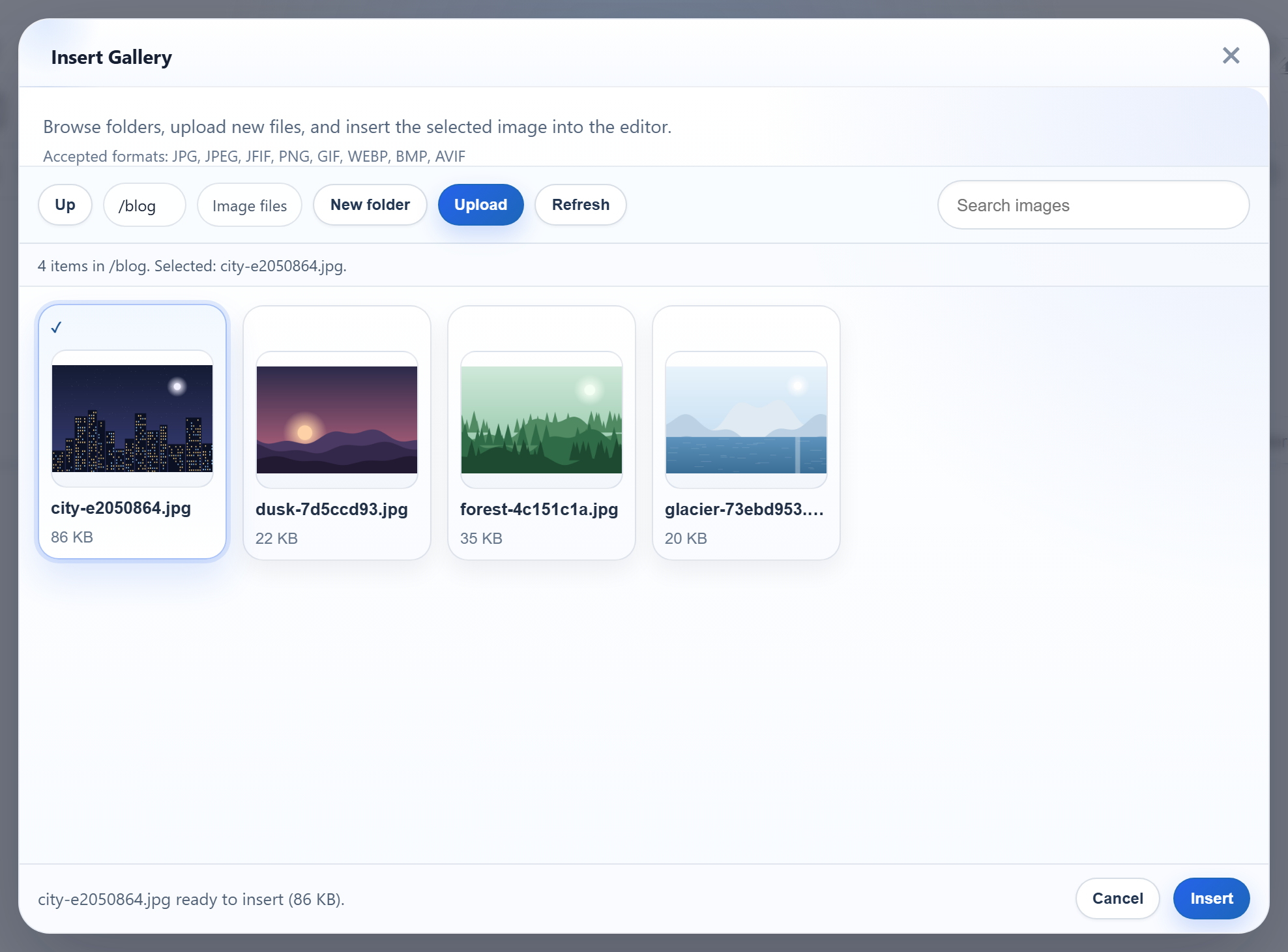
图片库对话框有一个 New folder 按钮,并按名称打开文件夹。两者都会把文件夹名称从浏览器发送到服务器,而 Windows 和 IIS 各自对哪些名称可用有一套规则。有些名称可以顺利创建,却永远无法提供图片。本页介绍 Web Forms 示例如何把 blog/2026 这样的虚拟文件夹转换为 uploads/ 内的路径,以及它在 Windows 上会拒绝哪些名称。
创建文件夹
对话框把 action=create-folder、folder(父文件夹)和 name POST 到 /rte/gallery。处理它的是提供列表的同一个 IHttpHandler 的 POST 分支,它从 Request.Unvalidated.Form 读取这些值(见图片库处理程序)。如果使用经过验证的 Request.Form,<b>x 这样的名称会因请求验证而产生 HTML 500。改为不经验证地读取后,它会得到对话框能够处理的 JSON 400。
public static void CreateFolder(HttpContext context, string parentFolder, string name)
{
    StorageRoot root = GetRoot(context);
    string parentDir = ResolveFolder(root, parentFolder ?? "");
    string problem = NameProblem(name);
    if (problem != null)
        throw new RteException(400, problem);

    string target = Path.Combine(parentDir, name);
    if (Directory.Exists(target) || File.Exists(target))
        throw new RteException(409, "A folder named \"" + name + "\" already exists.");
    Directory.CreateDirectory(target);
}
成功时返回父文件夹的列表,因此新文件夹会立即出现。名称已存在时返回 409。NTFS 不区分大小写,因此在 blog 旁边创建 Blog 同样得到 409。
从虚拟文件夹到磁盘路径
// Turns a virtual folder ("", "products", "products/2026") into a directory inside the
// root. Every segment must be a valid folder name, which already rules out "..", ".",
// empty segments, "\", ":", drive letters, NUL and leading "/". The resolved path is
// then checked against the root anyway, so a mistake in the rules cannot escape it.
static string ResolveFolder(StorageRoot root, string folder)
{
    if (folder.Length > 0)
    {
        foreach (string segment in folder.Split('/'))
        {
            if (!IsValidName(segment))
                throw new RteException(400, "Invalid folder.");
        }
    }

    string full = Path.GetFullPath(Path.Combine(root.Dir, folder.Replace('/', '\\')));
    if (!(full.TrimEnd('\\') + "\\").StartsWith(root.Dir, StringComparison.OrdinalIgnoreCase))
        throw new RteException(400, "Invalid folder.");
    if (!Directory.Exists(full))
        throw new RteException(404, "Folder not found.");
    return full;
}
虚拟文件夹绝不会按原样到达文件系统。以 / 分隔的每一部分都必须先通过文件夹名称规则,这些规则本身就排除了 ..、.、空段、\、:、驱动器号和 NUL。然后把 Path.GetFullPath 的结果与来自 Server.MapPath 的根目录进行比较,因此即使规则有疏漏,路径也无法离开根目录。由于 Windows 路径不区分大小写,比较使用 OrdinalIgnoreCase。在契约测试中,..、../..、%2e%2e、C:\Windows、/etc 和 a/../../x 都得到 400。
Windows 和 IIS 特殊对待的名称
// 1-64 chars of letters, digits, space, '-', '_', '.'; not starting with '.'.
// Windows extras: no trailing '.' or space (Windows silently drops them, so "a." would
// be the same folder as "a"), and no reserved device or IIS-hidden names.
public static bool IsValidName(string name)
{
    return NameProblem(name) == null;
}

static string NameProblem(string name)
{
    const string rule = "Folder names are 1-64 letters, digits, spaces, '-', '_' or '.', and cannot start with '.'.";
    if (string.IsNullOrEmpty(name) || name.Length > 64 || name[0] == '.')
        return rule;
    foreach (char c in name)
    {
        if (!char.IsLetterOrDigit(c) && c != ' ' && c != '-' && c != '_' && c != '.')
            return rule;
    }
    char last = name[name.Length - 1];
    if (last == '.' || last == ' ')
        return "Folder names cannot end with '.' or a space.";
    string lower = name.ToLowerInvariant();
    string stem = lower.Split('.')[0].Trim();
    if (Array.IndexOf(BlockedNames, lower) >= 0 || Array.IndexOf(BlockedNames, stem) >= 0)
        return "\"" + name + "\" is a reserved name on Windows or IIS.";
    return null;
}
除了基本规则(1 到 64 个字母、数字、空格、-、_ 或 .,且不以 . 开头)之外,经过测试后又增加了三条 Windows 和 IIS 规则:
- 不能以点或空格结尾。Microsoft 的文件命名规则规定名称不能以这两者结尾,因为 Windows API 会丢弃它们。以
2026.创建的文件夹在磁盘上会是2026,而对话框却仍在请求2026.。 - 不能使用设备名,例如
con、nul或com1。这也包括带扩展名的名称,例如aux.txt,Windows 同样会把它当作设备。 - 不能使用 IIS 隐藏段。IIS 请求筛选会拒绝任何包含名为
bin、App_Data、App_Code、web.config等路径段的 URL,无论位于哪一层。我们在uploads/bin/和uploads/App_Data/中各放了一张图片。尽管文件确实存在,两个 URL 都返回了 404.8。因此,名为bin的图片库文件夹会列出永远无法加载的图片。示例会以"bin" is a reserved name on Windows or IIS.拒绝这些名称。
允许使用 Unicode 字母。我们创建了 Fotos Ünïcode 2026 并向其中上传了图片。图片 URL 为 /uploads/Fotos%20%C3%9Cn%C3%AFcode%202026/ein-bild-….png,IIS 正常提供了它。
测试
在端口 5401 上运行本指南的示例项目,在对话框中创建一个顶层的 blog 文件夹,然后执行:
curl -F action=create-folder -F folder=blog -F name=2026 http://localhost:5401/rte/gallery
{"currentFolder":"blog","currentFolderDisplay":"/blog","parentFolder":"","folders":[{"folder":"blog/2026","name":"2026"}],"images":[...]}

curl -F action=create-folder -F folder= -F name=bin http://localhost:5401/rte/gallery
{"error":"\"bin\" is a reserved name on Windows or IIS."}
第一个请求返回 HTTP 200,父文件夹的列表中出现了新文件夹。再次发送会得到 409。第二个请求返回 HTTP 400。在浏览器中,在对话框里打开 blog:路径显示为 /blog,Up 可以返回根目录。
其他平台的同一指南
JavaScript · PHP · ASP.NET Core · MVC 5