Secure image upload in ASP.NET Core: the checks that matter
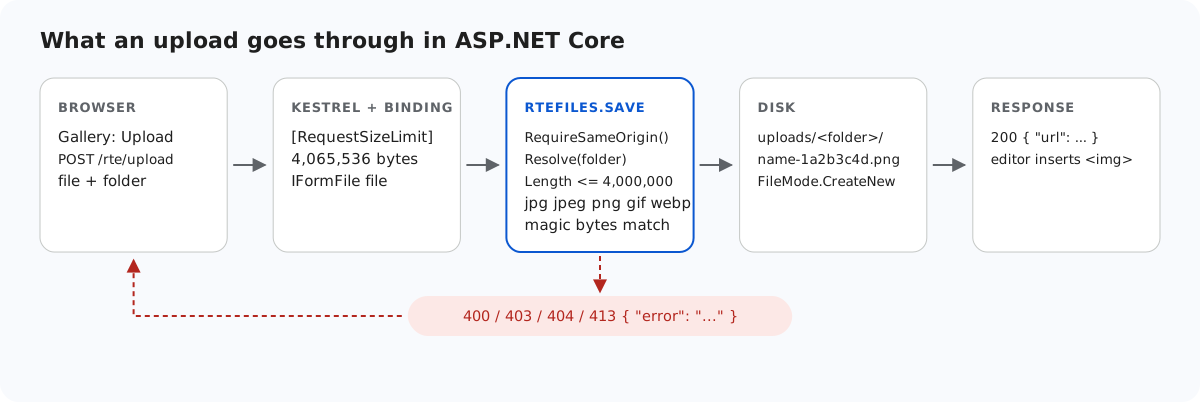
An upload route accepts files from anyone who can reach it, so each thing that can go wrong needs its own check. This page goes through the checks in the ASP.NET Core sample in the order a request meets them: where the request came from, the folder, the size, the type, the bytes, the stored name, and how the file is served afterwards. Each one comes with the answer we got when we broke it on purpose.
The checks, in order
- Origin. A POST that a browser marks as coming from another site gets 403.
- Folder. The virtual folder must resolve inside
uploads/and exist (400 or 404). Gallery folders in ASP.NET Core covers this check. - Size. Over 4,000,000 bytes gets 413. Much bigger requests are stopped earlier, by the limits in Upload size limits in ASP.NET Core.
- Extension. Only
.jpg,.jpeg,.png,.gifand.webp. SVG is left out because an SVG served from your own site can run script. - Bytes. The first bytes must match the extension.
- Name. The stored name is generated, so the client's name never reaches the disk.
Don't trust ContentType or FileName
IFormFile.ContentType is the Content-Type of the multipart part, which the client writes. A browser derives it from the file name, and curl sends whatever it is told. The sample ignores it and reads the first twelve bytes instead:
static bool SignatureMatches(string ext, byte[] head) => ext switch
{
    ".jpg" or ".jpeg" => head[0] == 0xFF && head[1] == 0xD8 && head[2] == 0xFF,
    ".png" => head.AsSpan(0, 8).SequenceEqual(new byte[] { 0x89, 0x50, 0x4E, 0x47, 0x0D, 0x0A, 0x1A, 0x0A }),
    ".gif" => head.AsSpan(0, 4).SequenceEqual("GIF8"u8),
    ".webp" => head.AsSpan(0, 4).SequenceEqual("RIFF"u8) && head.AsSpan(8, 4).SequenceEqual("WEBP"u8),
    _ => false,
};
This stops a script renamed to holiday.jpg. It does not prove the file is a valid picture: a file can start like a PNG and contain something else later. What makes that harmless here is how the file is served (below). If you need more, decode and re-encode every upload with an image library. The sample does not, to stay free of dependencies.
// "Red Square.png" -> "red-square"
static string SafeBaseName(string fileName)
{
    var name = Regex.Replace(Path.GetFileNameWithoutExtension(fileName).ToLowerInvariant(), "[^a-z0-9]+", "-").Trim('-');
    if (name.Length > 40) name = name[..40].TrimEnd('-');
    return name.Length == 0 ? "image" : name;
}
The base name is lowercased and reduced to a-z, 0-9 and -, eight random hex characters from RandomNumberGenerator are added, and the file is opened with FileMode.CreateNew, which fails rather than overwrite.
Serving the files safely
var uploads = RteFiles.UploadsFolder(app.Environment);
Directory.CreateDirectory(uploads);
app.UseStaticFiles(new StaticFileOptions
{
    FileProvider = new PhysicalFileProvider(uploads),
    RequestPath = "/uploads",
    ContentTypeProvider = new FileExtensionContentTypeProvider(new Dictionary<string, string>(StringComparer.OrdinalIgnoreCase)
    {
        [".jpg"] = "image/jpeg", [".jpeg"] = "image/jpeg", [".png"] = "image/png",
        [".gif"] = "image/gif", [".webp"] = "image/webp",
    }),
    OnPrepareResponse = ctx => ctx.Context.Response.Headers.XContentTypeOptions = "nosniff",
});
ASP.NET Core's default FileExtensionContentTypeProvider knows .html, .svg and .js, so a default UseStaticFiles on the upload folder would serve them as pages and scripts. The sample's provider knows only the five image types. Anything else in the folder gets a 404, because ServeUnknownFileTypes stays off. X-Content-Type-Options: nosniff tells the browser to use the declared type and not guess.
Cross-site requests without a token
ASP.NET Core's usual answer to cross-site request forgery is an antiforgery token. The editor's upload and New folder requests are XHRs built by rte-files.js and the gallery plugin, and the current release has no way to add a header or a field to them. So the routes opt out of token validation explicitly and check where the request came from instead:
// CSRF: the editor's upload and create-folder requests are XHRs that carry no antiforgery token,
// so these POSTs refuse requests that a browser marks as coming from another site instead.
// Browsers send Sec-Fetch-Site and Origin on these requests; tools like curl send neither.
static void RequireSameOrigin(HttpRequest request)
{
    var site = request.Headers["Sec-Fetch-Site"].ToString();
    var origin = request.Headers.Origin.ToString();
    var foreign = site is "cross-site" or "same-site"
        || (origin.Length > 0 && !(Uri.TryCreate(origin, UriKind.Absolute, out var o)
            && string.Equals(o.Authority, request.Host.Value, StringComparison.OrdinalIgnoreCase)));
    if (foreign) throw new RteError(403, "Cross-site request refused.");
}[ApiController]
[Route("rte")]
// [ApiController] actions are not antiforgery-checked unless the app adds a global
// AutoValidateAntiforgeryTokenAttribute. The editor's XHRs cannot send a token, so this opts out
// explicitly; RteFiles checks the request's origin instead.
[IgnoreAntiforgeryToken]Browsers send Sec-Fetch-Site and Origin on these requests, and a page on another site cannot change them. curl and server-side code send neither, and are let through: they do not have the user's cookies. Behind a reverse proxy that changes the Host header, add UseForwardedHeaders so Request.Host is the public host. In the Minimal API version the same choice is .DisableAntiforgery(). In .NET 8 it is required, as Upload images from a rich text editor in ASP.NET Core explains.
None of this decides who may upload. Add [Authorize] or .RequireAuthorization() once your app has sign-in.
Test it
Run the sample project for this guide with dotnet run and send it a script named like a photo, an SVG, and a request that claims to come from another site:
echo "not a picture" > holiday.jpg
curl -F "file=@holiday.jpg" http://localhost:5302/rte/upload
{"error":"The file is not a valid .jpg image."}

curl -F "file=@logo.svg" http://localhost:5302/rte/upload
{"error":"Only .jpg, .jpeg, .png, .gif and .webp images can be uploaded."}

curl -H "Origin: https://evil.example" -F "file=@photo.jpg" http://localhost:5302/rte/upload
{"error":"Cross-site request refused."}

curl -I http://localhost:5302/uploads/blog/photo-65fc24fe.jpg
HTTP/1.1 200 OK
Content-Type: image/jpeg
X-Content-Type-Options: nosniff
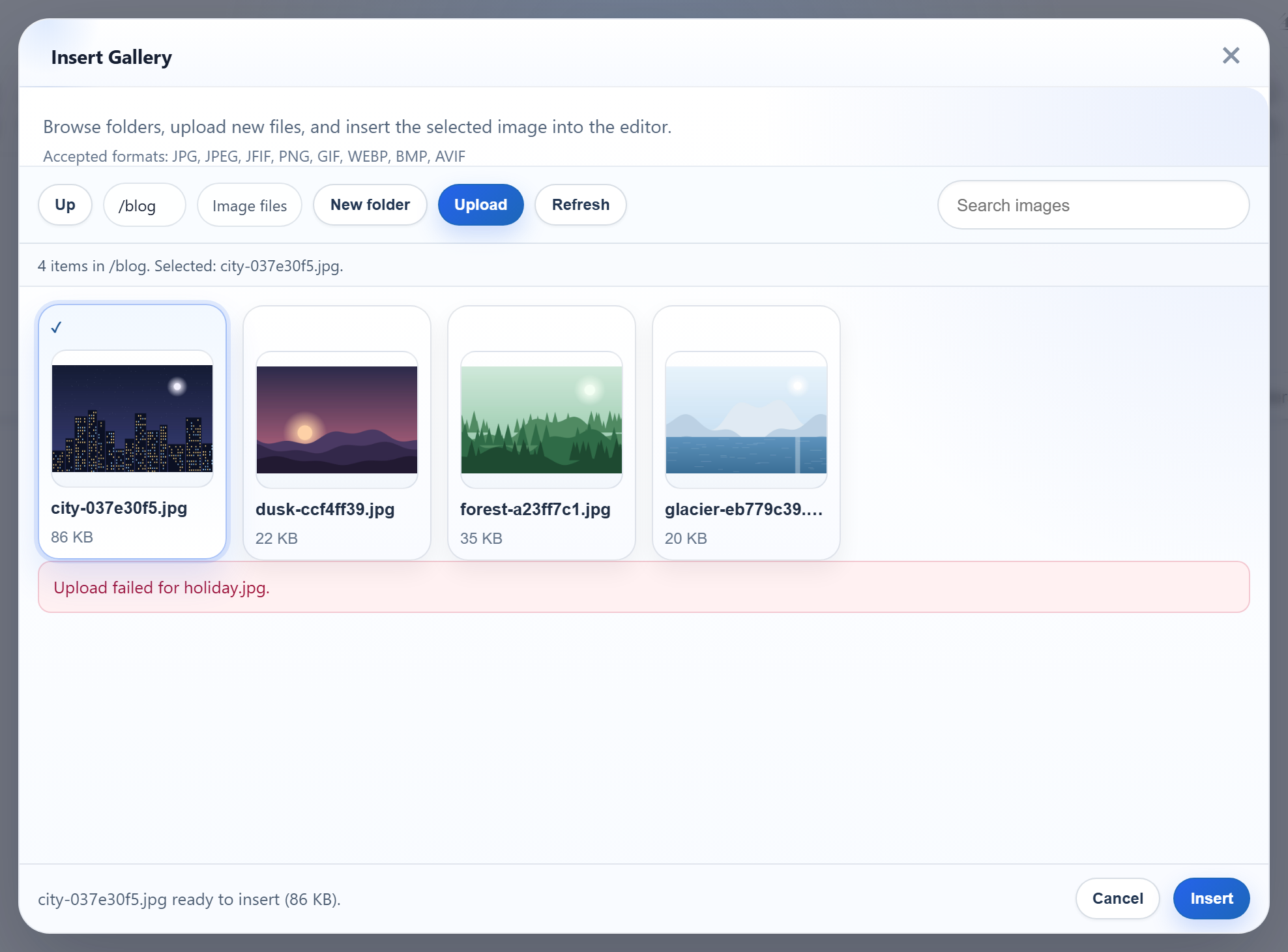
The first two are 400, the third 403. In the gallery the same fake holiday.jpg is refused too, but the dialog shows its own generic message, not the server's:
The same guide for other platforms
JavaScript · Next.js · PHP · Razor Pages · MVC 5 · Web Forms