Per-user image folders in PHP
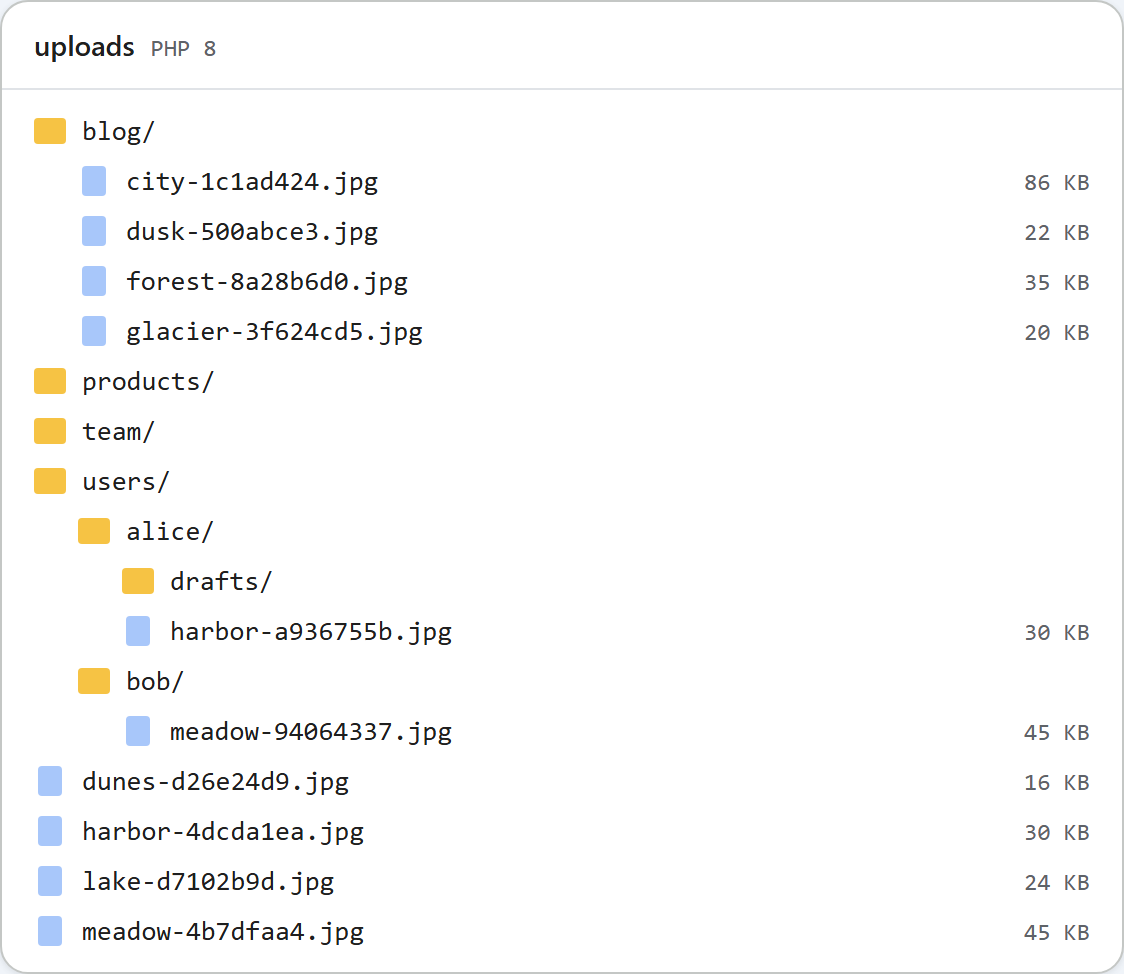
On a site where each person writes their own content, the gallery should show each person their own images, not everyone's. With the PHP sample that is a change in one function: the storage root is chosen per request, from the signed-in user in $_SESSION. This page shows that function, how to switch it on, and what it does and does not protect.
One function decides where files go
Every route in the sample (listing, creating a folder, uploading) gets its storage root from rte_root_for_request(). By default it returns the shared uploads/ folder. With RTE_PER_USER=1 in the environment, it returns uploads/users/<id>/ for the signed-in user:
// The one place that decides WHERE files live.
// Returns ['dir' => folder on disk, 'url' => public URL of that folder].
// Default: one shared folder. With RTE_PER_USER=1: uploads/users/<id>/ per signed-in user.
function rte_root_for_request(): array
{
    if (getenv('RTE_PER_USER') !== '1') {
        return ['dir' => __DIR__ . '/../uploads', 'url' => '/uploads'];
    }
    $id = rte_current_user_id();
    return ['dir' => __DIR__ . '/../uploads/users/' . $id, 'url' => '/uploads/users/' . $id];
}

// In shared mode, uploads/users/ holds other people's folders: never list or open it.
function rte_is_reserved(array $segments): bool
{
    return getenv('RTE_PER_USER') !== '1' && isset($segments[0]) && strcasecmp($segments[0], 'users') === 0;
}

// The signed-in user's id, from YOUR login (here: the PHP session). Never from the request.
function rte_current_user_id(): string
{
    if (session_status() !== PHP_SESSION_ACTIVE) {
        session_start();
    }
    $id = (string)($_SESSION['user_id'] ?? '');
    // PHP locks the session file until the request ends; release it so the
    // gallery's requests do not wait for each other.
    session_write_close();
    // The id becomes a folder name, so it must be a plain token.
    if (!preg_match('/\A[A-Za-z0-9_-]{1,64}\z/', $id)) {
        throw new RteHttpError(401, 'Sign in to use the image gallery.');
    }
    return $id;
}
Because the folder checks, the listing and move_uploaded_file() all work inside that root, nothing else changes. A user's drafts folder is uploads/users/alice/drafts on disk, but the gallery calls it drafts, and the URL it gets back is /uploads/users/alice/drafts/....
Where the user id comes from
The id must come from your own login, never from the request. In the sample it is read from $_SESSION['user_id']. It is also checked to be a plain token before it becomes a folder name. If your ids are e-mail addresses, use your numeric database id instead.
The session_write_close() call is there because of how PHP works. With the default file sessions, PHP keeps the session locked until the request ends, so the gallery's requests from the same browser would wait for each other. The root only needs the id, so the session is released straight after reading it.
Without a valid session, every route answers 401 {"error":"Sign in to use the image gallery."}. The dialog then shows "The image gallery is unavailable right now (http-401)." when it opens.
Trying it without a login system
The sample project includes demo-login.php so you can try two users. It sets the same session value your login code would set:
session_start();
session_regenerate_id(true);           // new session id at every sign-in
$user = $_GET['user'] ?? '';
if (in_array($user, ['alice', 'bob'], true)) {
    $_SESSION['user_id'] = $user;      // what rte_current_user_id() reads
} else {
    unset($_SESSION['user_id']);
}
It works only under PHP's built-in server (it checks PHP_SAPI), and the guide's routes do not depend on it. Delete it and set $_SESSION['user_id'] in your own sign-in code, after the password check, together with session_regenerate_id(true).
Shared mode and per-user mode on one disk
Per-user folders live under uploads/users/. If you ever run the shared mode on the same folder, that would make everyone's folders visible in the shared gallery. So in shared mode the sample hides users from the root listing, answers 404 for ?folder=users/alice, and refuses to create a folder called users. The picture at the top shows both on one disk: the shared blog, products and team folders, and users/alice and users/bob from per-user mode.
What this does not protect
The images are still served as static files from /uploads/. Anyone who has the URL of Bob's picture can open it, signed in or not. The random part of the stored name makes the URLs hard to guess, but it does not make them secret: they end up in the HTML of every document that shows the picture. If images must be private, serve them through a PHP script that checks the session, and keep uploads/ outside the document root.
Test it
Start the sample project for this guide in per-user mode. In PowerShell, set $env:RTE_PER_USER=1 first instead.
RTE_PER_USER=1 php -d upload_max_filesize=5M -d display_errors=0 -d log_errors=1 -S localhost:5201 router.phpThen sign in as two users with separate cookie files and upload one picture each:
curl "http://localhost:5201/rte/gallery?folder="
{"error":"Sign in to use the image gallery."}

curl -c alice.txt -b alice.txt "http://localhost:5201/demo-login?user=alice"
curl -c bob.txt -b bob.txt "http://localhost:5201/demo-login?user=bob"

curl -b alice.txt -F "file=@harbor.jpg" http://localhost:5201/rte/upload
{"url":"/uploads/users/alice/harbor-a936755b.jpg"}
curl -b bob.txt -F "file=@meadow.jpg" http://localhost:5201/rte/upload
{"url":"/uploads/users/bob/meadow-94064337.jpg"}

curl -b bob.txt "http://localhost:5201/rte/gallery?folder=..%2Falice"
{"error":"Invalid folder."}
Bob's listing contains only meadow-94064337.jpg. A folder of Alice's that Bob asks for by name (?folder=drafts) is a 404 for him, and a session cookie he makes up himself gets the 401. In the browser, open /demo-login?user=alice and then Insert Gallery to see Alice's folder.
The same guide for other platforms
JavaScript · ASP.NET Core · MVC 5 · Web Forms