Secure image uploads in PHP
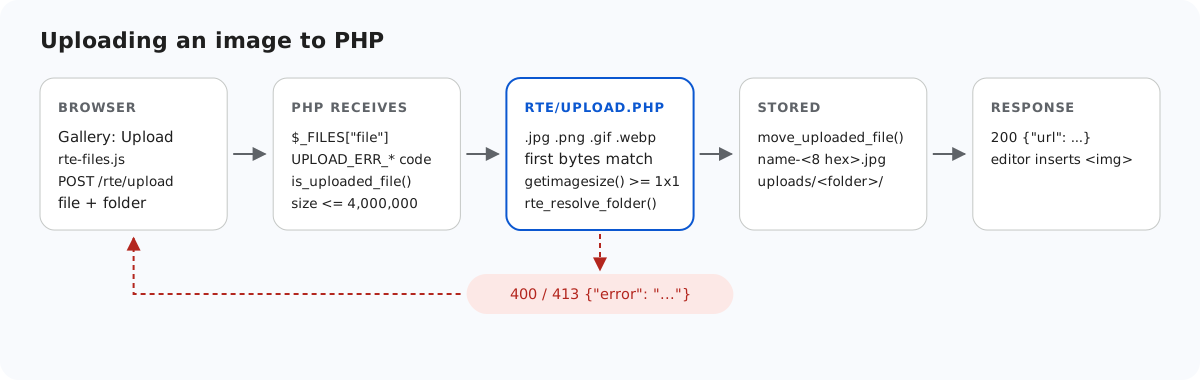
An upload endpoint lets strangers write files to your server. In PHP the worst outcome is specific: a file that the web server later runs as PHP. This page goes through the checks in the sample's rte/upload.php, shows what each one stops and what it cannot stop, and ends with the rule that matters most: nothing in uploads/ may ever be executed.
Do not trust what the browser says
$_FILES['file']['name'] and $_FILES['file']['type'] both come from the request. A client can send any name and any type. We sent a file containing <?php echo "hello"; ?> as holiday.png with type=image/png. A check on type would have accepted it. The sample ignores type completely and looks at the bytes instead:
// The name decides the extension; the bytes must agree with it.
// $file['type'] is whatever the browser (or attacker) sent, so it is ignored.
$ext = rte_extension((string)($file['name'] ?? ''));
if (!in_array($ext, RTE_IMAGE_EXTENSIONS, true)) {
    throw new RteHttpError(400, 'Only .jpg, .jpeg, .png, .gif and .webp images can be uploaded.');
}
$types = ['jpg' => IMAGETYPE_JPEG, 'jpeg' => IMAGETYPE_JPEG, 'png' => IMAGETYPE_PNG, 'gif' => IMAGETYPE_GIF, 'webp' => IMAGETYPE_WEBP];
// Signature first, then getimagesize() (core PHP, no GD needed) parses the header.
// A bare signature followed by junk still parses, but as 0x0, so require real dimensions.
$info = @getimagesize($file['tmp_name']);
if (!rte_signature_matches($file['tmp_name'], $ext) || $info === false
    || $info[2] !== $types[$ext] || $info[0] < 1 || $info[1] < 1) {
    throw new RteHttpError(400, 'The file is not a valid .' . $ext . ' image.');
}
The extension must be one of five, and the file's first bytes must match it:
// The first bytes of the file must match its extension.
function rte_signature_matches(string $file, string $ext): bool
{
    $handle = fopen($file, 'rb');
    if ($handle === false) {
        return false;
    }
    $head = (string)fread($handle, 12);
    fclose($handle);
    return match ($ext) {
        'jpg', 'jpeg' => str_starts_with($head, "\xFF\xD8\xFF"),
        'png' => str_starts_with($head, "\x89PNG\r\n\x1A\n"),
        'gif' => str_starts_with($head, 'GIF87a') || str_starts_with($head, 'GIF89a'),
        'webp' => str_starts_with($head, 'RIFF') && substr($head, 8, 4) === 'WEBP',
        default => false,
    };
}
Why getimagesize() and the 0 x 0 check
getimagesize() reads the image header and reports the type and dimensions. It is core PHP, so it works without GD or fileinfo. On its own it is easy to satisfy: a PNG signature followed by 3 MB of zeros passed getimagesize() as image/png, with a width and height of 0. That is why the sample also requires both dimensions to be at least 1.
Neither check makes a file harmless. We appended <?php echo "EXECUTED"; ?> to a real 1×1 PNG. It has a valid signature, valid dimensions, and the PHP code is still inside it. The sample stored it, as any image check would. What keeps that from mattering is the next two rules.
Generated names
The stored name is built by the server: the original name in lowercase, reduced to a-z, 0-9 and -, then eight random hex digits, then the checked extension. Red Square.png becomes something like red-square-abc60cfb.png. So the server never writes a name with a second dot (shell.php.png), never overwrites an existing file, and never keeps a name the client chose. A file called shell.php is refused before that: 400 {"error":"Only .jpg, .jpeg, .png, .gif and .webp images can be uploaded."}.
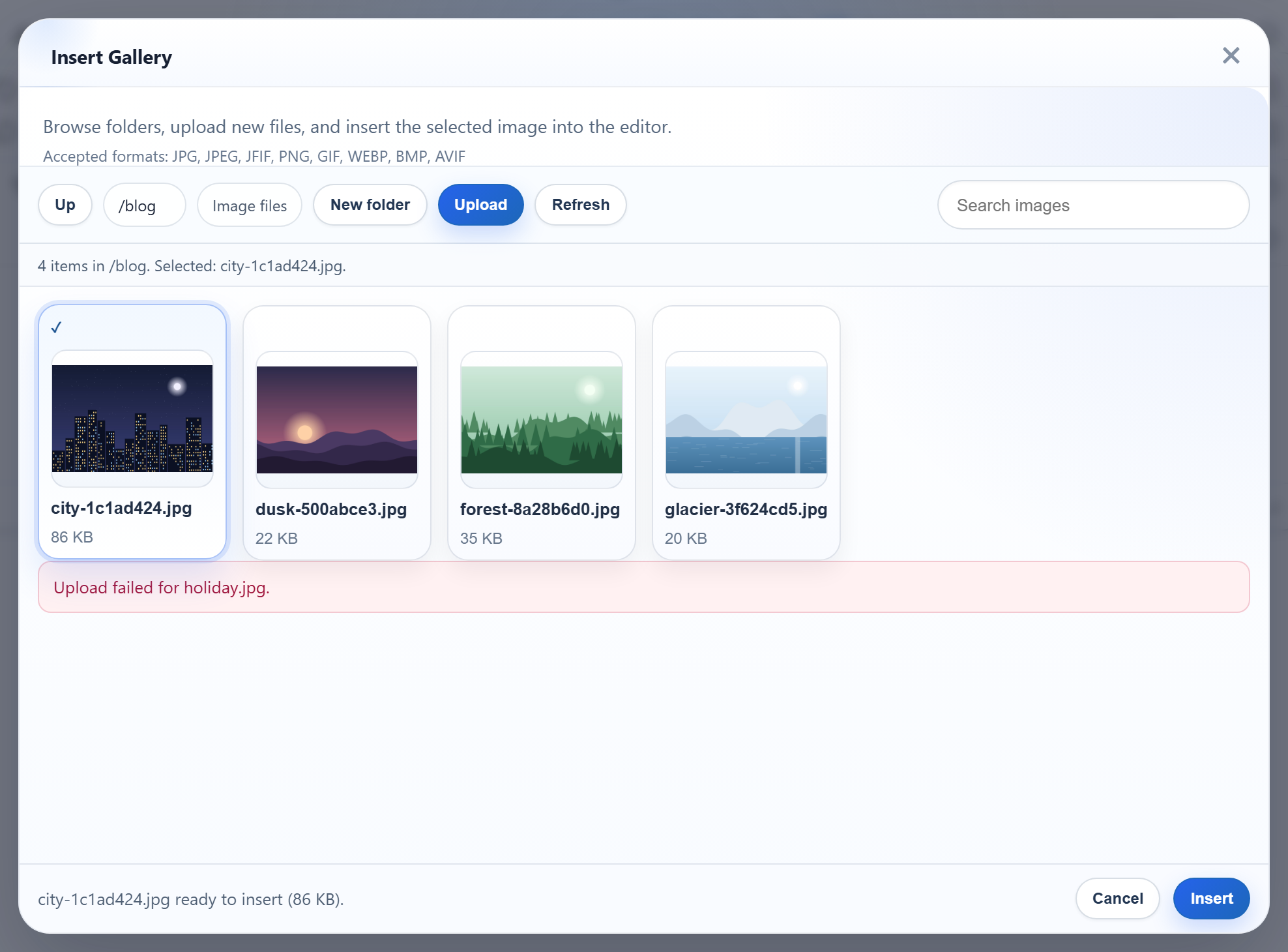
holiday.jpg, refused by the server. The dialog shows its own message; the server's reason is in the response body.Never run anything in uploads/
This is the rule that makes the other checks safe to get wrong. Configure the web server so it can only ever send files from uploads/ as bytes. On Apache, copy the sample's uploads.htaccess to uploads/.htaccess, or better, put the same lines in the vhost inside <Directory>:
# 1. Only image files can be requested. Everything else (x.php, x.phtml, .htaccess) -> 403,
#    whatever handler (mod_php, PHP-FPM, CGI) the server uses for .php.
Require all denied
<FilesMatch "(?i)\.(jpe?g|png|gif|webp)$">
    Require all granted
</FilesMatch>

# 2. Even an allowed name must not reach PHP. "AddHandler ... .php" also matches
#    "x.php.png" (mod_mime looks at every extension), so drop those mappings here.
RemoveHandler .php .phtml .phar .php3 .php4 .php5 .php7 .php8 .pht .phps
RemoveType .php .phtml .phar .php3 .php4 .php5 .php7 .php8 .pht .phps
<IfModule mod_php.c>
    php_flag engine off
</IfModule>
Options -Indexes -ExecCGI -Includes

# 3. Browsers must not guess a different type from the bytes.
<IfModule mod_headers.c>
    Header always set X-Content-Type-Options "nosniff"
</IfModule>
The RemoveHandler line covers a classic Apache trap. AddHandler application/x-httpd-php .php matches every extension in a name, so photo.php.png would run as PHP. On nginx, the ^~ prefix is the part that matters:
# ^~ : once a URL starts with /uploads/, nginx skips regex locations, so a
# "location ~ \.php$" block can never run an uploaded file.
location ^~ /uploads/ {
    deny all;
    location ~* \.(jpe?g|png|gif|webp)$ {
        allow all;
        add_header X-Content-Type-Options nosniff always;
    }
}
# Nothing else is PHP-executable (rte/files-lib.php, router.php, demo-login.php).
location ~ \.php$ { return 404; }
Without ^~, a regular location ~ \.php$ { fastcgi_pass ...; } elsewhere in the config wins over a plain location /uploads/, and /uploads/x.php is executed. Also keep security.limit_extensions = .php in the PHP-FPM pool, so FPM refuses to run photo.png even if some other rule hands it over.
PHP's built-in development server has the same trap in its own form. If a router script returns false, the server handles the file itself and runs .php files. The sample's router serves /uploads/ itself, images only. We checked: /uploads/probe.php gave 404, and /uploads/probe.php.png came back as image/png bytes, not run.
We tested the built-in server setup on Windows with PHP 8.2. The Apache and nginx rules above were not run on that machine, because neither server is installed there. Test them on your own server: put a test.php in uploads/ and request it. You should get 403 or 404, never its output.
Folders and paths
The folder field is a virtual path, checked part by part and then resolved with realpath() inside the storage root. That refuses .., absolute paths, drive letters, backslashes and symlinks or junctions that point outside. The folders guide has the code and what we observed with a Windows junction.
What the sample leaves to you
The sample does not sign anyone in, and its two POST routes have no CSRF token. rte-files.js sends a plain XMLHttpRequest with no extra headers. So a framework whose CSRF middleware runs on every POST, such as Laravel's web routes, would refuse it unless you exclude these routes or add the token yourself. Check the user before rte_root_for_request(). The per-user guide shows where that goes.
Test it
With the sample project for this guide running on port 5201:
printf '<?php echo "hello"; ?>' > holiday.png
curl -F "file=@holiday.png;type=image/png" http://localhost:5201/rte/upload
{"error":"The file is not a valid .png image."}

curl -F "file=@holiday.png;filename=shell.php" http://localhost:5201/rte/upload
{"error":"Only .jpg, .jpeg, .png, .gif and .webp images can be uploaded."}
Both answers are HTTP 400. The shared contract test sends the same kinds of files (a script named .png, an .svg, a .php, a traversal folder) and expects each to be refused: node shared/contract-test.mjs http://localhost:5201 ends with ALL 35 CHECKS PASSED.
The same guide for other platforms
JavaScript · Next.js · ASP.NET Core · Razor Pages · MVC 5 · Web Forms