书签卡片
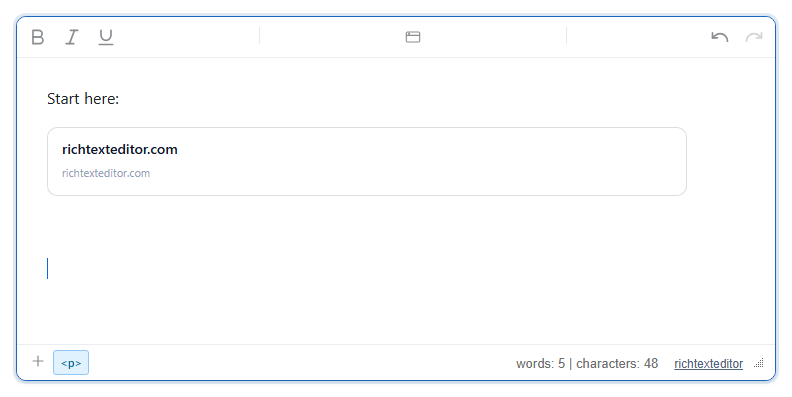
把链接插入为一张预览卡片,包含标题、简短描述、网站图标和缩略图,就像聊天应用中分享的链接一样。编辑器本身不获取任何内容:卡片显示的是您自己的 bookmarkResolver 返回的内容;如果没有解析器,则只显示域名。
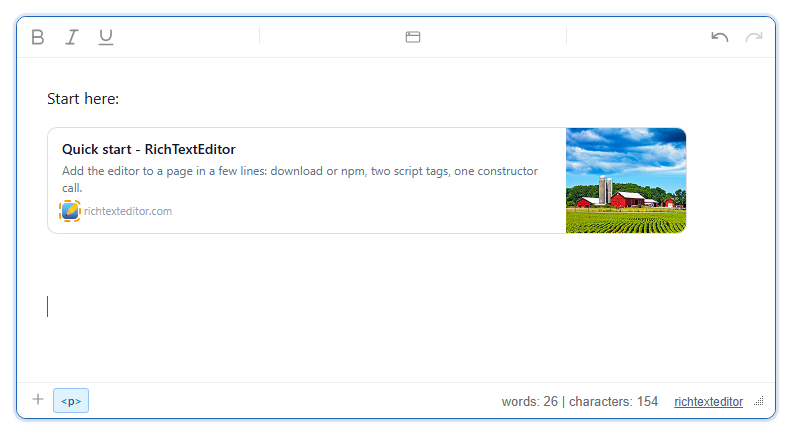
bookmarkResolver 为 richtexteditor.com/docs/quick-start 返回的内容生成的卡片。小图标上的虚线环是编辑器在标记一张 alt 为空的图片;它只在编辑时显示。启用
该功能由 bookmarkcard.js 插件提供(也包含在 plugins/all_plugins.js 中)。工具栏项为 insertbookmark(工具提示为 "Bookmark")。默认工具栏把它放在 "More"(⋮)菜单中;在您自己的工具栏中请添加 insertbookmark。要获得完整的卡片,请为它提供一个向您的服务器请求页面元数据的解析器:
<link rel="stylesheet" href="/richtexteditor/rte_theme_default.css" />
<script src="/richtexteditor/rte.js"></script>
<script src="/richtexteditor/plugins/bookmarkcard.js"></script>

<div id="div_editor1"><p>Start here:</p></div>
<script>
var editor1 = new RichTextEditor("#div_editor1", {
  toolbar: "custom",
  toolbar_custom: "{bold,italic,underline}|{insertbookmark}|{undo,redo}",
  bookmarkResolver: function (url) {
    return fetch("/api/unfurl?url=" + encodeURIComponent(url))
      .then(function (r) { return r.json(); }); // { title, description, image, favicon }
  }
});
</script>
/api/unfurl 是您自己的端点,不属于编辑器。它应当在服务器上获取页面,读取其 <title>、og:description、og:image 和图标,并以 JSON 形式返回。浏览器本身无法读取其他网站的页面,因此这一步要在您的服务器上进行。
选项
| 选项 | 默认值 | 作用 |
|---|---|---|
bookmarkResolver | null | 返回元数据(或解析为元数据的 Promise)的 function (url):{ title, description, image, favicon }。每个字段都是可选的。 |
bookmarkFaviconService | ""(关闭) | 网站图标的 URL 前缀。卡片的图标为该前缀加上域名,例如 "/favicon-proxy?domain="。只有在解析器没有返回 favicon 时才会使用。 |
text_insertbookmark、text_insertbookmarktitle、text_insertbookmarklabel | "Bookmark"、"Insert bookmark"、"Link URL" | 按钮工具提示、对话框标题和字段标签。 |
使用方法
- 点击按钮、调用
editor1.execCommand("insertbookmark"),或者在斜杠菜单中选择 "Bookmark"。输入地址,然后按 Enter 或点击 Insert。 - 只接受
http和https。像richtexteditor.com/docs/quick-start这样的纯域名会在前面加上https://。javascript:、data:、vbscript:和file:地址会被拒绝,并提示 "Enter a valid http(s) URL."(请输入有效的 http(s) URL)。 - 解析器运行期间,对话框显示 "Fetching preview…"。如果解析失败或耗时超过 8 秒,则改为插入一张简单卡片。
- 要删除卡片,请把鼠标悬停在卡片上并点击角上的圆形 ×,或者在光标位于卡片上时按 Delete 或 Backspace。没有编辑步骤;请删除卡片后重新插入。
注意事项
- 保存的卡片是一个链接。使用上面的解析器时,内容为:
<p><a class="rte-bookmark-card" data-rte-block="bookmark" href="https://richtexteditor.com/docs/quick-start" target="_blank" rel="noopener noreferrer" contenteditable="false" style=""><span class="rte-bookmark-remove" data-rte-bookmark-remove="1" role="button" tabindex="0" aria-label="Remove bookmark" title="Remove bookmark">x</span><span class="rte-bookmark-main"><span class="rte-bookmark-title">Quick start - RichTextEditor</span><span class="rte-bookmark-desc">Add the editor to a page in a few lines: download or npm, two script tags, one constructor call.</span><span class="rte-bookmark-url"><img class="rte-bookmark-favicon" src="/img/editor_32x32.png" alt="" width="16" height="16"><span>richtexteditor.com</span></span></span><span class="rte-bookmark-thumb" style="background-image:url('/img/editor-image.png')"></span></a></p> - 卡片的外观(边框、布局、缩略图大小)由插件只在编辑器内部添加的样式表提供。您的展示页面需要为
rte-bookmark-*类编写自己的规则。在那里也要隐藏.rte-bookmark-remove:× 会随卡片一起保存。 - 图标和缩略图的地址按解析器给出的原样保存,并由每位读者的浏览器加载。如果不希望读者的浏览器访问被链接的网站,请返回您自己服务器(或代理)上的地址。
- 既没有解析器也没有
bookmarkFaviconService时,插入卡片完全不会发出任何网络请求。对话框的说明中提到了网站图标,但默认情况下并没有图标。 - 净化程序必须保留带有
href、target、rel和class的a、内部的span和img元素,以及缩略图上的style属性(图片就在其中)。