电子邮件 HTML
把文档转换为能在电子邮件客户端中正常显示的 HTML。邮件客户端会丢弃 <style> 块、外部样式表和类名,因此 editor.getEmailHTML() 会把每个元素的外观作为内联 style 属性复制到元素上,删除 class 和 id,并把结果包装在一个固定宽度、居中的表格中。
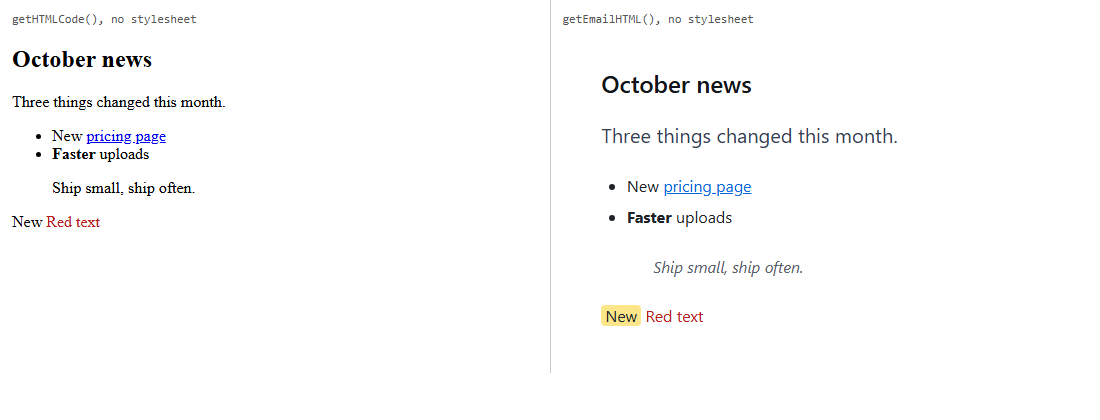
getHTMLCode(),右侧为 getEmailHTML()。引文的左边框丢失了;见“注意事项”。启用
该功能由 emailtoolkit.js 插件提供(也包含在 plugins/all_plugins.js 中)。它添加了方法 editor.getEmailHTML() 和命令 emailexport("Email HTML")。按钮位于默认工具栏的 "more" 面板中,斜杠菜单把它列为 "Export email HTML"。要把它放到您自己的工具栏中:
<div id="editor"><h2>October news</h2><p class="lede">Three things changed this month.</p>…</div>
<script>
var editor = new RichTextEditor("#editor", {
  contentCssUrl: "site.css",
  toolbar_default: "{bold,italic,underline}|{paragraphs}|{emailexport}"
});
// Send this to your mail service:
var html = editor.getEmailHTML({ width: 600 });
</script>
选项
| 选项 | 默认值 | 作用 |
|---|---|---|
emailInlineProperties | color、background-color、font-family、font-size、font-weight、font-style、text-decoration、text-align、line-height、四个 margin-* 和 padding-*、border、border-radius、vertical-align、list-style-type、width | 复制到每个元素上的 CSS 属性。只会复制这些属性。 |
emailWrapWidth | 640 | 包装表格的宽度,以像素为单位。 |
getEmailHTML(options) 接受 { wrap: false },返回不带表格的内联内容;接受 { width: 600 },在单次调用中覆盖 emailWrapWidth。
得到的结果
每个元素都会得到所列每个属性的计算值,但默认值除外(normal、none、0px、透明背景、字重 400、左对齐或 start 对齐、baseline)。width 只写在表格、单元格和图片上,list-style-type 只写在列表上。在上面的运行中,getEmailHTML({ wrap: false }) 的开头为:
<h2 style="color:rgb(17, 20, 24);font-family:system-ui, -apple-system, "Segoe UI", Roboto, "Helvetica Neue", Arial, sans-serif;font-size:24px;font-weight:600;line-height:30px;margin-bottom:14.4px">October news</h2><p style="color:rgb(51, 65, 85);font-family:system-ui, …;font-size:20px;line-height:34px;margin-bottom:20px">Three things changed this month.</p>class="lede" 和标题的 id 都被删除了;导语段落 20px 的灰色文字原本来自这个类。链接保留 href,图片保留 src 和 alt。script、style、link 和 meta 元素会被丢弃。使用包装(默认)时,内容位于:
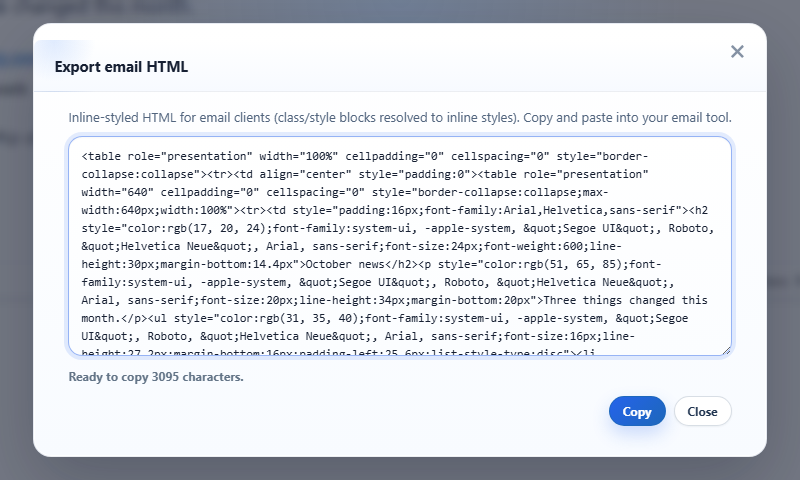
<table role="presentation" width="100%" cellpadding="0" cellspacing="0" style="border-collapse:collapse"><tr><td align="center" style="padding:0"><table role="presentation" width="600" cellpadding="0" cellspacing="0" style="border-collapse:collapse;max-width:600px;width:100%"><tr><td style="padding:16px;font-family:Arial,Helvetica,sans-serif">…</td></tr></table></td></tr></table>对话框在一个获得焦点的只读文本框中显示完整的包装后 HTML,以及长度("Ready to copy 3095 characters.")、把它写入剪贴板的 Copy 按钮和 Close 按钮。
注意事项
- 列表之外的属性会丢失。上面的引文通过其类获得了
border-left: 4px solid;当各边不同时,border没有单一的值,因此这条规则没有被带过来。请添加您需要的属性:设置emailInlineProperties: ["color", "border-left", "padding-left", "font-style"]后,引文输出为<blockquote style="color:rgb(87, 96, 106);border-left:4px solid rgb(37, 99, 235);padding-left:12px;font-style:italic">。您添加的属性不会过滤默认值,因此它们也会以border-left:0px none的形式出现在其他元素上。 - 样式是从编辑器当前的显示状态中读取的。类的外观来自内容样式表(
contentCssUrl),因此请加载与您的邮件应有外观相同的 CSS。字体会变成完整的计算字体栈。 - 它是根据实时文档生成的,因此标签可能与
getHTMLCode()不同:以<strong>输入的粗体在这里仍然是<strong>,而getHTMLCode()返回的是<b>。 - 开启合并字段预览时,邮件使用的是模板的字段,而不是示例数据。
- 输出不会保存在任何地方;文档本身保持不变。图片 URL 按原样保留,因此在邮件中请使用绝对 URL。