Bookmark cards
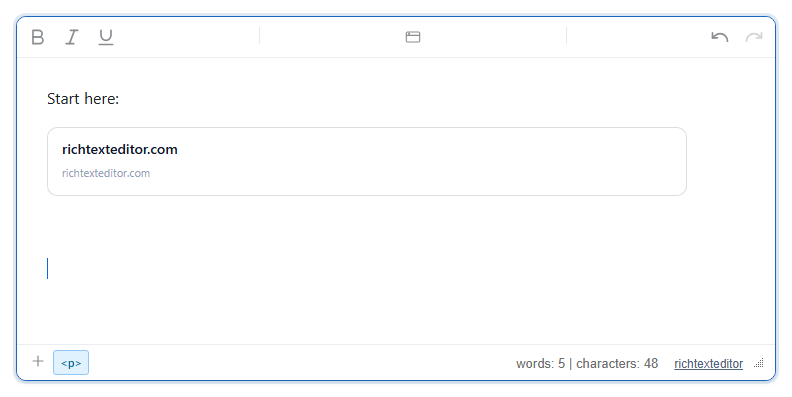
Insert a link as a preview card with a title, a short description, the site's icon and a thumbnail, like a shared link in a chat app. The editor fetches nothing itself: the card shows what your own bookmarkResolver returns, or just the domain name if you have none.
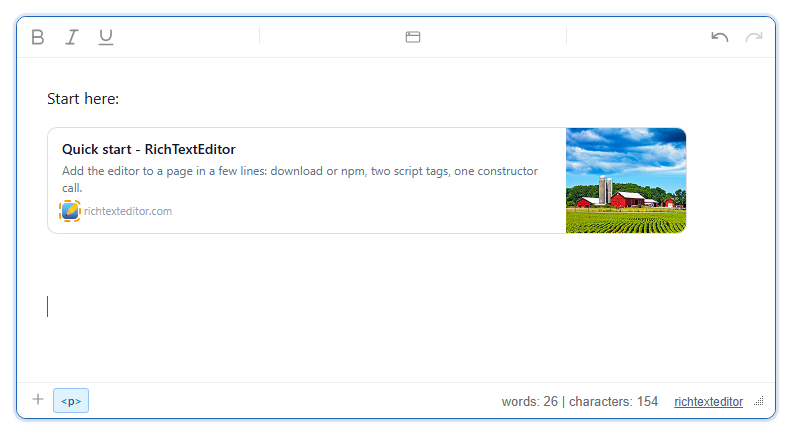
bookmarkResolver returned for richtexteditor.com/docs/quick-start. The dashed ring on the small icon is the editor marking an image whose alt is empty; it is shown only while editing.Turn it on
The feature is the bookmarkcard.js plugin (also in plugins/all_plugins.js). The toolbar item is insertbookmark (tooltip "Bookmark"). The default toolbar has it in the "More" (⋮) menu; in your own toolbar add insertbookmark. For full cards, give it a resolver that asks your server for the page's metadata:
<link rel="stylesheet" href="/richtexteditor/rte_theme_default.css" />
<script src="/richtexteditor/rte.js"></script>
<script src="/richtexteditor/plugins/bookmarkcard.js"></script>

<div id="div_editor1"><p>Start here:</p></div>
<script>
var editor1 = new RichTextEditor("#div_editor1", {
  toolbar: "custom",
  toolbar_custom: "{bold,italic,underline}|{insertbookmark}|{undo,redo}",
  bookmarkResolver: function (url) {
    return fetch("/api/unfurl?url=" + encodeURIComponent(url))
      .then(function (r) { return r.json(); }); // { title, description, image, favicon }
  }
});
</script>
/api/unfurl is your endpoint, not part of the editor. It should fetch the page on the server, read its <title>, og:description, og:image and icon, and return them as JSON. A browser cannot read other sites' pages itself, which is why this runs on your server.
Options
| Option | Default | What it does |
|---|---|---|
bookmarkResolver | null | function (url) returning the metadata, or a Promise of it: { title, description, image, favicon }. Every field is optional. |
bookmarkFaviconService | "" (off) | A URL prefix for site icons. The card's icon becomes this prefix plus the domain, for example "/favicon-proxy?domain=". Used only when the resolver returns no favicon. |
text_insertbookmark, text_insertbookmarktitle, text_insertbookmarklabel | "Bookmark", "Insert bookmark", "Link URL" | Button tooltip, dialog title and field label. |
Using it
- Click the button, call
editor1.execCommand("insertbookmark"), or pick "Bookmark" in the slash menu. Type the address and press Enter or Insert. - Only
httpandhttpsare accepted. A bare domain such asrichtexteditor.com/docs/quick-startgetshttps://in front.javascript:,data:,vbscript:andfile:addresses are refused with "Enter a valid http(s) URL." - While the resolver runs, the dialog says "Fetching preview…". If it fails, or takes longer than 8 seconds, a plain card is inserted instead.
- To remove a card, hover it and click the round × in its corner, or press Delete or Backspace with the caret on it. There is no edit step; remove the card and insert it again.
Things to know
- The saved card is a link. With the resolver above the content was:
<p><a class="rte-bookmark-card" data-rte-block="bookmark" href="https://richtexteditor.com/docs/quick-start" target="_blank" rel="noopener noreferrer" contenteditable="false" style=""><span class="rte-bookmark-remove" data-rte-bookmark-remove="1" role="button" tabindex="0" aria-label="Remove bookmark" title="Remove bookmark">x</span><span class="rte-bookmark-main"><span class="rte-bookmark-title">Quick start - RichTextEditor</span><span class="rte-bookmark-desc">Add the editor to a page in a few lines: download or npm, two script tags, one constructor call.</span><span class="rte-bookmark-url"><img class="rte-bookmark-favicon" src="/img/editor_32x32.png" alt="" width="16" height="16"><span>richtexteditor.com</span></span></span><span class="rte-bookmark-thumb" style="background-image:url('/img/editor-image.png')"></span></a></p> - The card's look (border, layout, thumbnail size) is a stylesheet the plugin adds inside the editor only. Your display page needs its own rules for the
rte-bookmark-*classes. Hide.rte-bookmark-removethere too: the × is saved with the card. - The icon and thumbnail addresses are stored as the resolver gave them and loaded by every reader's browser. Return addresses on your own server (or a proxy) if you do not want readers' browsers to contact the linked site.
- With no resolver and no
bookmarkFaviconService, inserting a card makes no network request at all. The dialog's note mentions a favicon, but by default there is none. - Sanitizers must keep
awithhref,target,relandclass, the innerspanandimgelements, and thestyleattribute on the thumbnail (it holds the picture).
Related: auto-embed, smart chips, rich blocks demo.